Listen to this Post
Introduction
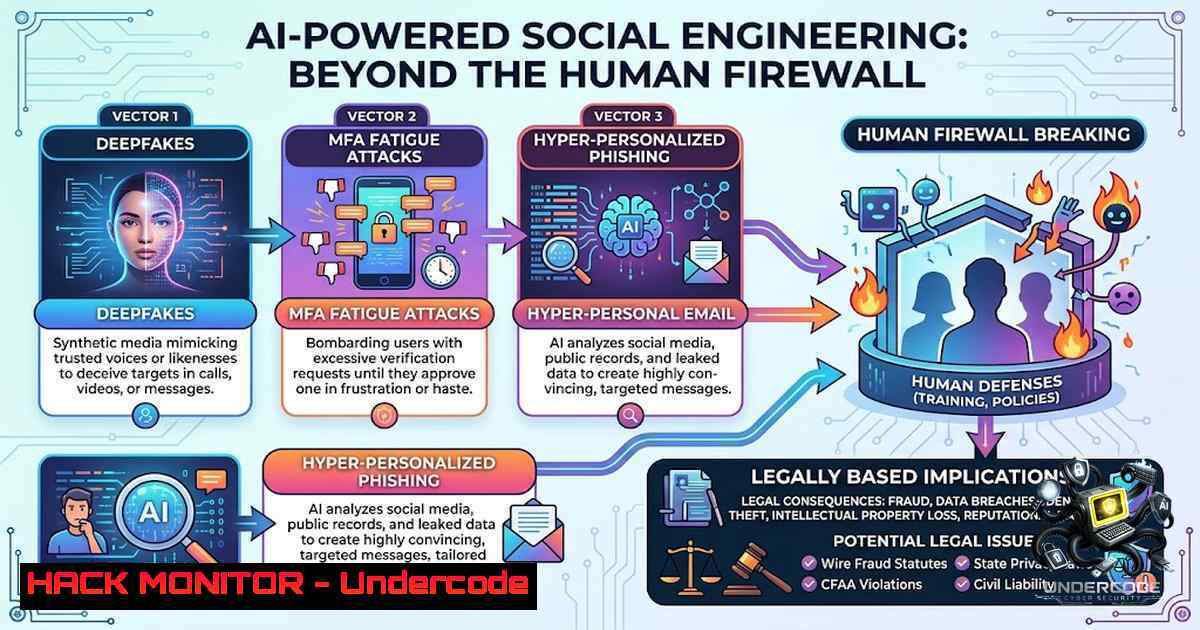
Social engineering has always exploited the most vulnerable component of any security system: human psychology. However, the integration of artificial intelligence has transformed this threat from easily spotted email typos and suspicious links into hyper-realistic, context-aware attacks that can mimic voices, writing styles, and even behavioral patterns with frightening accuracy【10†L2-L4】. As security engineers fortify technical perimeters with zero-trust architectures and next-generation firewalls, adversaries are pivoting to the path of least resistance—manipulating trust, urgency, and human emotion through AI-enhanced deception【10†L4-L5】. This article dissects the mechanics of modern AI-driven social engineering, provides actionable defensive strategies, and equips security professionals with the command-line tools, configuration hardening techniques, and verification protocols necessary to counter these evolving threats.
Learning Objectives
- Identify and analyze the three primary AI-amplified social engineering vectors: AI-enhanced phishing, deepfake-driven Business Email Compromise (BEC), and MFA fatigue attacks.
- Implement technical controls including email authentication protocols (DMARC, DKIM, SPF), voice biometrics, and conditional access policies to mitigate AI-generated impersonation.
- Develop human-centric defense layers such as out-of-band verification workflows, family/personal code phrases, and security awareness training that addresses AI-specific red flags.
- Apply practical Linux and Windows commands to investigate suspicious emails, analyze headers, monitor authentication logs, and respond to credential-based intrusions.
1. AI-Enhanced Phishing: Beyond Grammar and Typos
Traditional phishing detection relied on glaring red flags: poor grammar, mismatched URLs, and generic greetings. AI-powered large language models have rendered these indicators obsolete. Attackers now craft highly personalized messages that incorporate contextual details scraped from social media, breached databases, and publicly available corporate directories【10†L6-L8】. These campaigns extend across email, SMS, QR codes, collaboration platforms like Slack and Teams, and even voice calls using real-time voice cloning.
Step‑by‑Step: Investigating Suspicious Emails Using Linux Command-Line Tools
When a suspicious email lands in your inbox, manual header analysis remains one of the most reliable verification methods. Below is a practical workflow for extracting and analyzing email headers on a Linux system:
1. Extract the full email headers.
Most email clients provide a “Show Original” or “View Source” option. Save the output to a file, e.g., suspicious.eml.
- Parse the “Received” chain to trace the email’s path.
Use `grep` to isolate routing information:
grep -i "received:" suspicious.eml | head -20
This displays the mail transfer agents (MTAs) the message passed through. Look for discrepancies between the claimed origin and the actual originating IP.
- Verify the originating IP address against threat intelligence feeds.
Extract the first external IP using `awk` and query it against abuse databases:grep -i "received:" suspicious.eml | awk '{print $NF}' | grep -Eo '[0-9]+.[0-9]+.[0-9]+.[0-9]+' | head -1 | xargs -I {} curl -s "https://api.abuseipdb.com/api/v2/check?ipAddress={}" -H "Key: YOUR_API_KEY" -H "Accept: application/json" -
Analyze the “Authentication-Results” header for SPF, DKIM, and DMARC alignment.
grep -i "authentication-results:" suspicious.eml
A failed SPF (Sender Policy Framework) or DKIM (DomainKeys Identified Mail) check combined with a `dmarc=fail` result strongly indicates spoofing.
5. Examine embedded URLs without clicking them.
Use `grep` to extract all URLs and then `curl` to inspect redirect chains:
grep -Eo 'https?://[^"]+' suspicious.eml | while read url; do curl -s -I -L "$url" | grep -i "location"; done
This reveals whether the link ultimately resolves to a credential-harvesting domain.
- Check for suspicious attachments using `file` and
clamscan.file suspicious_attachment.pdf clamscan suspicious_attachment.pdf
Even PDFs and Office documents can harbor malicious macros or exploit payloads.
Windows PowerShell Equivalents
For Windows environments, PowerShell provides similar capabilities:
Get-Content suspicious.eml | Select-String -Pattern "received:"
(Get-Content suspicious.eml | Select-String -Pattern "https?://[^""]+").Matches.Value
- Business Email Compromise (BEC) and Deepfake Executive Impersonation
Business Email Compromise has evolved from simple spoofed CEO emails into multi-channel attacks that combine deepfake audio, AI-generated video snippets, and perfectly mimicked writing styles【10†L10-L12】. Attackers research executive communication patterns, travel schedules, and vendor relationships to launch contextually accurate urgent requests for wire transfers, payroll changes, or sensitive data disclosures【10†L11-L12】. The emotional manipulation is amplified by the perceived authority of the impersonated leader.
Step‑by‑Step: Implementing Out-of-Band Verification Protocols
Out-of-band verification means confirming sensitive requests through a completely different communication channel than the one used to receive the request. This breaks the attacker’s ability to intercept or mimic both channels.
- Establish a mandatory verification policy for any financial or sensitive data request.
Define that any request exceeding a monetary threshold (e.g., $5,000) or involving employee PII must be verified via a secondary channel. -
Create a shared secret or code phrase for executive-level communications.
This is the “family safe word” concept applied to corporate environments【10†L20】. The code phrase should be:
– Known only to the executive and a small circle of authorized personnel.
– Changed periodically (e.g., every 90 days).
– Never transmitted via email—only shared in person or through an encrypted messaging app.
3. Implement voice biometrics for phone-based verification.
Deploy a voice authentication solution that analyzes over 100 unique vocal characteristics. When an executive calls requesting a sensitive action, the system performs real-time matching against their enrolled voiceprint.
- Configure conditional access policies in Microsoft Entra ID (Azure AD) or Okta.
Require step-up authentication for high-risk actions:
- Microsoft Entra ID: Create a Conditional Access policy that triggers MFA re-authentication when a user attempts to access financial applications or initiate privileged roles.
- Okta: Use “ThreatInsight” and “Behavioral Detection” to flag anomalous login locations or device fingerprints, then enforce additional verification.
5. Audit and monitor executive account activity.
On a Windows domain controller, use PowerShell to pull recent authentication logs for C-suite accounts:
Get-EventLog -LogName Security -InstanceId 4624 | Where-Object { $_.Message -match "CEO" } | Select-Object TimeGenerated, Message
On Linux with auditd, monitor sudo commands executed by privileged users:
ausearch -m USER_CMD -k admin_commands | grep -i "ceo"
3. Credential Theft and MFA Fatigue Attacks
MFA fatigue, also known as MFA bombing or push-spamming, involves an attacker who already possesses a valid username and password repeatedly triggering MFA push notifications to the victim’s authenticator app or phone【10†L14-L15】. The goal is to overwhelm the user into accidentally approving one of the requests out of frustration or confusion【10†L15】. Combined with AI-generated social engineering pretexts—such as a fake IT support call claiming the user needs to “approve a test” to resolve an issue—this tactic has proven highly effective.
Step‑by‑Step: Hardening MFA and Detecting Fatigue Attacks
- Enforce number-matching MFA instead of simple “Approve/Deny” push notifications.
Number-matching requires the user to enter a number displayed on their login screen into their authenticator app, making accidental approvals virtually impossible. This is configurable in Microsoft Authenticator, Google Authenticator, and Okta Verify. -
Configure risk-based authentication to block impossible travel scenarios.
If a user logs in from New York and five minutes later receives an MFA prompt originating from Russia, the system should automatically block the attempt and alert the security team. -
Monitor for MFA prompt anomalies using SIEM queries.
A sudden spike in MFA requests for a single user within a short timeframe is the primary indicator of a fatigue attack. In Splunk, a query like this surfaces suspicious patterns:index=authentication_logs action="mfa_challenge" user= | stats count by user, _time span=5m | where count > 5
In Microsoft 365 Defender, use:
IdentityLogonEvents
| where Application == "Active Directory"
| where ActionType == "MFA challenge"
| summarize Count = count() by UserPrincipalName, bin(TimeGenerated, 5m)
| where Count > 5
- Implement FIDO2 security keys (e.g., YubiKeys) for high-privilege accounts.
FIDO2 keys are resistant to phishing because they validate the legitimacy of the website domain before responding to an authentication challenge. This breaks both credential theft and MFA bypass attempts. -
Educate users to never approve MFA requests they did not initiate.
This simple rule, when reinforced through regular training, significantly reduces the success rate of fatigue attacks【10†L16】. If an unexpected prompt appears, the user should deny it immediately, reset their password via a trusted device, and alert the security operations center. -
QR Code Phishing (Quishing) in Physical and Digital Spaces
QR codes have become ubiquitous in restaurants, parking garages, and corporate lobbies. Attackers are now overlaying malicious QR codes on legitimate ones or sending QR codes via email that direct users to credential-harvesting sites【10†L8】. Since QR codes are visually opaque, users cannot preview the destination URL before scanning.
Step‑by‑Step: Defending Against Quishing Attacks
- Deploy QR code scanning applications that preview the destination URL.
Many mobile security apps (e.g., Bitdefender, Kaspersky) now include QR scanner features that display the decoded URL and perform reputation checks before automatically opening the link. -
Conduct physical inspections of QR codes in public areas.
Look for stickers placed over existing codes or signs that appear tampered with. In corporate environments, regularly audit QR codes posted on bulletin boards, meeting rooms, and visitor check-in kiosks. -
Use URL expansion tools to uncover shortened QR code destinations.
On Linux, `curl` can resolve shortened URLs without visiting them:curl -s -I "https://bit.ly/example" | grep -i location
On Windows PowerShell:
(Invoke-WebRequest -Uri "https://bit.ly/example" -MaximumRedirection 0).Headers.Location
- Block known malicious QR code domains at the network level.
Integrate threat intelligence feeds (e.g., AlienVault OTX, MISP) into your firewall or web proxy to automatically block domains associated with QR code phishing campaigns. -
Building a Culture of Security Awareness and Shared Responsibility
Technical controls alone cannot defeat social engineering. The human element remains both the primary target and the strongest defensive layer when properly trained【10†L23-L24】. Organizations must foster a culture where verification is celebrated, not penalized, and where reporting suspicious activity is met with gratitude rather than blame【10†L27】.
Step‑by‑Step: Implementing an Effective Security Awareness Program
1. Conduct simulated AI-enhanced phishing exercises.
Use platforms like KnowBe4 or Cofense that now offer AI-generated phishing templates that mimic real-world deepfake and BEC scenarios. Track click rates, report rates, and time-to-report as key performance indicators.
- Establish a “verify first” policy for all urgent requests.
Communicate that no legitimate executive or vendor will ever pressure an employee to bypass verification procedures. If urgency is being used as a coercive tactic, it is almost certainly an attack【10†L35-L36】.
3. Create a centralized reporting channel.
Make it easy for employees to report suspicious emails, SMS messages, phone calls, or QR codes. A simple “Report Phishing” button in Outlook or a dedicated Slack channel lowers the barrier to reporting.
4. Extend awareness to families and vulnerable populations.
As the original post emphasizes, cybercriminals often target parents, grandparents, and individuals less familiar with technology【10†L29】. Provide employees with resources to share with their families, including the concept of a family safe word for verifying urgent requests【10†L20】.
What Undercode Say
- AI is an amplifier, not a creator, of social engineering risk. The underlying psychological principles—authority, urgency, scarcity, and liking—remain unchanged. AI simply makes these manipulations more scalable, personalized, and difficult to distinguish from legitimate communications.
- Defense must be layered and multi-modal. No single control, whether technical or human-centric, is sufficient. Combining email authentication protocols, MFA hardening, out-of-band verification, and continuous security awareness training creates a resilient security posture that can withstand AI-enhanced attacks.
- The weakest link is still the human under pressure. Attackers know that stress, fatigue, and the desire to be helpful are powerful levers. MFA fatigue attacks succeed not because MFA is broken, but because users are conditioned to approve prompts quickly. Breaking this conditioning requires both technical safeguards (number matching) and cultural change (celebrating verification).
- Verification is a verb, not a noun. It must be an active, habitual action rather than a passive assumption. Whether it’s checking email headers, calling back on a known number, or asking for a code phrase, verification requires deliberate effort. Organizations must remove friction from these verification processes to make the secure choice the easy choice.
- The future belongs to identity-centric security. As perimeter defenses become increasingly porous, identity becomes the new perimeter. Protecting identities through phishing-resistant MFA, continuous authentication, and behavioral analytics is the most critical investment organizations can make today.
Prediction
- +1 AI-generated phishing and deepfake attacks will become indistinguishable from genuine communications within the next 18–24 months, forcing a fundamental shift away from content-based detection toward behavioral and contextual analysis.
- +1 Regulatory bodies will mandate out-of-band verification for all financial transactions above a certain threshold, similar to the European Union’s PSD2 strong customer authentication requirements, but extended to cover BEC scenarios.
- -1 Organizations that fail to adopt phishing-resistant MFA (FIDO2, passkeys) will experience a significant increase in successful credential theft and MFA fatigue attacks, with average breach costs exceeding $5 million per incident.
- -1 The cybersecurity skills gap will be exacerbated by the need for professionals who understand both AI technologies and human psychology, creating a premium for interdisciplinary security roles.
- +1 Security awareness training will evolve from annual compliance exercises to continuous, AI-adaptive micro-learning modules that simulate real-time threats based on each employee’s role, communication patterns, and observed vulnerabilities.
▶️ Related Video (80% Match):
🎯Let’s Practice For Free:
🎓 Live Courses & Certifications:
Join Undercode Academy for Verified Certifications
🚀 Request a Custom Project:
Secure, high-velocity infrastructure and disruptive technological engineering. Contact our engineering team for high-tier development and proprietary systems:
[email protected]
💎 Smart Architecture | 🛡️ Secure by Design | ⭐ Trusted by Thousands
IT/Security Reporter URL:
Reported By: Sierramontgomerymp Cybersecurity – Hackers Feeds
Extra Hub: Undercode MoN
Basic Verification: Pass ✅


