Listen to this Post
Introduction
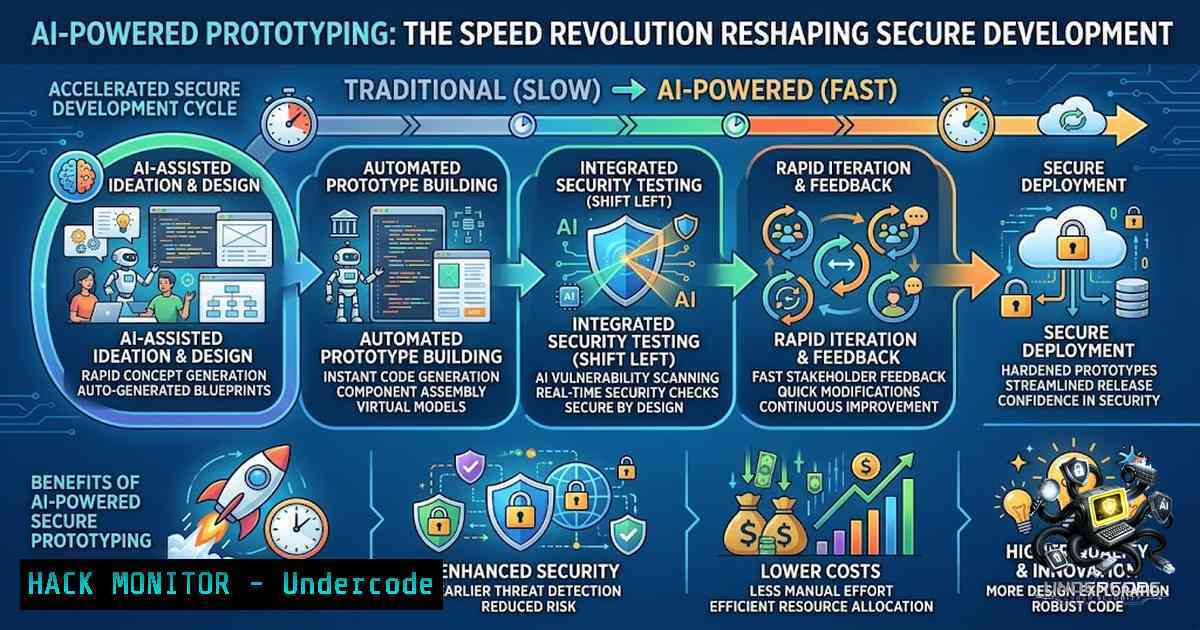
Artificial Intelligence has fundamentally altered the product development landscape, compressing what once required weeks of specialized effort into hours of guided collaboration. As AI tools like Claude evolve to support real-world development workflows, the competitive advantage no longer belongs exclusively to those who can write code—it belongs to those who know how to architect solutions, define requirements, and effectively collaborate with AI systems. However, this acceleration introduces critical security implications that demand immediate attention from every development team.
Learning Objectives
- Understand how AI-assisted development compresses prototyping timelines and what this means for security posture
- Master prompt engineering techniques that produce secure, production-ready code from AI assistants
- Implement practical guardrails—including Linux/Windows commands and CI/CD controls—to prevent AI-generated vulnerabilities from reaching production
- The New Development Paradigm: Architect, Don’t Just Code
The most profound shift in AI-assisted development is the evolving role of the developer. Rather than spending hours on implementation details, practitioners now focus on defining structure, logic, constraints, and expected outcomes while AI handles substantial portions of the implementation. This transition enables early-stage products and prototypes to be developed dramatically faster—sometimes by an order of magnitude—when AI is used correctly.
However, this speed comes with a caveat: using AI effectively is not about blindly trusting every output. It requires knowing how to guide, evaluate, verify, and improve what AI produces. Research confirms that AI-generated code contains vulnerabilities in approximately 45% of security-relevant scenarios, and when five leading AI coding agents built identical applications, none produced CSRF protection or security headers. The message is clear: speed without security is a liability.
Step-by-Step Guide: Establishing an AI-Assisted Development Workflow
- Define Architecture First: Before engaging any AI tool, document your application’s architecture, data flow, and security requirements. This serves as the foundation for all subsequent AI interactions.
-
Craft Security-Focused Prompts: Explicitly include security requirements in your prompts. Research shows that structuring prompts with specific patterns and words improves the security of LLM-generated code.
-
Implement a Review Gate: Treat all AI-generated code as untrusted until reviewed. Run SAST (Static Application Security Testing) before merging and implement secrets scanning in pre-commit hooks.
-
Keep Humans in the Loop: Never allow AI agents to perform consequential actions without human approval. This is non-1egotiable for production environments.
-
API Key Security: The First Line of Defense
API keys are the lifeblood of AI-assisted development, yet they remain one of the most frequently compromised assets. Never paste API keys, passwords, or connection strings into a prompt. This seemingly obvious practice is violated daily, with devastating consequences.
Step-by-Step Guide: Securing API Keys Across Platforms
Linux/MacOS Environment Variable Setup
bash
Store API key securely in environment variables
export ANTHROPIC_API_KEY=”your-api-key-here”
Add to .bashrc or .zshrc for persistence
echo ‘export ANTHROPIC_API_KEY=”your-api-key-here”‘ >> ~/.bashrc
Verify the variable is set (but never echo the actual key in logs)
env | grep ANTHROPIC
[/bash]
Windows PowerShell Setup
bash
Set environment variable for current session
$env:ANTHROPIC_API_KEY = “your-api-key-here”
Set permanently for current user
Verify (without exposing the full key)
Get-ChildItem Env:ANTHROPIC_API_KEY
[/bash]
Secrets Management with Vault (Cross-Platform)
bash
Store secret in HashiCorp Vault
vault kv put secret/anthropic/api_key value=”your-api-key”
Retrieve and inject into environment
export ANTHROPIC_API_KEY=$(vault kv get -field=value secret/anthropic/api_key)
[/bash]
Critical Practices: Monitor usage and logs closely. Never share your API key—if someone needs access to the Claude API, they should obtain their own key. Avoid including API keys in public discussions, emails, or support tickets.
- Prompt Engineering for Security: Writing Instructions That Protect
The quality of AI-generated code is directly proportional to the quality of the prompts provided. Clear, careful, and security-focused instructions can greatly increase the chance that the assistant produces code that’s correct and secure.
Step-by-Step Guide: Crafting Security-Focused Prompts
- Include Security Requirements Explicitly: Start every prompt with security expectations. Example:
bash
“Generate a Python Flask endpoint that:
– Validates all input parameters against a whitelist
– Uses parameterized queries to prevent SQL injection
– Implements rate limiting (100 requests/minute)
– Logs all authentication attempts without exposing credentials
– Returns sanitized error messages (no stack traces)”
[/bash]
- Use Plan Mode: Employ a read-only planning mode where the AI outlines its approach before generating code. This allows you to catch potential security issues early.
-
Specify Security Standards: Reference specific standards in your prompts (e.g., “Follow OWASP Top 10 guidelines,” “Implement NIST authentication recommendations”).
-
Iterate and Refine: Studies indicate that prompts optimized using security-specific techniques lead to the most improvement in the security of LLM-generated code.
-
Implement Prompt Validation: Validate all inputs—including prompts—before processing. Sanitize data passed between the AI orchestrator and tool endpoints.
4. Hardening AI-Generated Code: From Prototype to Production
The gap between prototype and production is where most AI-generated code fails. GenAI compresses the “idea-to-demo” timeline but makes it easy to ship a fragile prototype with invisible risk: hardcoded secrets, unclear boundaries, ambiguous logging, and the dreaded “we’ll secure it later” mentality.
Step-by-Step Guide: Hardening Commands and Controls
Linux: Security Scanning and Hardening
bash
Install and run SAST tool (Semgrep example)
pip install semgrep
semgrep –config=auto –include=”.py” ./src/
Scan for secrets in codebase
pip install truffleHog
trufflehog filesystem –directory=./src
Run dependency vulnerability scan
pip install safety
safety check -r requirements.txt
Implement pre-commit hooks for security
cat > .pre-commit-config.yaml << EOF
repos:
– repo: https://github.com/Yelp/detect-secrets
rev: v1.4.0
hooks:
– id: detect-secrets
args: [‘–baseline’, ‘.secrets.baseline’]
EOF
pre-commit install
[/bash]
Windows: Security Scanning and Hardening
bash
Install and run SAST tool
pip install bandit
bandit -r .\src\
Scan for secrets
pip install truffleHog
trufflehog filesystem –directory=.\src
Run dependency check
pip install safety
safety check -r requirements.txt
Enable Windows Defender Application Guard for isolation
Add-WindowsCapability -Online -1ame “Windows.ApplicationGuard.Enterprise”
[/bash]
CI/CD Security Gates
bash
GitHub Actions security workflow example
name: Security Scan
on: [push, pull_request]
jobs:
security:
runs-on: ubuntu-latest
steps:
– uses: actions/checkout@v3
– name: Run SAST
run: semgrep –config=auto ./src
– name: Scan for secrets
run: trufflehog filesystem –directory=./src
– name: Dependency scan
run: safety check -r requirements.txt
[/bash]
5. AI Agent Safety: Preventing Destructive Actions
AI coding agents have access to powerful capabilities—shell commands, file writes, web requests—that can cause significant damage if misused. Implementing safety layers is essential.
Step-by-Step Guide: Implementing AI Agent Safety Controls
Installing and Using sh-guard-cli (Semantic Command Safety)
bash
Install sh-guard-cli (available for Linux, macOS, Windows)
npm install -g sh-guard-cli
Parse and analyze a command for safety
sh-guard “rm -rf /” Will flag as high-risk
Integrate with AI agent workflows
sh-guard –analyze “$AI_GENERATED_COMMAND”
[/bash]
sh-guard-cli parses commands into ASTs, analyzes data flow through pipelines, and scores risk in under 100 microseconds. Pre-built binaries are available for macOS (ARM/x64), Linux (x64/ARM64), and Windows (x64).
Using CC Safety Net for AI Coding Agents
CC Safety Net acts as a PreToolUse hook that intercepts and blocks destructive git and filesystem commands before AI coding agents run them. It parses command semantics—meaning flag reordering, shell wrappers, and interpreter one-liners cannot bypass it.
bash
Install CC Safety Net
git clone https://github.com/kenryu42/cc-safety-1et.git
cd cc-safety-1et
npm install
Configure for Claude Code
cp config.example.json config.json
Edit config.json to set your preferred safety rules
Run with Claude Code
npx cc-safety-1et –agent=claude
[/bash]
Implementing Falco Rules with Prempti
Prempti provides a policy and visibility layer for AI coding agents, intercepting tool calls before execution and evaluating them against Falco rules.
bash
Install Prempti
git clone https://github.com/falcosecurity/prempti.git
cd prempti
Run with Claude Code
prempti –agent=claude –rules=./rules.yaml
[/bash]
6. Cloud Hardening for AI-Enabled Applications
Deploying AI-generated code to the cloud requires additional security considerations. The three most common vulnerabilities in AI-generated enterprise code are improper input validation, over-permissive IAM role assignments, and hardcoded credentials.
Step-by-Step Guide: Cloud Security Hardening
AWS IAM Least Privilege Implementation
bash
Create a minimal IAM policy for your application
aws iam create-policy \
–policy-1ame MyAppMinimalPolicy \
–policy-document ‘{
“Version”: “2012-10-17”,
“Statement”: [
{
“Effect”: “Allow”,
“Action”: [
“s3:GetObject”,
“s3:PutObject”
],
“Resource”: “arn:aws:s3:::my-app-bucket/”
}
]
}’
Apply to the application’s IAM role
aws iam attach-role-policy \
–role-1ame MyAppRole \
–policy-arn arn:aws:iam::123456789012:policy/MyAppMinimalPolicy
[/bash]
Azure Managed Identity Configuration
bash
Create a managed identity for the application
az identity create –1ame MyAppIdentity –resource-group MyResourceGroup
Assign minimal permissions
az role assignment create \
–assignee
–role “Storage Blob Data Reader” \
–scope /subscriptions/
[/bash]
Secrets Rotation Automation
bash
AWS Secrets Manager rotation schedule
aws secretsmanager rotate-secret \
–secret-id my-api-key \
–rotation-rules ‘{“AutomaticallyAfterDays”: 30}’
Azure Key Vault secret rotation
az keyvault secret set-attributes \
–1ame my-api-key \
–vault-1ame my-key-vault \
–expires $(date -d “+30 days” +%Y-%m-%d)
[/bash]
7. The SHIELD Framework: Structural Security Guardrails
Palo Alto Networks has developed the SHIELD framework to secure AI-assisted development. This framework defines best practices that organizations should implement:
- S – Separation of Duties: Restrict AI agents to development and test environments only
- H – Hardened Project Templates: Use templates with built-in security controls
- I – Integrated Security Gates: Implement CI/CD security checks
- E – Enforced Secrets Management: Centralized authentication and authorization
- L – Least Privilege Access: Minimize permissions for AI agents
- D – Deterministic Controls: Enforce predictable, auditable behaviors
Step-by-Step Guide: Implementing SHIELD Principles
- Restrict AI Agent Environments: Never allow AI agents to operate in production environments. Use dedicated development and testing sandboxes.
-
Deploy Hardened Templates: Use project templates that include:
– Pre-configured security headers
– Input validation middleware
– Rate limiting
– Comprehensive logging
- Enforce CI/CD Security Gates: Block any pull request that fails security scanning.
-
Centralize Secrets Management: Use HashiCorp Vault, AWS Secrets Manager, or Azure Key Vault.
-
Apply Constitutional Constraints: Embed non-1egotiable security principles into the specification layer, ensuring AI-generated code adheres to security requirements by construction. Case studies show that constitutional constraints reduce security defects by 73%.
What Undercode Say
-
Speed Without Security Is Technical Debt: AI compresses development timelines, but every shortcut taken today becomes a security incident waiting to happen tomorrow. The “we’ll secure it later” mentality is where prototypes go to die.
-
The Developer’s Role Is Evolving, Not Disappearing: The advantage now belongs to those who can effectively collaborate with AI—defining architecture, crafting precise prompts, and critically evaluating outputs. Security expertise becomes more valuable, not less, in an AI-assisted world.
Analysis: The integration of AI into development workflows represents a paradigm shift that mirrors the transition from assembly language to high-level languages. Just as higher-level abstractions didn’t eliminate the need for understanding memory management, AI assistance doesn’t eliminate the need for security expertise. Organizations that treat AI-generated code as inherently trustworthy are building on a foundation of sand. The data is clear: AI-generated code contains vulnerabilities at alarming rates. The path forward requires intentional security practices embedded at every stage—from prompt engineering to production deployment. The organizations that thrive will be those that view AI not as a replacement for security thinking, but as a force multiplier that demands even more rigorous security practices.
Prediction
- +1 Security-focused prompt engineering will become a recognized discipline, with dedicated roles emerging for “AI Security Prompt Engineers” who specialize in crafting instructions that produce secure, compliant code.
-
+1 The market for AI code security tools will explode, with SAST, DAST, and secrets scanning tools integrating directly with AI coding assistants to provide real-time security feedback during code generation.
-
-1 Organizations that fail to implement AI code security guardrails will experience a surge in security incidents, with AI-generated vulnerabilities becoming a primary attack vector for adversaries.
-
+1 Regulatory frameworks will evolve to require documented AI-assisted development practices, mandating security reviews of all AI-generated code before production deployment.
-
-1 The skills gap will widen as developers who master AI collaboration and security surge ahead, while those who treat AI as a magic black box fall dangerously behind.
-
+1 Constitutional security constraints—embedding security rules directly into AI specifications—will become standard practice, reducing security defects by over 70% in organizations that adopt them.
-
-1 Shadow AI development (unapproved AI tool usage) will become the new shadow IT, creating invisible security risks that security teams cannot monitor or control.
▶️ Related Video (90% Match):
https://www.youtube.com/watch?v=0o8Wr6Tqbeo
🎯Let’s Practice For Free:
🎓 Live Courses & Certifications:
Join Undercode Academy for Verified Certifications
🚀 Request a Custom Project:
Secure, high-velocity infrastructure and disruptive technological engineering. Contact our engineering team for high-tier development and proprietary systems:
[email protected]
💎 Smart Architecture | 🛡️ Secure by Design | ⭐ Trusted by Thousands
IT/Security Reporter URL:
Reported By: Ali Mehrvarz – Hackers Feeds
Extra Hub: Undercode MoN
Basic Verification: Pass ✅


