
Listen to this Post
Introduction
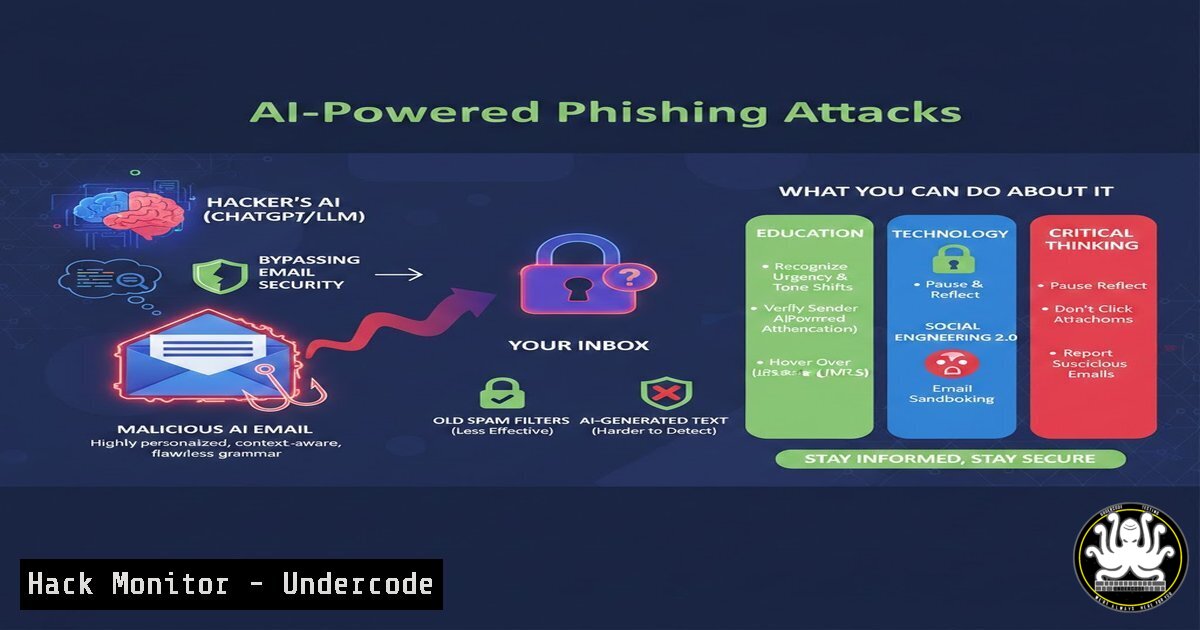
The convergence of artificial intelligence and cybercrime has given rise to a new breed of phishing attacks—hyper-personalized, grammatically flawless, and capable of evading traditional email filters. By leveraging large language models like ChatGPT, attackers can now craft convincing spear‑phishing emails at scale, complete with context‑aware lures that mimic legitimate correspondence. Understanding the mechanics of these AI‑generated threats is critical for IT professionals, security analysts, and anyone responsible for defending enterprise networks against social engineering.
Learning Objectives
- Analyze how generative AI is used to automate and enhance phishing campaigns.
- Identify indicators of AI‑generated phishing emails that bypass conventional defenses.
- Implement technical countermeasures, including email filtering rules, endpoint detection, and user awareness training.
- Deploy open‑source tools to simulate and test organizational resilience against AI‑powered phishing.
- Apply hardening techniques for Microsoft 365 and Google Workspace to block sophisticated spoofing attempts.
You Should Know
1. Anatomy of an AI‑Generated Phishing Email
Modern phishing emails generated by AI models like GPT‑4 exhibit near‑perfect grammar, contextually relevant subject lines, and personalized content scraped from social media or corporate websites. Attackers feed the model with target information (e.g., job titles, recent projects, vendor relationships) and prompt it to generate emails that appear to come from trusted colleagues or partners. These emails often include realistic links that redirect to credential‑harvesting pages hosted on compromised domains or cloud services.
Step‑by‑step guide to analyzing a suspicious AI‑generated email:
- Extract headers: Use `eml` analysis tools or command‑line utilities to view full email headers.
On Linux/macOS
cat suspicious_email.eml | grep -E "^(From:|To:|Subject:|Received:)"
2. Check SPF/DKIM/DMARC:
 Use dig to verify SPF records
dig TXT example.com | grep "v=spf1"
 Use opendkim‑verify if installed
opendkim-verify < suspicious_email.eml
3. Analyze links safely: Extract all URLs and test them in a sandbox.
grep -oP 'https?://[^\s"]+' suspicious_email.eml | while read url; do
echo "Checking $url"
curl -I --insecure "$url" 2>/dev/null | head -n 10
done
4. Linguistic analysis: Look for unnatural phrasing, overly formal tone, or missing contextual cues. AI models sometimes repeat phrases or use generic salutations like “Dear User.”
2. Defending Email Gateways with Advanced Filtering Rules
Traditional signature‑based filters fail against AI‑generated content because each email is unique. Instead, deploy behavior‑based detection and integrate threat intelligence feeds.
Microsoft 365 Exchange Online protection configuration:
- Enable Anti‑phish policies with impersonation protection for executives and key partners.
- Set up Transport Rules to flag external emails with suspicious keywords or domains:
Connect to Exchange Online PowerShell
New-TransportRule -Name "External to Internal - Flag AI Phishing" `
-FromScope NotInOrganization `
-SentToScope InOrganization `
-SubjectContainsWords "password","verify","urgent" `
-SetHeaderName "X-PhishingWarning" -SetHeaderValue "HighRisk"
- Use Advanced Threat Protection (ATP) Safe Links and Safe Attachments to detonate URLs and attachments in a sandbox.
Google Workspace hardening:
- In Admin console, go to Apps > Gmail > Advanced settings.
- Add Content compliance rules to quarantine emails with specific patterns.
- Enable SPF, DKIM, and DMARC enforcement for your domain:
Generate DKIM key for your domain
(Follow Google's guide to add TXT record)
- Configure URL protection to rewrite links and check against real‑time threat lists.
3. Simulating AI‑Powered Phishing Attacks with Open‑Source Tools
To test your defenses, use frameworks like GoPhish integrated with AI content generation.
Install GoPhish on Ubuntu 22.04:
wget https://github.com/gophish/gophish/releases/download/v0.12.1/gophish-v0.12.1-linux-64bit.zip
unzip gophish-v0.12.1-linux-64bit.zip
cd gophish-v0.12.1-linux-64bit
sudo chmod +x gophish
./gophish
Create a realistic AI‑generated template:
- Use an AI API (e.g., OpenAI) to generate email bodies based on target profiles.
- Integrate via a custom Python script that calls the API and feeds the output into GoPhish campaigns.
- Example Python snippet to generate phishing text:
import openai
openai.api_key = "your-api-key"
response = openai.ChatCompletion.create(
model="gpt-4",
messages=[{"role": "user", "content": "Write a convincing email asking an employee to reset their Office 365 password due to a security update. Include a link to a fake login page."}]
)
print(response.choices[bash].message.content)
Conduct the campaign:
- Set up a landing page that captures credentials.
- Monitor results in GoPhish dashboard.
- Analyze which users clicked or entered data.
- Endpoint Detection and Response (EDR) for Phishing Payloads
AI‑phishing often leads to malware downloads or credential theft. Configure EDR agents to detect post‑click behavior.
Using Sysmon on Windows to monitor process creation and network connections:
– Install Sysmon with a config that logs suspicious processes:
 Download Sysmon and config
Invoke-WebRequest -Uri https://download.sysinternals.com/files/Sysmon.zip -OutFile Sysmon.zip
Expand-Archive Sysmon.zip .
.\Sysmon64.exe -accepteula -i sysmon-config.xml
– Monitor Event ID 1 (process creation) for unusual executables launched from email clients.
– Correlate with network connections (Event ID 3) to known malicious IPs.
Linux endpoint hardening with auditd:
sudo apt install auditd
sudo auditctl -w /usr/bin/wget -p x -k wget_download
sudo auditctl -w /usr/bin/curl -p x -k curl_download
 Monitor file changes in user home directories
sudo auditctl -w /home/ -p wa -k user_home_changes
5. API Security: How Attackers Abuse AI Services
Cybercriminals often use stolen API keys to generate phishing content at scale. Secure your own AI API keys and monitor for abuse.
Best practices for API key management:
- Store keys in environment variables or secret managers (e.g., HashiCorp Vault).
- Implement rate limiting and IP whitelisting.
- Regularly audit API usage logs for anomalous patterns.
- Example of checking OpenAI usage via CLI:
curl https://api.openai.com/v1/usage -H "Authorization: Bearer $OPENAI_API_KEY"
6. Cloud Hardening Against Credential Harvesting
Phishing pages often mimic cloud login portals. Use conditional access policies and multi‑factor authentication (MFA) to mitigate stolen credentials.
Azure AD Conditional Access policy to block risky sign‑ins:
– Go to Azure AD > Security > Conditional Access.
– Create policy: “Block access for low‑risk and medium‑risk sign‑ins.”
– Require MFA for all external access.
AWS S3 bucket misconfiguration check:
 Use AWS CLI to list bucket permissions
aws s3api get-bucket-acl --bucket your-bucket-name
 Check if bucket is public
aws s3api get-bucket-policy --bucket your-bucket-name
 Enforce blocking public access
aws s3api put-public-access-block --bucket your-bucket-name --public-access-block-configuration BlockPublicAcls=true,IgnorePublicAcls=true,BlockPublicPolicy=true,RestrictPublicBuckets=true
7. Training and Awareness for the AI Era
Technical controls must be complemented by user education. Develop training modules that explain how AI can mimic trusted contacts.
Example training topics:
- Recognizing subtle cues: urgency, unusual requests, slight deviations in email addresses.
- Simulated phishing exercises with AI‑generated content.
- Reporting mechanisms: one‑click reporting buttons in Outlook or Gmail.
Command to extract and analyze user reporting rates from logs:
 Parse email gateway logs for user-reported phish
grep "reported_phish" /var/log/mail.log | awk '{print $6}' | sort | uniq -c
What Undercode Say
- AI is a double‑edged sword: While defenders use AI to detect anomalies, attackers weaponize it to create ever‑more convincing lures. The arms race now extends to linguistic sophistication.
- Defense in depth is non‑negotiable: No single control stops AI‑phishing. Combine email filtering, endpoint monitoring, conditional access, and continuous user education.
- Proactive simulation beats reactive response: Regularly test your environment with AI‑generated phishing templates. Measure click rates, credential submission, and report response times to identify weak spots.
- API key hygiene is critical: Stolen API keys fuel the generation of malicious content. Implement strict access controls and monitor usage for spikes or unusual patterns.
The rise of generative AI has democratized sophisticated phishing, lowering the barrier for attackers. Organizations must adapt by integrating AI‑aware defenses into every layer of their security stack. The future will see AI‑driven social engineering evolve into real‑time voice and video deepfakes, making today’s email‑based attacks just the beginning.
Prediction
Within the next 18 months, we will witness the first large‑scale deepfake video conference call used to authorize fraudulent wire transfers, combining real‑time AI voice cloning and face swapping. This will force enterprises to adopt out‑of‑band verification protocols and deploy AI‑based deepfake detection tools in video collaboration platforms. The arms race between generative AI and cybersecurity will intensify, leading to new regulatory frameworks requiring disclosure of AI‑generated content in business communications.
▶️ Related Video (72% Match):
🎯Let’s Practice For Free:
IT/Security Reporter URL:
Reported By: Adam Biddlecombe – Hackers Feeds
Extra Hub: Undercode MoN
Basic Verification: Pass ✅


