Listen to this Post
Introduction:
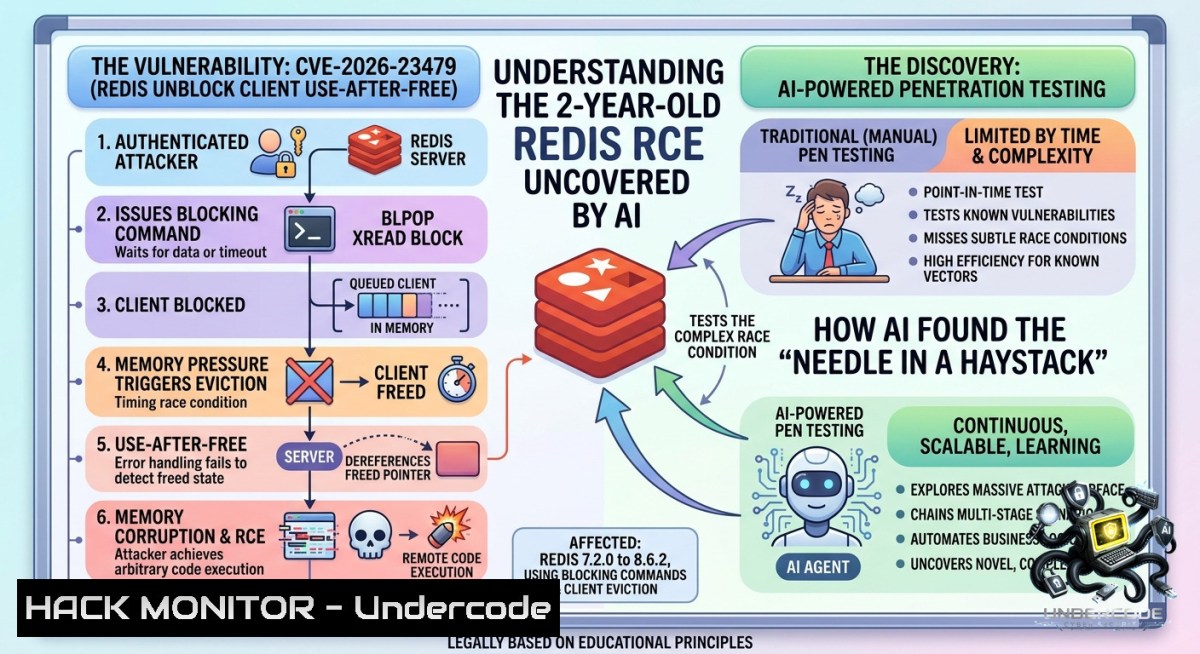
The landscape of cybersecurity is changing rapidly as autonomous AI tools are now capable of hunting for complex vulnerabilities in large codebases. A prime example is CVE-2026-23479, a critical use-after-free (UAF) vulnerability in Redis that remained hidden for over two years until an AI agent discovered it. This flaw allows an authenticated user to execute arbitrary operating system commands on the Redis host, posing a severe threat to the vast majority of cloud environments that rely on the in-memory data store.
Learning Objectives:
– Understand the root cause and exploit mechanics of the CVE-2026-23479 use-after-free vulnerability.
– Learn how to manually detect vulnerable Redis configurations and verify patch levels.
– Master mitigation strategies, including upgrading to secure versions and implementing principle-of-least-privilege ACLs.
You Should Know:
1. Deep Dive into CVE-2026-23479: The AI-Discovered Memory Corruption
The vulnerability was found by an autonomous AI tool built by Team Xint Code to hunt bugs in large codebases, and a working RCE exploit was demonstrated at ZeroDay.Cloud 2025. Tracked as CVE-2026-23479, the flaw was introduced in Redis 7.2.0 and remained in every stable branch until patches were released on May 5, 2026. The vulnerability is a classic use-after-free (CWE-416) located in the `unblockClientOnKey()` function in `src/blocked.c`. The code mishandles the return value from `processCommandAndResetClient()`, accessing a client structure even if it was freed as a side effect.
The complete exploit chain, as detailed by Wiz’s analysis, operates in three sophisticated stages. First, it leaks a heap pointer using a simple Lua script. Second, it grooms client memory limits, parks a bloated client on a stream, and then forces Redis to free the blocked client mid-call, immediately reclaiming the memory with a fake client structure. Finally, it manipulates Redis’s memory accounting to overwrite a function pointer in the Global Offset Table (GOT), redirecting execution to `system()`.
While the CVSS score is rated as 7.7 (High) by Redis and 8.8 (High) by the NVD, its real-world impact is amplified by default configurations. The official Redis Docker image ships with only partial RELRO, leaving the GOT writable at runtime, which makes the final exploit step significantly easier.
To determine if a system is at risk, use the following Linux command:
 Check the current Redis server version
redis-server --version

 Check if the instance is unauthenticated (a major risk factor)
redis-cli INFO server | grep redis_version

 For a more detailed scan, use nmap to identify Redis services
nmap -p 6379 --script redis-info <target-ip>
2. Vulnerability Verification and Patch Management
System administrators must prioritize updating to the secure versions. All Redis deployments from 7.2.0 up to, but not including, 8.6.3 are vulnerable. Patches have been backported to all stable branches in the following fixed versions:
– Redis 7.2.x: upgrade to 7.2.14
– Redis 7.4.x: upgrade to 7.4.9
– Redis 8.2.x: upgrade to 8.2.6
– Redis 8.4.x: upgrade to 8.4.3
– Redis 8.6.x: upgrade to 8.6.3
Step-by-step guide to verifying and patching your Redis instance:
Linux/macOS:
 Step 1: Check current version
redis-cli INFO server | grep redis_version

 Step 2: If vulnerable, upgrade via your package manager
 For Debian/Ubuntu (if using official Redis repo)
sudo apt update && sudo apt upgrade redis-server

 For RHEL/CentOS/Fedora
sudo dnf upgrade redis

 Step 3: Or upgrade from source to the latest stable version
wget https://download.redis.io/releases/redis-8.6.3.tar.gz
tar xzf redis-8.6.3.tar.gz
cd redis-8.6.3
make
sudo make install

 Step 4: Restart the service and re-verify
sudo systemctl restart redis-server
redis-server --version
Windows (using WSL or Docker):
For Windows environments, the easiest method is to use Docker, which is how many cloud deployments run Redis.
 Pull the latest secured Redis image
docker pull redis:8.6.3-bookworm

 Stop and remove the old container
docker stop redis-container
docker rm redis-container

 Run a new container with the secured version
docker run --1ame redis-container -d -p 6379:6379 redis:8.6.3-bookworm
3. Exploitation Mechanics: The Attack Chain
The attack is not trivial, but it is highly reliable for an authenticated user. The exploit chain leverages a specific set of Redis commands that any authenticated user might have in a default deployment. Triggering the bug requires an authenticated session with permissions to:
– Tune client memory limits via `CONFIG SET maxmemory-clients`
– Execute Lua via `EVAL`
– Issue stream commands (`XREAD`, `XADD`)
– Perform basic `SET`/`GET`
In ACL terms, this is the `@admin`, `@scripting`, `@stream`, and `@read`/`@write` categories. In a default Redis deployment, the default user holds all these privileges. The attack flow works by creating a scenario where a blocked client is evicted mid-execution, triggering the UAF. From there, the attacker crafts a fake client object to hijack the execution flow, ultimately calling `system()` with a shell command.
To understand if your current access can exploit this, an admin can audit ACL permissions:
 List all users and their ACL rules
redis-cli ACL LIST

 Check current user's permissions
redis-cli ACL WHOAMI

 A secure configuration should look like this, limiting commands for app users
redis-cli ACL SETUSER app_user on >securepassword +@read +@write +@stream -@admin -@scripting
4. Mitigation, Hardening, and Monitoring
If upgrading immediately is not possible, network-level hardening is critical. The vulnerability requires authenticated access, so securing the authentication layer is the primary defense. Wiz’s analysis shows that 80% of cloud environments use Redis, and out of those, 85% are configured without a password, which significantly increases the attack surface.
Step-by-step hardening guide for Redis in production:
1. Bind to localhost or trusted networks: Edit your `redis.conf` file.
bind 127.0.0.1 ::1
 OR
bind 192.168.1.100 10.0.0.1
2. Set a strong password for the default user:
redis-cli CONFIG SET requirepass "Your-V3ry-Str0ng-P@ssw0rd"
For persistence, add `requirepass Your-V3ry-Str0ng-P@ssw0rd` to `redis.conf`.
3. Implement Principle of Least Privilege ACLs: Create specific users for each application.
 Create a read-only user for a reporting dashboard
redis-cli ACL SETUSER dashboard on >dashboard_pass +@read

 Create a user with limited stream and write access, but no admin or scripting
redis-cli ACL SETUSER app_user on >app_pass +@read +@write +@stream -@admin -@scripting
4. Enable TLS for authentication: To prevent credential sniffing, configure Redis with TLS.
 In redis.conf
tls-port 6379
port 0
tls-cert-file /path/to/redis.crt
tls-key-file /path/to/redis.key
tls-ca-cert-file /path/to/ca.crt
5. Monitor for exploitation attempts: Look for anomalous client eviction patterns and rapid, authenticated executions of `CONFIG SET` followed by Lua scripts (`EVAL`).
5. Mitigation via Firewall and Security Groups
One of the most effective immediate mitigations is network isolation. Since the exploit requires a network-accessible Redis port, blocking it at the perimeter stops the attack chain entirely, regardless of the software vulnerability. This is the only reliable method to protect against a zero-day if patching is impossible.
Step-by-step guide for network isolation:
Linux (using iptables):
 Allow only specific trusted application servers (e.g., 10.0.0.50)
sudo iptables -A INPUT -p tcp -s 10.0.0.50 --dport 6379 -j ACCEPT

 Drop all other traffic to the Redis port
sudo iptables -A INPUT -p tcp --dport 6379 -j DROP

 Save the rules (for Debian/Ubuntu)
sudo apt install iptables-persistent
sudo netfilter-persistent save
Windows (using Windows Defender Firewall with PowerShell):
 Block inbound traffic to Redis port 6379 from all sources
New-1etFirewallRule -DisplayName "Block Redis Port 6379" -Direction Inbound -LocalPort 6379 -Protocol TCP -Action Block

 Allow only a specific IP, e.g., 192.168.1.50
$RuleParams = @{
DisplayName = "Allow Redis from App Server"
Direction = "Inbound"
LocalPort = 6379
Protocol = "TCP"
RemoteAddress = "192.168.1.50"
Action = "Allow"
}
New-1etFirewallRule @RuleParams
Cloud Environment (AWS Security Group example): Configure security groups to restrict inbound traffic on port 6379 to only specific application security groups or IP CIDR blocks, removing `0.0.0.0/0` access. This reduces the attack surface from the public internet to only known, trusted hosts.
What Undercode Say:
– Key Takeaway 1: Autonomous AI is no longer just a defensive tool for log analysis; it is now an effective offensive weapon capable of discovering zero-day vulnerabilities that evade human security researchers for years. This marks a paradigm shift in vulnerability research.
– Key Takeaway 2: The real-world severity of a CVE is often dictated not just by its CVSS score, but by deployment practices. The `CVE-2026-23479` exploit, while requiring authentication, is devastating because the majority of Redis instances in the cloud run without a password, making them trivial targets for lateral movement after an initial breach.
– Analysis: The discovery of this vulnerability by an AI tool should serve as a wake-up call for organizations to invest more heavily in runtime application self-protection (RASP) and micro-segmentation. While traditional patch management is essential, AI-driven attacks will move faster than human-led patching cycles. Organizations must adopt a zero-trust architecture that assumes the network is already compromised and relies on strict, least-privilege access controls for all services, not just Redis. The days of relying on obscurity or default configurations are over.
Expected Output:
Introduction:
[2–3 sentence cybersecurity‑angle introduction]
The discovery of CVE-2026-23479 by an autonomous AI agent marks a critical turning point in cyber defense, proving that AI can now discover sophisticated memory corruption bugs that evade human experts. This use-after-free vulnerability in Redis, left unpatched for two years, allows authenticated attackers to execute arbitrary OS commands, transforming a widely used database into a entry point for full system compromise.
What Undercode Say:
– Key Takeaway 1: Autonomous AI is now an effective offensive tool capable of discovering zero-day vulnerabilities faster than human researchers.
– Key Takeaway 2: The severity of CVE-2026-23479 is amplified by the fact that 85% of cloud-based Redis instances run without a password, trivializing the authentication requirement.
Prediction:
– +1 The integration of AI into Security Operations Centers (SOCs) will accelerate, leading to dramatically faster vulnerability discovery and patch development cycles, potentially reducing the average “days of risk” from 60 to under 10.
– -1 However, threat actors will weaponize the same autonomous AI tools at scale, leading to a wave of zero-day exploits that outpace human defenses and overwhelming traditional vulnerability management teams.
▶️ Related Video (84% Match):
🎯Let’s Practice For Free:
🎓 Live Courses & Certifications:
[Join Undercode Academy for Verified Certifications](https://undercode.co.uk/certifications/)
🚀 Request a Custom Project:
Secure, high-velocity infrastructure and disruptive technological engineering. Contact our engineering team for high-tier development and proprietary systems:
[[email protected]](mailto:[email protected])
💎 Smart Architecture | 🛡️ Secure by Design | ⭐ Trusted by Thousands
IT/Security Reporter URL:
Reported By: [Hackermohitkumar An](https://www.linkedin.com/posts/hackermohitkumar_an-autonomous-ai-tool-found-a-redis-rce-share-7467936677806698496-MFZz/) – Hackers Feeds
Extra Hub: Undercode MoN
Basic Verification: Pass ✅
🔐JOIN OUR CYBER WORLD [ CVE News • HackMonitor • UndercodeNews ]
[💬 Whatsapp](https://undercode.help/whatsapp) | [💬 Telegram](https://t.me/UndercodeCommunity)
📢 Follow UndercodeTesting & Stay Tuned:
[𝕏 formerly Twitter 🐦](https://x.com/undercodeupdate) | [@ Threads](https://www.threads.net/@undercodetesting) | [🔗 Linkedin](https://www.linkedin.com/company/undercodetesting/) | [🦋BlueSky](https://bsky.app/profile/undercode.bsky.social)


