Listen to this Post
Introduction
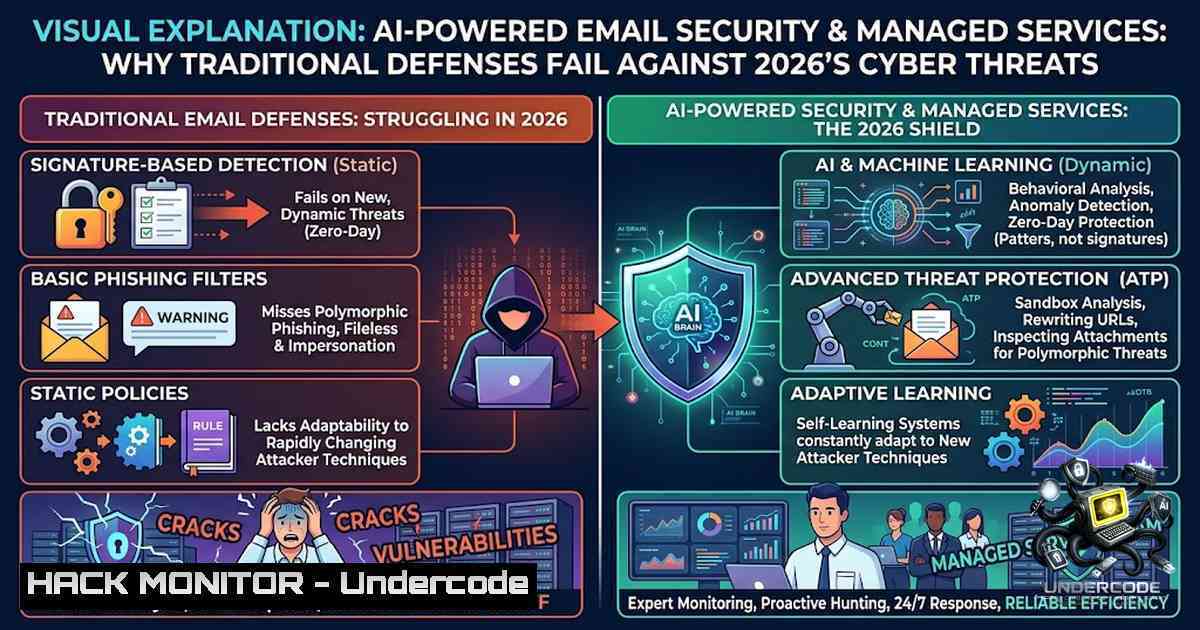
Email remains the primary attack vector for cybercriminals, with phishing dominating malicious email categories at 48% and AI-generated phishing now establishing itself as the baseline threat. As attackers increasingly leverage large language models to craft flawless Business Email Compromise (BEC) messages and impersonation attempts at scale, organizations can no longer rely on legacy Secure Email Gateways (SEGs) that filter based solely on sender reputation and message signatures. NetSolve Systems, a UAE-based IT solutions provider with 26 years of industry experience, addresses this evolving threat landscape through AI-powered threat detection, advanced email filtering, and comprehensive managed security services that protect businesses against phishing, malware, malicious attachments, and emerging cyber threats.
Learning Objectives
- Understand the mechanics of AI-generated phishing, BEC, and impersonation attacks and how they bypass traditional email defenses
- Master the implementation of email authentication protocols (SPF, DKIM, DMARC) to prevent domain spoofing and impersonation
- Deploy AI-powered threat detection techniques including behavioral analysis, natural language processing, and computer vision
- Configure multi-layered email filtering and secure email gateway policies for Microsoft 365 and Google Workspace environments
- Implement incident response procedures for email-based attacks and establish ongoing security monitoring
You Should Know
- Email Authentication Trio: SPF, DKIM, and DMARC Implementation
Email authentication is the foundational layer of defense against domain spoofing and impersonation. The three protocols—SPF, DKIM, and DMARC—work together to verify that emails originate from authorized servers and have not been tampered with during transit.
What This Does: SPF (Sender Policy Framework) specifies which mail servers are authorized to send emails from your domain. DKIM (DomainKeys Identified Mail) adds a digital signature to outgoing emails that receiving servers can verify. DMARC (Domain-based Message Authentication, Reporting, and Conformance) builds on both, telling receiving servers how to handle emails that fail authentication checks and enabling reporting on failed checks.
Step-by-Step Guide:
Step 1: Configure SPF Record
Add a TXT record to your domain’s DNS settings:
v=spf1 mx include:spf.protection.outlook.com include:spf.yourmsp.com -all
The `-all` at the end instructs receiving servers to reject emails from unauthorized senders (hard fail).
Step 2: Set Up DKIM
Enable DKIM signing in your email platform (Microsoft 365, Google Workspace, or your mail server). Generate a DKIM key pair and publish the public key as a TXT record:
default._domainkey.yourdomain.com TXT "v=DKIM1; k=rsa; p=MIGfMA0GCSqGSIb3DQEBAQUAA4GNADCBiQKBgQC..."
Step 3: Create DMARC Policy
Publish a DMARC TXT record starting with a monitoring policy (p=none) to collect reports, then progress to quarantine (p=quarantine) and eventually reject (p=reject):
_dmarc.yourdomain.com TXT "v=DMARC1; p=reject; rua=mailto:[email protected]; ruf=mailto:[email protected]; fo=1"
Step 4: Verify Records
Use command-line tools to verify your configurations:
- Linux/macOS: `dig TXT _dmarc.yourdomain.com` or `nslookup -type=TXT _dmarc.yourdomain.com`
– Windows: `nslookup -type=TXT _dmarc.yourdomain.com`
– Online tools: MXToolbox, DMARC Analyzer
Step 5: Monitor and Enforce
Review DMARC aggregate reports to identify legitimate senders that need to be added to your SPF or DKIM configurations before enforcing stricter policies.
2. AI-Powered Threat Detection: Beyond Signature-Based Filtering
Traditional email filters relying on signature-based detection and reputation scoring are increasingly ineffective against AI-generated phishing emails that contain no malicious links or attachments. Modern AI-powered email security leverages machine learning, natural language understanding (NLU), computer vision, and behavioral analysis to identify threats that traditional filters miss.
What This Does: AI systems establish a behavioral baseline for each user, learning writing style, tone, vocabulary choices, and communication patterns. They detect anomalies—subtle deviations that indicate account takeover or impersonation—and identify AI-generated messages related to financial fraud and BEC attempts. Advanced systems also employ computer vision to analyze embedded images and QR codes (quishing) that text-based filters overlook.
Step-by-Step Guide for Implementing AI-Powered Email Security:
Step 1: Assess Your Current Email Security Posture
Audit existing email security controls, including SEG configurations, spam filtering rules, and user reporting mechanisms. Identify gaps in protection against AI-generated threats.
Step 2: Deploy Behavioral AI Protection
Implement solutions that use adaptive AI to learn communication patterns and relationships among mailbox users, establishing a unique behavioral baseline and social graph for your environment. This enables detection of subtle and sophisticated threats that bypass traditional filters.
Step 3: Enable AI-Generated Email Detection
Configure your email security platform to detect AI-generated content. Modern solutions can identify generative messages related to financial fraud and BEC attempts even when messages contain no malicious links or attachments. Ensure detection covers multiple languages (English, French, German, Italian, Portuguese, Russian, Spanish, Turkish).
Step 4: Implement Real-Time URL and Attachment Analysis
Configure link protection that uses machine learning and deep learning to provide advanced protection against phishing, including short-wave, highly targeted attacks. Enable sandboxing for attachments to detect zero-day malware.
Step 5: Establish Continuous Monitoring and Tuning
Regularly review AI detection accuracy, adjust thresholds based on false positive rates, and incorporate user-reported phishing to improve detection for every other inbox.
Linux Command for Email Log Analysis:
 Analyze mail logs for suspicious patterns
grep -E "fail|reject|block|spam" /var/log/mail.log | tail -100

Check DMARC aggregate reports (XML parsing)
xmllint --xpath "//record/row/source_ip" /path/to/dmarc-report.xml

Monitor for unusual outbound email volume
grep "status=sent" /var/log/mail.log | awk '{print $1}' | uniq -c | sort -1r
Windows PowerShell Command for Exchange/Office 365 Monitoring:
 Get message trace for suspicious patterns
Get-MessageTrace -StartDate (Get-Date).AddDays(-7) -EndDate (Get-Date) |
Where-Object {$_.Status -eq "Failed"} |
Select-Object Received, SenderAddress, RecipientAddress, Subject, Status

Check for unusual forwarding rules (potential compromise indicator)
Get-Mailbox | Get-InboxRule | Where-Object {$_.ForwardTo -1e $null}
3. Multi-Layered Email Filtering Architecture
A defense-in-depth approach to email security requires multiple filtering layers operating at different points in the email delivery path. This architecture ensures that threats are caught even if they evade individual layers.
What This Does: Multi-layered filtering applies sequential checks—connection filtering, sender reputation, content filtering, attachment scanning, URL analysis, and behavioral detection—to maximize threat detection while minimizing false positives.
Step-by-Step Guide:
Step 1: Connection-Level Filtering
Configure your mail server or SEG to perform IP reputation checks, DNS-based blocklists (DNSBL), and reverse DNS validation. Reject connections from known malicious IP addresses at the SMTP level.
Step 2: Sender Authentication Checks
Enable SPF, DKIM, and DMARC checking on inbound mail. Configure actions for authentication failures: quarantine for soft failures, reject for hard failures.
Step 3: Content and Attachment Filtering
Deploy anti-spam and anti-malware scanning with regular signature updates. Configure attachment filtering to block dangerous file types (.exe, .js, .vbs, .docm with macros) unless specifically allowed.
Step 4: AI-Powered Phishing Detection
Apply machine learning models to analyze email content, headers, and sending patterns. Detect impersonation attempts, brand spoofing, and social engineering techniques.
Step 5: Post-Delivery Protection
Implement solutions that continuously monitor delivered emails, retroactively removing threats that were not detected at the time of delivery. Enable user reporting buttons and integrate with Security Operations Centers (SOCs).
Linux Postfix Configuration Example:
 /etc/postfix/main.cf - Enable DNSBL checks
smtpd_recipient_restrictions =
permit_mynetworks,
permit_sasl_authenticated,
reject_rbl_client zen.spamhaus.org,
reject_rbl_client bl.spamcop.net,
reject_rhsbl_sender dbl.spamhaus.org,
check_policy_service unix:private/policyd-spf,
permit

Enable header and body checks
header_checks = regexp:/etc/postfix/header_checks
body_checks = regexp:/etc/postfix/body_checks
- Business Email Compromise (BEC) Defense and Impersonation Protection
BEC attacks are among the most financially damaging cyber threats, with low-volume but high-impact attacks targeting payment processes and executive impersonation. Attackers increasingly use AI to generate convincing BEC emails in multiple languages.
What This Does: BEC defense combines technical controls (authentication, filtering) with organizational measures (payment verification, user training) to prevent fraudulent wire transfers and sensitive data disclosure.
Step-by-Step Guide:
Step 1: Implement Anti-Impersonation Controls
Configure email security to detect display name spoofing—where attackers use a familiar name but a different domain. Enable external email warning banners to make messages from outside the organization visually obvious.
Step 2: Deploy AI-Based BEC Detection
Enable detection of AI-generated BEC emails that may contain no malicious links or attachments. Modern solutions can identify generative messages related to financial fraud and BEC attempts based on linguistic analysis.
Step 3: Establish Payment Verification Procedures
Implement dual-approval processes for payment requests, requiring out-of-band verification (phone call to a known number, not the one in the email). Validate vendor and bank-account changes through independent channels.
Step 4: Conduct Regular Phishing Simulations
Run simulated phishing campaigns targeting executives and finance personnel. Use realistic BEC scenarios to test employee awareness and reporting behavior.
Step 5: Monitor for Compromised Accounts
Detect account takeover through unusual login patterns, forwarding rules, and mailbox activity. Implement phishing-resistant MFA such as FIDO2 security keys.
5. Managed Security Services and SOC Integration
For organizations without dedicated security teams, managed security service providers (MSSPs) offer comprehensive protection including Security Operations Centers (SOC), Managed Detection and Response (MDR), and SIEM-as-a-Service.
What This Does: Managed services provide 24/7 monitoring, threat hunting, incident response, and continuous security optimization, enabling businesses to leverage enterprise-grade security without building internal capabilities.
Step-by-Step Guide:
Step 1: Define Security Requirements
Identify regulatory compliance requirements (UAE data residency, GDPR, etc.), risk tolerance, and budget constraints. Determine which services are needed: email security, endpoint protection, network monitoring, or full SOC coverage.
Step 2: Select an MSSP
Evaluate providers based on their technology stack, threat intelligence capabilities, incident response SLAs, and regional presence. Ensure they support your email platform (Microsoft 365, Google Workspace, on-premises Exchange).
Step 3: Integrate Security Controls
Configure SIEM integration to aggregate logs from email security, endpoints, firewalls, and cloud applications. Establish data feeds for threat intelligence sharing.
Step 4: Establish Incident Response Protocols
Define escalation procedures, communication plans, and remediation workflows. Conduct tabletop exercises to test incident response readiness.
Step 5: Continuous Improvement
Schedule regular security posture reviews, vulnerability assessments, and penetration testing. Update configurations based on emerging threat intelligence.
What Undercode Say
- AI is the new baseline, not the exception. Attackers are using AI to generate flawless phishing emails at scale, making traditional signature-based detection obsolete. Organizations must deploy AI-powered defenses that can match and counter AI-generated threats.
-
Email authentication is non-1egotiable. SPF, DKIM, and DMARC are essential to prevent domain spoofing and impersonation. Yet many organizations still lack proper implementations—70% of high-confidence phishing emails passed DMARC authentication in 2025, indicating widespread misconfiguration.
-
The human element remains critical. Even the best technical controls can be bypassed by sophisticated social engineering. Regular phishing simulations, bite-sized training, and clear reporting processes are essential to build a security-conscious culture.
-
Zero trust applies to email too. Assume that any email could be malicious, regardless of sender reputation. Verify identities through multiple channels, especially for financial transactions and sensitive data requests.
-
Managed services bridge the skills gap. With the cybersecurity talent shortage, MSSPs provide access to specialized expertise and 24/7 monitoring that most organizations cannot build internally.
-
Behavioral analysis is the future of threat detection. AI that learns normal communication patterns and establishes social graphs can detect anomalies that rule-based systems miss, including account takeover and insider threats.
-
UAE businesses face unique challenges. Regional data residency requirements, the rapid pace of digital transformation, and the concentration of high-value targets make UAE organizations particularly attractive to attackers.
-
Proactive defense beats reactive response. Waiting for an attack to expose vulnerabilities is costly and damaging. Implementing layered defenses before incidents occur is far more effective and economical.
Prediction
-1 The commoditization of AI-powered phishing tools will continue to lower the barrier to entry for cybercriminals, leading to a surge in highly personalized, multilingual BEC attacks targeting UAE businesses. Organizations that fail to implement AI-based defenses and proper email authentication will face increased financial losses and reputational damage.
+1 Advances in AI-powered email security, including behavioral analysis and social graph modeling, will enable proactive threat detection that identifies compromised accounts and sophisticated impersonation attempts before they cause harm.
+1 The UAE’s investment in cybersecurity infrastructure, including cyber fusion centers and regulatory frameworks, will create a more resilient digital ecosystem, provided businesses leverage managed security services to augment their internal capabilities.
-1 The increasing sophistication of AI-generated content will make it harder for users to distinguish legitimate emails from phishing attempts, necessitating a shift toward automated, machine-led detection rather than relying on human judgment.
+1 Adoption of phishing-resistant MFA (FIDO2) and post-delivery protection will reduce the effectiveness of credential theft and account takeover, forcing attackers to shift to alternative tactics.
-1 Organizations that view email security as a one-time implementation rather than an ongoing process will remain vulnerable as attackers continuously evolve their techniques. Regular security assessments, configuration reviews, and employee training are essential to stay ahead.
For expert guidance on implementing these security measures, contact NetSolve Systems at +971 50 77 35 496 or [email protected]. Visit www.thenetsolve.com for comprehensive managed security services tailored to UAE businesses.
▶️ Related Video (80% Match):
🎯Let’s Practice For Free:
🎓 Live Courses & Certifications:
Join Undercode Academy for Verified Certifications
🚀 Request a Custom Project:
Secure, high-velocity infrastructure and disruptive technological engineering. Contact our engineering team for high-tier development and proprietary systems:
[email protected]
💎 Smart Architecture | 🛡️ Secure by Design | ⭐ Trusted by Thousands
IT/Security Reporter URL:
Reported By: Cybersecurityuae Uaebusinesses – Hackers Feeds
Extra Hub: Undercode MoN
Basic Verification: Pass ✅


