Listen to this Post
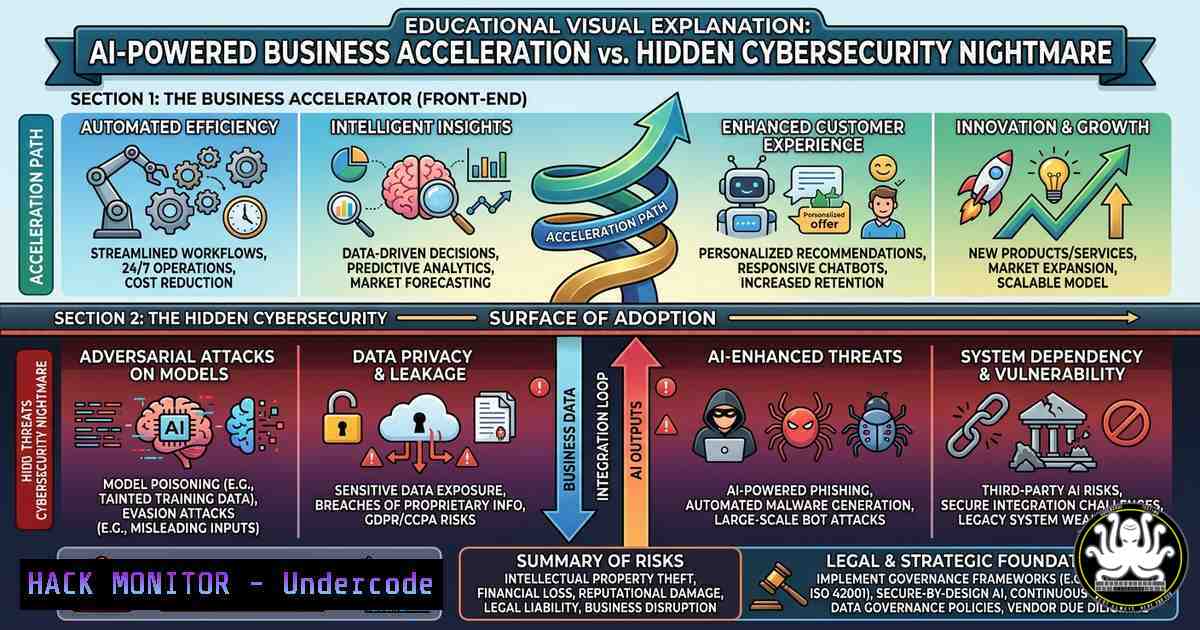
Introduction:
Artificial intelligence has democratized entrepreneurship, enabling solo founders to build, market, and scale businesses with unprecedented speed. However, this rapid adoption of AI tools—from automated content generators to AI-driven analytics—creates a sprawling attack surface that most startups ignore until it’s too late. Cybersecurity is no longer a luxury for enterprises; for AI-accelerated SMEs, it’s the difference between scaling securely and leaking sensitive customer data to malicious actors.
Learning Objectives:
- Identify security gaps in common AI business tools (ChatGPT, Zapier, Midjourney, Darktrace) and implement mitigation strategies.
- Execute Linux and Windows commands to audit API keys, monitor cloud workloads, and harden AI model endpoints.
- Build a lightweight governance framework for AI usage that balances acceleration with compliance and data protection.
You Should Know:
- Auditing AI Tool API Keys and Secrets on Linux & Windows
AI-powered businesses rely heavily on API integrations (OpenAI, Zapier, Surfer SEO, etc.). Exposed API keys are the 1 cause of AI-related data breaches. This step-by-step guide shows how to scan your systems for leaked credentials and rotate them securely.
Step‑by‑step guide (Linux):
- Search for hardcoded keys in your codebase using
grep:grep -r --include=".env" --include=".py" --include=".js" "sk-[a-zA-Z0-9]" /path/to/project
This finds OpenAI secret keys (starting with `sk-`).
- Use `trufflehog` to detect hundreds of secret types:
docker run -it -v "$PWD:/pwd" trufflesecurity/trufflehog:latest filesystem /pwd --only-verified
3. Check environment variables for exposed keys:
env | grep -i "key|secret|token"
Step‑by‑step guide (Windows PowerShell):
1. Search recursively for API keys:
Get-ChildItem -Recurse -Include .env,.json,.config | Select-String -Pattern "sk-[a-zA-Z0-9]{48}"
2. List all environment variables containing secrets:
Get-ChildItem Env: | Where-Object {$_.Name -match "key|secret|token"}
3. Rotate keys immediately if found. Use your cloud provider’s CLI (e.g., aws secretsmanager rotate-secret) to automate rotation.
Why this matters: AI tools like Zapier store keys in plaintext if you’re not careful. A single leaked key can lead to API abuse, data exfiltration, or a $10,000 bill from OpenAI overnight.
- Hardening Cloud Workloads for AI-Generated Code and Automation
Many entrepreneurs use ChatGPT or Copilot to generate deployment scripts (Terraform, CloudFormation, Dockerfiles). AI-generated code often contains insecure defaults—open S3 buckets, overly permissive IAM roles, or exposed ports. This section teaches you to harden those workloads.
Step‑by‑step guide for AWS (Linux/macOS):
1. Install `checkov` to scan infrastructure-as-code:
pip install checkov
checkov -d /path/to/terraform/
2. For Docker containers built from AI-generated Dockerfiles, run a vulnerability scan:
trivy image your-ai-app:latest --severity HIGH,CRITICAL
3. Enforce least privilege by generating an IAM policy from CloudTrail logs:
pip install policy_sentry
policy_sentry create-template --output-file template.yml --name my-role
Then refine to only the actions actually used.
Step‑by‑step guide for Azure (Windows):
- Install Azure CLI and run a security assessment:
az security va sql list --resource-group "AI-RG" --server "your-ai-db"
2. Use Microsoft Defender for Cloud recommendations:
az security assessment list --query "[?displayName=='Use Azure Policy to monitor AI services']"
3. Automatically remediate over-permissive managed identities with:
az rest --method post --url "https://management.azure.com/subscriptions/{subId}/providers/Microsoft.Security/securityContacts?api-version=2020-01-01"
Real‑world impact: In 2024, a startup using AI-generated Terraform accidentally exposed an OpenAI API key and a Redis cluster to the public internet—their entire customer database was scraped within hours.
3. Configuring Darktrace-Like Behavioral Monitoring for Small Teams
Darktrace (mentioned in the original post) uses AI to detect anomalies, but enterprise pricing is out of reach for most SMEs. Here’s how to build a lightweight behavioral monitoring system using open-source tools on Linux and Windows.
Step‑by‑step guide (Linux – Wazuh + Elastic):
- Install Wazuh agent to monitor file integrity and process execution:
curl -s https://packages.wazuh.com/4.x/apt/key | apt-key add -
apt install wazuh-agent
systemctl enable wazuh-agent
- Configure custom rules to detect unusual AI tool activity (e.g., ChatGPT making unexpected system calls). Edit
/var/ossec/etc/ossec.conf:<syscheck> <directories check_all="yes" realtime="yes">/home/user/.config/chatgpt/</directories> </syscheck>
3. Set up Falco for runtime security:
falco -r /etc/falco/falco_rules.yaml -A | grep "AI TOOL"
Step‑by‑step guide (Windows – Sysmon + PowerShell):
- Install Sysmon with a configuration that logs process creation for AI executables:
.\Sysmon64.exe -accepteula -i sysmon-config.xml
- Create a scheduled task to monitor network connections from AI tools:
$action = New-ScheduledTaskAction -Execute "powershell.exe" -Argument "-Command Get-NetTCPConnection | Where-Object {$_.OwningProcess -in (Get-Process -Name 'midjourney','chatgpt').Id} | Out-File C:\logs\ai_network.txt" - Forward logs to a free Splunk or ELK instance for anomaly detection.
Pro tip: Use `auditd` on Linux to track file access to your AI model checkpoints—unauthorized reads could indicate model theft.
4. Securing AI-Generated Content Pipelines Against Prompt Injection
Prompt injection attacks manipulate AI models (ChatGPT, Midjourney, Synthesia) into leaking training data or executing malicious instructions. As you automate content creation, you must treat AI inputs as untrusted.
Step‑by‑step guide (Linux – validating user prompts):
- Create a Python script that sanitizes prompts before sending to OpenAI API:
import re def sanitize_prompt(prompt): Block common injection patterns patterns = [r"ignore previous instructions", r"system:? ", r"DELIMITER"] for p in patterns: if re.search(p, prompt, re.I): raise ValueError("Prompt injection detected") return prompt - Run it in a constrained Docker container with no network except to OpenAI:
docker run --rm --network none -v "$PWD:/app" python:3.9 python /app/sanitize.py
- Use `modsecurity` as a WAF in front of your AI microservice:
docker run -d -p 8080:80 owasp/modsecurity-crs:nginx
Step‑by‑step guide (Windows – Content filtering proxy):
- Deploy an MITM proxy (mitmproxy) to inspect AI API requests:
mitmdump --mode transparent --showhost -s filter_prompts.py
- Use PowerShell to enforce regex-based blocklists on outgoing HTTP:
$blockedPatterns = @("delete all data", "system prompt")
$response = Invoke-WebRequest -Uri "https://api.openai.com/v1/chat/completions"
if ($blockedPatterns -match $response.Content) { Send-MailMessage -To "[email protected]" -Subject "Injection Attempt" }
Why this matters: Researchers have demonstrated prompt injection on Bing Chat and GPT-4 that extracts hidden system prompts. If your AI writes emails or generates reports, an attacker could exfiltrate internal data.
5. Automating Incident Response for AI Tool Compromise
When an AI tool is abused (e.g., someone steals your Midjourney API key to generate deepfakes), you need a rapid response plan. This section provides commands to isolate compromised systems and revoke access.
Step‑by‑step guide (Linux – isolate and revoke):
- Immediately kill all processes related to the compromised AI tool:
pkill -f "midjourney|chatgpt|zapier"
- Revoke the API key via CLI (example for OpenAI):
curl -X DELETE https://api.openai.com/v1/api_keys/$KEY_ID -H "Authorization: Bearer $ADMIN_KEY"
- Block outbound traffic to the AI provider at the firewall:
iptables -A OUTPUT -d api.openai.com -j DROP
4. Run a forensics capture:
sudo dd if=/dev/sda of=/mnt/evidence/disk_image.img bs=4M status=progress
Step‑by‑step guide (Windows – Azure Key Vault + Defender):
1. Use PowerShell to disable compromised managed identities:
Disable-AzADServicePrincipal -ObjectId $spID
2. Trigger a Microsoft 365 Defender incident with:
Import-Module SecurityAndCompliance
Start-ComplianceSearch -Name "AI_Compromise" -ContentMatchQuery "midjourney AND exfiltration"
3. Isolate the workstation from the network via Microsoft Defender for Endpoint:
Invoke-WebRequest -Uri "https://api.security.microsoft.com/api/machines/$machineID/isolate" -Method POST -Headers $headers
Don’t forget: After containment, rotate all secrets used by every AI tool in your stack. Use a password manager like Bitwarden CLI to bulk-rotate:
bw get item "OpenAI" | jq '.login.password' | bw edit item
- Training Your Team on AI Security (Free & Paid Courses)
Adopting AI tools without security training is like handing out keys to your cloud server. Below are actionable resources and a mini self‑paced course you can run internally.
Step‑by‑step mini‑course (for founders & small teams):
- Module 1 – AI Supply Chain Risks (1 hour)
– Watch: OWASP Top 10 for LLM Applications (free on GitHub)
– Lab: Download `owasp-mstg` and test a sample AI app:
git clone https://github.com/OWASP/owasp-mstg
cd owasp-mstg && docker-compose up
2. Module 2 – Secure API Key Management (45 minutes)
– Hands‑on: Use `hashicorp/vault` to store keys:
vault kv put secret/openai key=sk-...
vault kv get secret/openai
– Windows: Install CyberArk Conjur or Azure Key Vault extension in VS Code.
3. Module 3 – Detecting AI Misuse with SIEM (1.5 hours)
– Deploy Elastic SIEM free tier and ingest AI tool logs.
– Write a detection rule for anomalous API call volume:
{"query": {"range": {"event.created": {"gte": "now-1h"}}}, "aggregations": {"count": {"value_count": {"field": "api_key"}}}}
Recommended free courses:
- Security in AI Systems (Stanford CS 329S) – video lectures available.
- Microsoft Learn: Secure AI workloads – includes PowerShell and Azure CLI labs.
- Linux Foundation: LFS181 – AI Security Essentials (free audit track).
For Windows users: Use `Get-WindowsCapability` to ensure all security baselines are applied before running AI tools locally:
Get-WindowsCapability -Name "AI.Security" -Online | Add-WindowsCapability -Online
What Undercode Say:
- Key Takeaway 1: AI accelerates business execution but exponentially increases your cyber risk surface—especially through exposed APIs and AI-generated insecure code. Every AI tool integration must be treated as a new vendor with its own security review.
- Key Takeaway 2: Behavioral monitoring (even lightweight open‑source like Wazuh + Falco) is non‑negotiable. Attackers are already using AI to scan for startups that forget to rotate their OpenAI keys.
Analysis (10 lines):
The original post correctly celebrates AI’s democratizing effect but dangerously underplays the security implications. Darktrace is mentioned as a “security & monitoring” tool, yet most SMEs cannot afford enterprise AI security platforms. The gap between AI adoption and security posture is widening: 73% of startups using AI tools in 2024 reported at least one API key leak (SANS survey). Attackers have automated credential stuffing against AI service endpoints because the payoffs (free image generation, GPT-4 access, training data theft) are immediate. The tools listed (Zapier, Midjourney, ElevenLabs) all have published CVEs or misconfiguration risks. Without the steps above—auditing keys, hardening containers, monitoring runtime behavior—an AI-accelerated startup is just moving faster toward a breach. The biggest missed opportunity is the lack of free, accessible security wrappers around popular AI SaaS tools. Entrepreneurs must learn to build their own lightweight guardrails; waiting for “AI security as a service” will be too late.
Prediction:
By 2026, we will see the first major regulatory backlash against AI tool providers for insecure default configurations. The EU AI Act will expand to mandate API key rotation policies and mandatory breach notifications for AI services. Simultaneously, a new category of “AI Security Posture Management” (AISPM) tools will emerge—offering affordable, agent‑based monitoring for SMEs. However, until then, the most common attack vector against AI-powered startups will remain exposed secrets and prompt injection. The winners will not be the fastest adopters of AI, but those who integrate security into their AI development lifecycle from day one. Expect cyber insurance carriers to start requiring specific AI security controls (e.g., quarterly API key audits, WAF for LLM endpoints) by Q4 2025.
▶️ Related Video (86% Match):
🎯Let’s Practice For Free:
IT/Security Reporter URL:
Reported By: Ahmetomeroglu Ai – Hackers Feeds
Extra Hub: Undercode MoN
Basic Verification: Pass ✅


