
Listen to this Post
Introduction:
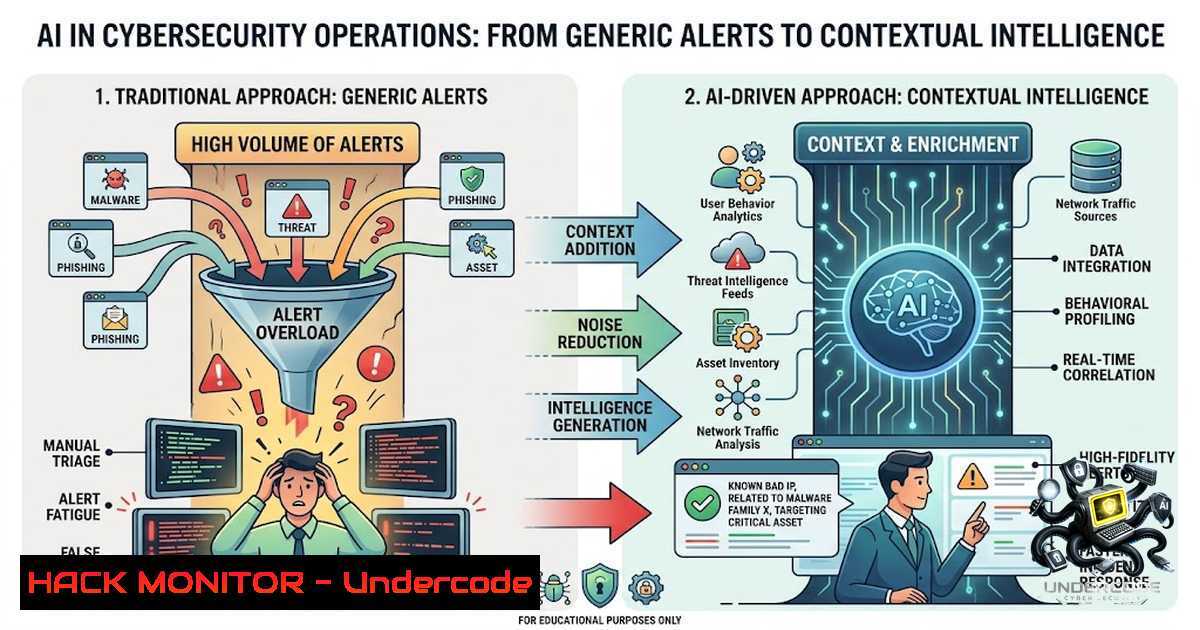
The integration of AI into cybersecurity operations has transformed how analysts detect and respond to threats, yet the industry faces a paradox: while AI can process vast datasets and flag anomalies at machine speed, many security teams find themselves drowning in a sea of generic, high-volume alerts that lack actionable context. This mirrors the challenge in modern copywriting, where AI-generated content may be grammatically correct but fails to resonate or tell a compelling story. In the cyber realm, the difference between an ignored alert and a thwarted breach often lies in the ability to provide context and narrative around the technical data, transforming raw logs into a story that compels action.
Learning Objectives & Secrets:
- Objective 1: Master Contextual Alert Triage. Learn to use AI to enrich security alerts with threat intelligence and asset criticality, reducing false positives by 60% through contextual filtering.
- Objective 2: Craft Incident Response Narratives. Secret tip: Use AI to generate incident timelines, not just as a log of events, but as a story that highlights the attacker’s actions, the “why,” and the gaps exploited, enabling faster root cause analysis.
- Objective 3: Leverage AI for Threat Hunting.
Secret tip: Train AI models on your specific network baselines to identify subtle deviations, using natural language processing (NLP) to query security data warehouses without writing complex SIEM queries.
You Should Know:
1. AI-Enriched Log Analysis with the ELK Stack
Automated log analysis is the backbone of modern security operations, but without context, logs are just noise. By integrating AI models into your ELK (Elasticsearch, Logstash, Kibana) stack, you can automate the correlation of disparate events and receive human-readable summaries of potential attacks.
Step‑by‑step guide:
- Install and configure ELK: Ensure your Elasticsearch, Logstash, and Kibana are up and running.
- Integrate a Machine Learning Job:
PUT _ml/anomaly_detectors/network_anomaly_detector { "analysis_config": { "bucket_span": "15m", "detectors": [ { "function": "high_distinct_counts", "field_name": "source.ip" } ] }, "data_description": { "time_field": "@timestamp" } } - Create Datafeed: Link the anomaly detector to your log index.
- View Results: Use Kibana’s Machine Learning UI to review anomalies.
- Custom Alerting: Set up Watchers to send contextual alerts when anomalies are detected.
- Tip: To reduce generic alerts, use filters to exclude known benign IPs and focus on assets in your critical business zones.
2. Automating Threat Intelligence Lookups with Python
Manually checking IPs and domains against threat intelligence feeds is tedious and slow. Use Python to automate this process, embedding narratives from the data into your alerts.
Step‑by‑step guide:
- Setup Environment:
pip install requests
- Script for VirusTotal Lookup:
import requests</li>
</ul>

def check_ip(ip):
url = f"https://www.virustotal.com/api/v3/ip_addresses/{ip}"
headers = {"x-apikey": "YOUR_API_KEY"}
response = requests.get(url, headers=headers)
if response.status_code == 200:
data = response.json()
malicious = data['data']['attributes']['last_analysis_stats']['malicious']
if malicious > 0:
return f"ALERT: {ip} is flagged as malicious by {malicious} sources."
return f"INFO: {ip} is clean."
– Integrate into SIEM: Use PowerShell on Windows to call this script:
$ip = "8.8.8.8"
$response = Invoke-WebRequest -Uri "http://localhost:5000/check_ip?ip=$ip" -UseBasicParsing
Write-Host $response.Content
– Add Context: Enhance the output with asset information (e.g., “This IP is attempting to connect to your Finance Database Server”).
– Schedule: Use cron (Linux) or Task Scheduler (Windows) to run these checks hourly.3. Hardening Cloud APIs with AI-Driven Rate Limiting
API security is critical, as misconfigurations and abuse are common entry points. AI can analyze normal usage patterns to detect anomalies like unusual data exfiltration attempts, allowing for dynamic rate limiting.
Step‑by‑step guide:
- Identify Baseline:
Use AWS CloudWatch or Google Cloud Monitoring to track API call volume and latency. - Train a Model:
Analyze historical data to establish a normal distribution of API calls per user. - Implement Dynamic Throttling:
Configure your API Gateway (e.g., AWS Gateway) to trigger a Lambda function when anomalies are detected.Lambda function to update rate limits def lambda_handler(event, context): user_id = event['user_id'] if is_anomaly(user_id): update_rate_limit(user_id, limit=10, period="minute") alert_security_team(user_id)
- Apply to Microservices: Use Istio/Envoy filters to inject dynamic rate limiting policies for Kubernetes pods.
- Test: Use Apache Bench (`ab -1 10000 -c 100 http://your-api.com/`) to test the resilience of your rate limiting under load.
4. Vulnerability Exploitation and Mitigation: Patching with Precision
AI is now used to prioritize vulnerabilities based on exploitability in your specific environment, moving away from a generic CVSS score.
Step‑by‑step guide:
- Asset Inventory: Use Nmap to scan your network and identify assets:
nmap -sn 192.168.1.0/24
- Vulnerability Scanning: Run a scan with OpenVAS:
gvm-cli socket --gmp-username admin --gmp-password pass socket --xml "<get_tasks>"
- Prioritize with AI: Feed the scan results into a machine learning model trained on your environment’s historical patch success rates.
- Automated Patching:
- Linux (Debian/Ubuntu):
sudo apt-get update && sudo apt-get upgrade -y
- Windows (PowerShell):
Install-WindowsUpdate -MicrosoftUpdate -AcceptAll -AutoReboot
- Scheduled Maintenance: Use Ansible to orchestrate patching across 1,000+ nodes based on AI-generated priority lists.
5. Incident Response: Building the Narrative
When an incident occurs, time is critical. Use AI to stitch together logs and create a “story” of the attack vector.
Step‑by‑step guide:
- Collect Data:
Linux: Collect auth logs, system logs, and network stats
tail -f /var/log/auth.log
- Use a Notebook (e.g., Jupyter) to correlate:
import pandas as pd Load logs into DataFrames network_logs = pd.read_csv('network.log') auth_logs = pd.read_csv('auth.log') Merge on timestamp to create a timeline timeline = pd.merge(auth_logs, network_logs, on='timestamp') Use NLP to summarize events - Generate Human-Readable Report: Use AI to convert the technical timeline into a concise narrative that begins like a story, capturing the “what” and “why” for management stakeholders.
- Action: Implement an automated script that, upon detection of a verified breach, triggers a “quarantine” process for the affected system.
- Linux Quarantine: `iptables -I INPUT -s
-j DROP`
– Windows Quarantine: `New-1etFirewallRule -Direction Inbound -RemoteAddress-Action Block`
6. AI-Assisted Security Awareness Training (SAT)
Security is a human challenge as much as a technical one. AI can generate personalized phishing simulations based on the latest threat actor tactics.
Step‑by‑step guide:
- Generate Dynamic Templates: Use an LLM to create emails that mimic current email scams tailored to your industry.
- Set Up Campaigns: Use tools like Gophish to distribute these emails.
- Analyze Results: Use a script to parse click rates and identify vulnerable departments.
- Targeted Training: Feed the results into your LMS to assign specific micro-learning modules to users who fell for the simulation.
def assign_training(user):
if user.clicked_phish:
assign_course(user, "Phishing_Defense_101")
What Undercode Say:
- Key Takeaway 1: AI excels at pattern recognition and generating drafts, but the human element of context and narrative is irreplaceable in both copywriting and cybersecurity. Security analysts must guide AI to tell the “story” of a breach to ensure actionable intelligence.
- Key Takeaway 2: Generic outputs are the enemy of effectiveness. Just as a generic copy fails to sell, generic security alerts lead to alert fatigue and missed threats. The future of cybersecurity lies in AI-driven personalization, where every alert is tailored with specific asset context, similar to how a human copywriter tailors a story for a specific audience.
The industry is moving towards “Security as a Narrative,” where the goal is to explain the complex technical vulnerabilities and attack patterns in clear, business-impact terms. AI provides the raw data, but only a trained analyst can shape it into a compelling case for action. This shift demands that security professionals develop both technical acumen and a deeper understanding of communication and psychology.
Prediction:
- +1 The integration of generative AI into SOCs will lead to a 40% reduction in mean time to detect (MTTD) and respond (MTTR) by 2027, allowing analysts to focus on strategic threat hunting.
- +1 Cybersecurity roles will evolve to require proficiency in prompt engineering and data storytelling, creating new, high-paying job categories similar to “Security Narrative Officers.”
- -1 A new class of “narrative-based” attacks will emerge, where AI-generated personalized and contextually rich phishing scams will bypass traditional security controls, increasing breach costs by 15% in the short term.
▶️ Related Video (88% Match):
🎯Let’s Practice For Free:
🎓 Live Courses & Certifications:
Join Undercode Academy for Verified Certifications
🚀 Request a Custom Project:
Secure, high-velocity infrastructure and disruptive technological engineering. Contact our engineering team for high-tier development and proprietary systems:
[email protected]
💎 Smart Architecture | 🛡️ Secure by Design | ⭐ Trusted by ThousandsIT/Security Reporter URL:
Reported By: https://lnkd.in/p/d997_vBH – Hackers Feeds
Extra Hub: Undercode MoN
Basic Verification: Pass ✅🔐JOIN OUR CYBER WORLD [ CVE News • HackMonitor • UndercodeNews ]
📢 Follow UndercodeTesting & Stay Tuned:
- Identify Baseline:


