Listen to this Post
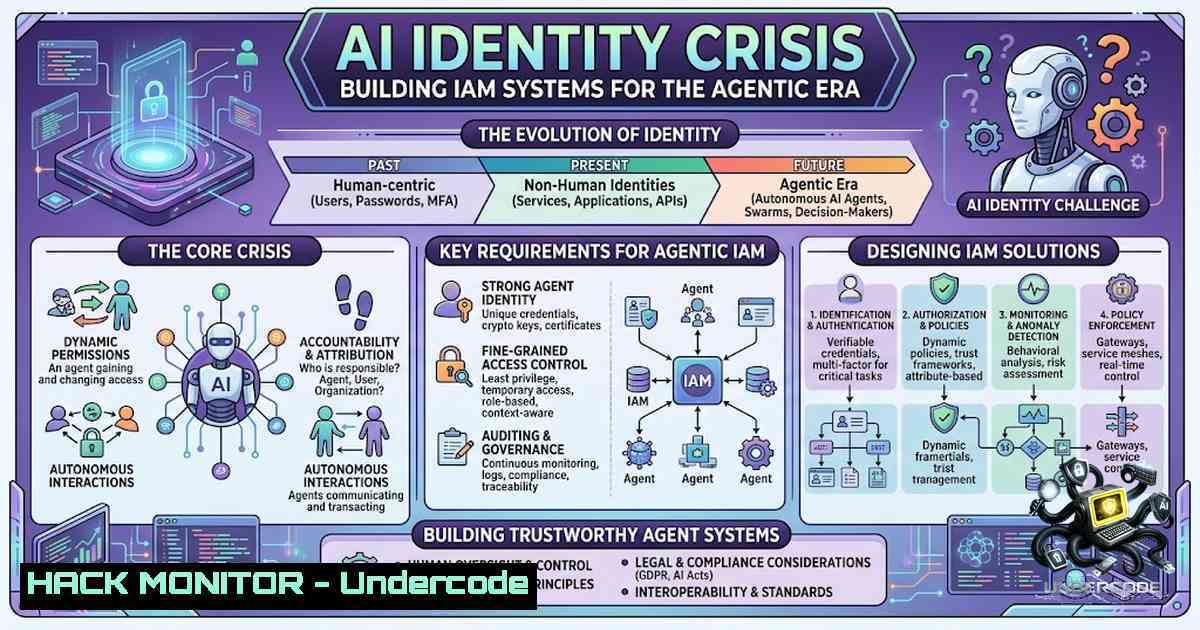
Introduction:
The rapid acceleration of AI adoption has fundamentally altered the identity and access management landscape, creating an urgent imperative: organizations must move beyond using AI for IAM and instead build IAM systems that are inherently AI-ready. As AI agents begin to outnumber human identities by as much as 100 to 1, the traditional identity fabric—built for human users and static machine credentials—is proving dangerously inadequate. This article explores the pressing threats at the intersection of AI cybersecurity and identity management, providing technical practitioners with actionable strategies to secure non-human identities (NHIs) and AI agents before attackers exploit the gap.
Learning Objectives:
- Understand the fundamental shift from human-centric IAM to AI-ready identity architectures that treat AI as a distinct identity class
- Master practical techniques for discovering, inventorying, and governing non-human identities and AI agents across multi-cloud environments
- Implement least-privilege, just-in-time access controls with short-lived credentials and dynamic authorization for agentic workloads
You Should Know:
- The NHI Inventory Imperative: Discovering Your Agentic Attack Surface
Before you can secure AI agents and non-human identities, you must first know what exists in your environment. Experts recommend building a unified inventory of all AI and non-human identities. This means identifying every agent, where it runs, who deployed it, and what it can access. AI agents can no longer be classified simply as “bot” or “machine” identities—each must have a unique, verifiable identity tied to its origin to provide traceability.
Linux Command – Discovering Service Accounts and Cron Jobs:
 List all system accounts (UID < 1000 typically indicate service accounts)
cat /etc/passwd | awk -F: '$3 < 1000 {print $1, $3, $7}'

Find all cron jobs that run with non-human identities
for user in $(cut -f1 -d: /etc/passwd); do crontab -u $user -l 2>/dev/null; done

Audit systemd services running under non-interactive users
systemctl list-units --type=service --all | grep -E "@|service"
Windows Command – Discovering Service Accounts and Scheduled Tasks:
 List all service accounts (accounts with empty passwords or specific flags)
Get-WmiObject Win32_UserAccount -Filter "LocalAccount=True" |
Where-Object { $<em>.SID -like "S-1-5-21--500" -or $</em>.SID -like "S-1-5-21--502" }

Enumerate all scheduled tasks and their associated principals
Get-ScheduledTask | ForEach-Object {
$task = $_;
$principal = $task.Principal;
[bash]@{TaskName=$task.TaskName; UserId=$principal.UserId}
} | Format-Table -AutoSize

Audit Windows services running under service accounts
Get-Service | Where-Object { $<em>.StartName -1e "LocalSystem" -and $</em>.StartName -1e "NT AUTHORITY\NetworkService" }
Step-by-Step Guide:
- Run the Linux commands above to enumerate all local user accounts with UIDs below 1000, then cross-reference these against your known service accounts.
- Use `auditd` or `syslog` to monitor authentication attempts from these service accounts and establish a baseline of normal behavior.
- For cloud environments, use cloud provider APIs (AWS CLI, Azure CLI, GCloud) to list all IAM roles, service principals, and workload identities—these represent your non-human identity inventory.
- Register each discovered agent or NHI in your identity directory, tie each one to an accountable human owner, and define permitted actions.
2. Workload Federation and Short-Lived Credentials
Hard-coded, long-lived credentials are the Achilles’ heel of AI identity security. Instead of static secrets, organizations should use a workload identity provider to mint short-lived credentials on demand, derived from the workload’s own platform-1ative identity. AI agents should use short-lived, task-specific tokens that are automatically issued and revoked. This approach eliminates the risk of credential theft and lateral movement.
AWS CLI – Configuring IAM Roles for EC2 with IMDSv2 (Instance Metadata Service v2):
 Enable IMDSv2 (requires token for metadata access)
aws ec2 modify-instance-metadata-options \
--instance-id i-xxxxxxxxxxxxxxxxx \
--http-tokens required \
--http-put-response-hop-limit 2

Retrieve temporary credentials from IMDSv2 (session token required)
TOKEN=$(curl -X PUT "http://169.254.169.254/latest/api/token" -H "X-aws-ec2-metadata-token-ttl-seconds: 21600")
curl -H "X-aws-ec2-metadata-token: $TOKEN" http://169.254.169.254/latest/meta-data/iam/security-credentials/

Assume a role to get temporary credentials for a specific workload
aws sts assume-role --role-arn "arn:aws:iam::123456789012:role/ai-agent-role" \
--role-session-1ame "ai-agent-session" \
--duration-seconds 3600
Azure CLI – Managed Identities and Federated Credentials:
 Enable system-assigned managed identity for a VM
az vm identity assign --1ame myVM --resource-group myResourceGroup

Get access token using the VM's managed identity (from within the VM)
curl 'http://169.254.169.254/metadata/identity/oauth2/token?api-version=2018-02-01&resource=https://management.azure.com/' -H Metadata:true

Create a federated identity credential for workload identity federation
az identity federated-credential create \
--1ame myFederatedCredential \
--identity-1ame myIdentity \
--resource-group myResourceGroup \
--issuer https://token.actions.githubusercontent.com \
--subject repo:myorg/myrepo:environment:prod
Step-by-Step Guide:
- Replace all hard-coded API keys and static passwords with workload identity federation. Every AI agent must authenticate using its platform-1ative identity (EC2 instance profile, Azure Managed Identity, GCP service account).
- Enforce a maximum credential lifetime of 1 hour for all agentic workloads—never issue credentials valid for more than a single task execution.
- Implement automated credential rotation and revocation as part of your CI/CD pipeline.
3. Fine-Grained Authorization: Moving Beyond Binary Access
Traditional IAM systems enforce binary access decisions (allow/deny) based on static role assignments. AI-ready IAM requires relationship-based access control (ReBAC) or attribute-based access control (ABAC) models to enforce precise, context-aware permissions. Access decisions must be dynamic, based on real-time context including the agent’s identity, the sensitivity of the resource, the time of access, and the specific task being performed.
Open Policy Agent (OPA) – Rego Policy for AI Agent Authorization:
package authz

Import input data
import input

Default deny
default allow = false

Allow if the agent has the right scope and the resource is appropriate
allow {
input.agent.role == "data-processor"
input.resource.type == "analytics-dataset"
input.resource.sensitivity_level <= 2
input.request.time >= input.agent.authorized_hours.start
input.request.time <= input.agent.authorized_hours.end
input.request.intent == "read-only"
}

Deny if the agent is attempting an action outside its defined scope
deny_reason = "Action not authorized for this agent's scope" {
not input.agent.allowed_actions[bash] == input.action
}

Deny if the agent lacks human owner approval for the specific task
deny_reason = "Human approval required for this operation" {
input.action == "write"
not input.human_approval.present
}
Step-by-Step Guide:
- Deploy Open Policy Agent or a similar policy-as-code engine as a sidecar or centralized authorization service.
- Define policy bundles that explicitly enumerate what each AI agent classification can and cannot do—start with restrictive “deny by default” policies.
- Feed AI identity signals—new agents, changing scopes, unusual access patterns—into your SIEM and detection programs, not just your governance dashboards.
-
API Security and MCP (Model Context Protocol) Hardening
As AI agents increasingly communicate via APIs and MCP servers, securing these interfaces becomes paramount. Descope’s Agentic Identity Hub, for example, provides scope-based access control, monitoring, and identity management across the AI agent lifecycle. Every API call from an AI agent should carry a verifiable identity token that includes the agent’s intent and authorized scope.
API Security – JWT Validation and Scope Enforcement (Node.js/Express):
const jwt = require('jsonwebtoken');
const express = require('express');
const app = express();

// Middleware to validate JWT and enforce scope
function validateAgentToken(req, res, next) {
const token = req.headers.authorization?.split(' ')[bash];
if (!token) return res.status(401).json({ error: 'No token provided' });

try {
const decoded = jwt.verify(token, process.env.JWT_SECRET, {
algorithms: ['RS256'],
issuer: 'https://identity.example.com',
audience: 'https://api.example.com'
});

// Enforce scope-based access
const requiredScope = req.route?.scope;
if (requiredScope && !decoded.scopes?.includes(requiredScope)) {
return res.status(403).json({
error: 'Insufficient scope',
required: requiredScope,
provided: decoded.scopes
});
}

// Attach agent identity to request
req.agent = decoded;
next();
} catch (err) {
return res.status(401).json({ error: 'Invalid token', details: err.message });
}
}

// Route with scope enforcement
app.get('/api/sensitive-data', validateAgentToken, (req, res) => {
// Only agents with 'data:read' scope can access
res.json({ data: 'sensitive information', accessed_by: req.agent.sub });
});
MCP Server Security – OAuth 2.0 Client Credentials Flow for AI Agents:
 Register an MCP client (AI agent) with OAuth 2.0
 Client ID and secret should be generated per agent, not shared
curl -X POST https://auth.example.com/register \
-H "Content-Type: application/json" \
-d '{"client_name": "data-analyzer-agent-001",
"grant_types": ["client_credentials"],
"scope": "data:read analytics:write"}'

Obtain an access token for the agent
curl -X POST https://auth.example.com/oauth/token \
-H "Content-Type: application/x-www-form-urlencoded" \
-d "grant_type=client_credentials&client_id=agent-001&client_secret=xxxx&scope=data:read"
Step-by-Step Guide:
- Every AI agent must register as an OAuth 2.0 client with a unique client ID and short-lived client secret.
- Enforce the OAuth 2.0 client credentials grant flow for machine-to-machine communication, never using resource owner password credentials.
- Implement token introspection at every API gateway to validate token status and revocation in real-time.
5. Cloud Hardening for Agentic Workloads
AI agents deployed in cloud environments require additional hardening. This includes enforcing delegated authority—AI agents must use explicit, delegated access policies rather than human credentials. Organizations should implement Identity Security Posture Management (ISPM) to continuously assess and remediate identity-related risks.
Terraform – Hardening IAM for AI Workloads on AWS:
 IAM role for AI agent with least privilege and condition-based access
resource "aws_iam_role" "ai_agent_role" {
name = "ai-data-processor-role"
assume_role_policy = jsonencode({
Version = "2012-10-17"
Statement = [
{
Action = "sts:AssumeRole"
Effect = "Allow"
Principal = {
Service = "ec2.amazonaws.com"
}
Condition = {
StringEquals = {
"aws:SourceInstanceType": ["c5.large", "m5.large"]  Only specific instance types
},
IpAddress = {
"aws:SourceIp": ["10.0.0.0/8"]  Only from internal CIDR
}
}
}
]
})
}

Policy with explicit resource restrictions and condition keys
resource "aws_iam_policy" "ai_agent_policy" {
name = "ai-agent-limited-policy"
policy = jsonencode({
Version = "2012-10-17"
Statement = [
{
Effect = "Allow"
Action = [
"s3:GetObject",
"s3:ListBucket"
]
Resource = [
"arn:aws:s3:::ai-training-data/",
"arn:aws:s3:::ai-training-data"
]
Condition = {
StringEquals = {
"s3:prefix": ["dataset-v2/", "models/"]  Only specific prefixes
},
Bool = {
"aws:MultiFactorAuthPresent": "false"  No MFA required for machine identities
}
}
},
{
Effect = "Deny"
Action = [
"s3:DeleteObject",
"s3:PutObject"
]
Resource = "arn:aws:s3:::ai-training-data/"
}
]
})
}
Google Cloud – Workload Identity Federation Configuration:
 Create a workload identity pool for external AI workloads
gcloud iam workload-identity-pools create ai-agent-pool \
--location="global" \
--description="Pool for AI agents"

Create a provider for GitHub Actions or other external identity providers
gcloud iam workload-identity-pools providers create-oidc github-provider \
--location="global" \
--workload-identity-pool="ai-agent-pool" \
--issuer-uri="https://token.actions.githubusercontent.com" \
--attribute-mapping="google.subject=assertion.sub"

Grant the workload identity pool access to specific GCP resources
gcloud projects add-iam-policy-binding my-project \
--member="principalSet://iam.googleapis.com/projects/1234567890/locations/global/workloadIdentityPools/ai-agent-pool/" \
--role="roles/storage.objectViewer"
Step-by-Step Guide:
- Use infrastructure-as-code (Terraform, CloudFormation) to define IAM roles for AI agents with explicit resource restrictions and condition keys.
- Enforce the principle of least privilege at every level—never grant wildcard permissions to any AI agent.
- Implement workload identity federation to eliminate the need for static service account keys in CI/CD pipelines.
-
Vulnerability Exploitation and Mitigation: The Over-Permissioned AI Threat
The most immediate tactical crisis in AI identity security is over-permissioned AI—agents granted excessive access that attackers can exploit. Attackers are already deploying AI-powered malware as autonomous agents, and speed is the game changer. Organizations must treat every AI agent as a potential insider threat and implement continuous behavioral monitoring.
Linux – Monitoring Agent Behavior with Auditd:
 Configure auditd to monitor all commands executed by AI agent service accounts
auditctl -w /usr/bin/ -p x -k ai-agent-commands
auditctl -w /bin/ -p x -k ai-agent-commands
auditctl -w /usr/local/bin/ -p x -k ai-agent-commands

Monitor all file access by AI agent processes
auditctl -a always,exit -S openat -S read -S write -F uid=1001 -k ai-file-access

Generate alert on anomalous outbound network connections
auditctl -a always,exit -S connect -F uid=1001 -k ai-1etwork-connect

Review audit logs for suspicious activity
ausearch -k ai-agent-commands --format text | tail -50
ausearch -k ai-file-access --format text | grep -E "DELETE|WRITE" | tail -30
Windows – Monitoring Agent Behavior with PowerShell and Event Logs:
 Enable process auditing for AI agent service accounts
auditpol /set /subcategory:"Process Creation" /success:enable /failure:enable

Monitor all process creations by specific service accounts
Get-WinEvent -FilterHashtable @{
LogName='Security'
ID=4688
Data='AI_AGENT_SERVICE_ACCOUNT'
} | Select-Object TimeCreated, @{N='Process';E={$<em>.Properties[bash].Value}}, @{N='CommandLine';E={$</em>.Properties[bash].Value}}

Monitor file access by AI agents
Get-WinEvent -FilterHashtable @{
LogName='Security'
ID=4663
Data='AI_AGENT_SERVICE_ACCOUNT'
} | Select-Object TimeCreated, @{N='Object';E={$<em>.Properties[bash].Value}}, @{N='Access';E={$</em>.Properties[bash].Value}}

Set up real-time alert for privileged access by AI accounts
Register-ObjectEvent -Query "SELECT  FROM System WHERE EventID=4672 AND Data='AI_AGENT_SERVICE_ACCOUNT'" -Action { Write-Warning "AI Agent escalated privileges!" }
Step-by-Step Guide:
- Establish behavioral baselines for each AI agent classification—normal data access patterns, typical API call frequencies, and expected network destinations.
- Implement real-time anomaly detection that triggers alerts when an agent deviates from its baseline (e.g., accessing sensitive data outside business hours, making API calls to unexpected endpoints).
- Practice rapid revocation—have a documented and operationally tested procedure to immediately revoke all credentials for a compromised AI agent.
What Undercode Say:
- Key Takeaway 1: The shift from human-centric to AI-ready IAM is not optional—it’s existential. Organizations that treat AI agents as just another “bot” identity will inevitably suffer breaches. Every AI agent must have a verifiable, unique identity, a human owner, and explicitly defined, least-privilege permissions.
-
Key Takeaway 2: Speed and automation are both the solution and the problem. While AI accelerates identity attacks, it also enables real-time, context-aware access decisions that static IAM cannot achieve. The organizations that succeed will be those that embed continuous adaptive trust (CAT) into their identity fabric, shifting from binary authentication to continuous, signal-based risk evaluation.
The convergence of AI and identity management represents the most significant security paradigm shift since the adoption of Zero Trust. As Rohit Ganguly from Descope articulated, the critical question is no longer just about using AI for IAM but building IAM systems that are AI-ready. Practitioners must move beyond traditional IAM thinking and embrace agentic identity as a distinct discipline—one that requires new tooling, new policies, and a fundamentally different approach to trust. The future belongs to those who can secure the agentic frontier without slowing innovation.
Prediction:
- -1 Agentic identities will outnumber human identities by 100 to 1 within 18 months, creating an unprecedented identity management crisis that will overwhelm traditional IAM teams—organizations without automated NHI governance will face massive security incidents.
-
-1 AI-powered malware deployed as autonomous agents will become the primary attack vector for enterprise breaches by early 2027, with attackers leveraging speed and scale that human defenders cannot match.
-
+1 The emergence of AI-1ative IAM platforms, purpose-built for agentic workloads, will create a new $10B+ cybersecurity market category—early adopters will gain significant competitive advantage in both security posture and operational efficiency.
-
+1 Workload identity federation and zero-standing-privileges architectures will become mandatory compliance requirements for regulated industries by 2028, forcing widespread adoption of short-lived credential patterns.
-
-1 Organizations that fail to implement AI identity governance will suffer data breaches costing an average of $5M+ per incident as over-permissioned AI agents become the new insider threat.
▶️ Related Video (88% Match):
https://www.youtube.com/watch?v=15_pppse4fY
🎯Let’s Practice For Free:
🎓 Live Courses & Certifications:
Join Undercode Academy for Verified Certifications
🚀 Request a Custom Project:
Secure, high-velocity infrastructure and disruptive technological engineering. Contact our engineering team for high-tier development and proprietary systems:
[email protected]
💎 Smart Architecture | 🛡️ Secure by Design | ⭐ Trusted by Thousands
IT/Security Reporter URL:
Reported By: https://lnkd.in/p/e5hFbtHX – Hackers Feeds
Extra Hub: Undercode MoN
Basic Verification: Pass ✅


