Listen to this Post
Introduction:
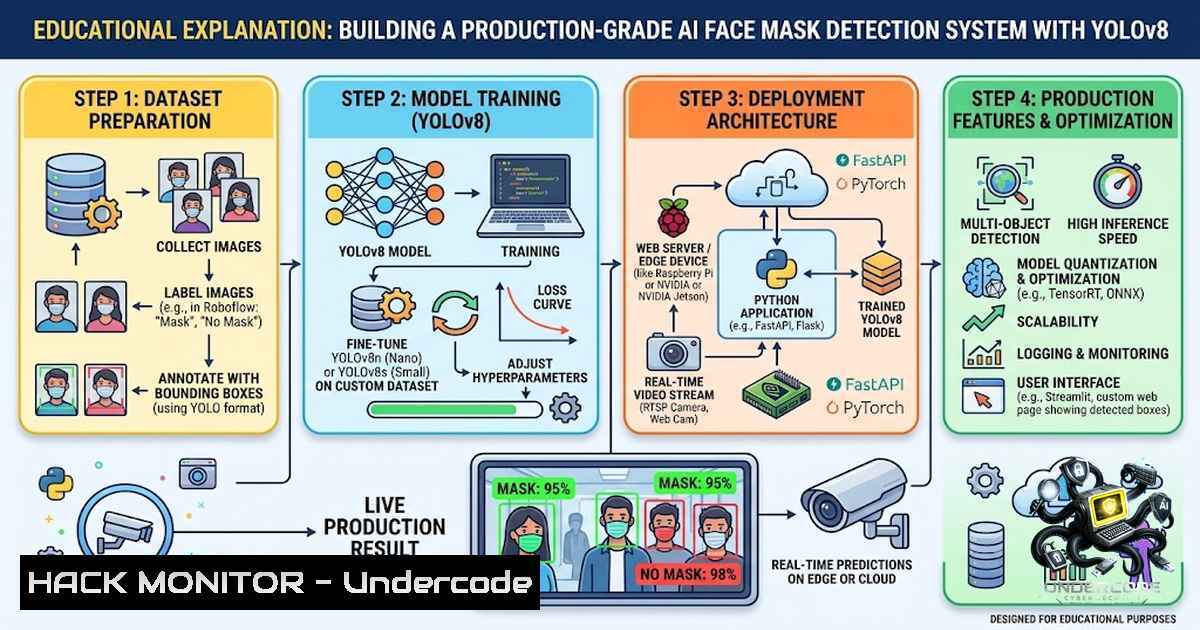
Real-time object detection has evolved from academic research to production-ready applications, but bridging the gap between a working prototype and a deployable system remains a challenge. This article walks through the architecture, implementation, and deployment of an AI-powered face mask detection system built with YOLOv8, OpenCV, and Streamlit — a portfolio-grade project that demonstrates clean modular design, performance optimization, and production hygiene. Whether you are a computer vision beginner or an experienced developer, this guide provides actionable insights into building real-time detection systems that actually work beyond the notebook.
Learning Objectives:
- Understand the end-to-end architecture of a real-time face mask detection system using YOLOv8 and OpenCV
- Learn how to implement threaded video capture, device auto-selection, and performance tuning for real-time inference
- Master production-ready practices including testing, CI/CD, Docker containerization, and graceful error handling
You Should Know:
1. System Architecture and Modular Design
The face mask detection system is built around a clean, modular Python architecture that separates concerns into distinct, testable components. Unlike a monolithic script, this design allows each piece — video capture, detection, alerts, and screenshot management — to be developed, tested, and maintained independently.
The core modules include:
– `video_stream.py` : Handles OpenCV webcam capture with threaded frame reading to decouple I/O latency from detection speed
– `detector.py` : Wraps the YOLOv8 model with automatic device selection (CUDA > Apple Silicon MPS > CPU) and FP16 half-precision on CUDA for ~2x throughput
– `model_downloader.py` : Automatically fetches pretrained mask-detection weights from Hugging Face Hub on first run — no manual setup required
– `alerts/` : Voice alert management with pyttsx3 (offline) and gTTS (online) with automatic fallback
– `screenshot.py` : Auto-saves annotated frames on no-mask detection with debounced cooldown
– `app.py` : Streamlit entrypoint with a custom design system, live dashboard, and real-time metrics
This modularity is not just for aesthetics — it enables unit testing with mocked hardware (camera and model), making the test suite runnable in CI environments without physical devices.
2. Installation and Environment Setup
Getting the system running locally requires a few straightforward steps. The project supports Python 3.10 or 3.11 and requires a webcam accessible to your operating system.
Step-by-step installation:
 1. Clone the repository and create a virtual environment
git clone https://github.com/alishahid1509022-cmd/mask-detector.git
cd mask-detector
python3.11 -m venv venv
source venv/bin/activate  On Windows: venv\Scripts\activate

<ol>
<li>Install dependencies
pip install --upgrade pip
pip install -r requirements.txt  For running only
or for development:
pip install -r requirements-dev.txt  Includes testing and linting tools</p></li>
<li><p>Configure environment variables (optional — sensible defaults provided)
cp .env.example .env
Edit .env if you need non-default settings (camera index, thresholds, etc.)</p></li>
<li><p>(Optional) Pre-fetch model weights manually
python models/download_model.py
The model weights are downloaded automatically on first run from the Hugging Face Hub repository (krishnamishra8848/Face_Mask_Detection). If you prefer a custom model, you can set `MODEL_URL` in `.env` to a direct `.pt` link or train your own using the Kaggle Face Mask Detection dataset:
yolo detect train data=mask_dataset.yaml model=yolov8n.pt epochs=50
3. Running the Application and Using the Interface
Launch the Streamlit app with a single command:
streamlit run src/mask_detector/app.py
 or use the convenience script:
./scripts/run_app.sh
Streamlit will print a local URL, typically `http://localhost:8501`.
Using the interface:
- Click ▶️ Start Camera in the main panel. The first click triggers the one-time model loading and, if needed, automatic weight download.
- The live feed appears with bounding boxes, labels, and confidence percentages drawn on every detected face.
- A color-coded status banner shows the current frame’s result: ✅ SAFE (mask detected), ALERT (no mask), or No face detected.
- Use the sidebar to tune camera index, confidence threshold, voice engine/cooldown, and screenshot cooldown — changes apply live without restarting the camera.
- Click ⏹️ Stop Camera to end the session; the dashboard keeps showing final statistics.
Live dashboard metrics updated every frame include: total detections, mask detections, no-mask detections, average confidence, current FPS, and session duration.
4. Voice Alerts and Cross-Platform Audio
When a face is detected without a mask, the system speaks “Please wear your face mask.” This is debounced by a cooldown timer (default 5 seconds) so it fires once per cooldown window instead of every single frame.
Two TTS engines are supported behind one interface:
– `pyttsx3` (default) — fully offline, uses your OS’s native speech engine:
– Windows: SAPI5, built-in, works out of the box
– macOS: NSSpeechSynthesizer, built-in, works out of the box
– Linux: requires espeak/espeak-1g — install with `sudo apt install espeak` (Debian/Ubuntu)
– `gtts` — Google’s online TTS, needs internet access. Install `playsound` separately for local playback: `pip install playsound==1.3.0` on Python ≤3.11
If the configured engine fails to initialize — most commonly `pyttsx3` on a Linux box without `espeak` — the app automatically falls back to the other engine rather than failing. Voice alerts are only fully disabled (falling back to the on-screen alert banner) if both engines fail.
5. Automatic Screenshot Evidence and Debouncing
Every time a no-mask detection occurs, the app saves the annotated frame (boxes and labels included) to the `Screenshots/` folder at the project root, creating it automatically if it doesn’t exist.
Filenames are timestamped, e.g., no_mask_2026-07-17_18-53-02.jpg, so files sort chronologically and never collide. Like voice alerts, this is debounced by a cooldown (SCREENSHOT_COOLDOWN_SECONDS, default 5 seconds, adjustable from the sidebar) so a sustained no-mask streak saves at most one screenshot per cooldown window.
Each successful save shows a toast notification (“Screenshot saved: …”) in the UI, and the running total is shown in the “Screenshots” stat card. A failed save (e.g., permissions) shows a one-time friendly warning toast instead of failing silently or repeating every frame.
6. Performance Optimization and Hardware Acceleration
The system is designed for real-time performance on consumer hardware. Key optimizations include:
- Auto device selection: `MaskDetector` auto-selects the fastest available device at load time — CUDA GPU, then Apple Silicon (MPS), then CPU — and uses FP16 half-precision on CUDA for roughly 2x throughput. Override with `DEVICE=cpu|cuda|mps` in `.env` if needed.
-
Threaded capture: Camera frames are read on a dedicated background thread, decoupling camera I/O latency from detection speed.
-
Frame rate limiting: The detection loop is rate-limited to `TARGET_FPS` (default 30) to avoid burning CPU beyond what’s useful.
-
Inference sizing: `INFERENCE_IMG_SIZE` (default 640) controls the resolution YOLOv8 resizes frames to internally — lower values trade accuracy for speed on slower hardware.
-
Warm-up inference: The model runs one warm-up inference at load time so the first live frame isn’t the slow one.
7. Testing, CI, and Code Quality
The project enforces production-grade code quality through a comprehensive toolchain:
- Testing: `pytest` with `pytest-mock` for unit tests — hardware (camera/model) is mocked out so tests run in CI without physical devices
- Linting: `ruff` for fast linting
- Formatting: `black` for consistent code style
- Import sorting: `isort` for organized imports
- Type checking: `mypy` for static type safety
- Pre-commit hooks: `pre-commit` runs all checks on every commit
All four checks (plus pytest) run automatically on every push/PR via GitHub Actions against Python 3.10 and 3.11.
8. Error Handling and Graceful Degradation
One of the most overlooked aspects of production systems is error handling. This project implements comprehensive error handling at every layer:
| Failure | Behavior |
||-|
| Camera unavailable at startup | `CameraNotAvailableError` → friendly Streamlit error with troubleshooting hints |
| Camera disconnected mid-session | Background reader detects no frames for CAMERA_DISCONNECT_TIMEOUT_SECONDS; raises `CameraNotAvailableError` instead of silently freezing |
| Model weights missing | Downloaded automatically; clear error with next steps only if every automatic option fails |
| Permission denied writing files | Caught explicitly and surfaced as a specific “permission denied” message |
| Screenshot save failure | Logged and skipped — never crashes the detection loop |
| Voice engine failure | Automatic cross-platform fallback (pyttsx3 ↔ gTTS); on-screen-only alerts if both fail |
| Per-frame processing error | Caught, frame skipped, loop continues |
| Unexpected error during detection | Camera released, session resets to idle, friendly message shown |
9. Deployment Options
The app can be deployed to multiple platforms — Docker, Streamlit Community Cloud, and Render — with full step-by-step instructions and configuration files included in the repository.
Quick start with Docker:
docker build -t mask-detector .
docker run --rm -p 8501:8501 --env-file .env mask-detector
 or:
docker compose up --build
Important caveat: This app captures video via cv2.VideoCapture, which opens a physical webcam on the machine the Streamlit process runs on. None of the cloud platforms have a physical camera attached to their servers, so the UI, dashboard, and sidebar deploy correctly, but clicking Start Camera shows a camera-unavailable message. For live detection, run it locally or via Docker on a native Linux host with `–device` passthrough. A true browser-based cloud deployment (streaming a visitor’s own webcam over WebRTC) is tracked as a future improvement.
10. Future Improvements and Roadmap
The project’s roadmap includes several natural next steps:
- Cloud/browser deployment: Stream video from the visitor’s own browser via `streamlit-webrtc` so a visitor’s webcam works on Streamlit Community Cloud/Render
- Multi-camera / multi-face tracking: Stable per-person IDs across frames via a lightweight tracker to reduce duplicate alerts/screenshots
- Mask-type classification: Distinguish surgical, N95, and cloth masks
- Exportable analytics: Download session stats as CSV or persist to a database
- Email/SMS/webhook alerts: Notify channels on sustained no-mask detections
- REST API mode: Expose the detector over FastAPI for integration into other systems
- Dark mode and internationalization: Additional UI polish
What Undercode Say:
- Modular architecture is non-1egotiable for production systems. The separation of video capture, detection, alerts, and screenshot management into independent modules with clear interfaces enables unit testing, maintainability, and graceful error handling. This is what separates a “notebook demo” from a “portfolio-quality project.”
-
Performance optimization requires understanding the full pipeline. Threaded capture, device auto-selection, FP16 inference, and frame rate limiting are not isolated tweaks — they work together to deliver real-time performance on consumer hardware. The warm-up inference trick alone prevents the first frame from being a slow outlier, significantly improving user experience.
-
Error handling is where most projects fall short. The comprehensive error handling strategy — from camera disconnection to permission errors to voice engine fallback — demonstrates that the system is designed for real-world use, not just ideal conditions. This level of attention to edge cases is what makes a project truly production-ready.
-
The cloud deployment caveat highlights a fundamental limitation of server-side video capture. The current approach works perfectly for local deployment but cannot stream a visitor’s webcam from a cloud server. This is not a flaw but a design constraint — and the planned WebRTC integration is the correct architectural solution for browser-based cloud deployment.
-
Training data quality matters more than model architecture. The system’s current limitation — occasionally classifying hands or books as masks — stems from the training dataset, not the YOLOv8 architecture. The planned expansion to include diverse face occlusions in the training data will directly address this accuracy gap.
Prediction:
-
+1 The democratization of computer vision through tools like YOLOv8, OpenCV, and Streamlit will continue to lower the barrier to entry, enabling more developers to build production-grade vision applications without deep expertise in model training or deployment infrastructure.
-
+1 The trend toward “production hygiene” — testing, CI, Docker, and error handling — in portfolio projects signals a maturation of the AI/ML engineering field, where employers increasingly value software engineering skills alongside model development.
-
+1 Real-time detection systems with voice alerts and automatic evidence capture will find applications beyond mask detection, including workplace safety monitoring, retail analytics, and accessibility tools for visually impaired users.
-
+1 The modular, extensible architecture of this project makes it a strong foundation for broader computer vision applications — with minimal changes, the same pipeline could detect hard hats, safety vests, or social distancing violations.
-
+1 The integration of offline TTS (pyttsx3) and online TTS (gTTS) with automatic fallback is a best practice for edge deployment, where internet connectivity cannot be guaranteed.
-
+1 The growing availability of pretrained models on Hugging Face Hub is accelerating development — the ability to download weights automatically on first run eliminates a major friction point for new users.
-
-1 Cloud deployment of webcam-based applications remains challenging due to the lack of physical cameras on server infrastructure. While WebRTC-based solutions exist, they add significant complexity to the stack.
-
-1 The current limitation in distinguishing between masks and other face coverings (hands, books) highlights a broader challenge in object detection: models are only as good as their training data, and real-world occlusions are diverse and difficult to capture comprehensively.
-
+1 The project’s emphasis on debouncing — both for voice alerts and screenshots — is a subtle but critical UX consideration that prevents notification spam and disk bloat. This attention to user experience will become increasingly important as AI systems move from prototypes to products.
-
+1 The inclusion of a live analytics dashboard with session metrics transforms the system from a simple detector into a monitoring tool, opening up use cases in compliance reporting, occupancy analysis, and behavioral studies.
▶️ Related Video (80% Match):
https://www.youtube.com/watch?v=8JeOWIjRZAw
🎯Let’s Practice For Free:
🎓 Live Courses & Certifications:
Join Undercode Academy for Verified Certifications
🚀 Request a Custom Project:
Secure, high-velocity infrastructure and disruptive technological engineering. Contact our engineering team for high-tier development and proprietary systems:
[email protected]
💎 Smart Architecture | 🛡️ Secure by Design | ⭐ Trusted by Thousands
IT/Security Reporter URL:
Reported By: Ali Shahid – Hackers Feeds
Extra Hub: Undercode MoN
Basic Verification: Pass ✅


