Listen to this Post
Introduction:
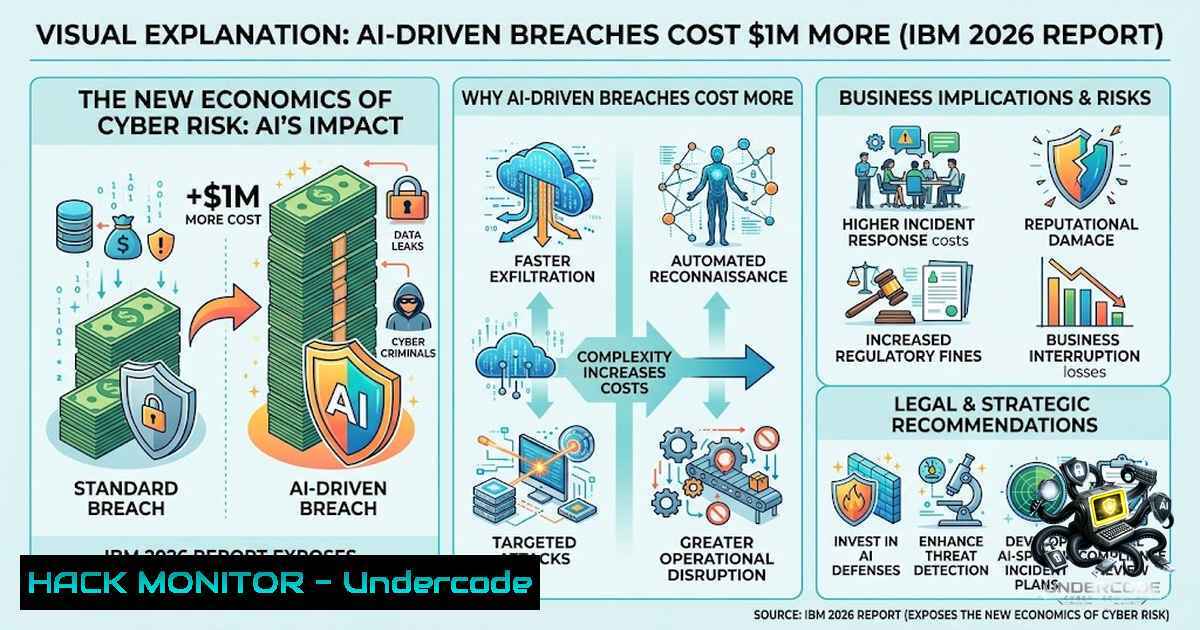
The 2026 IBM Cost of a Data Breach Report, conducted in partnership with the Ponemon Institute and based on 602 real-world breaches across 17 countries, marks a definitive tipping point in the cybersecurity landscape. For the first time, the data quantifies not just the rising cost of breaches but the fundamental economic shift driven by adversarial AI: attacks are becoming cheaper and faster to launch while breaches grow more expensive to contain. With the global average breach cost reaching a record $4.99 million—a 12% year-over-year increase—and AI-driven attacks adding approximately $1 million per incident, organizations can no longer treat AI security as a niche concern. This article dissects the report’s critical findings, translates them into actionable technical controls, and provides hands-on guidance for defenders racing to close the gap against machine-speed adversaries.
Learning Objectives:
- Understand the economic and technical implications of AI-driven attacks, including deepfake impersonation, AI-enabled malware, and model-specific threats like inversion and prompt injection.
- Master practical defense strategies, including AI access control implementation, Kubernetes workload isolation, and cryptographic visibility.
- Apply verified Linux, Windows, and cloud CLI commands to harden AI infrastructure, detect compromises, and automate incident response.
- Develop a forward-looking security posture that addresses frontier AI threats and post-quantum cryptographic risks.
- The Economics of AI-Driven Attacks: Why Speed Costs Millions
The report’s most striking revelation is the acceleration of the attack lifecycle. Frontier AI models—highly advanced systems capable of autonomous reconnaissance, exploit development, and adaptive malware generation—have compressed attack timelines from weeks to hours. This machine-speed capability directly translates to financial impact: AI-driven attacks surged 56% year-over-year and now account for one in four malicious breaches. The average cost of an AI-enabled breach stands at $6 million, compared to $4.99 million for the global average. Detection and escalation costs, combined with lost business from operational disruption, represent 63% of total breach expenses—a figure that underscores the premium on rapid detection and containment.
Critically, the report identifies deepfake impersonation as the most common AI attack vector, followed by AI-generated malware and AI-powered phishing campaigns. These attacks are not just more sophisticated; they are also more cost-effective for adversaries. Attackers can now launch campaigns for thousands of dollars while inflicting millions in damages. This asymmetric economics demands a defensive counterweight—and the data shows that organizations extensively using AI and automation in security operations saved an average of $1.93 million per breach and shortened breach lifecycles by 65 days.
Hands-On: Detecting AI-Driven Attack Indicators
To detect AI-generated phishing and deepfake attempts, security teams can deploy the following Python script to analyze email headers and content for anomalies indicative of AI generation:
import re
import numpy as np
from sklearn.feature_extraction.text import CountVectorizer

def analyze_email_headers(headers):
 Check for signs of AI-generated spoofing
spoof_indicators = []
if 'Received' in headers:
received_count = len(re.findall(r'Received:', headers))
if received_count < 3:
spoof_indicators.append('Low hop count - possible spoof')
if 'Reply-To' in headers and 'From' in headers:
if headers['Reply-To'] != headers['From']:
spoof_indicators.append('Reply-To mismatch - potential phishing')
return spoof_indicators

Windows PowerShell: Extract and analyze email headers
 Get-MessageTrackingLog -Server ExchangeServer -Start "2026-08-01" |
 Where-Object {$_.EventId -eq "RECEIVE"} |
 Select-Object -First 100 | Export-Csv -Path "email_headers.csv"
Linux Command: Monitor for unusual outbound traffic patterns indicative of AI malware beaconing:
sudo tcpdump -i eth0 -1n 'dst port 443' -c 1000 | awk '{print $3}' | sort | uniq -c | sort -1r | head -20
- The Access Control Failure: 92% of AI Breaches Lacked Proper Controls
Perhaps the report’s most damning statistic: among organizations that experienced an AI-related breach, 92% lacked adequate AI access controls. This is not a failure of AI model security per se—it is a failure of identity and access management (IAM) applied to non-human entities. The root causes read like a familiar litany: compromised APIs (27%), cloud misconfigurations affecting AI workloads (27%), and vulnerable applications or plug-ins.
The two costliest AI incident types—model inversion ($6.07 million per breach) and prompt injection ($5.89 million)—are fundamentally access problems in disguise. Model inversion succeeds when an attacker can query a model enough times to reconstruct sensitive training data from its outputs. Prompt injection causes damage in proportion to what the hijacked agent is permitted to access. Both require hardened access controls, not just better models.
Step-by-Step: Implementing AI Access Controls with OAuth 2.0 and JWT
The IETF’s Agent Authorization Profile (AAP) extends OAuth 2.0 and JWT for autonomous AI agents, providing structured claims for agent identity, task context, and delegation chains. Here’s how to implement it:
Step 1: Register each AI agent with a cryptographic identity
 Generate Ed25519 key pair for agent authentication
openssl genpkey -algorithm ed25519 -out agent_private.key
openssl pkey -in agent_private.key -pubout -out agent_public.key
Step 2: Configure OAuth 2.0 client credentials flow for the agent
{
"client_id": "ai-agent-001",
"client_authentication": "private_key_jwt",
"token_endpoint_auth_method": "private_key_jwt",
"grant_types": ["client_credentials"],
"scope": "model:read data:classify"
}
Step 3: Enforce fine-grained authorization (FGA) using attribute-based access control (ABAC)
 Example ABAC policy for AI agent
- action: "model:query"
resource: "production-model-v2"
condition: "agent.trust_level >= 3 AND request.context.contains('authorized_user')"
effect: "allow"
Step 4: Implement dynamic, short-lived tokens
 Generate JWT with short expiry (5 minutes)
 Linux: Using jwt CLI
jwt encode --secret $(cat agent_private.key) --alg EdDSA \
--exp $(date -d '+5 minutes' +%s) \
--payload '{"sub":"agent-001","scope":"read-only"}'
Windows PowerShell: Audit existing service accounts and assign unique identities to each AI agent:
Get-ADServiceAccount -Filter  | ForEach-Object {
if ($<em>.Name -match "AI|agent|bot") {
Write-Host "Found AI service account: $($</em>.Name)" -ForegroundColor Yellow
 Enforce managed service account with automatic password rotation
Set-ADServiceAccount -Identity $_.Name -ManagedPasswordIntervalInDays 30
}
}
- Securing AI Workloads in Kubernetes: A Zero-Trust Approach
With 27% of AI-related breaches originating from cloud misconfigurations, securing AI workloads in containerized environments is non-1egotiable. The report emphasizes that organizations must strengthen app, data, and machine-agent security while ensuring cloud workloads are configured and monitored.
Step-by-Step: Kubernetes AI Workload Isolation
Step 1: Enforce namespace isolation with restricted Pod Security Standards
 namespace.yaml
apiVersion: v1
kind: Namespace
metadata:
name: ai-workloads
labels:
pod-security.kubernetes.io/enforce: restricted
pod-security.kubernetes.io/audit: restricted
pod-security.kubernetes.io/warn: restricted
Step 2: Apply a default-deny NetworkPolicy
 default-deny.yaml
apiVersion: networking.k8s.io/v1
kind: NetworkPolicy
metadata:
name: default-deny-all
namespace: ai-workloads
spec:
podSelector: {}
policyTypes:
- Ingress
- Egress
 No rules = deny all traffic
Step 3: Explicitly allow only necessary egress for model inference
 allow-model-egress.yaml
apiVersion: networking.k8s.io/v1
kind: NetworkPolicy
metadata:
name: allow-model-inference
namespace: ai-workloads
spec:
podSelector:
matchLabels:
app: ai-inference
policyTypes:
- Egress
egress:
- to:
- namespaceSelector:
matchLabels:
kubernetes.io/metadata.name: model-registry
ports:
- protocol: TCP
port: 443
Step 4: Implement hardware-isolated sandboxes using Kata Containers
 Install Kata Containers runtime
sudo apt-get install kata-runtime

Configure containerd to use Kata for AI workloads
cat << EOF | sudo tee /etc/containerd/config.toml
[plugins."io.containerd.grpc.v1.cri".containerd.runtimes.kata]
runtime_type = "io.containerd.kata.v2"
privileged_without_host_devices = true
EOF

Restart containerd
sudo systemctl restart containerd

Deploy AI pod with Kata runtime
kubectl run ai-inference --image=my-ai-model:latest \
--overrides='{"spec":{"runtimeClassName":"kata"}}'
Linux Command: Audit Kubernetes RBAC for AI workloads:
 List all service accounts with excessive permissions
kubectl get clusterrolebindings -o json | jq '.items[] | select(.subjects[].kind=="ServiceAccount") | .metadata.name'

Check for privileged containers in AI namespaces
kubectl get pods -1 ai-workloads -o json | jq '.items[] | select(.spec.containers[].securityContext.privileged==true) | .metadata.name'
4. Cryptographic Gaps and Post-Quantum Readiness
The report exposes persistent weaknesses in encryption and cryptographic management: only 37% of breached organizations encrypt sensitive data both at rest and in transit, and just 34% have visibility into their cryptographic assets. As quantum computing advances, these gaps become existential risks. The report recommends transitioning to post-quantum encryption algorithms and modernizing security practices through discovery, analysis, and remediation.
Step-by-Step: Cryptographic Discovery and Hardening
Step 1: Discover cryptographic assets across the environment
 Linux: Find all TLS certificates and their expiry dates
find /etc/ssl /usr/local/etc/ssl -1ame ".crt" -o -1ame ".pem" 2>/dev/null | \
while read cert; do
echo "Certificate: $cert"
openssl x509 -in "$cert" -1oout -dates 2>/dev/null || echo " [bash]"
done

Discover SSH keys and their algorithms
find /home -1ame "id_" -o -1ame ".pem" 2>/dev/null | \
while read key; do
ssh-keygen -l -f "$key" 2>/dev/null || echo " [bash]"
done
Step 2: Audit for weak cryptographic algorithms
 Check for TLS 1.0/1.1 or weak ciphers
nmap --script ssl-enum-ciphers -p 443 <target-ip>

Linux: Audit OpenSSL configuration for weak ciphers
grep -r "DEFAULT@SECLEVEL" /etc/ssl/openssl.cnf || echo "SECLEVEL not set - default may be insecure"
Step 3: Implement quantum-safe key exchange (example using OpenSSL with Kyber)
 Generate post-quantum hybrid certificate (requires OpenSSL with OQS provider)
openssl req -x509 -1ew -1ewkey ec -pkeyopt ec_paramgen_curve:P-256 \
-pkeyopt oqs_alg:kyber768 -keyout hybrid_key.pem -out hybrid_cert.pem -days 365 -1odes

Configure Nginx to use hybrid certificate
 /etc/nginx/nginx.conf
ssl_certificate /etc/nginx/ssl/hybrid_cert.pem;
ssl_certificate_key /etc/nginx/ssl/hybrid_key.pem;
ssl_protocols TLSv1.3;
ssl_ecdh_curve X25519:kyber768:P-256;
Windows PowerShell: Audit BitLocker and file-level encryption:
 Check BitLocker status on all drives
Get-BitLockerVolume | Select-Object MountPoint, ProtectionStatus, EncryptionMethod

List all encrypted files in sensitive directories
Get-ChildItem -Path "C:\SensitiveData" -Recurse -File |
Where-Object { (Get-Item $_.FullName).Attributes -match "Encrypted" } |
Select-Object FullName
5. Ransomware and Reputation: The Weaponization of Trust
Ransomware incidents rose significantly in the report’s findings, with 39% of surveyed organizations experiencing ransomware and 41% of those facing threats of public disclosure, media exposure, or reputational harm. Attackers are now weaponizing reputation alongside data encryption, creating a dual extortion model that amplifies financial and brand damage.
Step-by-Step: Ransomware Detection and Rapid Response
Step 1: Deploy file integrity monitoring (FIM) for early detection
 Linux: Monitor critical directories for unauthorized changes using auditd
auditctl -w /etc -p wa -k etc_changes
auditctl -w /var/www -p wa -k web_changes
auditctl -w /home -p wa -k home_changes

View recent changes
ausearch -k etc_changes -ts recent
Step 2: Implement automated ransomware detection with eBPF
 Install and run tracee for suspicious process behavior
tracee --filter 'comm=bash' --filter 'comm=python' --filter 'comm=wget' \
--output json | grep -E "file_write|process_exec" | tee ransomware_alert.log
Step 3: Configure Windows Defender for ransomware protection (Windows)
 Enable Controlled Folder Access
Set-MpPreference -EnableControlledFolderAccess Enabled

Add protected folders
Add-MpPreference -ControlledFolderAccessProtectedFolders "C:\Users\Documents"
Add-MpPreference -ControlledFolderAccessProtectedFolders "C:\Users\Desktop"

Configure cloud-delivered protection
Set-MpPreference -CloudBlockLevel High
Set-MpPreference -CloudTimeout 50
Step 4: Establish immutable backup strategy
 Linux: Create immutable backups using borg with append-only mode
borg init --encryption=repokey-blake2 /backup/repo
borg config /backup/repo append_only 1

Schedule daily backup with retention
0 2    borg create --stats --compression lz4 /backup/repo::daily-{now} /data
6. The Defensive AI Imperative: Automating Vulnerability Management
The report highlights a critical defensive gap: while more than 50% of organizations use AI agents for threat detection and containment, only 18% apply agents to vulnerability management. This leaves known exposures lingering even as AI shortens exploit windows. Three-quarters of organizations report that frontier AI threats are prompting them to rethink how agents are deployed across security operations.
Step-by-Step: Deploying AI Agents for Vulnerability Management
Step 1: Integrate AI-powered vulnerability scanning into CI/CD
 GitHub Actions workflow for AI vulnerability scanning
name: AI Vulnerability Scan
on:
push:
paths:
- 'models/'
- 'requirements.txt'

jobs:
vulnerability-scan:
runs-on: ubuntu-latest
steps:
- uses: actions/checkout@v4
- name: Run AI model vulnerability scanner
run: |
pip install model-scan
model-scan scan --path ./models --output json --severity critical
- name: Upload scan results
uses: actions/upload-artifact@v4
with:
name: vulnerability-report
path: scan_results.json
Step 2: Automate patch management with AI-driven prioritization
 Linux: Use AI to prioritize CVEs based on exploit likelihood
 Install and configure vulnerability prioritization tool
vuln-prioritizer --feed nvd --model exploit-prediction --output priority_list.json

Automatically patch critical vulnerabilities
cat priority_list.json | jq -r '.[] | select(.priority=="critical") | .package' | \
xargs sudo apt-get install --only-upgrade -y
Step 3: Implement automated remediation playbooks
 Python: Automated remediation for common misconfigurations
import subprocess
import json

def remediate_cloud_misconfig(resource_id, misconfig_type):
if misconfig_type == "public_s3_bucket":
cmd = f"aws s3api put-bucket-acl --bucket {resource_id} --acl private"
elif misconfig_type == "open_security_group":
cmd = f"aws ec2 revoke-security-group-ingress --group-id {resource_id} --protocol tcp --port 22 --cidr 0.0.0.0/0"
elif misconfig_type == "unencrypted_rds":
cmd = f"aws rds modify-db-instance --db-instance-identifier {resource_id} --storage-encrypted --apply-immediately"
subprocess.run(cmd, shell=True, check=True)
print(f"Remediated {misconfig_type} on {resource_id}")
Windows PowerShell: Schedule automated vulnerability scans with Microsoft Defender:
 Schedule daily vulnerability scan
$Action = New-ScheduledTaskAction -Execute "MpCmdRun.exe" -Argument "-Scan -ScanType 3"
$Trigger = New-ScheduledTaskTrigger -Daily -At 2am
$Settings = New-ScheduledTaskSettingsSet -AllowStartIfOnBatteries -DontStopIfGoingOnBatteries
Register-ScheduledTask -TaskName "DailyVulnerabilityScan" -Action $Action -Trigger $Trigger -Settings $Settings
What Undercode Say:
- The asymmetry is the story: AI makes attacks cheaper and faster while breaches remain expensive to fix. Organizations that fail to deploy defensive AI are effectively subsidizing adversary innovation. The $1.93 million average savings from security AI is not a luxury—it is a cost of doing business in 2026.
- Access control is the new perimeter: The 92% statistic is a wake-up call. AI access controls are not about the model; they are about identity, APIs, and cloud configurations. Treat every AI agent as a non-human identity with least-privilege access, short-lived tokens, and continuous verification. The IETF’s Agent Authorization Profile provides a standardized path forward—implement it now.
Analysis: The IBM 2026 report fundamentally reframes cybersecurity economics. Organizations are caught in a pincer movement: adversaries leveraging frontier AI to accelerate attacks while defensive AI adoption remains uneven. The 56% surge in AI-driven attacks and the $1 million premium per incident represent a structural shift, not a transient trend. Critical infrastructure sectors—where 62% of AI-driven attacks are concentrated—face cascading risks that extend beyond individual organizations to supply chains and essential services. The report’s finding that 85% of organizations plan to increase security spending after learning about frontier AI threats, compared to 64% after experiencing a breach, suggests a proactive shift in risk perception. However, the persistent gap in vulnerability management—only 18% use AI agents for this purpose—indicates that defenders are still playing catch-up. The path forward requires integrating remediation into development workflows, securing identity at runtime, and fixing risks at the speed attackers are already moving.
Prediction:
- +1 Organizations that aggressively deploy AI agents across the full security lifecycle—from vulnerability management to incident response—will reduce breach costs by over 40% within 24 months, narrowing the gap between attack speed and defense speed.
- +1 The IETF’s Agent Authorization Profile and related OAuth 2.0 extensions will become the de facto standard for AI agent identity by 2028, driving a new wave of IAM solutions tailored for non-human entities.
- -1 Critical infrastructure sectors, particularly financial services and energy, will experience at least one systemic AI-driven breach causing cascading economic disruption before 2028, triggering regulatory mandates for AI security controls.
- -1 Organizations that delay post-quantum cryptographic migration face a 70% probability of successful harvest-1ow-decrypt-later attacks by 2030, with quantum-capable adversaries already collecting encrypted data today.
- +1 The convergence of AI security and traditional IAM will create a new CISO role—the Chief AI Security Officer—responsible for governing agentic identities, model access, and cryptographic posture by 2027.
🎯Let’s Practice For Free:
🎓 Live Courses & Certifications:
Join Undercode Academy for Verified Certifications
🚀 Request a Custom Project:
Secure, high-velocity infrastructure and disruptive technological engineering. Contact our engineering team for high-tier development and proprietary systems:
[email protected]
💎 Smart Architecture | 🛡️ Secure by Design | ⭐ Trusted by Thousands
IT/Security Reporter URL:
Reported By: Ibms 2026 – Hackers Feeds
Extra Hub: Undercode MoN
Basic Verification: Pass ✅


