Listen to this Post
Introduction:
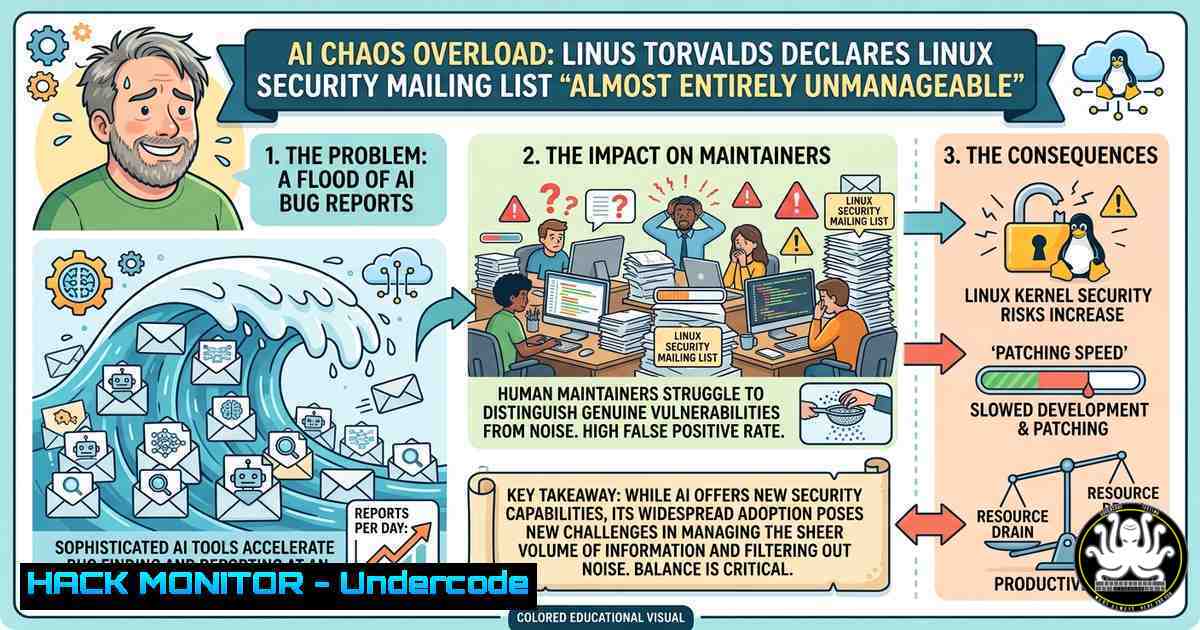
The very tools designed to harden system security are now paralyzing the open-source ecosystem. On Sunday, Linus Torvalds announced the release of Linux kernel 7.1-rc4 but quickly pivoted to a stark warning: the Linux kernel security mailing list has become “almost entirely unmanageable,” crippled by a “continued flood” of AI-generated bug reports. This incident reveals a critical new cyber risk where security teams are overwhelmed not by malicious actors, but by an avalanche of noise generated by well-intentioned researchers running identical AI tools.
Learning Objectives:
- Analyze the impact of AI-generated duplicate vulnerability reports on traditional security triage workflows.
- Apply Linux and Windows filtering techniques to manage high-volume, low-quality security alerts.
- Implement responsible disclosure practices and AI-assisted reporting policies for open-source and enterprise environments.
You Should Know:
- The “AI Slop” Breakdown: Why Automated Discovery Is Breaking Human Triage
The core issue stems from what maintainers are calling “AI slop”—automated, often duplicated reports generated by large language models (LLMs) analyzing source code. Two years ago, the kernel security list received roughly two to three reports per week. Today, maintainers report receiving five to ten AI-generated reports per day. The problem is not the accuracy of the findings but the massive duplication: dozens of researchers, running the same AI toolkits against the same codebases, independently generate identical tickets and submit them via private channels.
This creates a dangerous paradox: a process designed for secrecy actually amplifies the chaos. Because the mailing list is private, reporters cannot see if a bug has already been filed or fixed. “People spend all their time just forwarding things to the right people or saying ‘that was already fixed a week/month ago,’” Torvalds wrote, calling it “entirely pointless churn”.
Step‑by‑Step Guide to Duplicate Triage (Linux & Windows):
To combat this, security teams must automate the detection of duplicates before they reach human analysts. Here is a practical triage workflow using common command-line tools.
- Hash-Based Deduplication (Linux): Generate a unique fingerprint for the core description of a report (e.g., the affected function name and line range). This ignores timestamps and reporter IDs.
 Process a directory of incoming reports (.txt files)
 Extract the vulnerability type and location to create a hash key
for report in /var/log/incoming_reports/.txt; do
grep -E "Vulnerability Type:|Location:" "$report" | sort | md5sum >> report_hashes.txt
done

Sort and find duplicates by comparing hash values
sort report_hashes.txt | uniq -c | sort -nr | head -20
- PowerShell Fuzzy Matching (Windows): For Windows-based SOC teams, use PowerShell to compare new reports against a fixed-issues database to filter closed tickets.
 Load existing resolved issues database
$resolvedIssues = Get-Content "C:\Security\resolved_cves.txt"

Check incoming report text against resolved issues
Get-ChildItem "C:\Security\new_reports\" -Filter .txt | ForEach-Object {
$content = Get-Content $<em>.FullName -Raw
$isNew = $true
foreach ($issue in $resolvedIssues) {
if ($content -match [bash]::Escape($issue)) {
Write-Host "Duplicate found: $($</em>.Name) matches $issue"
Move-Item $<em>.FullName "C:\Security\duplicates\"
$isNew = $false
break
}
}
if ($isNew) { Write-Host "New issue: $($</em>.Name)" }
}
- Automated Header Tagging: Modify your mail transport agent (e.g., Postfix or Sendmail) to inject custom headers into incoming reports that contain specific AI tool signatures.
 Add to /etc/postfix/main.cf (Linux)
 Filter subject lines for generic AI phrasing
header_checks = regexp:/etc/postfix/ai_filter.regex

Content of /etc/postfix/ai_filter.regex
/^Subject:.potential vulnerability.AI|LLM/ PREPEND X-Flag: AI-Generated
/^X-Generator:.(Copilot|ChatGPT|CodeQL)/ PREPEND X-AI-Tool: Yes
- The New Linux Mandate: Public Disclosures and Mandatory Patches
In direct response to the crisis, the Linux Kernel project has merged new documentation that fundamentally changes how AI-discovered bugs are handled. The previous workflow of submitting findings to a private security list is now considered invalid for AI-assisted detections.
Step‑by‑Step Guide to Responsible AI Reporting (Linux Kernel Policy):
- Determine Disclosure Type: If the vulnerability was discovered using an AI/LLM tool, it is automatically classified as non-confidential. According to the new threat model, “AI detected bugs are pretty much by definition not secret”.
- Avoid the Private List: Do not send the report to
[email protected]. Sending AI findings there is now considered a waste of resources because reporters cannot see each other’s submissions, leading to duplicative churn. - Submit Publicly Directly to Maintainers: The report must be submitted openly on the public Linux Kernel Mailing List (LKML) or directly to the relevant subsystem maintainer. This ensures transparency and allows the community to instantly see if a fix is already in progress.
- Include a “Assisted-by” Tag: If AI generated any part of the code or analysis, you must use the new `Assisted-by:` tag in the submission. Note that AI agents themselves cannot sign off on code; the legal responsibility remains entirely with the human contributor.
- Provide a Verified Patch: Torvalds emphasized that raw findings are low-value. “If you actually want to add value… create a patch too,” he stated. Do not submit a drive-by report without a fix.
-
Fighting AI Noise with AI Triage: The Emerging Arms Race
Industry experts, such as Sven Fassbender, note that security teams are now facing a new equilibrium crisis. Organizations are being “overwhelmed by a vast amount of bug reports that need to be triaged by limited human resources,” forcing them to consider deploying AI to filter the noise generated by other AI systems. This raises a fundamental question: is this a sustainable equilibrium or just an arms race that degrades the quality of cybersecurity?
Step‑by‑Step Guide to Configuring SpamAssassin for AI Slop (Linux):
Linux kernel maintainers have begun using customized Procmail and SpamAssassin rules to identify and quarantine AI-generated patterns. Here is how to configure a basic filter.
- Install SpamAssassin: `sudo apt-get install spamassassin spamc` (Debian/Ubuntu).
- Create Custom Rules File: Edit `/etc/spamassassin/local.cf` and add rules targeting typical AI slop patterns.
 Target generic, high-level language lacking specifics
body AI_SLOP_1 /potential security vulnerability/i
body AI_SLOP_2 /could lead to a buffer overflow/i
body AI_SLOP_3 /it is recommended to/i
body AI_SLOP_4 /please review the attached patch/i

Score the rules aggressively
score AI_SLOP_1 3.5
score AI_SLOP_2 3.0
score AI_SLOP_3 2.5
score AI_SLOP_4 4.0

Mark messages with a score > 5 as spam
required_score 5.0
- Restart and Test:
sudo systemctl restart spamassassin. Then test a raw AI report:spamassassin -t < ai_generated_report.txt. -
The Threat Actor Opportunity: How Noise Becomes an Attack Vector
Security experts like Tyler Mitchell and Christopher Ijams warn that threat actors have almost certainly noticed this new vulnerability in the disclosure process. Attackers can now execute a “flood attack” against security teams. By submitting thousands of low-quality, AI-generated reports that require manual validation, an adversary can induce “alert fatigue.” While defenders are bogged down triaging fake reports, a real zero-day exploit can slip through undetected. This transforms informational overload from a logistical nuisance into a primary denial-of-service vector against security operations centers (SOCs).
- Windows SOC Mitigation: Implementing Rate-Limiting and Webhook Filtering
For Windows-based enterprise SOCs, integrating automated triage directly into the ticketing system is essential. Use PowerShell to interact with the API of your SIEM or ticketing platform.
 PowerShell script to rate-limit submissions from a single source
$submissionLog = @{}
$incomingReport = @{
SourceIP = "192.168.1.100"
ToolName = "AI-Scanner-v2"
}
$timeWindow = 300  5 minutes in seconds

if ($submissionLog.ContainsKey($incomingReport.SourceIP)) {
$lastSubmission = $submissionLog[$incomingReport.SourceIP]
if ((Get-Date) - $lastSubmission -lt (New-TimeSpan -Seconds $timeWindow)) {
Write-Warning "Rate limit exceeded for $($incomingReport.SourceIP). Rejecting report."
exit 1
}
}

$submissionLog[$incomingReport.SourceIP] = Get-Date
Write-Host "Report accepted. Processing..."
6. Hardening Cloud Workloads Against AI-Generated Alert Storms
In cloud environments, the “noise” generated by AI tools can trigger auto-scaling events or drive up costs if not properly governed. To prevent this, implement strict API security measures and input validation on all reporting endpoints.
Step‑by‑Step Guide to API Security Hardening:
- Implement Schema Validation: Do not accept raw text dumps. Require submitters to adhere to a strict JSON schema that forces them to provide a proof-of-concept (PoC) and a patch. Reject any submission that does not conform.
- Apply Web Application Firewall (WAF) Rules: Configure your WAF to block or rate-limit requests containing common AI hallucination phrases (e.g., “fixes a critical bug,” “as per the documentation”).
- Leverage Cloud-Native Triage: Use AWS Lambda or Azure Functions to automatically scan incoming report text against a vector database of known resolved issues. Automatically reject reports that achieve a similarity score above a defined threshold.
What Undercode Say:
- The Efficiency Paradox: AI has successfully democratized vulnerability discovery, but it has failed to democratize validation. The result is an inverted pyramid where a vast base of easily generated reports crushes the narrow bottleneck of expert human analysis.
- Process Over Technology: The Linux community’s response—changing the disclosure process rather than banning the tool—is the correct architectural move. They are not fighting AI; they are designing systems resilient to its negative externalities.
Expected Output:
Introduction:
The widespread availability of LLM-powered bug hunting tools has created a dangerous inversion in security workflows. While attackers once struggled to find vulnerabilities, defenders now struggle to find signal within the overwhelming noise of AI-generated reports.
What Undercode Say:
- Key Takeaway 1: The Law of Inverse Triage. In the AI era, the cost of generating a security finding approaches zero, but the cost of validating a finding remains high. This incentivizes spamming and degrades the entire security ecosystem.
- Key Takeaway 2: Trust but Verify is Dead. The Linux kernel is moving to a “Prove then Post” model. Reports without a functioning patch are now effectively considered noise.
Prediction:
Over the next 12 months, we will see the proliferation of “disclosure bombs” where malicious actors weaponize AI slop to cripple competitor bug bounty programs. This will force standardization of the vulnerability disclosure format (VDF) and the adoption of machine-learning-based triage layers that can distinguish between a hallucinated bug and a real exploit. The organizations that survive will be those that automate the rejection of low-quality data, not those that attempt to ingest it all.
▶️ Related Video (70% Match):
🎯Let’s Practice For Free:
IT/Security Reporter URL:
Reported By: Cybersecuritynews Linux – Hackers Feeds
Extra Hub: Undercode MoN
Basic Verification: Pass ✅


