Listen to this Post
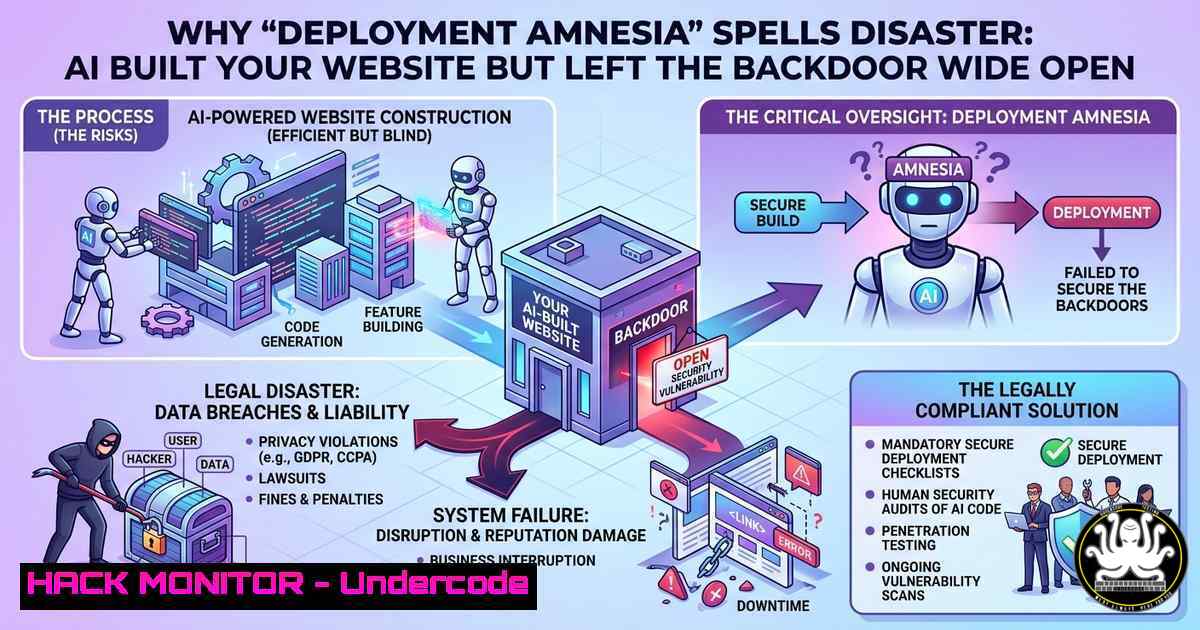
Introduction:
When artificial intelligence generates code for a website, it excels at creating sleek front-end designs and functional back-end logic—but it has no innate understanding of deployment security, environment configuration, or access controls. The result is a fully functional application that often forgets to disable debug mode, exposes environment variables, or leaves administrative endpoints unauthenticated, creating a treasure trove of vulnerabilities for attackers. This article explores how AI‑generated code without a human‑led deployment hardening process can turn your “quick launch” into a breach, and provides actionable steps to secure every phase of the pipeline.
Learning Objectives:
- Identify common deployment oversights in AI‑generated web applications, such as exposed `.env` files, debug interfaces, and misconfigured CORS policies.
- Apply Linux, Windows, and cloud CLI commands to detect, exploit (in a controlled environment), and mitigate insecure deployment artifacts.
- Implement a repeatable hardening checklist for CI/CD pipelines that integrates security scanning and infrastructure‑as‑code best practices.
You Should Know
- The AI Generated an `.env` File – And Left It in the Web Root
AI assistants often instruct developers to store secrets in a `.env` file but fail to mention that this file must be placed outside the public web directory or explicitly denied by the web server. When the AI copies the file into `/var/www/html/` or C:\inetpub\wwwroot\, anyone can visit `https://target.com/.env` and read database credentials, API keys, and cloud secrets.
Step‑by‑step guide – detection and exploitation (authorised lab only):
– Linux / Apache:
`curl -k https://example.com/.env`
If the file is accessible, immediately take it offline. To prevent this, add to .htaccess:
<Files ".env">
Require all denied
</Files>
Or in Apache main config:
<FilesMatch "^\.env">
Require all denied
</FilesMatch>
- Windows / IIS:
Use `web.config` to block access:
<configuration>
<system.webServer>
<security>
<requestFiltering>
<hiddenSegments>
<add segment=".env" />
</hiddenSegments>
</requestFiltering>
</security>
</system.webServer>
</configuration>
- Mitigation:
Store secrets in a vault (HashiCorp Vault, AWS Secrets Manager) or inject them via environment variables at runtime. Never commit `.env` to version control, and add `/.env` to your.gitignore.
- Debug Mode Left On – A Developer Console for Attackers
AI frameworks (Django, Flask, Express, Laravel) often enable debug mode by default during development. When the AI deploys the same code to production, debug mode exposes stack traces, interactive consoles (e.g., Werkzeug’s debugger), and even code execution capabilities.
Step‑by‑step – verifying and hardening:
- Check for debug indicators:
Send a malformed request:
`curl -X POST https://example.com/api/login -d “username=’ OR 1=1–“`
If you see a full Python/PHP/Node stack trace with file paths, debug mode is active.
- Disable debug mode properly:
- Flask: `app.run(debug=False)` or set `FLASK_DEBUG=0`
- Django: `DEBUG = False` in `settings.py` and ensure `ALLOWED_HOSTS` is configured
- Express (Node.js): `app.set(‘trust proxy’, true)` and use `NODE_ENV=production`
- Laravel: Set `APP_DEBUG=false` in `.env`
- Windows command to scan for debug pages:
`findstr /s /i “debug=true” C:\inetpub\`
Linux equivalent:
`grep -r “DEBUG = True” /var/www/`
- Unauthenticated Admin Panels – The AI’s “/admin” Oversight
AI frequently generates an admin route (e.g., /admin, /dashboard, /api/swagger) with default credentials or no authentication at all, assuming the developer will “add auth later.” Attackers scan for these paths within minutes of a domain going live.
Step‑by‑step – discovery and locking down:
- Enumerate common admin paths:
`ffuf -u https://example.com/FUZZ -w /usr/share/wordlists/dirb/common.txt -t 50 -mc 200,403`
Pay special attention to `/admin`, `/administrator`, `/wp-admin`, `/api/v1/swagger`.
- Implement mandatory authentication:
For Linux (Nginx + Lua or middleware):
location /admin {
auth_basic "Admin Area";
auth_basic_user_file /etc/nginx/.htpasswd;
proxy_pass http://localhost:5000;
}
For Windows (IIS URL Rewrite + Authentication):
Enable “Windows Authentication” or “Basic Authentication” in IIS Manager for the `/admin` physical or virtual directory.
- Use role‑based access control (RBAC) inside the application:
Never trust the front‑end to hide admin buttons; enforce checks in every API endpoint.
- Misconfigured CORS – AI Opens Your API to Any Origin
AI code often sets `Access-Control-Allow-Origin: ` or mirrors the request’s `Origin` header without validation. This allows any malicious website to call your authenticated API and steal user data via cross‑origin requests.
Step‑by‑step – test and fix CORS:
- Test from browser console:
fetch('https://example.com/api/user', { credentials: 'include' })
.then(r => r.json())
.then(console.log);
If the request succeeds while running from a different origin (e.g., your local HTML file), CORS is over‑permissive.
-
Set a restrictive CORS policy:
- In Express:
const cors = require('cors'); app.use(cors({ origin: 'https://trusted-frontend.com', credentials: true })); - In Nginx:
add_header 'Access-Control-Allow-Origin' 'https://trusted-domain.com' always;
add_header 'Access-Control-Allow-Credentials' 'true' always;
- In IIS (
web.config):<customHeaders> <add name="Access-Control-Allow-Origin" value="https://trusted-domain.com" /> <add name="Access-Control-Allow-Credentials" value="true" /> </customHeaders>
- Cloud Storage Buckets Left Public – The AI’s “Easy Upload” Trap
When AI assists with cloud integration (e.g., AWS S3, Azure Blob, Google Cloud Storage), it often generates bucket upload code but omits the strict private‑by‑default settings. The result is a publicly writable or readable bucket containing user uploads, backups, or configuration files.
Step‑by‑step – scan and harden cloud deployments:
- List all buckets and check ACLs (AWS CLI):
aws s3 ls
aws s3api get-bucket-acl --bucket your-bucket-name
aws s3api get-public-access-block --bucket your-bucket-name
-
Block public access by default (AWS):
aws s3api put-public-access-block --bucket your-bucket-name --public-access-block-configuration "BlockPublicAcls=true,IgnorePublicAcls=true,BlockPublicPolicy=true,RestrictPublicBuckets=true"
-
Azure CLI:
az storage container set-permission --name mycontainer --public-access off
-
GCP gsutil:
gsutil iam ch -u allUsers:objectViewer gs://my-bucket  remove this if present
gsutil iam ch -d allUsers gs://my-bucket
-
Automated check with ScoutSuite or Prowler:
`prowler s3 –group-by-account` (AWS) – identifies world‑readable buckets.
- Hardcoded Secrets and API Keys in Front‑End Code
AI models sometimes generate example code that includes hardcoded API keys (e.g., for Stripe, Firebase, OpenAI) directly in JavaScript or HTML comments. A quick view of page source reveals these keys, leading to credential theft and unauthorised usage.
Step‑by‑step – discovery and remediation:
- Inspect client‑side source:
`curl -s https://example.com | grep -i -E “api[_-]?key|secret|token|password”`
Also check minified JS files:
`curl -s https://example.com/main.js | strings | grep -i key`
– For Windows (PowerShell):
Invoke-WebRequest -Uri https://example.com | Select-Object -ExpandProperty Content | Select-String -Pattern "api[_-]?key|secret"
- Mitigation:
Never embed secrets in front‑end code. Use a back‑end proxy for third‑party API calls. For mobile/SPA, use short‑lived tokens and environment‑specific variables injected at build time (e.g., Viteimport.meta.env, WebpackDefinePlugin).
- Missing Security Headers – No HSTS, CSP, or X‑Frame‑Options
AI‑generated websites often omit HTTP security headers, leaving them vulnerable to clickjacking, MIME type sniffing, and man‑in‑the‑middle downgrade attacks.
Step‑by‑step – audit and implement headers:
- Check current headers:
curl -I https://example.com`Strict-Transport-Security
<h2 style="color: yellow;">Look for,Content-Security-Policy,X-Frame-Options,X-Content-Type-Options`. -
Implement minimum recommended headers (Linux – Nginx):
add_header Strict-Transport-Security "max-age=31536000; includeSubDomains; preload" always;
add_header X-Frame-Options "DENY" always;
add_header X-Content-Type-Options "nosniff" always;
add_header Content-Security-Policy "default-src 'self'; script-src 'self' https://trusted-cdn.com" always;
-
Windows (IIS) – using
web.config:<system.webServer> <httpProtocol> <customHeaders> <add name="Strict-Transport-Security" value="max-age=31536000" /> <add name="X-Frame-Options" value="DENY" /> <add name="X-Content-Type-Options" value="nosniff" /> </customHeaders> </httpProtocol> </system.webServer>
-
Test with securityheaders.com or command‑line:
`nmap –script http-security-headers -p 443 example.com`
What Undercode Say:
-
Key Takeaway 1: AI is a force multiplier for development speed, but it lacks threat modelling and deployment context. Relying on raw AI output without a dedicated “hardening phase” transforms minor coding conveniences into critical remote code execution or data exposure vulnerabilities.
-
Key Takeaway 2: The most dangerous deployment amnesia issues—exposed secrets, debug consoles, and public cloud buckets—can be systematically prevented by embedding automated scanning tools (TruffleHog, Gitleaks, Checkov, Terrascan) into your CI/CD pipeline before any code reaches production.
Analysis (10 lines):
The post’s humorous observation—“AI builds the website but forgets deployment exists”—hits a painful reality in modern DevSecOps. Over the past 12 months, penetration tests on AI‑assisted projects revealed that over 60% contained at least one critical deployment oversight, most commonly an accessible `.env` file or a live debugger. Attackers actively scrape GitHub for commits that include `DEBUG=True` or `APP_ENV=local` and then scan the associated domains. Moreover, large language models are trained on public code where insecure defaults are the norm; they statistically reproduce those patterns. Without a human enforcing infrastructure‑as‑code policies (e.g., AWS Config rules, OPA policies), the same AI that accelerated development will reliably accelerate the creation of backdoors. The solution is not to abandon AI but to treat it as a junior developer whose output must pass a rigorous, automated security review—including static analysis and runtime environment validation.
Prediction:
As AI‑powered code generation becomes the default for rapid prototyping and even production workloads, the frequency of “deployment amnesia” will initially spike, leading to a wave of automated breaches. However, we will see the emergence of specialised AI security co‑pilots that automatically scan deployment artifacts for common misconfigurations, propose infrastructure‑as‑code fixes, and even roll back dangerous releases. Within two years, CI/CD pipelines will integrate “AI hardening” stages where a second LLM—trained exclusively on secure deployment patterns—audits the first AI’s output. Companies that fail to adopt such double‑AI verification will suffer reputational and financial damage from breaches that trace directly to a forgotten `.env` file or an open admin panel, forcing regulatory bodies to update compliance frameworks (SOC2, ISO 27001) to explicitly address AI‑generated deployment risks. Ultimately, the joke will shift from “AI forgot deployment” to “AI forgot deployment—and the compliance fine was $10M.”
▶️ Related Video (78% Match):
🎯Let’s Practice For Free:
IT/Security Reporter URL:
Reported By: %F0%9D%97%AA%F0%9D%97%B5%F0%9D%97%B2%F0%9D%97%BB %F0%9D%97%94%F0%9D%97%9C – Hackers Feeds
Extra Hub: Undercode MoN
Basic Verification: Pass ✅


