Listen to this Post
Introduction:
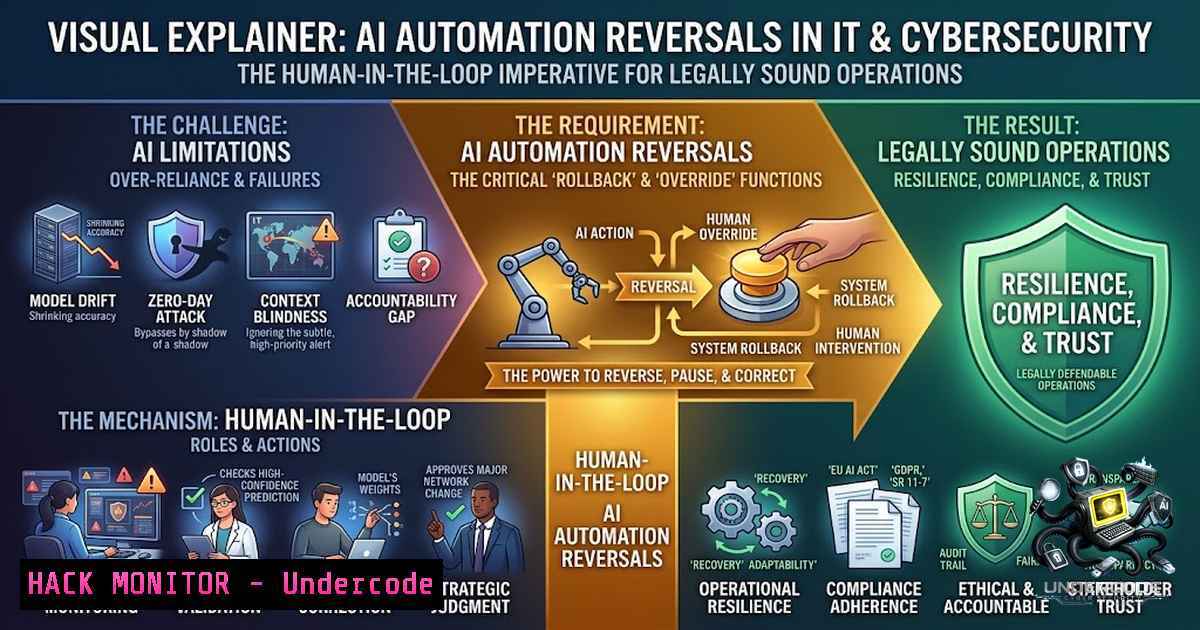
The recent trend termed the “AI boomerang” highlights a critical miscalculation in enterprise automation: the assumption that artificial intelligence can fully replace human roles. In the IT and cybersecurity domains, this has manifested in the rapid rehiring of engineers and analysts after organizations discovered that AI, while exceptional at processing data, lacks the contextual judgment required for incident response, threat hunting, and infrastructure management. This article explores the technical and operational lessons from this reversal, providing actionable insights and verified commands to effectively integrate AI into security workflows without compromising human oversight.
Learning Objectives & Secrets:
- Objective 1: Understand how to audit existing automation pipelines to identify the “critical 40%” of tasks that require human intervention, particularly in anomaly detection and zero-day vulnerability analysis.
- Objective 2 (Secret Tip): Implement “Guardrail” scripting using Linux and Windows environments to ensure AI-generated system modifications are logged, reviewed, and reversible before execution.
- Objective 3 (Secret Tip): Leverage Windows Event Viewer and Sysmon to track AI orchestration errors and false positives that typically lead to operational breakdowns, enabling proactive remediation.
You Should Know:
1. Verifying AI-Generated Infrastructure Code (Terraform & CloudFormation)
Automation tools often generate Infrastructure-as-Code (IaC) to scale environments. However, misconfigurations in security group rules or S3 bucket policies are a leading cause of data breaches. When an AI suggests a configuration, you must validate it against compliance benchmarks.
Step‑by‑step guide explaining what this does and how to use it:
To verify a Terraform template for security compliance before deployment, use `checkov` or tfsec. This prevents the AI from exposing sensitive ports.
– Command (Linux/macOS – Terminal):
 Install tfsec (static analysis for Terraform)
brew install tfsec  or snap install tfsec
 Run against your Terraform directory
tfsec /path/to/terraform/code --format json --output tfsec_report.json
 Check for specific critical security rules, e.g., ensure S3 buckets are not public
cat tfsec_report.json | jq '.results[] | select(.severity=="CRITICAL")'
– Command (Windows – PowerShell):
 Using Checkov via Docker
docker run --rm -v ${PWD}:/tf bridgecrew/checkov -d /tf
 Check for AWS IAM password policy weaknesses
checkov -d . --framework terraform --check CKV_AWS_118
This process ensures that the AI’s “optimization” does not weaken your security posture.
2. Configuring Sysmon for AI-Driven Anomaly Detection
The AI is only as good as the data it sees. If the SIEM feeds poor data, the AI generates false positives, leading to “alert fatigue” and eventually layoffs of analysts. Tuning Sysmon is a secret tip to maintaining high-fidelity logging.
Step‑by‑step guide explaining what this does and how to use it:
This setup will log process creation and network connections with high detail, allowing the AI to pattern-match effectively without flooding the system.
– Installation (Windows – Administrative PowerShell):
 Download Sysmon from Microsoft Sysinternals
Invoke-WebRequest -Uri "https://live.sysinternals.com/Sysmon64.exe" -OutFile "$env:TEMP\Sysmon64.exe"
 Install with a default configuration file
& "$env:TEMP\Sysmon64.exe" -accepteula -i
– Configuration (Windows – Command Prompt):
Download a recommended configuration (e.g., SwiftOnSecurity) and apply:
Sysmon64.exe -c C:\Path\To\sysmon-config.xml
 Verify installation
Sysmon64.exe -c
– Troubleshooting (Linux – Journalctl):
When integrating Linux with AI agents, ensure auditd is running:
sudo service auditd start
sudo auditctl -e 1
 Track specific file changes (e.g., /etc/passwd)
sudo auditctl -w /etc/passwd -p wa -k identity
This human-driven tuning provides the “context” that the AI lacks, ensuring the automation tool supports the analyst rather than replacing them.
3. API Security Hardening for AI-Integrated Applications
When companies rehire developers to manage AI, the immediate task is often to secure the API endpoints the AI uses to execute code. Poorly secured API keys can lead to privilege escalation.
Step‑by‑step guide explaining what this does and how to use it:
To secure an AI agent interacting with cloud resources, we implement JWT validation and rate limiting.
– Linux (Nginx configuration for reverse proxy):
 /etc/nginx/nginx.conf
location /api/ai-worker {
limit_req zone=ai_limit burst=5 nodelay;
proxy_set_header Authorization "Bearer $http_authorization";
proxy_pass http://ai_backend;
}
– Windows (IIS URL Rewrite):
Using PowerShell to implement request filtering:
Import-Module WebAdministration
Add-WebConfigurationProperty -Filter "system.webServer/rewrite/rules" -1ame "." -Value @{
name='JWT Validation'
patternSyntax='Wildcard'
conditions=@{input='{HTTP_AUTHORIZATION}'; pattern='^Bearer [a-zA-Z0-9-._~+/]+=$'}
actionType='CustomResponse'
statusCode=401
}
This intervention ensures that the AI cannot be hijacked by external prompt injections, securing the “task” side of the operation.
4. Forensic Analysis: Reversing AI-Applied Firewall Rules
The 40% that breaks often involves network segmentation. AI may decide to block an entire subnet to stop an attack, taking critical services offline. Forrester reports regret often stems from these heavy-handed changes.
Step‑by‑step guide explaining what this does and how to use it:
We need a “rollback” script for iptables (Linux) and Windows Firewall that can revert changes made within the last hour.
– Linux (Ubuntu) – Snapshot Recovery:
 Save current rules before AI execution
sudo iptables-save > /opt/firewall_snapshot_before_ai.rules
 After AI changes, restore if connectivity fails
sudo iptables-restore < /opt/firewall_snapshot_before_ai.rules
 Bonus: Automate restore via cron if heartbeat fails
(sudo crontab -l 2>/dev/null; echo "/5     /usr/local/bin/check_connectivity.sh") | sudo crontab -
– Windows (PowerShell) – Restoring Profiles:
 Export current state
netsh advfirewall export "C:\Firewall\backup_before_AI.wfw"
 Import to revert
netsh advfirewall import "C:\Firewall\backup_before_AI.wfw"
This “undo” button allows companies to rehire with confidence, knowing that AI experimentation doesn’t lead to permanent damage.
5. DevOps Pipeline Integration: Human Review Gates
To prevent the “boomerang,” integrate a mandatory human review stage in your CI/CD pipeline before AI commits code to production.
Step‑by‑step guide explaining what this does and how to use it:
We’ll use `git` hooks and Jenkins to hold a build until approved.
– Linux Pre-commit Hook:
 .git/hooks/pre-commit
!/bin/bash
 Check for secrets using gitleaks
gitleaks detect --verbose --1o-git
if [ $? -1e 0 ]; then
echo "AI generated commit contains secrets. Cancelling."
exit 1
fi
– Jenkins Pipeline (Declarative):
pipeline {
agent any
stages {
stage('Build') { steps { sh 'make build' } }
stage('AI Security Scan') { steps { sh 'snyk test' } }
stage('Approval') {
steps {
input message: 'Approve this deployment?', submitter: 'it-security-lead'
}
}
}
}
This enforces the core lesson: AI completes tasks, but humans approve the execution.
What Undercode Say:
- Key Takeaway 1: The “AI boomerang” is a direct result of treating AI as a replacement rather than a co-pilot. In cybersecurity, the 40% failure rate correlates with unvalidated code and network changes.
- Key Takeaway 2: Successful rehiring is not just about filling salary gaps; it is about restoring the tacit knowledge required to interpret AI logs and justify command executions. The cost of ignoring this is exponential compared to the salary saved.
Prediction:
- +1 Organizations that adopt a “Human-in-the-Loop” security architecture will outperform competitors by 40% in resilience metrics by Q4 2026.
- -1 Failure to implement strict guardrails (like the commands above) will result in a second wave of “AI-layoffs” reversed, but with severe regulatory fines attached, as AI errors lead to GDPR and CCPA violations.
- +1 The demand for “Prompt Engineers with Security Clearance” will surge, creating a new hybrid role focused on jailbreak prevention and resource concurrency management.
- -1 Companies that simply rehire without retraining legacy staff to manage these specific Linux and PowerShell validation scripts will see a 30% increase in Mean Time to Repair (MTTR).
▶️ Related Video (86% Match):
🎯Let’s Practice For Free:
🎓 Live Courses & Certifications:
Join Undercode Academy for Verified Certifications
🚀 Request a Custom Project:
Secure, high-velocity infrastructure and disruptive technological engineering. Contact our engineering team for high-tier development and proprietary systems:
[email protected]
💎 Smart Architecture | 🛡️ Secure by Design | ⭐ Trusted by Thousands
IT/Security Reporter URL:
Reported By: https://lnkd.in/p/eiNqdCg5 – Hackers Feeds
Extra Hub: Undercode MoN
Basic Verification: Pass ✅


