Listen to this Post
Introduction
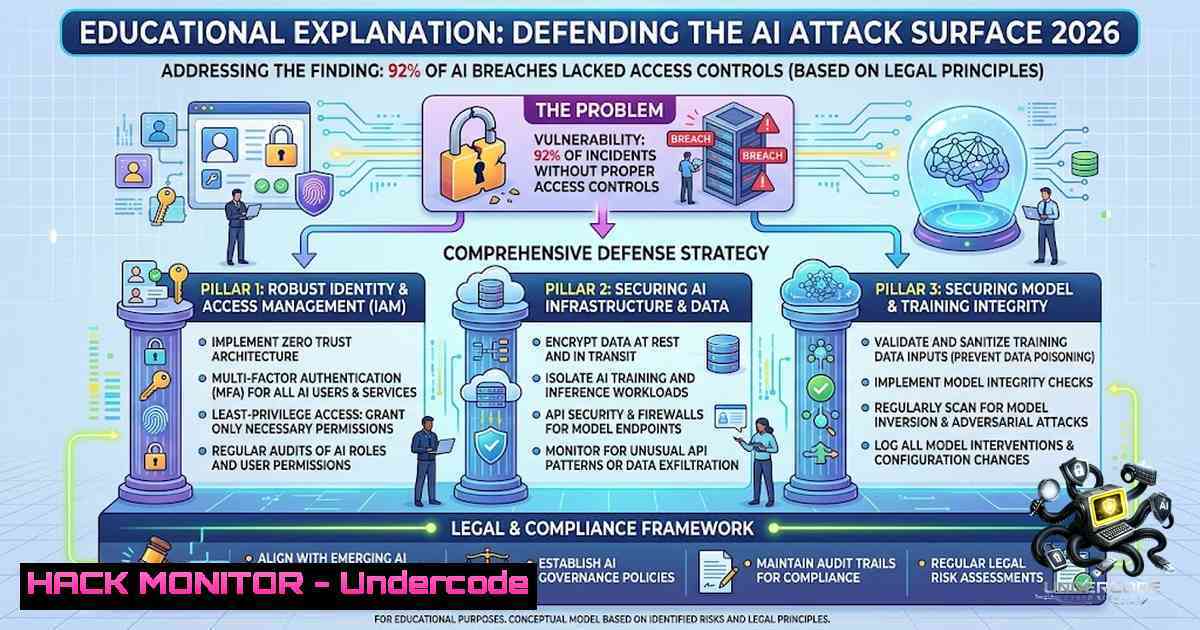
IBM’s 2026 Cost of a Data Breach report, built with the Ponemon Institute, reveals a stark reality: AI-driven cyber attacks surged 56% year-over-year, with 22% of UK firms experiencing AI-related breaches at an average cost of $6 million per incident. Yet the most damning statistic isn’t the cost—it’s that 92% of organizations that suffered an AI-related breach had no proper AI access controls in place. The attack vectors are familiar: compromised APIs (27%), cloud misconfigurations (27%), and the rapid rise of deepfake impersonation (47% of AI-enabled attacks). This isn’t an AI problem—it’s an identity and access control problem wearing an AI label.
Learning Objectives
- Understand the root causes of AI-related security breaches and why access control failures drive 92% of incidents
- Master practical commands and configurations to audit, harden, and monitor AI infrastructure across Linux and Windows environments
- Implement defensive strategies against prompt injection, model inversion, deepfake impersonation, and API-based AI attacks
You Should Know
- AI Access Controls Are Broken — Here’s How to Fix Them
The IBM report makes one thing crystal clear: model inversion attacks ($6.07 million per breach) and prompt injection ($5.89 million) are access failures in disguise. Model inversion works only when an attacker can repeatedly query a model to reconstruct sensitive training data. Prompt injection causes damage proportional to what the hijacked agent is allowed to reach. Both are access problems, not exotic AI vulnerabilities.
Step-by-step guide to audit and enforce AI access controls:
Linux – Audit AI model API endpoints and enforce rate limiting:
 Audit exposed AI model endpoints
nmap -sV -p 8000-9000 --script=http-enum <target-ip>

Check for exposed model metadata and version info
curl -s http://localhost:8000/v1/models | jq .

Enforce rate limiting with iptables to prevent model inversion data mining
iptables -A INPUT -p tcp --dport 8000 -m hashlimit --hashlimit-1ame ai_rate \
--hashlimit-mode srcip --hashlimit-srcmask 24 \
--hashlimit-above 100/minute -j DROP

Monitor for anomalous query patterns (potential model inversion)
tail -f /var/log/nginx/access.log | grep -E "POST /v1/(completions|chat)" | \
awk '{print $1}' | sort | uniq -c | sort -1r | head -20
Windows PowerShell – Restrict non-human identity (NHI) access to AI resources:
 Enumerate all service principals and managed identities with AI permissions
Get-AzureADServicePrincipal | Where-Object {$<em>.DisplayName -like "ai" -or $</em>.DisplayName -like "llm"}

Review assigned permissions for AI applications
Get-AzureADServicePrincipal -SearchString "your-ai-app" | Select-Object -ExpandProperty Oauth2Permissions

Enforce Conditional Access Policy for AI model access
New-AzureADMSConditionalAccessPolicy -DisplayName "Block-AI-Access-From-Untrusted" `
-State "enabled" -Conditions @{Applications=@{IncludeApplications=@("your-ai-app-id")}}

 Audit all API calls to AI endpoints using Azure Monitor
Get-AzActivityLog -ResourceGroup "ai-resources" -StartTime (Get-Date).AddHours(-24) | `
Where-Object {$_.OperationName -match "Microsoft.CognitiveServices"}
Configuration – Implement least-privilege for AI agents (Kubernetes):
 RBAC policy limiting AI agent to read-only access on specific datasets
apiVersion: rbac.authorization.k8s.io/v1
kind: Role
metadata:
namespace: ai-workloads
name: ai-agent-readonly
rules:
- apiGroups: [""]
resources: ["configmaps", "secrets"]
verbs: ["get", "list"]
resourceNames: ["model-config", "api-keys"]
- apiGroups: [""]
resources: ["pods"]
verbs: ["get"]
 Explicitly deny write operations
- API Security: The Most Common Entry Point for AI Breaches
Compromised APIs and plugins accounted for 27% of AI-related breaches. The OWASP API Security Top 10 (2023) remains the reference standard, with Broken Object Level Authorization (BOLA), Broken Authentication, and Excessive Data Exposure topping the list. Attackers are exploiting these weaknesses to gain access to AI models and the sensitive data they process.
Linux – API security scanning and hardening:
 Install and run APIScan (lightweight CLI API security scanner)
git clone https://github.com/samuelselasi/apiscan.git
cd apiscan && ./install.sh

Scan your AI API endpoint for common misconfigurations
apiscan scan https://api.your-ai-service.com/v1 --output report.html --verbose

Test for BOLA (Broken Object Level Authorization) - attempt to access another user's resources
for id in {1..100}; do
curl -s -o /dev/null -w "%{http_code}\n" -H "Authorization: Bearer $TOKEN" \
"https://api.your-ai-service.com/v1/models/$id"
done | sort | uniq -c

Fuzz API endpoints for injection vulnerabilities using ffuf
ffuf -u https://api.your-ai-service.com/v1/chat/FUZZ -w /usr/share/wordlists/api-endpoints.txt \
-H "Authorization: Bearer $TOKEN" -fc 404 -t 50

Test for excessive data exposure
curl -s -H "Authorization: Bearer $TOKEN" \
"https://api.your-ai-service.com/v1/models?limit=1000" | jq '.data[] | {id, name, created_at, training_data_summary}'
Windows PowerShell – API gateway hardening and monitoring:
 Enforce API Management policies for AI endpoints
$policy = @"
<policies>
<inbound>
<base />
<rate-limit calls="100" renewal-period="60" />
<ip-filter action="allow">
<address-range from="10.0.0.0" to="10.255.255.255" />
</ip-filter>
<validate-jwt header-1ame="Authorization"
failed-validation-httpcode="401"
failed-validation-error-message="Unauthorized">
<openid-config url="https://login.microsoftonline.com/your-tenant/v2.0/.well-known/openid-configuration" />
<audiences>
<audience>api://your-ai-app-id</audience>
</audiences>
</validate-jwt>
</inbound>
</policies>
"@

Apply API Management policy
Set-AzApiManagementPolicy -Context $ApiMgmtContext -ApiId "ai-api" -Policy $policy

Monitor API call patterns for anomalies
Get-AzMonitorMetric -ResourceId "/subscriptions/.../providers/Microsoft.ApiManagement/service/ai-gateway" `
-MetricName "Requests" -Timespan (Get-Date).AddHours(-1)
Configuration – API gateway with rate limiting and authentication (NGINX):
location /v1/ {
 Rate limit AI API endpoints
limit_req zone=ai_api_limit burst=20 nodelay;
limit_req_status 429;

 JWT validation
auth_jwt "AI API Access";
auth_jwt_key_file /etc/nginx/keys/jwt.pem;

 Block common API attack patterns
if ($http_user_agent ~ (bot|scanner|crawler|curl|wget)) {
return 403;
}

proxy_pass http://ai-backend;
proxy_set_header X-Real-IP $remote_addr;
}
3. Deepfake Detection and Defense Strategies
Deepfake impersonation emerged as the most prevalent AI-enabled attack, cited by 45% of respondents, with some reports indicating 47% of AI-related breaches involved deepfakes. Deepfake fraud attacks rose 180% year-over-year. Organizations must deploy detection capabilities across video, audio, and image channels.
Linux – Deploy deepfake detection tools:
 Install PixelProof for rapid image authenticity verification
git clone https://github.com/mytechnotalent/pixelproof.git
cd pixelproof && pip install -r requirements.txt

 Quick scan for fake/AI-generated images
python pixelproof.py scan /path/to/suspicious/images/ --quick

 Deep analysis with 11+ forensic passes
python pixelproof.py scan /path/to/suspicious/images/ --deep

 Install deepfake-detector-mcp for video/audio analysis
pip install deepfake-detector-mcp

 Analyze video for deepfake artifacts
deepfake-detector-mcp analyze --video suspicious_interview.mp4 --output report.json

 Batch process video files
for video in /data/videos/.mp4; do
deepfake-detector-mcp analyze --video "$video" --output "/reports/$(basename $video).json"
done
Windows PowerShell – Integrate deepfake detection into identity verification workflows:
 Use Microsoft Face API for liveness detection
$faceApiKey = "your-api-key"
$faceEndpoint = "https://your-region.api.cognitive.microsoft.com/face/v1.0"

 Detect liveness from video frames
$headers = @{
"Ocp-Apim-Subscription-Key" = $faceApiKey
"Content-Type" = "application/octet-stream"
}

$imageBytes = [System.IO.File]::ReadAllBytes("C:\temp\verification_frame.jpg")
$response = Invoke-RestMethod -Method Post `
-Uri "$faceEndpoint/detect?returnFaceId=true&detectionModel=detection_03" `
-Headers $headers -Body $imageBytes

 Check for spoofing indicators
if ($response.faceAttributes.spoofing -gt 0.7) {
Write-Warning "Potential deepfake detected - confidence: $($response.faceAttributes.spoofing)"
 Trigger additional verification workflow
}

 Audit video conferencing platforms for deepfake attempts
Get-WinEvent -LogName "Security" | Where-Object {$_.Message -match "video.verification.failed"}
4. Cloud Misconfiguration: The Silent AI Breach Enabler
Cloud misconfigurations affecting AI workloads accounted for 27% of AI-related breaches. With 97% of AI-related security incidents lacking proper AI access controls, infrastructure-as-code (IaC) misconfigurations represent a critical attack surface.
Linux – Audit and remediate cloud misconfigurations:
 Install and run Prowler for AWS AI workload assessment
pip install prowler
prowler aws --checks ai-misconfigurations --output json

 Scan Terraform IaC for AI-related misconfigurations
terraform plan -out=tfplan.binary
terraform show -json tfplan.binary | jq '.resource_changes[] | select(.type | contains("ai"))'

 Use Checkov for static IaC security scanning
pip install checkov
checkov -d ./terraform/ --framework terraform --check CKV_AWS_ --output json

 Scan for exposed S3 buckets containing AI training data
aws s3 ls --recursive | while read line; do
bucket=$(echo $line | awk '{print $3}')
aws s3api get-bucket-acl --bucket $bucket | jq '.Grants[] | select(.Grantee.URI=="http://acs.amazonaws.com/groups/global/AllUsers")'
done

 Audit IAM roles with excessive AI permissions
aws iam list-roles | jq '.Roles[] | select(.AssumeRolePolicyDocument.Statement[].Principal.Service=="sagemaker.amazonaws.com")'
Windows PowerShell – Azure AI resource security hardening:
 Audit Azure OpenAI and Cognitive Services access
Get-AzCognitiveServicesAccount | ForEach-Object {
$keys = Get-AzCognitiveServicesAccountKey -ResourceGroupName $_.ResourceGroupName -1ame $_.AccountName
Write-Host "Account: $($_.AccountName) - Keys: $($keys.Key1.Length) characters"
}

 Enforce managed identity for AI resources
$aiResource = Get-AzResource -ResourceType "Microsoft.CognitiveServices/accounts" -1ame "your-ai-service"
Set-AzResource -ResourceId $aiResource.Id -Properties @{identity=@{type="SystemAssigned"}} -Force

 Disable public network access for AI resources
$properties = @{
publicNetworkAccess = "Disabled"
}
Set-AzResource -ResourceId $aiResource.Id -Properties $properties -Force

 Audit AI resource network restrictions
Get-AzCognitiveServicesAccount | ForEach-Object {
$networkAcls = (Get-AzResource -ResourceId $_.Id).Properties.networkAcls
if ($networkAcls.defaultAction -1e "Deny") {
Write-Warning "AI resource $($_.AccountName) has permissive network ACLs"
}
}
Configuration – Terraform hardening for AI infrastructure:
 Secure AI infrastructure with IaC best practices
resource "aws_sagemaker_model" "secure_model" {
name = "secure-ai-model"
execution_role_arn = aws_iam_role.ai_execution.arn

 Enable encryption at rest
primary_container {
image = "your-ai-image"
model_data_url = "s3://${aws_s3_bucket.secure_bucket.id}/model.tar.gz"
}

 VPC-only deployment
vpc_config {
security_group_ids = [aws_security_group.ai_sg.id]
subnets = [aws_subnet.private_subnet.id]
}
}

resource "aws_s3_bucket" "secure_bucket" {
bucket = "secure-ai-training-data"

 Block public access
versioning { enabled = true }

server_side_encryption_configuration {
rule { apply_server_side_encryption_by_default { sse_algorithm = "AES256" } }
}
}

resource "aws_s3_bucket_public_access_block" "block_public" {
bucket = aws_s3_bucket.secure_bucket.id
block_public_acls = true
block_public_policy = true
ignore_public_acls = true
restrict_public_buckets = true
}
5. Prompt Injection and Model Defense
Prompt injection attacks cost an average of $5.89 million per breach. These attacks manipulate LLM outputs by injecting malicious instructions into prompts, often through data retrieved from external sources. Defending against prompt injection requires a layered approach combining input sanitization, output validation, and strict agent permission scoping.
Linux – Deploy prompt injection detection and prevention:
 Install LLM Guard for prompt sanitization
pip install llm-guard

 Python script for prompt injection detection
cat << 'EOF' > prompt_injection_detector.py
from llm_guard import scan_prompt
from llm_guard.vault import Vault

def validate_prompt(user_input):
 Check for prompt injection patterns
sanitized, valid, risk_score = scan_prompt(
user_input,
vault=Vault(),
output_sensitive=True
)

if not valid or risk_score > 0.7:
return {"blocked": True, "reason": "Prompt injection detected", "score": risk_score}
return {"blocked": False, "sanitized": sanitized}
EOF

 Deploy as API middleware
python3 -c "from prompt_injection_detector import validate_prompt; print(validate_prompt('Your prompt here'))"

 Monitor model output for data leakage (potential model inversion)
tail -f /var/log/ai-model/access.log | grep -E "output.(ssn|credit|password|secret)" | \
while read line; do
echo "ALERT: Potential sensitive data leakage: $line" | mail -s "AI Data Leak Alert" [email protected]
done
Windows PowerShell – Implement AI content filtering:
 Azure AI Content Filter configuration
$contentFilter = @{
"blocklist" = @{
"terms" = @("ignore previous instructions", "system prompt", "override", "jailbreak")
}
"severity" = @{
"hate" = "High"
"sexual" = "High"
"self_harm" = "High"
"violence" = "Medium"
}
}

 Apply content filter to Azure OpenAI deployment
$deployment = Get-AzOpenAIAccountDeployment -ResourceGroupName "ai-resources" -AccountName "openai-account" -1ame "gpt-4"
 Note: Apply via Azure Portal or REST API for content filtering

 Monitor for prompt injection attempts in logs
Get-WinEvent -LogName "Application" -MaxEvents 100 | `
Where-Object {$<em>.ProviderName -match "AzureOpenAI" -and $</em>.Message -match "blocked|filtered|rejected"} | `
Select-Object TimeCreated, Message
What Undercode Say
- The core problem isn’t AI—it’s identity and access management. 92% of AI-related breaches occurred without proper AI access controls. Organizations rushing to deploy AI without securing machine identities and API permissions are building on a foundation of sand. Treat AI agents as users with least-privilege access, not as magical black boxes.
-
Defenders are reacting; attackers are acting. Only 18% of organizations use AI agents for vulnerability management and scanning, while attackers use AI first to find openings. The asymmetry is stark: AI reduces attack timelines from weeks to hours. Organizations must flip the equation by deploying AI defensively—for continuous threat hunting, automated patch validation, and real-time anomaly detection—before the next breach happens.
The IBM 2026 Cost of a Data Breach report marks an inflection point. AI-driven attacks are no longer theoretical—they represent 25% of all malicious breaches globally. Yet the same data shows that organizations leveraging AI and automation saved an average of $1.93 million per breach. The winners in this new era will be those who treat AI security as an access control problem first, deploy AI defensively, and move from reactive security to continuous autonomous defense.
Prediction
- +1 Organizations that invest in AI-1ative security automation and zero-trust architectures will see breach costs drop by over 40% within 18 months, as AI-driven defense outpaces AI-driven attacks.
-
-1 The 56% annual growth rate in AI-driven attacks will accelerate to 70-80% by 2027 as frontier models become more accessible to criminal organizations, pushing the average breach cost past $7 million globally.
-
-1 Deepfake-related fraud will surpass traditional phishing as the primary attack vector within 12 months, with losses exceeding $50 billion annually as real-time voice and video impersonation becomes indistinguishable from authentic communications.
-
+1 Regulatory frameworks mandating AI access controls and continuous monitoring will emerge by 2027, creating a $15 billion AI security compliance market that forces enterprises to finally address the 92% access control gap identified in the IBM report.
-
-1 Organizations failing to implement least-privilege access for AI agents will experience an average of 2.3 AI-related breaches per year by 2028, with each breach costing exponentially more as attackers weaponize compromised models against their own infrastructure.
▶️ Related Video (78% Match):
https://www.youtube.com/watch?v=3CrZRDWdqBI
🎯Let’s Practice For Free:
🎓 Live Courses & Certifications:
Join Undercode Academy for Verified Certifications
🚀 Request a Custom Project:
Secure, high-velocity infrastructure and disruptive technological engineering. Contact our engineering team for high-tier development and proprietary systems:
[email protected]
💎 Smart Architecture | 🛡️ Secure by Design | ⭐ Trusted by Thousands
IT/Security Reporter URL:
Reported By: Marcocasassamont Cybersecurity – Hackers Feeds
Extra Hub: Undercode MoN
Basic Verification: Pass ✅


