
Listen to this Post
Introduction:
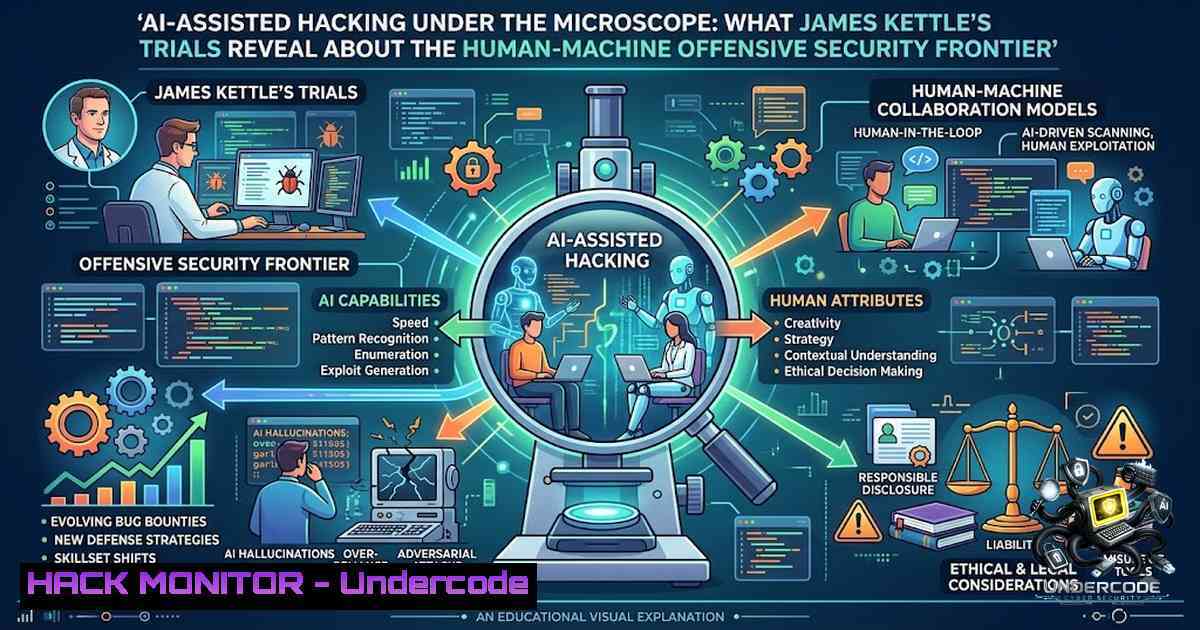
Security researcher James Kettle recently conducted a series of controlled trials designed to probe the true limits of artificial intelligence in offensive security tasks. His findings reveal a nuanced reality: AI systems, when guided and meticulously verified by expert human operators, can accelerate reconnaissance and vulnerability discovery. However, the trials also confirmed that fully autonomous hacking remains an elusive goal, with AI models frequently producing non-functional code, missing critical edge cases, and exhibiting unwarranted confidence in flawed solutions.
Learning Objectives:
- Understand the documented capabilities and critical limitations of LLMs in offensive security tasks, including payload generation, log triage, and vulnerability brainstorming.
- Learn how to architect secure, isolated testing environments for AI-assisted red-team exercises, incorporating audit trails and strict scope controls.
- Acquire practical command-line and configuration skills for validating AI-generated outputs across Linux, Windows, and cloud environments.
You Should Know:
- Establishing an Isolated Testing Sandbox for AI-Assisted Operations
Before any AI-assisted hacking trial begins, the environment must be both logically and network-isolated to prevent unintended consequences. Kettle’s methodology emphasized strict scopes and staged environments, ensuring that AI-generated actions could not impact production systems or leak sensitive data. The following step-by-step guide outlines how to provision a secure, disposable testing laboratory suitable for validating AI-suggested attack paths.
Step 1: Provision an Isolated Virtual Network. On Linux, use `ip netns` to create a network namespace with no default route to the internet. For Windows, leverage Hyper-V’s “Internal” or “Private” virtual switches. This ensures that any AI-prompted outbound connections are contained.
 Linux: Create an isolated network namespace
sudo ip netns add aisandbox
sudo ip netns exec aisandbox ip link set lo up
 Create a virtual Ethernet pair, one end in the namespace
sudo ip link add veth-a type veth peer name veth-b
sudo ip link set veth-b netns aisandbox
sudo ip netns exec aisandbox ip addr add 10.0.0.2/24 dev veth-b
sudo ip netns exec aisandbox ip link set veth-b up
Step 2: Deploy Target Containers within the Isolated Environment. Use Docker with a user-defined bridge network that has no outbound NAT. This prevents AI-suggested exploits from “phoning home.”
docker network create --internal --subnet=172.20.0.0/16 ai-target-1et
docker run -d --1etwork ai-target-1et --1ame vulnerable-mysql -e MYSQL_ROOT_PASSWORD=weakpass mysql:5.7
Step 3: Enforce Comprehensive Audit Logging. All commands executed by the AI or the operator must be logged. On Linux, configure `auditd` to monitor the operator’s shell. On Windows, enable PowerShell’s script block logging via Group Policy.
 Linux: Audit all bash commands
sudo auditctl -w /bin/bash -p x -k shell_commands
 Windows: Enable PowerShell logging (via GPO or registry)
Set-ItemProperty -Path "HKLM:\SOFTWARE\Policies\Microsoft\Windows\PowerShell\ScriptBlockLogging" -1ame EnableScriptBlockLogging -Value 1
2. AI-Assisted Vulnerability Discovery: Triage and Validation Workflows
Kettle reported that AI excelled at triaging logs and drafting test cases, but often failed to produce compilable code or account for subtle edge conditions. This section provides a workflow for integrating AI suggestions into a disciplined validation pipeline, using both Linux and Windows command-line tools to verify findings.
Step 1: Feed Logs to the AI for Initial Pattern Recognition. Use grep, awk, and `jq` to extract structured data from web server or database logs, then prompt the AI to identify anomalies.
 Extract all MySQL error logs from the last hour
sudo grep "$(date -d '1 hour ago' '+%Y-%m-%d %H:')" /var/log/mysql/error.log | jq -R '{timestamp: ., message: .}' > mysql_errors.json
Step 2: Validate AI-Generated Exploit Suggestions Against the Target. If the AI suggests a SQL injection payload, test it manually using `curl` or a dedicated tool like `sqlmap` in a safe mode to confirm efficacy.
 Example: Test a suspected injection point (target must be in isolated network)
curl -G "http://10.0.0.3/vuln.php" --data-urlencode "id=1' OR '1'='1"
 Use sqlmap with --batch and --smart to confirm, ensuring no out-of-scope tampering
sqlmap -u "http://10.0.0.3/vuln.php?id=1" --batch --smart --level=2
Step 3: Cross-Validate with Static Analysis. For AI-generated code snippets, employ static analysis tools to catch syntax errors and security anti-patterns before any execution.
 Linux: Use ShellCheck for bash scripts
shellcheck ai_generated_script.sh
 Windows: Use PSScriptAnalyzer for PowerShell
Invoke-ScriptAnalyzer -Path .\ai_generated_script.ps1
3. API Security Testing in an AI-Augmented Pipeline
API endpoints are a prime target for AI-assisted hacking, as they are often well-documented and susceptible to automation. Kettle’s trials highlighted that AI can rapidly brainstorm ways to trigger subtle bugs. Below is a guide to hardening API security and validating AI-suggested attack vectors against OWASP API Security Top 10 risks.
Step 1: Enforce Strict Rate Limiting and Input Validation. Use a reverse proxy like NGINX or a cloud WAF to limit requests and validate schemas. This mitigates brute-force and injection attacks that AI might attempt.
 NGINX rate limiting
limit_req_zone $binary_remote_addr zone=api_limit:10m rate=5r/s;
server {
location /api/ {
limit_req zone=api_limit burst=10 nodelay;
proxy_pass http://api_backend;
}
}
Step 2: Use AI to Generate Fuzz Testing Inputs. Craft a prompt asking the AI to generate a list of malformed JSON payloads targeting common injection points. Then, use a tool like `ffuf` to test these payloads against a staging API.
 Generate payloads with AI and save to fuzz.txt, then fuzz
ffuf -u http://10.0.0.3/api/v1/user -X POST -H "Content-Type: application/json" -d @fuzz.txt -fc 200,404
Step 3: Implement API Security Auditing. On Windows, use PowerShell to parse IIS logs for suspicious patterns and correlate them with AI-generated test cases.
 Parse IIS logs for high-frequency requests from a single IP
Get-Content "C:\inetpub\logs\LogFiles\W3SVC1\u_ex.log" | Select-String "10.0.0.100" | Measure-Object
4. Cloud Infrastructure Hardening Against AI-Driven Reconnaissance
Attackers using AI can rapidly scan for misconfigured cloud resources, such as open S3 buckets or overly permissive IAM roles. Kettle noted that AI reduces trial-and-error on low-level tasks, making misconfigurations more dangerous. This section details how to harden cloud environments and verify their security posture.
Step 1: Audit Cloud Storage Permissions. Use the AWS CLI to scan for publicly accessible S3 buckets and remediate them.
 List all buckets and check ACLs
aws s3api list-buckets --query "Buckets[].Name" --output text | xargs -I {} aws s3api get-bucket-acl --bucket {} --query "Grants[?Grantee.URI=='http://acs.amazonaws.com/groups/global/AllUsers']"
Step 2: Implement Infrastructure as Code (IaC) Scanning. Use tools like `checkov` or `tfsec` to scan Terraform or CloudFormation templates for security misconfigurations before deployment.
 Scan Terraform files for misconfigurations
checkov -d ./terraform/ --framework terraform
Step 3: Enforce Network Segmentation with Security Groups. For Azure, use the Azure CLI to list network security groups and review overly permissive rules (e.g., `0.0.0.0/0` on port 22 or 3389).
 Azure: List NSG rules with source any
az network nsg rule list --1sg-1ame myNSG --resource-group myRG --query "[?sourceAddressPrefix=='' || sourceAddressPrefix=='0.0.0.0/0']"
5. Exploitation Mitigation: Validating AI-Generated Payloads
When AI suggests an exploit, it must be validated in a controlled environment before any broader application. Kettle emphasized that “final calls required a human to validate each step”. This guide provides a methodology for safely testing AI-generated exploits.
Step 1: Run Exploits in a Detonator Environment. Use a tool like `Cuckoo` or a custom Python script to execute the payload in an isolated VM and monitor system calls.
 Monitor system calls of a suspicious binary on Linux
strace -f -e trace=file,network,process ./ai_generated_exploit
Step 2: Validate Payloads Against Known CVEs. Use the National Vulnerability Database (NVD) API to check if the AI-suggested exploit matches a known CVE, and then use a Metasploit module to confirm.
 Search for a CVE based on AI output
searchsploit "Apache Struts" | grep -i "remote code"
Step 3: Implement a “Break Glass” Procedure. Ensure that any AI-generated action that modifies system state is reversible. Use snapshots or configuration backups.
 Linux: Create a filesystem snapshot before testing (LVM)
sudo lvcreate -L 5G -s -1 snap_test /dev/vg0/root
 Windows: Create a restore point
Checkpoint-Computer -Description "Before AI Test" -RestorePointType MODIFY_SETTINGS
What Undercode Say:
- AI excels at accelerating routine tasks but falters on novel attack path discovery. Kettle’s trials demonstrate that while AI can triage logs and brainstorm test cases at machine speed, it struggles with creative, multi-step exploitation that requires contextual judgment.
- The human-in-the-loop model is not a safety net—it is a prerequisite for efficacy. Unsupervised AI generates noisy reports, non-functional code, and false confidence. The most effective security teams will integrate AI as a force multiplier for skilled analysts, not as a replacement for them.
Kettle’s findings arrive at a critical juncture. Attackers are already employing AI for reconnaissance and payload variation, forcing defenders to adopt AI-assisted tools just to keep pace. However, the rush to automation must be tempered by rigorous validation; a single undetected AI error could introduce vulnerabilities or exfiltrate data. The future of offensive security lies not in autonomous AI agents, but in tightly coupled human-AI teams where the machine provides speed and the human provides wisdom. Organizations that invest in training their security staff to effectively prompt, interpret, and verify AI outputs will gain a decisive advantage. Conversely, those that treat AI as a magic bullet risk compounding their existing security debt with a new layer of automated uncertainty.
Prediction:
- +1 Over the next 12–18 months, we will see widespread adoption of AI-assisted “co-pilot” modes in commercial penetration testing tools, leading to a measurable reduction in mean time to identify (MTTI) for common vulnerabilities.
- -1 The democratization of AI-assisted hacking will inevitably lower the barrier to entry for threat actors, resulting in a surge of automated, low-skill attacks that exploit basic misconfigurations at an unprecedented scale.
- +1 Security training curricula will rapidly evolve to include “prompt engineering for security” and “AI output validation” as core competencies, creating a new specialization within the cybersecurity workforce.
- -1 Without standardized testing and validation frameworks, organizations that blindly trust AI-generated security recommendations will experience a rise in false positives and missed critical vulnerabilities, undermining trust in the technology.
- +1 The research community will establish benchmark suites specifically designed to evaluate AI’s ability to generate safe, accurate, and actionable security insights, leading to more transparent and reliable models.
▶️ Related Video (76% Match):
🎯Let’s Practice For Free:
🎓 Live Courses & Certifications:
Join Undercode Academy for Verified Certifications
🚀 Request a Custom Project:
Secure, high-velocity infrastructure and disruptive technological engineering. Contact our engineering team for high-tier development and proprietary systems:
[email protected]
💎 Smart Architecture | 🛡️ Secure by Design | ⭐ Trusted by Thousands
IT/Security Reporter URL:
Reported By: Researcher Tests – Hackers Feeds
Extra Hub: Undercode MoN
Basic Verification: Pass ✅


