
Listen to this Post
Introduction:
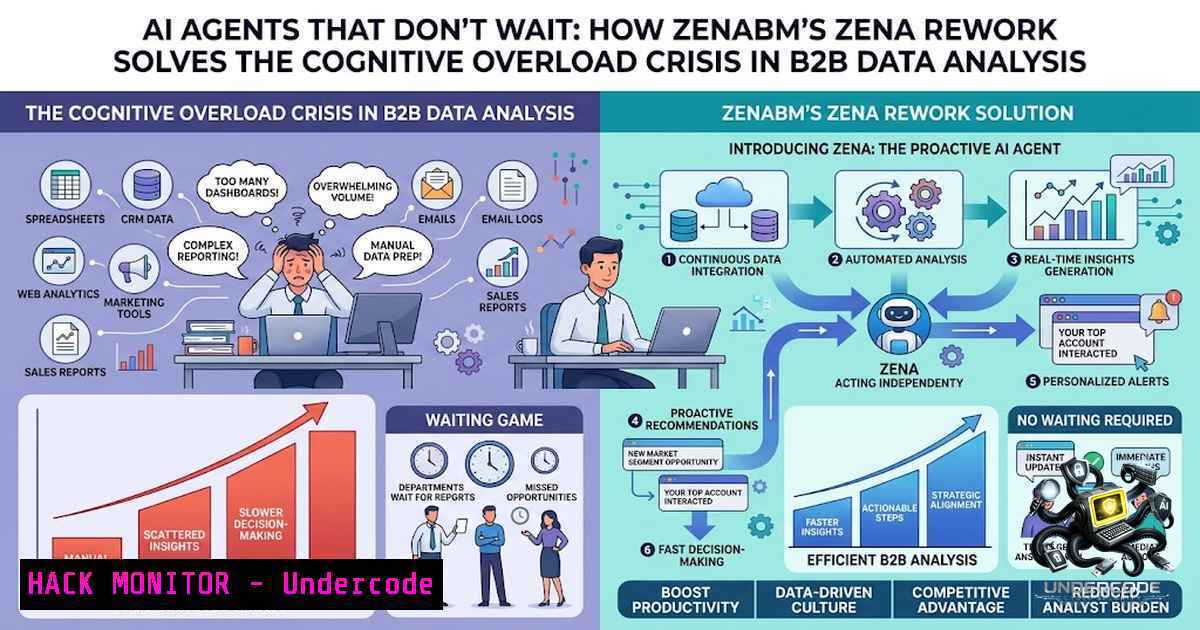
The fundamental promise of artificial intelligence in business intelligence has always been reduction of cognitive load—yet for most users, the opposite has occurred. When Michal Jackowski, founder of ZenABM, recently articulated a frustration shared by countless professionals—“I can click on buttons for hours, but I can’t chat with AI for hours. The responses I get are too verbose, unstructured, no amount of data will give the models proper context and tacit knowledge”—he identified a critical failure mode in enterprise AI. The burden of processing AI output and extracting actionable insights has fallen squarely on the user, creating what might be termed “AI-induced decision fatigue.” ZenABM’s response is a complete rework of their AI agent Zena, transforming it from a passive response engine into an autonomous data processor that proactively structures insights, identifies trends, and executes recommendations. This shift from reactive chatbots to proactive agents represents a significant architectural evolution in how AI interfaces with complex, multi-source data environments—particularly in account-based marketing (ABM) where data fragmentation across LinkedIn Ads, CRM systems, and engagement signals has historically created analytical paralysis.
Learning Objectives & Secrets:
- Objective 1: Master Proactive AI Data Processing — Understand how Zena autonomously processes raw data from 30+ LinkedIn Ads API endpoints, CRM touchpoints, and engagement signals to generate structured breakdowns without waiting for user prompts. The secret: the agent doesn’t just respond—it continuously ingests, correlates, and surfaces insights before you even know what to ask.
-
Objective 2 Secret Tip: Leverage the MCP Protocol for Direct Data Access — The ZenABM MCP (Model Context Protocol) server exposes 60+ structured JSON tools across LinkedIn Ads, companies, campaigns, ABM stages, deals, contacts, job titles, creatives, sources, and intent data. Instead of relying on CSV exports or screenshots, agents get direct, structured data access—eliminating the “data prep” phase entirely.
-
Objective 3 Secret Tip: Implement “Destructive-Action Safeguards” for Autonomous Execution — Zena can pause underperforming ads and reallocate budgets, but critical write actions are marked with safeguards that require confirmation before changing LinkedIn serving state. This creates a trust boundary where autonomy meets human oversight—the secret to deploying AI agents that actually execute without creating operational risk.
You Should Know:
- The ZenABM MCP Server: Your Gateway to Structured AI Data Access
The Model Context Protocol (MCP) represents a paradigm shift in how AI agents interact with business data. Rather than forcing agents to parse unstructured screenshots or manipulate CSV exports—a process that introduces friction and error—the ZenABM MCP server provides a standardized, JSON-based interface to live data.
What This Does: The MCP server acts as a middleware layer between your AI client (Claude Desktop, Cursor, or any MCP-compatible client) and ZenABM’s data layer. It advertises each available operation as a JSON schema, served over HTTP transport. When your AI agent needs information—say, “which companies engaged with my ads last week?”—it calls the appropriate tool through the MCP protocol, receives structured data, and can reason across it immediately.
How to Set It Up (Step-by-Step):
Step 1: Obtain Your ZenABM API Token
Log into app.zenabm.com → navigate to Settings → API → copy your JWT token.
Step 2: Configure Claude Desktop or Cursor
Add the following to your MCP servers configuration:
{
"mcpServers": {
"zenabm": {
"url": "https://app.zenabm.com/api/mcp",
"headers": {
"Authorization": "Bearer YOUR_ZENABM_API_TOKEN"
}
}
}
}
Step 3: Initialize Your AI Workspace
Launch Claude Code in your project directory and run `/init` to create a CLAUDE.md context file. This ensures the AI understands the available tools and data structures.
Step 4: Start Querying Naturally
Once connected, ask questions like:
- “Show the top companies by LinkedIn engagement last month”
- “Which Thought Leader Ads drove the most landing page clicks last week?”
- “Brief me on Acme before my sales call”
Linux/macOS Command for Quick Testing:
curl "https://app.zenabm.com/api/mcp" \
-H "Authorization: Bearer YOUR_ZENABM_API_TOKEN" \
-H "Content-Type: application/json"
Windows PowerShell Alternative:
$headers = @{
"Authorization" = "Bearer YOUR_ZENABM_API_TOKEN"
"Content-Type" = "application/json"
}
Invoke-RestMethod -Uri "https://app.zenabm.com/api/mcp" -Headers $headers -Method Get
2. Autonomous Data Processing: How Zena Structures Chaos
The core insight behind Zena’s rework is that traditional AI chatbots are fundamentally reactive—they wait for questions, generate verbose responses, and leave the user to extract meaning. Zena flips this model: it proactively processes your data, identifies trends, generates benchmarks, and produces beautifully structured outputs without being asked.
What This Does: Zena combines data from 30+ LinkedIn Ads API endpoints with CRM data and processed data from ZenABM (which already consolidates these sources into a single source of truth, calculating account engagement scores and ABM stages). The agent is also loaded with expertise from ABM and LinkedIn Ads experts, enabling it to provide context-aware recommendations.
Practical Implementation:
Step 1: Enable Zena in Your ZenABM Workspace
Zena is available to all ZenABM users with a 37-day free trial. Pricing starts at $59/month for 10 daily chats or $159/month for 50 daily chats.
Step 2: Ask Strategic, Not Operational, Questions
Instead of asking “what was my CTR last week?” (which a dashboard could answer), ask:
– “Which campaigns are driving pipeline and which are wasting budget?”
– “Which of my ABM campaigns had the highest impact on revenue this vs. last month?”
– “Which job titles engaged most with my campaigns month by month?”
Step 3: Let Zena Generate Reports
Zena can produce shareable Markdown reports in seconds, cross-referencing performance with pipeline data. This eliminates the hours spent manually pulling data from LinkedIn Campaign Manager.
3. The Wasted-Spend Audit: Automating Budget Optimization
One of Zena’s most powerful capabilities is autonomous budget optimization—identifying and pausing underperforming ads without manual intervention.
What This Does: Zena surfaces wasted spend by finding the four places LinkedIn budgets typically leak: eCPC outliers, impression-hog accounts, non-ICP job titles, and decaying ads. It then recommends (and can execute with approval) pausing inefficient ad sets and campaigns.
Step-by-Step Audit Workflow:
Step 1: Run the Weekly Audit Prompt
A single prompt identifies all four leak sources and rolls them into one reclaimable monthly spend number. The entire pass takes about 30 minutes.
Step 2: Review Recommendations
Zena presents structured findings with clear recommendations on what to pause, exclude, or prioritize.
Step 3: Approve Execution
Critical actions (pausing ads, excluding accounts) require confirmation before execution. This creates a safety boundary while still enabling rapid optimization.
Step 4: Monitor Results
Track the impact of paused ads on overall campaign performance and reallocate freed budget to winners with remaining headroom.
4. REST API Integration: Building Custom Analytics Pipelines
For teams that want to build bespoke analytics or integrate ZenABM data into existing workflows, the REST API provides programmatic access to all ABM data.
What This Does: The ZenABM API returns JSON data for companies, campaigns, deals, job titles, ABM stages, and more. All endpoints require Bearer token authentication.
Authentication Example:
curl -X GET "https://app.zenabm.com/api/v1/companies" \
-H "Authorization: Bearer sk_live_xxx" \
-H "Content-Type: application/json"
Python Integration Example:
import requests

headers = {
"Authorization": "Bearer YOUR_ZENABM_API_TOKEN",
"Content-Type": "application/json"
}

response = requests.get(
"https://app.zenabm.com/api/v1/campaigns",
headers=headers
)

data = response.json()
for campaign in data.get("campaigns", []):
print(f"{campaign['name']}: ${campaign['spend']} spent, {campaign['pipeline']} pipeline")
5. Claude Code Integration: Building Agentic Workflows
Beyond Zena’s chat interface, ZenABM supports direct integration with Claude Code, enabling sophisticated agentic workflows.
What This Does: Claude Code, connected to ZenABM’s MCP server, can run autonomous workflows for account list generation, creative analysis, budget reallocation, and sales handoff.
Setup Workflow:
Step 1: Install Claude Code
Follow Anthropic’s documentation to install Claude Code CLI.
Step 2: Install the ZenABM Plugin
In Claude Code, paste: `Install this plugin: https://github.com/emikor/zenabm-outbound-agent-plugin`
Step 3: Configure the MCP Server
Add ZenABM MCP to Claude Code configuration:
claude mcp add --transport stdio zen npx -y @beehiveinnovations/zen-mcp-server
Step 4: Run the Init Command
Run `/init` in Claude Code to generate context file.
Step 5: Execute Workflows
Use copy-paste prompts for:
- Target account lists (monthly: pulls companies engaged in last 30 days, checks against ICP)
- Creative generation (reads 10 best ads by eCTR, extracts patterns, drafts new variants)
- Wasted-spend audit (four prompts to find leaks, fifth to calculate reclaimable spend)
What Undercode Say:
- Key Takeaway 1: The shift from reactive chatbots to proactive AI agents represents a fundamental architectural evolution. Zena doesn’t wait for questions—it processes data autonomously and surfaces structured insights, trends, and recommendations. This reverses the traditional burden where users had to extract meaning from verbose AI outputs. The agent becomes a true coworker rather than a glorified search interface.
-
Key Takeaway 2: The MCP protocol and structured JSON tool access eliminate the “data prep” bottleneck that has plagued enterprise AI adoption. By providing 60+ tools across LinkedIn Ads, CRM, and engagement data, ZenABM enables AI agents to reason from actual business context rather than sanitized CSV exports. This is the difference between AI that generates plausible-sounding answers and AI that generates correct, actionable insights.
Analysis: What makes Zena’s rework particularly significant is its recognition that “I don’t know what I don’t know” is a fundamental cognitive barrier. Traditional analytics dashboards force users to know what to look for; AI chatbots force users to know what to ask. Zena’s proactive approach—processing data autonomously and surfacing what matters—addresses both failures simultaneously. The agent doesn’t just answer questions; it identifies questions you should have been asking. This is particularly valuable in ABM contexts where data is fragmented across LinkedIn Ads, CRM, website visits, and intent signals. The integration of expert knowledge from ABM practitioners (Tim Davidson, Ali Yildirim, Anthony Blatner, Gabriel Ehrlich) adds a layer of tacit knowledge that raw data alone cannot provide. The result is an agent that doesn’t just process information—it provides judgment.
Prediction:
- +1 Zena’s proactive agent model will become the template for next-generation business intelligence tools. The era of “ask-and-receive” chatbots is ending; the era of “anticipate-and-execute” agents is beginning. Teams that adopt proactive AI agents will see 3-5x faster campaign optimization cycles and significantly reduced analytical overhead.
-
+1 The MCP protocol standardization will accelerate AI agent adoption across enterprise software. As more platforms expose structured data through MCP servers, the barrier to building cross-functional AI agents will drop dramatically. ZenABM’s 60+ tool MCP server is an early indicator of this trend.
-
-1 Organizations that fail to implement proper safeguards around autonomous AI actions risk significant operational damage. While Zena’s destructive-action safeguards provide a model for safe execution, the broader industry lacks standardized governance frameworks for agentic AI. Expect high-profile incidents of AI agents making unauthorized changes before governance catches up.
-
+1 The integration of expert knowledge into AI agents (as Zena does with ABM practitioner expertise) will become a competitive differentiator. Raw data plus general-purpose LLMs produces generic insights; data plus domain expertise produces strategic advantage.
-
-1 The cognitive load problem Zena solves—users overwhelmed by verbose, unstructured AI outputs—will worsen before it improves for the broader market. Most AI products continue to prioritize response volume over response quality, creating a growing “AI fatigue” among knowledge workers. Zena’s proactive, structured approach is the exception, not the rule.
▶️ Related Video (72% Match):
https://www.youtube.com/watch?v=7HxVPYY-TIM
🎯Let’s Practice For Free:
🎓 Live Courses & Certifications:
Join Undercode Academy for Verified Certifications
🚀 Request a Custom Project:
Secure, high-velocity infrastructure and disruptive technological engineering. Contact our engineering team for high-tier development and proprietary systems:
[email protected]
💎 Smart Architecture | 🛡️ Secure by Design | ⭐ Trusted by Thousands
IT/Security Reporter URL:
Reported By: https://lnkd.in/p/eJeE3_Uv – Hackers Feeds
Extra Hub: Undercode MoN
Basic Verification: Pass ✅


