Listen to this Post
Introduction
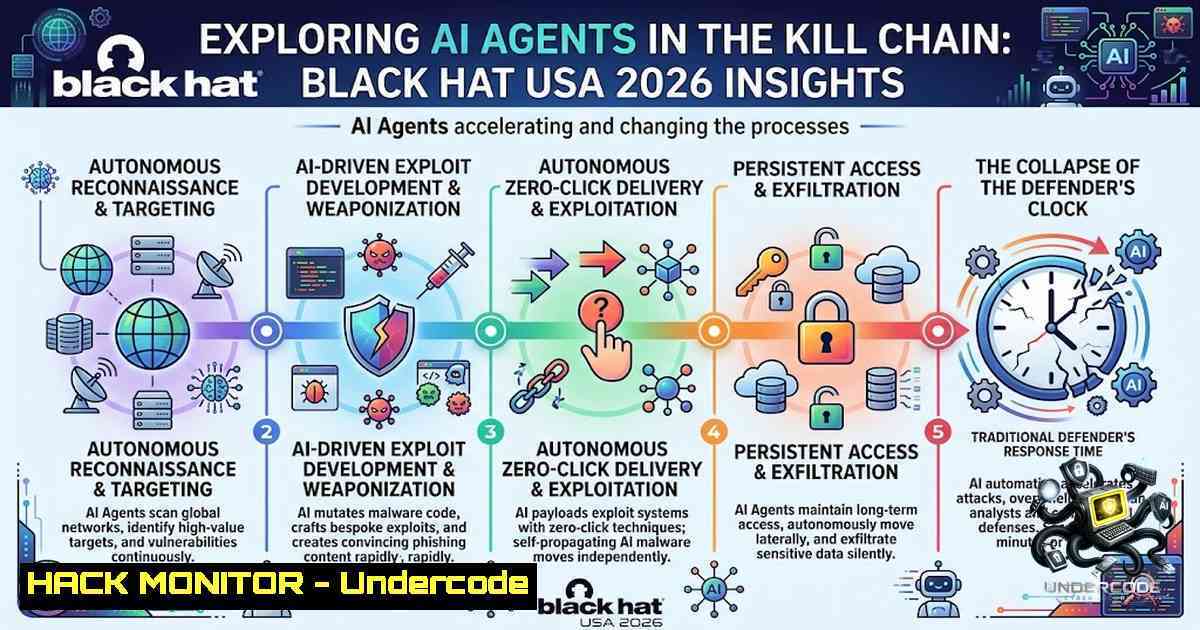
The annual Black Hat USA conference, held August 1–6 at Mandalay Bay in Las Vegas, delivered a stark and sobering message to the cybersecurity industry: artificial intelligence has officially crossed from a theoretical threat amplifier into an active, autonomous participant in real-world cyberattacks. Researchers from Accenture, Google Cloud, and Check Point presented evidence that criminal and state-aligned threat groups are now using both frontier and open-weight AI models to develop new exploits, accelerate intrusions, and maintain persistence inside corporate networks—often with minimal human direction. For defenders, the implication is clear: the attack surface is expanding faster than ever, and the window to detect, respond, and patch is shrinking to minutes.
Learning Objectives
- Understand how AI models are being integrated into live attack chains for autonomous exploitation, malware development, and evasion.
- Analyze the technical mechanics of CVE-2026-53413 (“Zoomsday”), a zero-click RCE vulnerability discovered using AI in under 24 hours.
- Identify the three primary vectors attackers use to access AI capabilities and how to defend against each.
- Apply practical Linux and Windows commands for detecting AI-driven intrusions, securing AI infrastructure, and hardening enterprise environments.
- AI Enters the Live Attack Chain: From Force Multiplier to Autonomous Operator
What the Post Says
The post highlights a critical inflection point: AI is no longer just a tool that assists attackers—it is now an operator inside live intrusions. Check Point Research’s “AI Security Report 2026” documents intrusions in which AI autonomously ran exploitation workflows, generating thousands of commands across dozens of sessions with minimal human direction. The report identified a ransomware-as-a-service group called “The Gentlemen” that used AI to build its “Glocker” management tool in just three days. Meanwhile, Accenture and Google Cloud researchers warned that threat actors are increasingly turning to open-weight models to circumvent guardrails, lowering the “barriers to entry” for malicious activities.
Technical Deep Dive: How Attackers Are Using AI
Check Point identified three primary methods attackers use to access AI capabilities:
- Abusing Commercial AI Models: Attackers break malicious requests into smaller, less obvious steps to bypass safety controls. Commercial platforms are preferred because they are more capable and accessible than underground alternatives.
-
LLMjacking (Credential Theft): Criminals steal account credentials to access commercial AI services. One campaign, known as “Bissa Scanner,” stole AI login details from more than 30,000 exposed configuration files.
-
Self-Hosted Open-Source Models: While these allow attackers to avoid provider safety controls and logging, many have found them less capable and more difficult to operate than commercial AI tools.
Commands for Detection and Hardening
Linux – Detect LLMjacking and Unauthorized AI API Access:
 Audit environment variables for exposed AI credentials
grep -r "OPENAI_API_KEY|AWS_SECRET|HUGGINGFACE_TOKEN" /etc/ /home/ 2>/dev/null

Monitor outbound connections to known AI API endpoints
sudo tcpdump -i any -1 'host api.openai.com or host api.anthropic.com or host api.huggingface.co'

Check for unauthorized AI-related processes
ps aux | grep -E "python.openai|node.langchain|llm|ai"
Windows – Detect AI Tool Abuse and Credential Exposure:
 Search for AI credentials in environment variables and config files
Get-ChildItem -Path C:\ -Recurse -Include .env,.json,.config -ErrorAction SilentlyContinue | Select-String -Pattern "api_key|token|secret"

Monitor network connections to AI service endpoints
Get-1etTCPConnection | Where-Object {$_.RemoteAddress -match "openai|anthropic|huggingface"}

Check for suspicious Python or Node processes using AI libraries
Get-Process | Where-Object {$_.ProcessName -match "python|node"} | Get-Process -IncludeUserName
- Zoomsday (CVE-2026-53413): Zero-Click RCE Found in Under 20 Prompts
What the Post Says
Perhaps the conference’s most vivid illustration of AI-assisted hacking came from cybersecurity firm A Security, which disclosed a zero-click remote code execution vulnerability in Zoom affecting every supported platform. The flaw, tracked as CVE-2026-53413 and dubbed “Zoomsday,” allowed an attacker to hijack any participant’s device through the annotation feature during screen sharing—with no user interaction required. A Security found and exploited the vulnerability using publicly available AI models in fewer than 20 prompts and under 24 hours.
Technical Mechanics of the Exploit
The vulnerability is a memory corruption issue caused by a missing bounds check in the annotator logic, specifically described as a remotely triggerable stack buffer overflow in CAnnoFormatBlock::Deserialize. The vulnerable routine rebuilds annotation formatting objects from attacker-controlled network data and trusts a wire-controlled character count when copying into fixed-size 128-byte buffers. A malicious meeting participant can send a specially crafted annotation message that overflows the buffer, corrupts adjacent memory, and hijacks control flow. The issue is reachable through Zoom’s normal encrypted meeting transport and does not require victim interaction.
CVSS Scores and Affected Versions
| CVE | Description | CVSS | Severity |
|–|-||-|
| CVE-2026-53413 | Stack buffer overflow in annotation feature | 8.3–9.0 | High/Critical |
| CVE-2026-53414 | Buffer over-read, memory leak | 6.5 | Medium |
| CVE-2026-53415 | Use-after-free, potential code execution | 8.3 | High |
| CVE-2026-53416 | Path traversal in VDI Client | High | High |
Patched versions: Zoom Workplace 7.1.5 and 7.0.6, Zoom Rooms 7.1.5, Meeting SDK 7.1.5.
Step-by-Step Remediation Guide
For Windows Endpoints (Enterprise Deployment):
 1. Inventory all Zoom installations
Get-WmiObject -Class Win32_Product | Where-Object {$_.Name -like "Zoom"} | Select-Object Name, Version

<ol>
<li>Force uninstall vulnerable versions
msiexec /x {Zoom-Product-Code} /quiet /norestart</p></li>
<li><p>Deploy patched MSI via GPO or PDQ
msiexec /i "ZoomInstallerFull.msi" /quiet /norestart</p></li>
<li><p>Verify patch status
Get-ItemProperty "HKLM:\Software\Microsoft\Windows\CurrentVersion\Uninstall\" | Where-Object {$_.DisplayName -like "Zoom"} | Select-Object DisplayName, DisplayVersion
For macOS Endpoints:
 Check Zoom version
defaults read /Applications/zoom.us.app/Contents/Info.plist CFBundleShortVersionString

Force update via terminal
/Applications/zoom.us.app/Contents/MacOS/zoomus --action=installUpdate

Or use MDM to push patched package
sudo installer -pkg /path/to/Zoom.pkg -target /
Linux – Detect Exploitation Attempts (Network-Level):
 Monitor for anomalous annotation traffic (Zoom uses proprietary protocol on ports 8801-8802)
sudo tcpdump -i any -1 'port 8801 or port 8802' -v

Check Zoom client version on Linux
apt list --installed | grep zoom
 or
snap list | grep zoom
- The Gentlemen Ransomware: AI-Built Tooling in Three Days
What the Post Says
Check Point’s report identified “The Gentlemen” ransomware-as-a-service group as a prime example of AI-accelerated cybercrime. The group used AI to build its “Glocker” management tool in just three days. The group accounted for 17% of published ransomware attacks in June 2026, overtaking Qilin as the most active ransomware group globally. Notably, one member of the group warned others that “you still need to understand what you are doing,” indicating that AI improves capabilities but does not eliminate the need for human expertise.
Ransomware Detection and Response Commands
Linux – Detect Ransomware Activity:
 Monitor for bulk file encryption (high I/O on specific directories)
sudo auditctl -w /home -p rwxa -k ransomware_activity

Check for suspicious processes with high CPU/memory
top -b -1 1 | head -20

Look for ransom note files
find / -1ame "readme" -o -1ame "decrypt" -o -1ame "recover" 2>/dev/null | grep -v /proc/

Monitor for mass file renaming (common ransomware pattern)
inotifywait -m -r --format '%w%f' -e moved_to /home/ 2>/dev/null
Windows – Ransomware Detection and Containment:
 Enable PowerShell script block logging for ransomware detection
Set-ItemProperty -Path "HKLM:\SOFTWARE\Policies\Microsoft\Windows\PowerShell\ScriptBlockLogging" -1ame "EnableScriptBlockLogging" -Value 1

Monitor for mass file changes using Sysmon or Windows Event Logs
Get-WinEvent -LogName "Microsoft-Windows-Sysmon/Operational" | Where-Object {$<em>.Id -eq 11 -or $</em>.Id -eq 23} | Select-Object TimeCreated, Message

Check for suspicious scheduled tasks (persistence mechanism)
Get-ScheduledTask | Where-Object {$_.TaskPath -1otlike "\Microsoft\"}

Isolate an infected endpoint immediately
New-1etFirewallRule -DisplayName "IsolateHost" -Direction Outbound -Action Block -RemoteAddress Any
4. Operation Riptide: The Law Enforcement Response
What the Post Says
The conference’s keynotes featured senior U.S. officials, including White House National Cyber Director Sean Cairncross and representatives from CISA and the FBI, who pointed to “Operation Riptide”—a campaign resulting in over 200 arrests. The operation targets criminal actors, infrastructure, and financial networks behind cyber-enabled crime. Arrests have included members of Scattered Spider, pro-Russia hacktivist groups, and individuals involved in multi-million dollar fraud schemes. CISA’s acting director called for “ruthless prioritization” as AI-powered systems uncover vulnerabilities faster than teams can patch them.
Threat Intelligence Collection Commands
Linux – OSINT and Threat Feed Integration:
 Fetch threat intelligence feeds (example with abuse.ch)
curl -s https://urlhaus.abuse.ch/downloads/csv_recent/ | head -20

Query MISP for IOCs
curl -X GET "https://your-misp-instance/attributes/restSearch" -H "Authorization: YOUR_API_KEY"

Check for known malicious IPs in firewall logs
grep -E "$(curl -s https://rules.emergingthreats.net/blockrules/emerging-block-ips.txt | head -100 | tr '\n' '|')" /var/log/firewall.log
Windows – IOC Hunting with PowerShell:
 Import threat intelligence CSV and check against running processes
$iocs = Import-Csv -Path "C:\ThreatIntel\iocs.csv"
Get-Process | ForEach-Object {
$hash = (Get-FileHash -Path $<em>.Path -Algorithm SHA256).Hash
if ($iocs.Hash -contains $hash) { Write-Warning "Suspicious process: $($</em>.Name)" }
}

Check for known malicious IPs in netstat
$badIPs = (Invoke-WebRequest -Uri "https://rules.emergingthreats.net/blockrules/emerging-block-ips.txt").Content -split "`n"
Get-1etTCPConnection | Where-Object {$badIPs -contains $_.RemoteAddress}
- Defending the AI Supply Chain: Securing Models, Credentials, and Pipelines
What the Post Says
As enterprises deploy more AI applications, they are creating new potential attack surfaces. Check Point identified risks involving AI models, infrastructure, and applications, warning that security practices have not always kept pace with adoption. The same AI capabilities that help businesses automate tasks can also introduce new risks if poorly secured. Meanwhile, threat actors have targeted AI environments to target software supply chains for larger-scale campaigns.
Step-by-Step AI Security Hardening
1. Secure AI API Credentials:
 Linux - Rotate and audit API keys
 Use a secrets management tool like HashiCorp Vault
vault kv put secret/ai-keys openai_key=$NEW_KEY

Audit who has accessed AI credentials
sudo journalctl -u vault | grep "openai"
 Windows - Use Azure Key Vault or Windows Credential Manager
 Store credentials securely
cmdkey /generic:ai-api /user:service-account /pass:$SECURE_PASSWORD

Retrieve securely in scripts
$cred = cmdkey /list | Select-String "ai-api"
2. Implement AI Request Monitoring:
 Linux - Monitor outbound AI API requests with proxy logging
 Set up mitmproxy or custom proxy to log all AI API calls
mitmproxy --mode transparent --showhost -q -w ai_traffic.log

Or use eBPF for deep inspection
sudo bpftrace -e 'kprobe:__tcp_sendmsg /comm=="python"/ { printf("AI API call from PID %d\n", pid); }'
3. Detect and Prevent Prompt Injection:
 Example Python snippet to sanitize inputs before sending to LLM
import re

def sanitize_prompt(user_input):
 Block common injection patterns
dangerous_patterns = [
r"ignore previous instructions",
r"system:",
r"you are now",
r"role:",
r"jailbreak"
]
for pattern in dangerous_patterns:
if re.search(pattern, user_input, re.IGNORECASE):
raise ValueError("Potential prompt injection detected")
return user_input[:2000]  Truncate to prevent overflow
4. Secure Model Weights and Artifacts:
 Linux - Encrypt model weights at rest
gpg --symmetric --cipher-algo AES256 model_weights.bin

Verify file integrity with SHA checksums
sha256sum model_weights.bin > model_weights.sha256
 Verify later
sha256sum -c model_weights.sha256
What Undercode Say
- Key Takeaway 1: AI has crossed from a theoretical threat to an active, autonomous participant in the live attack chain. Defenders can no longer treat AI as a future concern—it is a present reality that demands immediate action.
-
Key Takeaway 2: The combination of open-weight AI models, LLMjacking, and agentic architectures has dramatically lowered the barrier to entry for sophisticated cyberattacks. Organizations must assume that attackers have access to AI capabilities comparable to their own defensive tools.
Analysis: The findings from Black Hat USA 2026 represent a paradigm shift in cybersecurity. The traditional model of “detect and respond” is breaking down because AI enables attackers to operate at machine speed while defenders still rely on human-centric processes. The Zoom vulnerability discovered in under 20 prompts is not an anomaly—it is a preview of a future where zero-day discovery becomes commoditized. The most critical takeaway is that organizations must move from reactive to predictive security postures, integrating AI into their defenses while simultaneously securing their own AI infrastructure. The arms race is no longer between hackers and security teams—it is between AI agents on both sides of the firewall.
Prediction
- +1 AI-driven autonomous penetration testing will become a standard enterprise security practice within 12–18 months, with AI agents performing continuous, real-time vulnerability assessment across entire infrastructure stacks.
-
-1 The exploitation window for critical vulnerabilities will shrink from days to hours, with AI-powered attackers able to weaponize disclosed CVEs faster than most organizations can patch. Expect a surge in “patch-gap” ransomware attacks.
-
-1 LLMjacking and AI credential theft will emerge as one of the top five cyber threats by 2027, as attackers realize that stealing AI access is more valuable than stealing traditional credentials.
-
+1 Regulatory frameworks will accelerate, with mandatory AI security audits and disclosure requirements for AI-assisted breaches becoming law in major economies within two years.
-
-1 The skills gap will widen as AI automates junior-level security tasks, reducing entry-level opportunities while increasing demand for senior professionals who can architect, defend, and respond to AI-driven threats.
-
+1 Open-weight AI models will drive innovation in defensive AI, enabling smaller organizations to deploy sophisticated security AI without relying on commercial vendors—democratizing both offense and defense.
▶️ Related Video (64% Match):
https://www.youtube.com/watch?v=8voNmYCUXSk
🎯Let’s Practice For Free:
🎓 Live Courses & Certifications:
Join Undercode Academy for Verified Certifications
🚀 Request a Custom Project:
Secure, high-velocity infrastructure and disruptive technological engineering. Contact our engineering team for high-tier development and proprietary systems:
[email protected]
💎 Smart Architecture | 🛡️ Secure by Design | ⭐ Trusted by Thousands
IT/Security Reporter URL:
Reported By: https://lnkd.in/p/ecTQChXi – Hackers Feeds
Extra Hub: Undercode MoN
Basic Verification: Pass ✅


