Listen to this Post
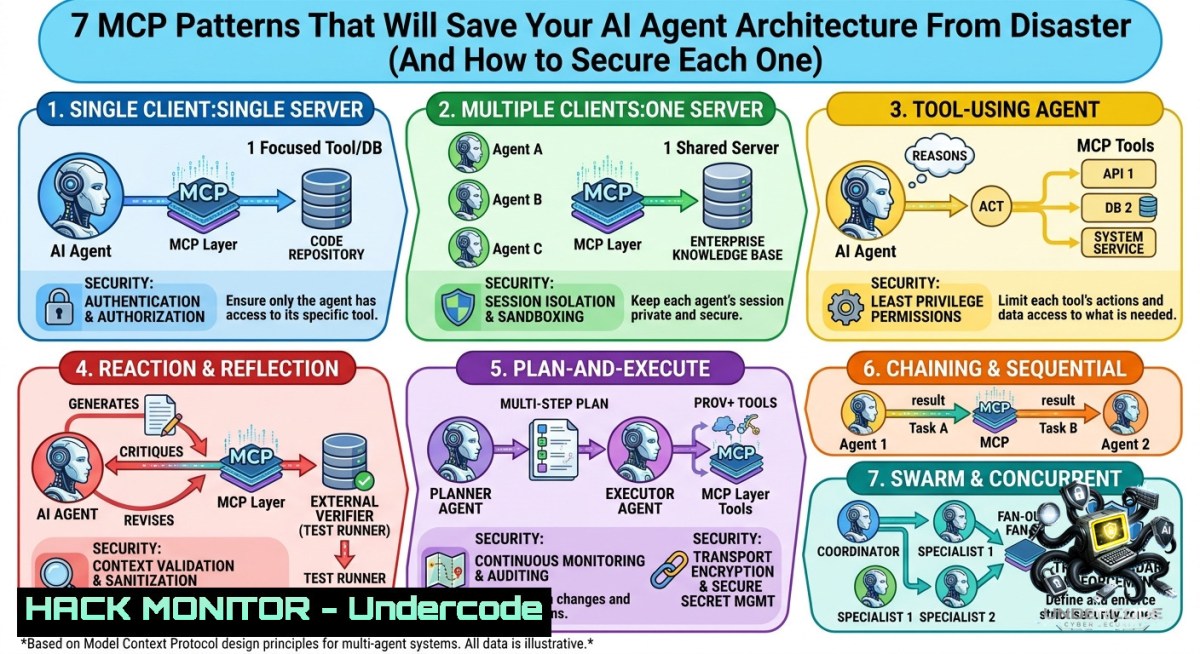
Introduction:
Model Context Protocol (MCP) defines how AI agents interact with external tools, data sources, and execution environments. Without a structured approach, agents become security nightmares—leaking context, executing arbitrary code, or losing session integrity. These seven MCP patterns, from Tool Specialist to Autonomous Reasoner, provide a blueprint for building resilient, auditable, and secure agentic systems.
Learning Objectives:
– Implement each MCP pattern with production‑ready security controls (sandboxing, authentication, session persistence)
– Harden API gateways and cloud deployments against common agent‑related vulnerabilities (injection, privilege escalation)
– Automate workflow coordination and context management using Linux/Windows commands, Docker, and Redis
You Should Know:
1. Tool Specialist – Dedicated Integration That Won’t Cross‑Contaminate
The Tool Specialist pattern binds one MCP server to exactly one external tool (e.g., GitHub API, Slack bot). This isolation prevents a compromised tool from affecting others and simplifies updates.
Step‑by‑step guide – secure setup:
– Linux: Run each MCP server in its own systemd service with `PrivateTmp=true`, `NoNewPrivileges=true`, and a dedicated low‑privileged user.
sudo useradd -r -s /bin/false mcptool
 Create service file /etc/systemd/system/mcp-github.service
[bash]
User=mcptool
PrivateTmp=yes
NoNewPrivileges=yes
ExecStart=/usr/local/bin/mcp-server --tool github
– Windows: Use a separate Windows Service account and apply AppLocker or WDAC (Windows Defender Application Control) to restrict executable paths.
– Hardening: Enforce API key rotation via HashiCorp Vault; never store secrets in environment variables of the MCP server.
– Vulnerability mitigation: Prevent tool‑to‑tool pivoting by network‑isolating each server – use `iptables` or Azure NSG rules that allow outbound only to the tool’s API endpoint.
2. Context Giver – Supply Knowledge Without Action Privileges
This pattern attaches documents, databases, or vector stores to an agent without granting write/modify capabilities. It powers RAG (Retrieval‑Augmented Generation) securely.
Step‑by‑step guide – read‑only context injection:
– Use a read‑only database user for PostgreSQL (or any SQL DB):
CREATE USER mcp_reader WITH PASSWORD 'strong_pwd';
GRANT CONNECT ON DATABASE knowledge_db TO mcp_reader;
GRANT USAGE ON SCHEMA public TO mcp_reader;
GRANT SELECT ON ALL TABLES IN SCHEMA public TO mcp_reader;
– For files: mount a volume as `ro` in Docker:
docker run -v /data/corp_docs:/docs:ro mcp-context-server
– Windows equivalent: Use `icacls` to set read‑only permission for the service account:
icacls C:\ContextData /grant "mcp_svc:(R)"
– Security note: Always sanitize context output – strip any embedded macros or scripts before feeding to the LLM to prevent prompt injection.
3. Unified Gateway – Centralize Authentication and Routing
A single entry point for multiple MCP servers handles authentication, rate limiting, and request routing. This is your API security frontline.
Step‑by‑step guide – NGINX as MCP gateway with OAuth2 Proxy:
– Install OAuth2 Proxy and configure it to validate JWT tokens from your identity provider (Okta, Azure AD).
– Sample NGINX location block for routing:
location /mcp/tool/ {
proxy_pass http://127.0.0.1:8081/;
auth_request /oauth2/auth;
error_page 401 = /oauth2/sign_in;
}
location /mcp/context/ {
proxy_pass http://127.0.0.1:8082/;
auth_request /oauth2/auth;
}
– Cloud hardening: Deploy the gateway inside a private subnet with AWS WAF or Azure Front Door to block SQLi and XSS attempts.
– Audit trail: Log all requests (method, user, tool, timestamp) to a SIEM like Splunk or ELK.
4. Persistent Session Manager – Stateful Conversations Without Leakage
Maintain context across multiple agent interactions while isolating sessions from each other. Store session state in a secure key‑value store with TTL.
Step‑by‑step guide – Redis with encrypted session data:
– Install Redis and enable TLS (versions 6+):
 Generate certs, then in redis.conf
tls-port 6379
tls-cert-file /etc/redis/redis.crt
tls-key-file /etc/redis/redis.key
– From the MCP server (Python example with `redis-py`):
import redis
r = redis.Redis(host='localhost', port=6379, ssl=True)
session_id = "user:1234:session"
r.setex(session_id, 3600, "context_json_encrypted")
– Linux command to monitor active sessions:
redis-cli --tls --cert client.crt --key client.key KEYS "user::session" | wc -l
– Risk mitigation: Encrypt session payloads before storage – use `openssl enc -aes-256-gcm` or a library like `cryptography`. Never store raw conversation logs with PII.
5. Sandboxed Keeper – Isolated Code Execution Environment
Run untrusted code (e.g., generated by an agent) inside a sandbox to protect the host system. This is critical for autonomous agents that may produce malicious commands.
Step‑by‑step guide – Docker + nsjail on Linux:
– Use a minimal Docker image with only the necessary interpreter (Python, Node.js).
– Run with restrictive seccomp and read‑only root:
docker run --rm --read-only --tmpfs /tmp:rw,noexec,nosuid,size=64m \
--cap-drop=ALL --security-opt=no-1ew-privileges:true \
python:3.11-slim python -c "print('safe execution')"
– For even stronger isolation, use `nsjail` (Google’s tool):
nsjail --mode o --chroot /sandbox/root/ --user 9999 --group 9999 \
--time_limit 5 --rlimit_as 512 --rlimit_cpu 2 -- \
/usr/bin/python3 user_script.py
– Windows Sandbox alternative: Use Windows Sandbox with a custom `.wsb` configuration that disables networking and maps a read‑only folder.
– Vulnerability mitigation: Prevent fork bombs and memory exhaustion by setting ulimits (`–ulimit nproc=10:10` in Docker).
6. Workflow Coordinator – Multi‑Step Automation With Error Handling
Orchestrate complex sequences (e.g., user onboarding: create account → assign role → send email) across multiple MCP servers. The coordinator must handle retries, dead‑letter queues, and idempotency.
Step‑by‑step guide – Temporal.io or simple Bash + jq:
– Define a workflow in YAML (example using a lightweight coordinator like n8n or custom Python).
– For a Linux/Bash script that coordinates two MCP tools:
!/bin/bash
step1=$(curl -s -X POST http://mcp-gateway/tool/user/create -d '{"name":"john"}' | jq -r '.user_id')
if [ -z "$step1" ]; then
echo "Step1 failed" >> /var/log/mcp_errors.log
exit 1
fi
step2=$(curl -s -X POST http://mcp-gateway/tool/role/assign -d "{\"user_id\":\"$step1\",\"role\":\"viewer\"}")
 Idempotency: store completed steps in Redis
redis-cli SET "workflow:${step1}:step2" "done"
– Security: Implement mutual TLS (mTLS) between the coordinator and each MCP tool to prevent request forgery.
– Resilience: Use a dead‑letter queue (RabbitMQ or Azure Queue) for failed steps and set up alerts on error spikes.
7. Autonomous Reasoner – Self‑Directed Agent With Guardrails
This pattern lets the agent plan, execute actions, and evaluate results independently. It requires the strongest safeguards – think constraint validation, human‑in‑the‑loop for sensitive actions, and budget limits.
Step‑by‑step guide – building a guarded reasoner with LangChain / Semantic Kernel:
– Define a “plan and execute” loop with maximum iterations (e.g., 10 steps).
– Inject a security validator between each tool call:
def validate_action(action, params):
deny_patterns = ["DROP TABLE", "rm -rf", "DELETE FROM", "Format C:"]
if any(pattern in str(params).lower() for pattern in deny_patterns):
return False, "Blocked dangerous action"
return True, "ok"
– Linux monitoring: Use auditd to log every command executed by the agent’s sandbox:
auditctl -a always,exit -F uid=9999 -S execve -k agent_actions
– Cost control: Set a token or API call budget; if exceeded, force the agent into a “safe state” that only allows read‑only context retrieval.
– Windows PowerShell equivalent: Enable Script Block Logging and send events to Windows Event Forwarding for real‑time analysis.
What Undercode Say:
– Key Takeaway 1: MCP patterns are not just architectural guidelines – they are security boundaries. Mixing Tool Specialist with Workflow Coordinator without proper authentication leads to privilege escalation. Always enforce least privilege per pattern.
– Key Takeaway 2: Sandboxed Keeper and Persistent Session Manager are the two most critical patterns for production AI agents. Without them, you risk session hijacking and remote code execution. Combine Docker sandboxes with encrypted Redis sessions for defense in depth.
Analysis (~10 lines):
The post correctly identifies that beginners struggle with MCP because they treat it as a monolithic integration. By breaking down the seven patterns, it reveals how to isolate failure domains and enforce access control. In practice, most security incidents involving AI agents stem from missing a context giver (leading to prompt injection) or using an uncoordinated workflow (leading to partial state leaks). Organizations should start with Tool Specialist and Sandboxed Keeper, then incrementally add Unified Gateway and Persistent Session Manager. The Autonomous Reasoner pattern is the most dangerous if deployed without human‑in‑the‑loop – it demands extra vigilance. The industry is moving toward “policy as code” for MCP, where each pattern’s security posture is declared in a rego file (Open Policy Agent). Expect SOC 2 and ISO 42001 (AI management systems) to require explicit mapping of MCP patterns in audit reports within two years.
Prediction:
– +1 MCP patterns will become a formal standard under the Cloud Native Computing Foundation (CNCF) by 2027, leading to certified reference implementations and security benchmarks.
– +1 Adoption of Sandboxed Keeper will drastically reduce supply‑chain attacks from compromised AI plugins, as sandboxing becomes a default requirement in enterprise agent platforms.
– -1 The Autonomous Reasoner pattern, without mandatory human‑approval gates, will cause at least three major data breaches in 2026–2027 due to agents autonomously executing destructive commands in production.
– -1 Organisations that mix Context Giver with Tool Specialist (by accidentally granting write access to knowledge bases) will face massive data leakage, as LLMs can be tricked into revealing and deleting documents.
▶️ Related Video (72% Match):
🎯Let’s Practice For Free:
🎓 Live Courses & Certifications:
[Join Undercode Academy for Verified Certifications](https://undercode.co.uk/certifications/)
🚀 Request a Custom Project:
Secure, high-velocity infrastructure and disruptive technological engineering. Contact our engineering team for high-tier development and proprietary systems:
[[email protected]](mailto:[email protected])
💎 Smart Architecture | 🛡️ Secure by Design | ⭐ Trusted by Thousands
IT/Security Reporter URL:
Reported By: [Thescholarbaniya Most](https://www.linkedin.com/posts/thescholarbaniya_most-beginners-struggle-to-learn-mcp-properly-share-7467670510278119424-dPyk/) – Hackers Feeds
Extra Hub: Undercode MoN
Basic Verification: Pass ✅
🔐JOIN OUR CYBER WORLD [ CVE News • HackMonitor • UndercodeNews ]
[💬 Whatsapp](https://undercode.help/whatsapp) | [💬 Telegram](https://t.me/UndercodeCommunity)
📢 Follow UndercodeTesting & Stay Tuned:
[𝕏 formerly Twitter 🐦](https://x.com/undercodeupdate) | [@ Threads](https://www.threads.net/@undercodetesting) | [🔗 Linkedin](https://www.linkedin.com/company/undercodetesting/) | [🦋BlueSky](https://bsky.app/profile/undercode.bsky.social)


