
Listen to this Post
Introduction:
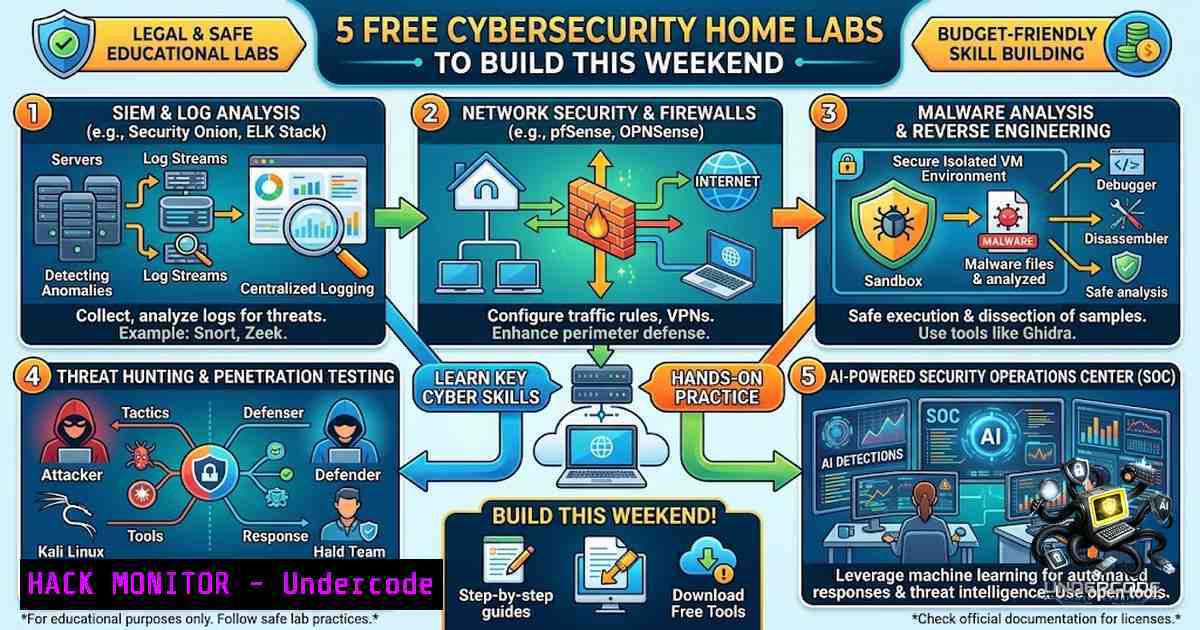
The gap between theoretical cybersecurity knowledge and practical, job-ready skills has never been wider. Employers consistently rank hands-on experience as the most critical factor in hiring decisions, yet traditional education pathways often leave aspiring professionals without access to enterprise-grade security tools. Home labs bridge this divide by providing safe, sandboxed environments where anyone can deploy SIEM solutions, configure web application firewalls, and even build AI-powered Security Operations Centers (SOCs) — all using free tools and open-source technologies. This weekend, five structured labs offer a direct path from beginner to competent practitioner, covering everything from log analysis with Wazuh to Android penetration testing, with each lab including step-by-step PDF guides to eliminate guesswork.
Learning Objectives & Secrets:
- Objective 1: Deploy a Production-Grade SIEM and XDR Solution – Master the complete installation of Wazuh Manager, agents, and file integrity monitoring (FIM) from scratch using VirtualBox and Ubuntu. The secret: configure real-time alerting by modifying agent configurations in `/var/ossec/etc/ossec.conf` to detect unauthorized file changes within seconds.
-
Objective 2 Secret Tip: Build a Web Application Firewall (WAF) with TLS Encryption – Deploy SafeLine WAF in reverse proxy mode between Kali Linux attackers and an Ubuntu Apache web server. The secret: generate self-signed certificates with OpenSSL (
sudo openssl req -x509 -1odes -days 365 -1ewkey rsa:2048 -keyout /etc/ssl/private/apache-selfsigned.key -out /etc/ssl/certs/apache-selfsigned.crt) and configure the WAF to block SQL injection and XSS payloads in real time. -
Objective 3 Secret Tip: Integrate AI into Your Home SOC – Combine Wazuh, Grafana, NetAlertX, and an AI agent (GPT-5 Nano) on a Zima Cube 2 server. The secret: use Docker to deploy NetAlertX with host network mode (
docker run -d --1etwork=host --cap-add=NET_RAW --cap-add=NET_ADMIN), then configure Grafana to visualize network device metrics alongside Wazuh security alerts in a unified dashboard.
You Should Know:
1. SIEM Deployment & Log Analysis with Wazuh
Wazuh provides a fully open-source SIEM and XDR platform that detects threats, monitors file integrity, and correlates security events across multiple endpoints. This lab walks you through setting up a Wazuh manager on Ubuntu within VirtualBox, installing agents on target systems, and configuring file integrity monitoring (FIM) to track critical system directories.
Step-by-Step Guide:
Step 1: Set Up Virtual Machine – Create an Ubuntu VM in VirtualBox with at least 4GB RAM and 20GB storage. Update the system: sudo apt update && sudo apt upgrade -y.
Step 2: Install Wazuh Manager – Download and run the official installer: curl -sO https://packages.wazuh.com/4.12/wazuh-install.sh && sudo bash ./wazuh-install.sh -a. This automatically configures the Wazuh indexer, server, and dashboard.
Step 3: Access Wazuh Dashboard – After installation, retrieve the admin password from the installation output and access the dashboard at https://<your-vm-ip>.
Step 4: Install Wazuh Agent on a Target – On a separate VM (Windows or Linux), run: curl -s https://packages.wazuh.com/key/GPG-KEY-WAZUH | sudo gpg --import, then install the agent package and configure it to connect to your manager IP.
Step 5: Configure File Integrity Monitoring – Edit the agent configuration file `/var/ossec/etc/ossec.conf` and add the following within the `
<directories whodata="yes" report_changes="yes" check_all="yes" restrict="\.conf$|\.yml$">/etc</directories>
<directories realtime="yes" check_all="yes">/root/health_data</directories>
Step 6: Restart the Agent – `sudo systemctl restart wazuh-agent` and monitor the dashboard for file change alerts.
2. Web Application Firewall (WAF) Deployment with SafeLine
SafeLine is a community WAF that protects web applications from OWASP Top 10 attacks. This lab deploys SafeLine in front of an Apache web server, with Kali Linux acting as the attacker to test WAF effectiveness.
Step-by-Step Guide:
Step 1: Set Up Ubuntu Web Server – Install Apache: sudo apt install apache2 -y. Create a test website and enable it.
Step 2: Generate Self-Signed SSL Certificate – Use OpenSSL to create a certificate for HTTPS: sudo openssl req -x509 -1odes -days 365 -1ewkey rsa:2048 -keyout /etc/ssl/private/apache-selfsigned.key -out /etc/ssl/certs/apache-selfsigned.crt.
Step 3: Configure Apache for HTTPS – Edit `/etc/apache2/sites-available/default-ssl.conf` and add: SSLEngine on, SSLCertificateFile /etc/ssl/certs/apache-selfsigned.crt, and SSLCertificateKeyFile /etc/ssl/private/apache-selfsigned.key. Enable SSL: `sudo a2enmod ssl` and sudo a2ensite default-ssl.conf, then restart Apache.
Step 4: Deploy SafeLine WAF – Run the automatic deployment script on the Ubuntu server: sudo bash -c "$(curl -fsSLk https://waf.chaitin.com/release/latest/manager.sh)". This installs all dependencies, sets up Docker Compose, and initializes the WAF environment.
Step 5: Configure SafeLine as Reverse Proxy – Access the SafeLine web interface at `https://
Step 6: Test from Kali Linux – From your Kali VM, attempt SQL injection against the protected web application using sqlmap -u "http://<ubuntu-ip>/vulnerable.php?id=1". Observe SafeLine blocking the attack and logging the event in its dashboard.
- AI-Powered Home SOC with Wazuh, Grafana, and NetAlertX
This beginner-friendly lab builds a complete SOC stack with AI integration, using Wazuh for security monitoring, NetAlertX for network device discovery, Grafana for visualization, and an AI agent for alert summarization.
Step-by-Step Guide:
Step 1: Deploy NetAlertX in Docker – On your central server (Zima Cube 2 or Ubuntu), clone the repository and start the container: git clone https://github.com/netalertx/NetAlertX.git && cd NetAlertX && docker compose up --force-recreate --build. NetAlertX scans your home network and identifies all connected devices.
Step 2: Configure NetAlertX – Set `SCAN_SUBNETS` environment variable to your network range (e.g., 192.168.1.0/24) and restart the container.
Step 3: Set Up Wazuh – Follow the SIEM deployment steps above to install Wazuh on the same server.
Step 4: Install Grafana – Add the Grafana repository and install: sudo apt-get install -y grafana. Start the service: sudo systemctl enable grafana-server && sudo systemctl start grafana-server.
Step 5: Connect Data Sources – In Grafana, add Wazuh and NetAlertX as data sources using their respective APIs. Import pre-built dashboards to visualize security alerts alongside network topology.
Step 6: Integrate AI Agent – Deploy a lightweight AI agent (GPT-5 Nano) to analyze incoming alerts. Configure the agent to query Wazuh alerts via API, summarize the top threats, and post summaries to a dedicated dashboard channel. This automation reduces Mean Time to Detect (MTTD) by handling Level 1 SOC analyst triage tasks.
4. SOC Analyst AI Agent Home Lab
This project builds an automated threat detection system using two VMs: one attacker and one internal server running a Python script to detect malicious IPs, paired with an AI agent (GPT-5 Nano) that acts as a Junior SOC analyst.
Step-by-Step Guide:
Step 1: Set Up Internal Server VM – Install Ubuntu and create a Python script that monitors `/var/log/auth.log` for failed SSH attempts, extracts source IPs, and checks them against threat intelligence feeds (e.g., AbuseIPDB).
Step 2: Build the AI Agent – Use GPT-5 Nano with a SOC playbook prompt. The agent receives alerts from the Python script and performs actions such as: querying IP reputation, escalating critical alerts, and generating incident reports.
Step 3: Deploy Attacker VM – Use Kali Linux to simulate brute-force attacks against the internal server SSH service: hydra -l root -P /usr/share/wordlists/rockyou.txt ssh://<internal-server-ip>.
Step 4: Automate Response – Configure the Python script to trigger the AI agent via API when malicious IPs are detected. The agent evaluates the severity and executes predefined SOC playbook steps.
Step 5: Visualize Results – Log all detections and AI responses to a central dashboard for review.
5. Build Your Own Android Hacking Lab
This lab provides a safe, sandboxed environment for learning Android security testing using free, open-source tools — no root or paid software required.
Step-by-Step Guide:
Step 1: Set Up Android Emulator – Install Android Studio and create an emulator running a recent Android version. Enable developer options and USB debugging.
Step 2: Install Termux on Android – Termux provides a Linux environment on Android. Install it via F-Droid and update packages: pkg update && pkg upgrade.
Step 3: Deploy Penetration Testing Tools – Within Termux, install tools like Nmap, Metasploit, and custom scripts. For example, PF15 (penetrate-fast_15) enables advanced packet crafting without root access.
Step 4: Set Up Proxy for Traffic Analysis – Configure Burp Suite or OWASP ZAP as a man-in-the-middle proxy on your host machine. Point the Android emulator’s network settings to use the proxy and intercept all app traffic.
Step 5: Perform Static and Dynamic Analysis – Use Jadx to decompile APK files to Java source code. Use Frida for runtime instrumentation to bypass SSL pinning and inspect encrypted traffic. Decompile and analyze the target application’s binaries.
Step 6: Practice Ethical Hacking – Simulate real-world attacks on deliberately vulnerable Android apps within your isolated lab environment. Document vulnerabilities, exploit vectors, and remediation steps.
What Undercode Say:
- Key Takeaway 1: Hands-on experience trumps certifications. Recruiters prioritize candidates who can demonstrate practical skills. Completing these five labs provides tangible, resume-ready projects that showcase SIEM deployment, WAF configuration, AI integration, and penetration testing capabilities — all within a single weekend.
-
Key Takeaway 2: AI is reshaping SOC operations, not replacing analysts. The integration of GPT-5 Nano and similar lightweight models into home labs demonstrates how AI handles repetitive triage tasks, allowing human analysts to focus on complex threat hunting and incident response. Understanding this synergy positions you ahead of the curve in the evolving cybersecurity job market.
-
Key Takeaway 3: Home labs democratize access to enterprise security tools. With open-source technologies like Wazuh, SafeLine, and Grafana, anyone can build a professional-grade security environment without costly licenses. The barrier to entry has never been lower — the only requirement is curiosity and the willingness to learn by doing.
-
Key Takeaway 4: Network visibility is foundational to security. Deploying NetAlertX reveals the true extent of devices on your home network, many of which may be unknown or unmanaged. This visibility is the first step toward effective threat detection and incident response.
-
Key Takeaway 5: Android security is an underserved skill. As mobile devices become primary targets for attackers, expertise in Android penetration testing is increasingly valuable. This lab provides a safe entry point into mobile security without requiring expensive hardware or commercial tools.
Prediction:
-
+1 The democratization of AI-powered security tools will accelerate the adoption of autonomous SOC agents in mid-sized enterprises, reducing reliance on expensive managed security service providers and creating new roles for analysts who can configure and oversee AI systems.
-
+1 Home lab proficiency will become a standard filter in cybersecurity hiring pipelines, with employers increasingly asking candidates to demonstrate lab projects during interviews rather than relying solely on certification credentials.
-
-1 The proliferation of accessible, open-source security tools may lead to an increase in unsophisticated attackers using these same resources for malicious purposes, highlighting the need for organizations to adopt defense-in-depth strategies that assume breach.
-
+1 As AI models like GPT-5 Nano become cheaper and more capable (costing as little as $0.00026 per alert triage), even small security teams will deploy AI agents for 24/7 alert monitoring, significantly reducing Mean Time to Respond (MTTR) and improving overall security posture.
-
-1 The complexity of integrating multiple open-source tools (Wazuh, Grafana, NetAlertX, AI agents) may create operational overhead for organizations without dedicated security engineers, potentially leading to misconfigurations and false sense of security.
🎯Let’s Practice For Free:
🎓 Live Courses & Certifications:
Join Undercode Academy for Verified Certifications
🚀 Request a Custom Project:
Secure, high-velocity infrastructure and disruptive technological engineering. Contact our engineering team for high-tier development and proprietary systems:
[email protected]
💎 Smart Architecture | 🛡️ Secure by Design | ⭐ Trusted by Thousands
IT/Security Reporter URL:
Reported By: https://lnkd.in/p/efvJrkgJ – Hackers Feeds
Extra Hub: Undercode MoN
Basic Verification: Pass ✅


