
Listen to this Post
Introduction:
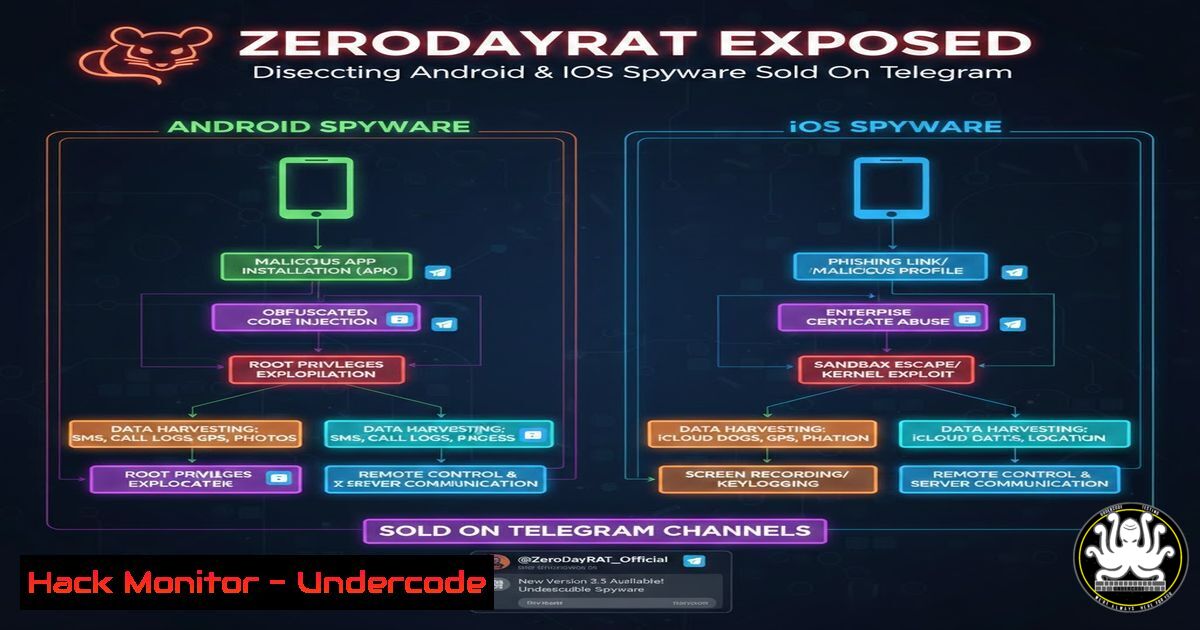
The mobile threat landscape has evolved from amateur malware to sophisticated commercial surveillance tools. Recently, researchers uncovered ZeroDayRAT, a troubling commercial spyware operation openly sold on Telegram channels, targeting both Android and iOS devices. This malware transforms compromised smartphones into comprehensive surveillance nodes, capable of streaming live camera feeds, capturing audio, exfiltrating SMS and OTPs, and even hijacking cryptocurrency wallets via a self-hosted command-and-control panel.
Learning Objectives:
- Understand the architecture and core capabilities of the ZeroDayRAT mobile spyware.
- Analyze the specific permissions and indicators of compromise (IoCs) associated with the malware.
- Implement defensive measures and detection techniques for both Android and iOS platforms.
1. Threat Modeling: Understanding the ZeroDayRAT Architecture
ZeroDayRAT operates on a client-server model. The “clients” are the infected mobile devices (Android and iOS), while the “server” is a self-hosted control panel purchased by the attacker. This setup allows the threat actor to manage multiple compromised devices from a centralized dashboard.
The malware’s primary functionalities include:
- Real-time Surveillance: Accessing the front and back cameras, and recording microphone audio.
- Geolocation Tracking: Continuously monitoring the device’s GPS coordinates.
- Data Exfiltration: Stealing SMS messages and intercepting OTP texts, which can be used to bypass two-factor authentication.
- Financial Theft: Targeting cryptocurrency wallet applications and data.
2. Android Analysis: Decoding the APK Manifest
To understand how ZeroDayRAT operates on Android, we must first look at the permissions it requests in its `AndroidManifest.xml` file. These permissions are the gateway to the device’s sensors and data.
Step-by-step guide to analyzing a suspected APK:
- Decompile the APK: Use `apktool` or `jadx-gui` to decompile the application.
Using apktool to decode resources
apktool d suspected_malware.apk

Using jadx-gui for a more readable Java source code
jadx-gui suspected_malware.apk
-
Inspect the Manifest: Navigate to the decoded files and open
AndroidManifest.xml. Look for a cluster of dangerous permissions that are unusual for the app’s purported function.<!-- Suspicious permissions to look for --> <uses-permission android:name="android.permission.CAMERA" /> <uses-permission android:name="android.permission.RECORD_AUDIO" /> <uses-permission android:name="android.permission.ACCESS_FINE_LOCATION" /> <uses-permission android:name="android.permission.READ_SMS" /> <uses-permission android:name="android.permission.RECEIVE_SMS" />
ZeroDayRAT specifically requires these permissions to function. A legitimate calculator app, for instance, should never request camera or SMS permissions.
3. iOS Analysis: Examining Configuration Profiles
On iOS, due to stricter sandboxing, spyware like ZeroDayRAT often relies on tricking users into installing a malicious Mobile Device Management (MDM) profile or an enterprise-signed application. This profile can configure the device to route traffic through a proxy or trust a malicious root certificate, enabling the spyware to bypass security controls.
Step-by-step guide to checking for malicious profiles:
- On the iOS Device: Go to Settings -> General -> VPN & Device Management.
- Check for Profiles: If you see a profile you did not intentionally install (especially from an unknown developer), tap on it.
3. Analyze the Details:
- Look for installed certificates under “Certificate Trust Settings.”
- Check if the profile enables full network traffic inspection or forces proxy settings. These are major red flags.
4. Network Forensics: Detecting C2 Communication
Once installed, ZeroDayRAT phones home to its self-hosted command-and-control (C2) panel. Analyzing network traffic is crucial for detection.
Step-by-step guide using `tcpdump` and Wireshark:
- Capture Traffic on the Local Network: If you are analyzing a test device, capture its traffic.
On a Linux machine acting as a gateway or on the same network segment
sudo tcpdump -i eth0 -w zerodayrat_capture.pcap host <IP_OF_TEST_DEVICE>
-
Analyze with Wireshark: Open the `.pcap` file in Wireshark.
– Use the filter `http.request or tls.handshake.type == 1` to see initial connections.
– Look for connections to suspicious domains or IP addresses that are not associated with common cloud services.
– ZeroDayRAT’s panel is “self-hosted,” meaning the C2 IP might be a dedicated server or a VPS. Check for unusual periodic beaconing (e.g., a connection every 30 seconds).
- Check DNS Queries: Malware often queries unique domains. Use the filter `dns.qry.name` in Wireshark to see all DNS lookups performed by the device. Look for long, random-looking subdomains which can be used for data exfiltration.
5. Endpoint Detection: Identifying IoCs on Android
On a potentially infected Android device, you can use command-line tools via ADB (Android Debug Bridge) to hunt for indicators of compromise.
Step-by-step guide using ADB:
1. Connect to the Device:
adb devices
adb shell
- List Running Services: Check for suspicious processes running in the background.
ps -A | grep -i "malware|rat|hidden"
-
Check for Unusual Admin Privileges: ZeroDayRAT might try to gain device admin privileges to persist.
dumpsys device_policy
This command lists all active device admin apps. Any app with this privilege that isn’t a known security or find-my-device tool is highly suspect.
4. Inspect Installed Packages: List all third-party applications.
pm list packages -3
Compare this list against the user’s known apps. Look for apps with generic names like “System Service,” “Update,” or “Battery Saver” that have no icon in the app drawer.
6. Mitigation: Hardening Android and iOS Against Spyware
Prevention is better than cure. Here are steps to hardendevices against threats like ZeroDayRAT.
On Android:
- Disable “Install from Unknown Apps”: Go to Settings -> Apps -> Special app access -> Install unknown apps. Ensure this permission is revoked for all browsers and messaging apps.
- Review App Permissions: Regularly audit app permissions in Settings -> Privacy -> Permission manager. Revoke permissions for apps that don’t need them (e.g., revoke camera access for a flashlight app).
On iOS:
- Avoid Unofficial Profiles: Never install configuration profiles from untrusted sources (links in emails, texts, or social media).
- Check Certificate Settings: Go to Settings -> General -> About -> Certificate Trust Settings. Ensure no unfamiliar certificates are enabled.
7. Cryptocurrency Wallet Protection
ZeroDayRAT specifically targets wallet hijacking. This can be done by overlaying fake screens on top of legitimate wallet apps (on Android) or by stealing clipboard data and replacing copied wallet addresses with the attacker’s address during a transaction.
Command-line check for Clipboard Hijackers (Android):
 Monitor clipboard changes (requires root or a debug build)
adb shell settings list system | grep clipboard
While this specific command is limited, it highlights the importance of using dedicated hardware wallets or at least verifying the receiving address multiple times before finalizing a cryptocurrency transaction on a mobile device.
What Undercode Say:
- Key Takeaway 1: The sale of spyware on public platforms like Telegram democratizes cyber-surveillance, making advanced tools accessible to low-skill criminals, stalkers, and corporate spies.
- Key Takeaway 2: Mobile devices are now primary targets. The convergence of surveillance (camera/mic) and financial theft (wallet/OTP) in a single piece of malware represents a significant escalation in capability.
The discovery of ZeroDayRAT is a stark reminder that mobile operating systems, despite their security improvements, are vulnerable to socially engineered attacks. Users remain the weakest link, often granting excessive permissions to apps without scrutiny. For enterprises, the “bring your own device” (BYOD) model becomes a significant liability, as a personal device infected with such spyware can become a gateway to corporate resources if it accesses work email or applications. This underscores the absolute necessity of mobile threat defense (MTD) solutions and strict device compliance policies that can detect jailbroken/rooted devices and suspicious application behavior before they connect to the corporate network.
Prediction:
The success of commercial spyware-as-a-service models on platforms like Telegram will lead to a surge in cross-platform mobile malware. We predict a rapid evolution where these RATs will incorporate more advanced obfuscation techniques to evade Google Play Protect and Apple’s notarization, potentially leveraging zero-day exploits for installation without user interaction. This will inevitably force a regulatory crackdown on both the sale of such tools and the platforms that host them, potentially pushing the trade further into the dark web.
▶️ Related Video (86% Match):
🎯Let’s Practice For Free:
IT/Security Reporter URL:
Reported By: Sana Ullah – Hackers Feeds
Extra Hub: Undercode MoN
Basic Verification: Pass ✅


