Listen to this Post
Introduction:
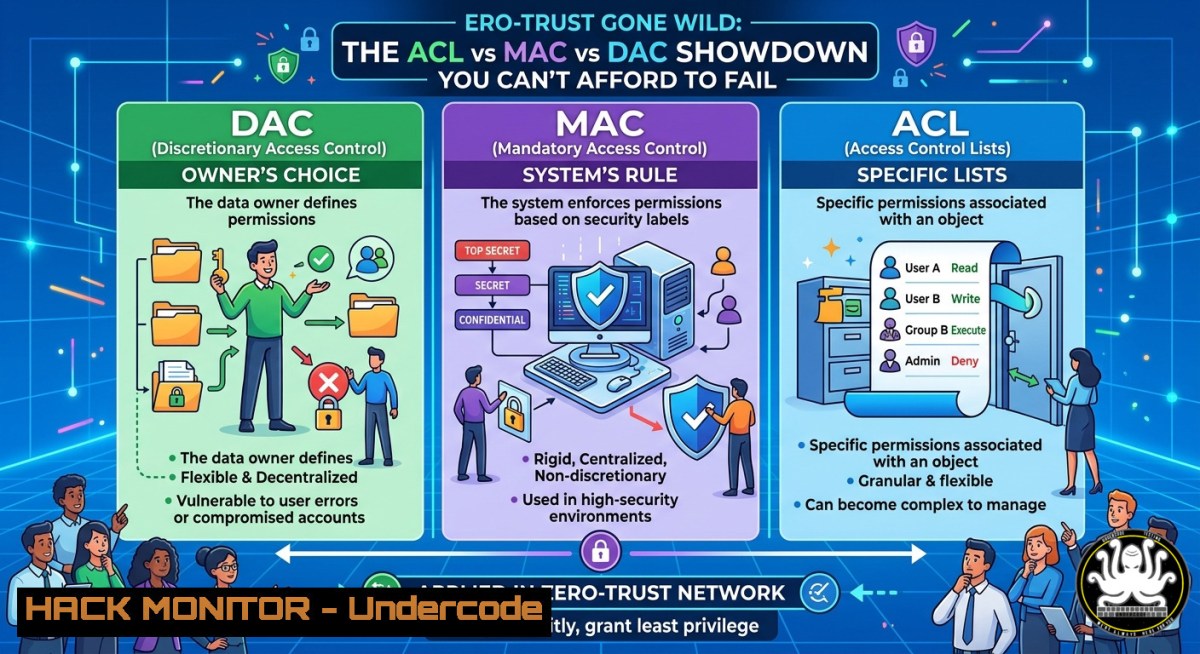
Access control is the bedrock of cybersecurity, determining who or what can interact with your sensitive resources. The poll question—“What is the method of coordinating access to resources based on the listing of permitted IP addresses?”—points directly to Access Control Lists (ACLs), which explicitly define which IP addresses are allowed or denied. Understanding the difference between Discretionary Access Control (DAC), Mandatory Access Control (MAC), and ACL-based filtering is critical for network hardening, cloud security, and preventing unauthorized lateral movement.
Learning Objectives:
- Differentiate between DAC, MAC, and ACL-based access control models in real-world scenarios.
- Implement IP-based ACLs on Linux (iptables/nftables) and Windows (netsh advfirewall).
- Apply cloud security group ACLs to restrict traffic in AWS, Azure, or GCP.
- Exploit weak IP-based filtering using source IP spoofing and apply mitigation techniques.
- Harden API endpoints and internal services using proper ACL ordering and logging.
You Should Know:
- Understanding the Access Control Trinity: DAC, MAC, and ACL
The poll’s correct answer is ACL (Access Control List). But why not DAC or MAC?
– DAC (Discretionary Access Control): Resource owners decide access (e.g., file permissions in Linux: chmod 700). It’s flexible but insecure—users may misconfigure.
– MAC (Mandatory Access Control): System-enforced labels (e.g., SELinux, MLS). Even file owners cannot override. Used in high-security environments.
– ACL (Access Control List): A list of rules applied to a resource (router, firewall, file) that matches subjects (IP addresses, users) to actions. When “listening of permitted IP addresses” is the criteria, that’s a network ACL.
Step-by-step guide to distinguish them:
- If a user can grant access to their own file → DAC (Linux `setfacl` still uses ACLs but within DAC model).
- If the OS enforces system-wide labels → MAC (SELinux, AppArmor).
- If you see rules like `allow from 192.168.1.0/24` on a firewall → ACL (network layer).
Linux command to view file ACLs (DAC with extended ACLs):
 Get ACLs on a file
getfacl /etc/shadow
 Set ACL to allow a specific user
setfacl -m u:john:r /etc/shadow
Windows command to view file ACLs:
Get-Acl C:\Windows\System32\drivers\etc\hosts | Format-List
2. Implementing IP-Based ACLs on Linux with iptables/nftables
Network ACLs are commonly implemented via firewall rules. On Linux, `iptables` (legacy) or `nftables` (modern) can filter by source/destination IP.
Step-by-step: Restrict SSH access to a single IP using iptables:
1. Flush existing rules (be careful with remote connections):
sudo iptables -F
sudo iptables -P INPUT DROP
sudo iptables -P FORWARD DROP
sudo iptables -P OUTPUT ACCEPT
2. Allow loopback and established connections:
sudo iptables -A INPUT -i lo -j ACCEPT
sudo iptables -A INPUT -m state --state ESTABLISHED,RELATED -j ACCEPT
3. Allow SSH only from `203.0.113.5`:
sudo iptables -A INPUT -p tcp --dport 22 -s 203.0.113.5 -j ACCEPT
4. Save rules (Debian/Ubuntu):
sudo apt install iptables-persistent
sudo netfilter-persistent save
Using nftables (modern):
sudo nft add table inet filter
sudo nft add chain inet filter input { type filter hook input priority 0\; policy drop\; }
sudo nft add rule inet filter input iif lo accept
sudo nft add rule inet filter input ct state established,related accept
sudo nft add rule inet filter input ip saddr 203.0.113.5 tcp dport 22 accept
sudo nft list ruleset
Windows equivalent using netsh (classic) or New-NetFirewallRule (PowerShell):
 Allow RDP from a single IP (Windows Defender Firewall)
New-NetFirewallRule -DisplayName "Allow RDP from 203.0.113.5" -Direction Inbound -Protocol TCP -LocalPort 3389 -RemoteAddress 203.0.113.5 -Action Allow
- Cloud Security Groups as ACLs: AWS, Azure, GCP
Cloud virtual firewalls (Security Groups) are stateful ACLs that filter based on IP, port, and protocol.
Step-by-step: Lock down an AWS EC2 instance to a corporate IP:
1. Open AWS Console → EC2 → Security Groups → Create Security Group.
2. Add inbound rule: Type SSH, Source → Custom → YOUR_CORP_IP/32.
3. For web servers, add HTTP/HTTPS rules with `0.0.0.0/0` only if public-facing.
4. Outbound rules: restrict to necessary IPs (e.g., only allow outbound to `10.0.0.0/8` for internal databases).
Azure NSG CLI example:
az network nsg rule create --nsg-name MyNSG --name AllowMyIP --priority 100 --direction Inbound --access Allow --protocol Tcp --destination-port-ranges 22 --source-address-prefixes 203.0.113.5/32
GCP firewall rule via gcloud:
gcloud compute firewall-rules create allow-ssh-from-corp --allow tcp:22 --source-ranges 203.0.113.5/32 --description "Allow SSH only from corp IP"
- Exploiting Weak IP-Based ACLs: Source IP Spoofing and Mitigation
Relying solely on IP addresses for access is vulnerable to spoofing. An attacker on the same network or with control of a router can forge the source IP.
Demonstration using Scapy (Python):
from scapy.all import
 Craft a TCP SYN packet with a spoofed source IP
ip = IP(src="203.0.113.5", dst="192.168.1.100")
tcp = TCP(sport=12345, dport=22, flags="S")
send(ip/tcp)
Mitigation strategies:
- Ingress filtering (BCP38): Configure routers to drop packets with source IPs not belonging to your network.
- Anti-spoofing on Linux using
rp_filter:Enable strict reverse path filtering echo 1 > /proc/sys/net/ipv4/conf/all/rp_filter
- Use layered security (TLS client certificates, VPN, or MFA) alongside IP ACLs.
Windows reverse path filtering (via PowerShell):
Set-NetIPv4Protocol -SourceRoutingBehavior Drop
Set-NetIPInterface -InterfaceAlias Ethernet -WeakHostSend Disabled -WeakHostReceive Disabled
5. API Security: Implementing ACLs at Application Layer
Modern APIs often implement IP whitelisting via middleware. However, attackers bypass IP checks using `X-Forwarded-For` header spoofing if the reverse proxy is misconfigured.
Step-by-step: Secure API endpoint with IP ACL in Flask:
from flask import Flask, request, abort

app = Flask(<strong>name</strong>)
ALLOWED_IPS = {'192.168.1.100', '10.0.0.5'}

@app.before_request
def limit_remote_addr():
 WARNING: Do NOT trust X-Forwarded-For directly without proxy validation
client_ip = request.remote_addr
if client_ip not in ALLOWED_IPS:
abort(403)

@app.route('/sensitive')
def sensitive():
return "Top secret data"
Hardening against header spoofing:
- Configure your reverse proxy (nginx, Apache) to override or strip `X-Forwarded-For` and set a trusted header.
- Nginx example to set real IP from proxy protocol:
set_real_ip_from 10.0.0.0/8;
real_ip_header X-Forwarded-For;
Testing IP ACL bypass with curl:
curl -H "X-Forwarded-For: 192.168.1.100" http://target/sensitive
- Cloud Hardening: Network ACLs vs Security Groups in AWS
AWS provides both Security Groups (stateful, instance-level) and Network ACLs (stateless, subnet-level). Many breaches occur because engineers confuse them.
Step-by-step: Use Network ACLs to block entire malicious subnets:
1. VPC → Subnets → Select subnet → Network ACL tab.
2. Add inbound rule: Rule 100, Type All TCP, Source `203.0.113.0/24` (malicious block), Allow = NO.
3. Add rule 200 to allow your corporate IP `203.0.113.5/32` (since NACLs are stateless, you must also allow return traffic ephemeral ports).
4. For stateless NACL, outbound rules must explicitly allow responses (high ports 1024-65535).
Common misconfiguration:
- Security Group allows `0.0.0.0/0` on port 22, but NACL denies everything. Result: no SSH. Check both!
Audit command using AWS CLI:
aws ec2 describe-security-groups --group-ids sg-12345678 --query 'SecurityGroups[].IpPermissions[]'
aws ec2 describe-network-acls --filters Name=vpc-id,Values=vpc-12345
- Vulnerability Exploitation: Bypassing IP-Based ACLs via DNS Rebinding
When an ACL permits “localhost” or `127.0.0.1` but also allows a domain name (rare), DNS rebinding can trick browsers into accessing internal services.
Mitigation: Never use hostnames in ACLs; always enforce IP ranges. If you must use DNS, pin TTL to 0 and re-resolve each time (still risky).
Linux command to test DNS rebinding against internal API:
 Use a tool like 'rebinder' or manual:
 Attacker sets DNS A record to their server IP (TTL 1s), then changes to 127.0.0.1
 Browser fetches script from attacker, then DNS resolves to 127.0.0.1, accessing localhost
Prevention: Implement `Sec-Fetch-Dest` headers, CORS strict policies, and never trust `Host` or `Origin` headers alone.
What Undercode Say:
- ACLs based on IP addresses are necessary but never sufficient—layer with cryptographic authentication.
- Most misconfigurations occur when mixing stateless (NACL) and stateful (Security Group) rules; always audit both directions.
- Source IP spoofing is trivial on local networks; enforce egress filtering and use `rp_filter` or cloud anti-spoofing features.
Prediction:
As zero-trust architectures gain adoption, IP-based ACLs will shift from perimeter defense to micro-segmentation inside clusters (e.g., Kubernetes Network Policies). However, IP spoofing and DNS rebinding will remain relevant until IPv6 with embedded cryptography (SEcure Neighbor Discovery) becomes ubiquitous. Expect AI-driven policy engines to auto-generate least-privilege ACLs by analyzing traffic patterns, but manual verification will still catch the fatal `0.0.0.0/0` mistake.
▶️ Related Video (78% Match):
🎯Let’s Practice For Free:
IT/Security Reporter URL:
Reported By: UgcPost 7459419564850716672 – Hackers Feeds
Extra Hub: Undercode MoN
Basic Verification: Pass ✅


