Listen to this Post
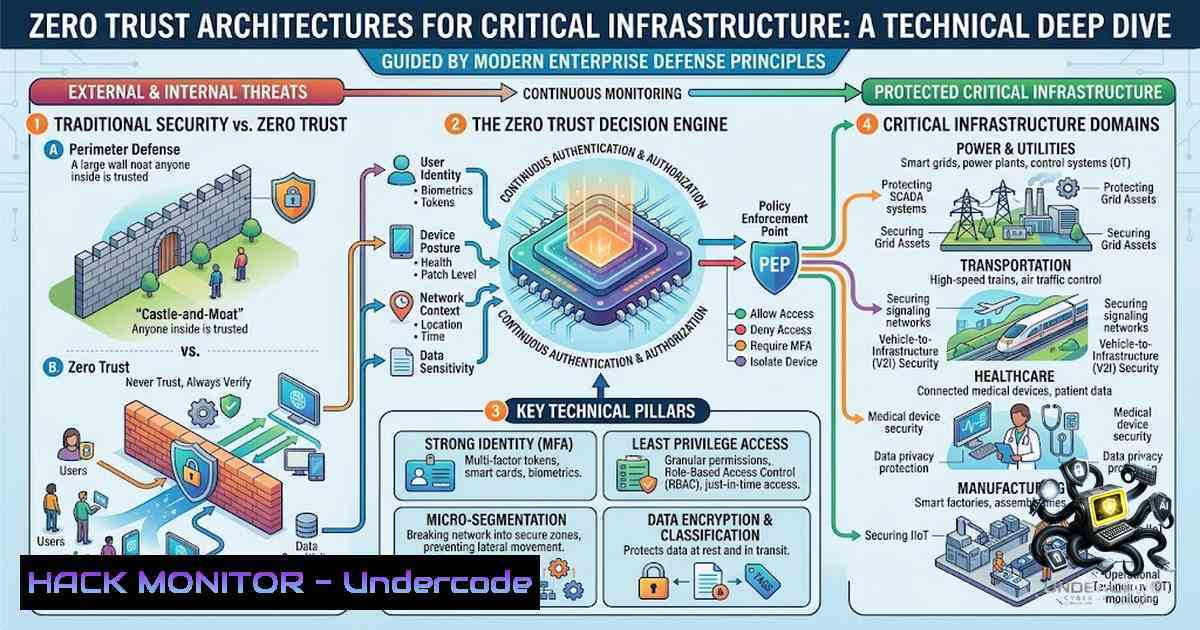
Introduction:
The convergence of operational technology (OT) and information technology (IT) has created a complex threat landscape where a single misconfigured firewall or unpatched SCADA endpoint can expose critical infrastructure to nation-state adversaries. As organizations migrate to cloud-1ative platforms and adopt AI-driven data engineering pipelines, the need for security architects who understand both Zero Trust Network Access (ZTNA) and legacy industrial protocols has never been more urgent. This article examines four high-stakes technical domains—Zscaler SASE architecture, SCADA/EMS security hardening, SAP S/4HANA public cloud protection, and AI/ML data pipeline security—providing actionable commands, configuration examples, and exploitation/mitigation strategies for security practitioners.
Learning Objectives:
- Implement and validate Zscaler Internet Access (ZIA), Zscaler Private Access (ZPA), and Zscaler Digital Experience (ZDX) in a Zero Trust architecture.
- Harden GE Reliance EMS/SCADA environments against protocol-level attacks targeting ICCP, DNP3, and IEC 61850.
- Secure SAP S/4HANA Public Cloud and Plant Maintenance (PM/EAM) modules using cloud-1ative security controls.
- Protect Databricks-based AI/ML data pipelines with encryption, access controls, and vulnerability scanning.
You Should Know:
- Zscaler Zero Trust Exchange: Architecture, Configuration, and Hardening
Zero Trust architecture assumes breach and verifies every request, regardless of origin. Zscaler’s suite—ZIA (secure internet/SaaS access), ZPA (secure private application access), and ZDX (digital experience monitoring)—enforces this paradigm by connecting users directly to applications without network-level access.
Step-by-Step Guide: Deploying and Hardening Zscaler ZPA
Step 1: Provision App Connectors
App Connectors are lightweight VMs that establish outbound tunnels to Zscaler’s cloud, enabling secure access to internal applications without inbound firewall rules.
Linux Deployment (App Connector VM):
 Download and install the App Connector package
wget https://cdn.zscaler.net/connector/app_connector_linux_x86_64.tar.gz
tar -xzvf app_connector_linux_x86_64.tar.gz
cd app_connector

Run the installation script with your provisioning token
sudo ./install.sh --token YOUR_PROVISIONING_TOKEN --cloud zscalercloud.net

Verify the connector status
sudo systemctl status zscaler-app-connector

Check connectivity to Zscaler cloud
tail -f /opt/zscaler/var/log/app_connector.log | grep "Connected"
Step 2: Configure Application Segments and Access Policies
In the Zscaler Admin Portal, define application segments (e.g., SAP S/4HANA, internal SCADA dashboards) and create access policies based on user attributes, device posture, and geolocation.
Example Access Policy (JSON via Zscaler API):
{
"policyType": "ACCESS_POLICY",
"rules": [
{
"name": "SAP_Finance_Access",
"action": "ALLOW",
"conditions": {
"users": ["[email protected]"],
"devicePosture": ["COMPLIANT"],
"locations": ["US_OFFICE"],
"applications": ["SAP_S4HANA_APP_SEGMENT"]
},
"timeWindows": ["BUSINESS_HOURS"]
}
]
}
Step 3: Enforce TLS Inspection and SSL Decryption
To detect threats in encrypted traffic, configure SSL inspection policies. This is critical for identifying command-and-control (C2) traffic masquerading as legitimate SaaS traffic.
Zscaler ZIA SSL Inspection Configuration (via Admin Console):
- Navigate to Policy > SSL Inspection.
- Create a new rule with Action: Decrypt for all traffic destined to external SaaS applications.
- Upload your organization’s root CA certificate to end-user devices via Group Policy (Windows) or mobile device management (MDM).
Windows Group Policy Deployment for Zscaler Root CA:
 Import Zscaler root CA certificate into Windows Trusted Root store
certutil -addstore -f "Root" C:\Zscaler\ZscalerRootCA.cer

Verify the certificate installation
certutil -store Root | findstr "Zscaler"
Step 4: Monitor with ZDX
ZDX provides real-time visibility into user experience, network latency, and application performance. Configure ZDX sensors on endpoints to proactively identify performance degradation that could indicate security incidents (e.g., DNS tunneling, DDoS).
ZDX Sensor Deployment (Windows via PowerShell):
 Download ZDX sensor installer
Invoke-WebRequest -Uri "https://cdn.zscaler.net/zdx/sensor/ZDX_Sensor_Windows.msi" -OutFile "$env:TEMP\zdx_sensor.msi"

Silent installation with provisioning key
msiexec /i "$env:TEMP\zdx_sensor.msi" PROVISIONING_KEY="YOUR_KEY" /quiet /norestart

Verify sensor is running
Get-Service -1ame "ZDXSensor" | Select-Object Status
Security Hardening Checklist for Zscaler Deployments:
- Enforce Micro-segmentation: Ensure each application segment has its own access policy; never use wildcard segments.
- Implement Continuous Access Evaluation (CAE): Integrate with Azure AD/Entra ID to revoke access in real-time when user risk changes.
- Regularly audit App Connector logs for anomalous connection attempts (e.g., connections from non-corporate IP ranges).
- Use Zscaler’s Cloud Firewall to block known malicious IPs and domains; update threat intelligence feeds daily.
- SCADA/EMS Security: Hardening GE Reliance and Industrial Control Systems
SCADA systems manage critical infrastructure—power grids, water treatment, and manufacturing. The GE Reliance EMS/SCADA platform uses ICCP (Inter-Control Center Communications Protocol), DNP3, and IEC 61850 for real-time data exchange. These protocols were designed for reliability, not security, making them prime targets for attackers.
Step-by-Step Guide: Securing GE Reliance SCADA Environments
Step 1: Network Segmentation and Firewall Rules
Isolate SCADA networks from corporate IT using industrial firewalls with deep packet inspection (DPI) for industrial protocols.
Linux iptables Rules for SCADA Network Segmentation:
 Block all traffic from SCADA subnet to corporate IT except on allowed ports
iptables -A FORWARD -s 192.168.10.0/24 -d 10.0.0.0/8 -j DROP

Allow ICCP traffic (TCP 102) only from trusted ICCP peer servers
iptables -A FORWARD -s 192.168.10.10 -d 192.168.20.10 -p tcp --dport 102 -j ACCEPT

Allow DNP3 traffic (TCP 20000) only from specific RTUs
iptables -A FORWARD -s 192.168.10.20 -d 192.168.30.0/24 -p tcp --dport 20000 -j ACCEPT

Log and drop all other SCADA traffic
iptables -A FORWARD -s 192.168.10.0/24 -j LOG --log-prefix "SCADA_BLOCKED: "
iptables -A FORWARD -s 192.168.10.0/24 -j DROP
Step 2: Harden ICCP and DNP3 Authentication
ICCP and DNP3 support authentication but are often left disabled. Enable and enforce strong authentication using pre-shared keys or certificates.
DNP3 Secure Authentication Configuration (Example – Vendor-Specific):
dnp3_config:
station_address: 10
master_address: 1
security:
authentication_mode: "ENABLED"
key_type: "AES-128"
pre_shared_key: "CHANGE_ME_COMPLEX_KEY_12345"
update_key_period: 86400  24 hours
challenge_interval: 5000  milliseconds
Step 3: Disable Unused Services and Default Credentials
SCADA systems often ship with default credentials and unnecessary services. Conduct a full port scan and disable everything not required.
Nmap Scan for GE Reliance SCADA Ports (Linux):
 Scan for open ports on SCADA server
nmap -sS -sV -p- 192.168.10.100

Identify services on common SCADA ports
nmap -sS -p 102,502,20000,2404,44818 192.168.10.0/24
Remediation Actions:
- Change default credentials for all RTUs, IEDs, and EMS servers immediately.
- Disable Telnet and FTP; enforce SSH and SFTP with key-based authentication.
- Remove unused OPC UA endpoints; restrict OPC UA to specific trusted clients using certificate-based authentication.
Step 4: Implement Logging and Intrusion Detection
Deploy a SCADA-specific intrusion detection system (IDS) like Snort or Suricata with custom rules for industrial protocols.
Suricata Rule for DNP3 Scanning Detection:
 /etc/suricata/rules/dnp3.rules
alert tcp any any -> any 20000 (msg:"DNP3 SCAN DETECTED"; flow:to_server; content:"|05 64|"; depth:2; threshold:type both, track by_src, count 10, seconds 5; classtype:attempted-recon; sid:1000001; rev:1;)
Step 5: Secure OPC UA Communications
OPC UA is increasingly used for IIoT integration. Enforce encryption and certificate validation.
OPC UA Certificate Generation and Deployment (Linux with OpenSSL):
 Generate a self-signed certificate for OPC UA server
openssl req -x509 -1ewkey rsa:2048 -keyout opcua_server.key -out opcua_server.crt -days 365 -1odes -subj "/CN=SCADA_OPC_Server"

Verify certificate
openssl x509 -in opcua_server.crt -text -1oout

Restrict OPC UA server to listen only on specific interfaces
 In OPC UA server configuration file:
 <UaTcpBinding>
 <Endpoint Url="opc.tcp://192.168.10.100:4840" />
 </UaTcpBinding>
- SAP S/4HANA Public Cloud Security: Protecting Enterprise Asset Management
SAP S/4HANA Public Cloud hosts critical business processes, including Plant Maintenance (PM) and Enterprise Asset Management (EAM). A compromise here can halt manufacturing, disrupt supply chains, and expose sensitive financial data. Security must span identity, data, and application layers.
Step-by-Step Guide: Securing SAP S/4HANA PM/EAM
Step 1: Implement SAP Cloud Identity Access Governance (IAG)
Enforce least privilege access to PM/EAM transactions. Use role-based access controls (RBAC) and segregate duties between maintenance planners, technicians, and auditors.
SAP Role Configuration for PM/EAM (via SAP Fiori Admin):
Role: Z_PM_MAINTENANCE_PLANNER
- Transaction: IW31 (Create Maintenance Order)
- Transaction: IW32 (Change Maintenance Order)
- Transaction: IW33 (Display Maintenance Order)
- Authorization Object: I_PM_ORD (Maintenance Order)
- Activity: 01 (Create), 02 (Change)
- Order Type: PM01 (Preventive Maintenance)

Role: Z_PM_TECHNICIAN
- Transaction: IW32 (Change Maintenance Order - limited)
- Transaction: IW33 (Display Maintenance Order)
- Transaction: IW41 (Confirm Maintenance Order)
- Authorization Object: I_PM_ORD
- Activity: 03 (Display), 06 (Confirm)
Step 2: Encrypt Data at Rest and in Transit
SAP S/4HANA Public Cloud encrypts data by default, but ensure custom extensions and external integrations also enforce encryption.
Check SAP Cloud Platform Encryption Settings:
-- Check encryption status for database tables (HANA Cloud)
SELECT SCHEMA_NAME, TABLE_NAME, ENCRYPTION_STATUS
FROM SYS.M_TABLES
WHERE ENCRYPTION_STATUS != 'ENCRYPTED';
Step 3: Secure SAP Cloud Connector and APIs
The SAP Cloud Connector bridges on-premises systems with SAP Cloud. Secure it with mutual TLS (mTLS) and restrict exposed endpoints.
SAP Cloud Connector Configuration (Linux):
 Check Cloud Connector status
systemctl status sapcloudconnector

Review access logs for anomalies
tail -f /usr/sap/cloudconnector/log/access.log | grep -E "401|403|500"

Restrict API access using SAP API Management policies
 Example OData API policy to validate JWT tokens:
{
"policy": "validate-jwt",
"config": {
"issuer": "https://<your-tenant>.accounts.ondemand.com",
"audience": "https://api.<your-tenant>.sap.com",
"jwks_uri": "https://<your-tenant>.accounts.ondemand.com/oauth2/v1/certs"
}
}
Step 4: Vulnerability Scanning for SAP Custom Code
Custom ABAP code in PM/EAM modules can introduce SQL injection and authorization bypass vulnerabilities. Use SAP Code Vulnerability Analyzer.
ABAP Code Review for Authorization Checks:
 Secure code pattern - always check authorization
CALL FUNCTION 'AUTHORITY_CHECK_TCODE'
EXPORTING
TCODE = 'IW32'
EXCEPTIONS
NOT_AUTHORIZED = 1
OTHERS = 2.

IF SY-SUBRC <> 0.
MESSAGE 'You are not authorized to change maintenance orders' TYPE 'E'.
ENDIF.
Step 5: Monitor SAP Security Audit Logs
Enable security audit logging for all critical PM/EAM transactions and integrate with SIEM.
SAP Audit Log Configuration (via transaction SM19):
- Activate audit policy: "Maintenance Order Changes" (IW32, IW33)
- Activate audit policy: "Technical Object Changes" (IE02, IE03)
- Activate audit policy: "Work Center Changes" (CR02, CR03)
- Forward logs to syslog for SIEM integration
4. Securing AI/ML Data Pipelines on Databricks
The SAP BDC Consultant role requires expertise in Databricks, Python, SQL, and AI/ML deployments. Data pipelines ingest, transform, and serve sensitive data—making them attractive targets for data exfiltration and model poisoning.
Step-by-Step Guide: Hardening Databricks AI/ML Pipelines
Step 1: Enable Databricks Unity Catalog for Governance
Unity Catalog provides fine-grained access control, data lineage, and auditing.
Unity Catalog Configuration (SQL):
-- Create a metastore and assign to workspace
CREATE METASTORE my_metastore;
ALTER METASTORE my_metastore SET OWNER TO <code>account-admin</code>;

-- Create a catalog for sensitive financial data
CREATE CATALOG finance_catalog;
ALTER CATALOG finance_catalog SET OWNER TO <code>data_governance_team</code>;

-- Create schema and set permissions
CREATE SCHEMA finance_catalog.sap_erp;
GRANT SELECT ON SCHEMA finance_catalog.sap_erp TO <code>finance_analyst_group</code>;
Step 2: Encrypt Data in Transit and at Rest
Configure Databricks to use customer-managed keys (CMK) for encryption.
AWS KMS Encryption for Databricks (via Terraform):
resource "aws_kms_key" "databricks_key" {
description = "CMK for Databricks workspaces"
deletion_window_in_days = 30
enable_key_rotation = true
}

resource "databricks_workspace" "this" {
workspace_name = "secure_ml_workspace"
 Other configuration...

encryption {
kms_key_arn = aws_kms_key.databricks_key.arn
}
}
Step 3: Secure Databricks Notebooks and Jobs
Prevent unauthorized code execution and data access.
Databricks CLI Commands for Security:
 List all clusters and check security configurations
databricks clusters list --output JSON | jq '.[] | {cluster_name, autotermination_minutes, enable_elastic_disk}'

Restrict cluster creation to specific instance types
databricks clusters create --json '{
"cluster_name": "secure_ml_cluster",
"node_type_id": "i3.xlarge",
"driver_node_type_id": "i3.xlarge",
"autoscale": {"min_workers": 2, "max_workers": 10},
"spark_conf": {
"spark.databricks.delta.properties.defaults.enableChangeDataFeed": "true"
}
}'

Monitor job runs for anomalies
databricks jobs list-runs --job-id 123 --limit 100 | jq '.runs[] | {run_id, state, creator_user_name, start_time}'
Step 4: Scan for Vulnerabilities in ML Dependencies
Use Trivy or Snyk to scan Python libraries and containers used in Databricks.
Trivy Scan of Databricks Cluster Libraries (Python):
 Generate requirements.txt from Databricks notebook
pip freeze > requirements.txt

Scan for vulnerabilities
trivy fs --severity HIGH,CRITICAL --exit-code 1 requirements.txt

Example vulnerable package (hypothetical)
 Flask 0.12.1 - CVE-2018-1000656 (CRITICAL)
Step 5: Implement MLflow Model Security
MLflow tracks experiments and models. Ensure model registry access controls and validate model inputs to prevent adversarial attacks.
MLflow Model Registration with Access Controls:
import mlflow
from mlflow.tracking import MlflowClient

client = MlflowClient()

Register a model with stage-specific permissions
model_version = client.create_model_version(
name="fraud_detection_model",
source="s3://ml-artifacts/fraud_model/1",
run_id="your_run_id"
)

Set permissions on the model stage (via REST API)
 Equivalent to: ONLY production stage can be read by production_app
Model Input Validation (Python):
import pandas as pd

def validate_model_input(df):
"""Prevent adversarial inputs like NaN injection or extreme values."""
required_columns = ['feature1', 'feature2', 'feature3']
if not all(col in df.columns for col in required_columns):
raise ValueError("Missing required columns")

Check for NaN in critical features
if df[bash].isna().any().any():
raise ValueError("NaN values detected in input")

Check for value ranges
if (df['feature1'] < 0).any() or (df['feature1'] > 10000).any():
raise ValueError("Feature1 out of expected range")

return df
What Undercode Say:
Key Takeaway 1: Zero Trust is not a product but a paradigm—Zscaler’s suite provides the technical controls, but success depends on rigorous identity governance, continuous monitoring, and a culture of “never trust, always verify.” The most common failure in Zscaler deployments is overly permissive access policies that negate the Zero Trust principle.
Key Takeaway 2: SCADA security remains the Achilles’ heel of critical infrastructure. While protocol-level authentication exists (DNP3 Secure Authentication, IEC 62351), it is rarely enabled due to operational constraints. Organizations must prioritize network segmentation, continuous anomaly detection, and regular penetration testing of OT environments—not just compliance checklists.
Key Takeaway 3: AI/ML pipelines introduce a new attack surface—data poisoning, model extraction, and adversarial inputs. Securing Databricks requires a defense-in-depth approach: Unity Catalog for governance, encryption for data protection, and runtime vulnerability scanning for dependencies. The intersection of data engineering and security is the frontier where most breaches will occur in the next three years.
Prediction:
- +1: The global Zero Trust Security market is projected to exceed $60 billion by 2028, with Zscaler, Palo Alto, and Netskope leading the SASE space. Organizations that fully operationalize Zscaler’s ZPA and ZDX will achieve 40% faster breach containment times.
- +1: AI-driven security operations centers (SOCs) will reduce mean time to detect (MTTD) by 60% by 2027, as Databricks and similar platforms integrate native anomaly detection for data pipeline activities.
- -1: Critical infrastructure sectors (energy, water, transportation) will experience a 300% increase in ransomware attacks targeting SCADA/EMS systems by 2027, driven by the convergence of IT and OT and the proliferation of unpatched legacy systems.
- -1: The shortage of cybersecurity professionals with both OT and cloud expertise will worsen, leaving 3.5 million unfilled positions globally by 2027, creating a skills gap that adversaries will exploit.
- +1: SAP’s investment in S/4HANA Public Cloud security—including embedded AI threat detection and automated patch management—will reduce configuration-related vulnerabilities by 55% in enterprise deployments by 2026.
- +1: Regulatory frameworks (NERC CIP, IEC 62443, NIST SP 800-82) will mandate Zero Trust architectures for critical infrastructure by 2028, driving widespread adoption of Zscaler-style solutions in OT environments.
- -1: The average cost of a data breach involving AI/ML pipelines will exceed $5 million by 2027, as attackers increasingly target training data and model weights for intellectual property theft.
- +1: Open-source security tools for SCADA (Snort, Suricata, Wireshark with industrial dissectors) will mature significantly, enabling smaller utilities to implement robust monitoring without vendor lock-in.
▶️ Related Video (78% Match):
🎯Let’s Practice For Free:
🎓 Live Courses & Certifications:
Join Undercode Academy for Verified Certifications
🚀 Request a Custom Project:
Secure, high-velocity infrastructure and disruptive technological engineering. Contact our engineering team for high-tier development and proprietary systems:
[email protected]
💎 Smart Architecture | 🛡️ Secure by Design | ⭐ Trusted by Thousands
IT/Security Reporter URL:
Reported By: Https: – Hackers Feeds
Extra Hub: Undercode MoN
Basic Verification: Pass ✅


