Listen to this Post
Introduction
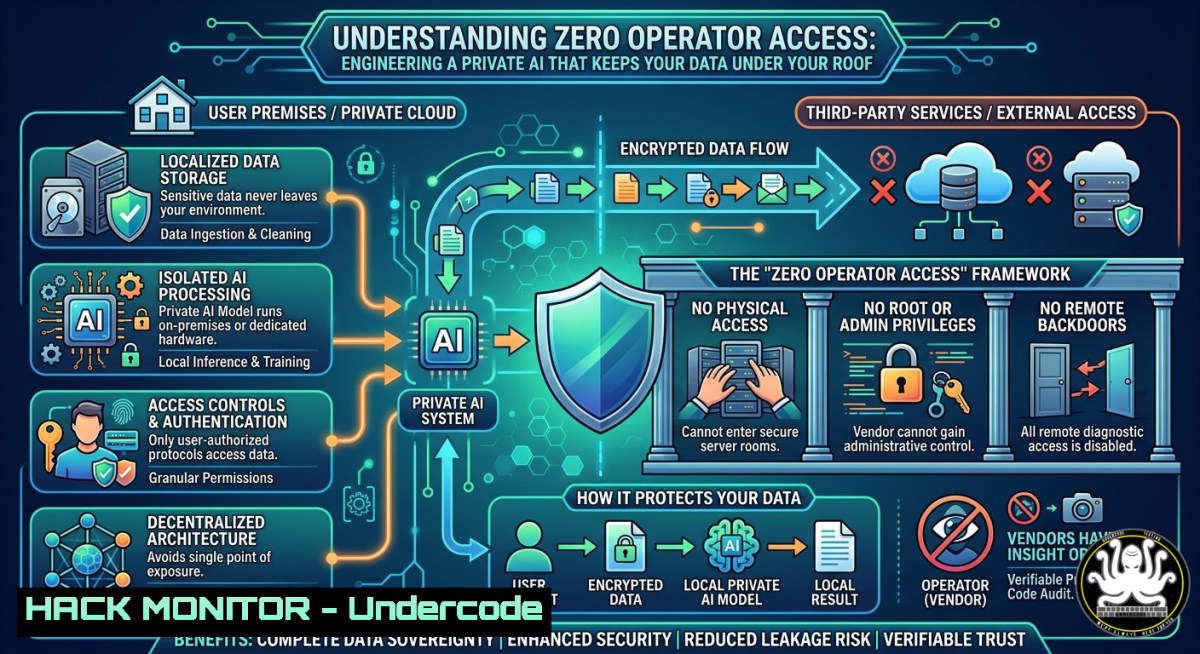
In the rush to adopt generative AI, most organizations have been forced to choose between functional AI assistants and data privacy, either handing over sensitive personal or corporate data to third‑party model providers or foregoing advanced AI capabilities altogether. However, by leveraging AWS Bedrock’s multi‑tenant security architecture, it is possible to run powerful models like while ensuring that prompts, responses, and custom data never leave your AWS region and are never accessible to the model provider.
Learning Objectives
- Configure a private AI deployment using Amazon Bedrock and that honors data sovereignty and residency requirements.
- Implement IAM least‑privilege access policies, VPC endpoints, and CloudTrail logging for comprehensive governance and auditability.
- Understand the technical guarantees—such as model deployment accounts, automated abuse detection with no human review, and zero operator access—that underpin this architecture.
You Should Know
- How AWS Bedrock Creates an Unbreachable Data Perimeter Around Your AI
The core innovation that makes a truly private AI agent possible is the model deployment account. In each AWS region where Bedrock is available, there exists one dedicated AWS account per model provider (such as Anthropic). These accounts are owned and operated solely by the Amazon Bedrock service team. Model providers have no access to these accounts, nor to any logs, customer prompts, or personalization data.
Beyond the deployment account isolation, AWS reinforces the privacy boundary through several mechanisms:
- No model training on your data: Your prompts, completions, and any custom data you supply are never used to train or improve AWS or third‑party foundation models.
- Zero operator access: With the latest inference engine, customer prompts and responses are never visible to either Anthropic or AWS operators.
- Automated abuse detection without human review: While AWS does run automated content classifiers to enforce acceptable‑use policies, Bedrock does not store user inputs or model outputs, and the classification process involves no human review of your data.
- Encryption everywhere: All data is encrypted in transit and at rest, and you may bring your own keys using AWS KMS.
- Private connectivity: Using AWS PrivateLink, you can create a VPC endpoint so that API calls to Bedrock travel entirely within the AWS network, never crossing the public internet.
This architectural isolation means that even though you are using Anthropic’s model, your personal schedule, emails, documents, and any other data you feed into the agent are effectively invisible to Anthropic. They remain inside your AWS account, in your chosen region, under your control.
- Step‑by‑Step: Deploying via Bedrock with Your Own Context
The following guide walks through setting up a private AI agent that has full access to your personal data (schedules, emails, documents) while never exposing that data to the model provider.
Prerequisites
- An active AWS account with Bedrock access in your preferred region.
- AWS CLI installed and configured with appropriate credentials.
- Python 3.8+ (for scripting automation).
Step 1: Enable Foundation Models in Bedrock
1. Navigate to the AWS Bedrock console.
- Under “Model access” in the left navigation, request access to the models you wish to use (e.g., 3.5 Sonnet, Opus). Access is typically granted within minutes.
- Wait for the “Access granted” status to appear.
Step 2: Create a Minimal IAM Policy for Code
Create an IAM policy that allows only the necessary actions. This follows the principle of least privilege.
{
"Version": "2012-10-17",
"Statement": [
{
"Effect": "Allow",
"Action": [
"bedrock:InvokeModel",
"bedrock:InvokeModelWithResponseStream"
],
"Resource": "arn:aws:bedrock:${REGION}::foundation-model/anthropic.-3-sonnet-20241022-v2:0"
}
]
}
Modify the resource ARN to match the specific model ID you enabled. The `InvokeModel` permission is the core requirement for sending prompts to the model.
Attach this policy to an IAM user or role that will be used by Code.
Step 3: Configure Code to Use Bedrock as Its Provider
Code must be explicitly told to route all AI requests through Amazon Bedrock rather than Anthropic’s public API. Set the following environment variables:
export CLAUDE_CODE_USE_BEDROCK=1
export AWS_REGION=us-east-1  or your preferred Bedrock region
export AWS_PROFILE=your-aws-profile-name
The `CLAUDE_CODE_USE_BEDROCK=1` flag switches the backend, while `AWS_PROFILE` points to the IAM credentials that have the policy from Step 2.
For more advanced setups, you can also use community tools like `-bedrock-setup` to automate credential discovery and model detection.
Step 4: Connect Your Personal Google Account (or Any External Data Source)
To give the agent access to your full context (schedules, emails, documents), you have two main options:
- Option A – Direct API Integration: Use Google’s APIs (Gmail, Google Calendar, Google Drive) via OAuth 2.0. Code can make authenticated API calls to retrieve data on demand. No data is stored permanently; it flows directly from Google to the model and back.
- Option B – Indexing with Bedrock Knowledge Bases: Upload your documents to an S3 bucket and create a Bedrock Knowledge Base. This uses Retrieval‑Augmented Generation (RAG) to allow the model to query your personal data without fine‑tuning or storing the data within the model itself.
The key security property is that neither approach requires sending your personal data to Anthropic. All API calls to Google originate from your AWS environment, and all data processing stays within the Bedrock service boundary.
Step 5: Validate the Setup
Run a simple test to confirm that your prompts are going through Bedrock and that responses are generated without error.
aws bedrock invoke-model \
--model-id anthropic.-3-sonnet-20241022-v2:0 \
--body '{"messages":[{"role":"user","content":[{"type":"text","text":"Say hello in one sentence."}]}]}' \
--cli-binary-format raw-in-base64-out \
--region us-east-1
If successful, you will receive a JSON response containing ’s output.
Step 6: Add Governance with CloudTrail and CloudWatch
To satisfy audit and compliance requirements, enable CloudTrail to log all Bedrock API calls.
aws cloudtrail create-trail --name bedrock-audit-trail --s3-bucket-name your-bedrock-logs-bucket
aws cloudtrail start-logging --name bedrock-audit-trail
Then configure CloudWatch to monitor for suspicious patterns, such as a sudden spike in `bedrock:InvokeModel` calls or an attempt to delete model invocation logging configurations.
This combination of IAM controls, network isolation, and comprehensive logging creates a deployment that regulatory auditors will accept.
3. Network Hardening: Private Connectivity via VPC Endpoints
By default, API calls to Bedrock traverse the public internet. For high‑security deployments, you should establish a VPC endpoint using AWS PrivateLink. This ensures that all traffic between your compute resources (e.g., an EC2 instance running Code) and Bedrock stays within the AWS backbone.
Step‑by‑Step VPC Endpoint Configuration
- Open the Amazon VPC console. Under “Virtual private cloud,” choose “Endpoints.”
- Click “Create endpoint.” For the service category, select “AWS services.”
- Search for
com.amazonaws.${REGION}.bedrock-runtime. This is the endpoint for model invocation. - Select the VPC and subnets where your application resources reside.
- For security groups, attach a group that allows outbound HTTPS (port 443) to the endpoint prefix list.
- Leave “Enable private DNS name” checked. This causes the standard Bedrock DNS names to resolve to the private IP address of the endpoint.
After creation, any call to the Bedrock API from within the VPC will automatically flow through the endpoint, bypassing the internet entirely.
To validate, attempt to invoke a Bedrock model from an EC2 instance that has no internet gateway, no NAT, and no public IP. The call should still succeed because traffic is routed through the VPC endpoint.
 From an EC2 instance in the private subnet
aws bedrock list-foundation-models --region us-east-1
If the VPC endpoint is correctly configured, the command returns the list of models even though the instance has no direct internet access.
- IAM Least Privilege in Practice: More than Just FullAccess
Many quick starts use AmazonBedrockFullAccess, a managed policy that grants broad permissions across all Bedrock actions and resources. This is strongly discouraged for production deployments.
Instead, design your IAM policy to:
- Restrict which models can be invoked (by ARN).
- Allow `bedrock:InvokeModel` but deny `bedrock:DeleteModelInvocationLoggingConfiguration` (which would disable audit trails).
- If using Bedrock Agents or Knowledge Bases, add granular permissions for those specific resource types.
A production‑ready policy might look like this:
{
"Version": "2012-10-17",
"Statement": [
{
"Effect": "Allow",
"Action": "bedrock:InvokeModel",
"Resource": "arn:aws:bedrock:us-east-1::foundation-model/anthropic.-3-sonnet-20241022-v2:0"
},
{
"Effect": "Allow",
"Action": [
"bedrock:GetModelInvocationLoggingConfiguration",
"bedrock:ListFoundationModels"
],
"Resource": ""
},
{
"Effect": "Deny",
"Action": "bedrock:DeleteModelInvocationLoggingConfiguration",
"Resource": ""
}
]
}
This allows you to invoke the specific model you need, read logging configurations, list available models, but explicitly denies deletion of logs – preventing an attacker from covering their tracks after abusing the AI.
- Guardrails and Abuse Detection: Defensive Layers You Cannot Ignore
Even with a private AI agent, you are responsible for preventing misuse. Amazon Bedrock Guardrails provide a programmable safety layer that filters harmful content from both user inputs and AI outputs.
{
"name": "private-agent-guardrails",
"description": "Filters hate, insults, sexual content, violence, and prompt attacks",
"filters": [
{"type": "HATE", "strength": "HIGH"},
{"type": "INSULTS", "strength": "HIGH"},
{"type": "SEXUAL", "strength": "HIGH"},
{"type": "VIOLENCE", "strength": "HIGH"},
{"type": "PROMPT_ATTACK", "strength": "HIGH"}
]
}
This guardrail can be attached to your model invocation requests. If the input or output violates a filter, Bedrock returns a `ValidationException` and blocks the request.
The abuse detection system operates on three principles:
- Fully automated classifiers that process inputs/outputs for harmful content.
- No storage of user inputs or model outputs beyond the classification window.
- Reporting of CSAM (child sexual abuse material) to NCMEC if detected – a legal requirement that overrides privacy guarantees.
As the user, you must ensure your data does not violate the Acceptable Use Policy. Automated detection can lead to account suspension if abuse is identified and not remediated.
6. Windows and Linux Commands for Day‑to‑Day Management
Linux / macOS (bash/zsh):
 List all available foundation models in Bedrock
aws bedrock list-foundation-models --query 'modelSummaries[?providerName==<code>Anthropic</code>]' --output table

Invoke with a system prompt and user message (using Messages API)
aws bedrock-runtime invoke-model \
--model-id anthropic.-3-sonnet-20241022-v2:0 \
--body '{"system":"You are a private AI assistant with no data retention.","messages":[{"role":"user","content":"What is my schedule for today?"}]}' \
--cli-binary-format raw-in-base64-out \
--region us-east-1 \
response.json

View the response
cat response.json | jq -r '.content[bash].text'

Check CloudTrail logs for Bedrock API calls (requires jq and AWS CLI)
aws cloudtrail lookup-events \
--lookup-attributes AttributeKey=EventName,AttributeValue=InvokeModel \
--start-time "$(date -u -d '1 hour ago' '+%Y-%m-%dT%H:%M:%SZ')" \
--region us-east-1
Windows (PowerShell):
 List Bedrock models
aws bedrock list-foundation-models --query 'modelSummaries[?providerName==<code>Anthropic</code>]' --output table

Invoke model (save output to file)
aws bedrock-runtime invoke-model `
--model-id anthropic.-3-sonnet-20241022-v2:0 `
--body '{"messages":[{"role":"user","content":"Hello"}]}' `
--cli-binary-format raw-in-base64-out `
--region us-east-1 `
response.json

Read the response (requires ConvertFrom-Json)
Get-Content response.json | ConvertFrom-Json | Select-Object -ExpandProperty content | Select-Object -ExpandProperty text
These commands form the operational backbone for interacting with your private AI.
What Undercode Say
- Architecture, not marketing, delivers privacy. The model deployment account design and zero operator access are concrete engineering controls, not just policy promises. Your data never touches Anthropic’s infrastructure – a fact you can verify through CloudTrail and network flow logs.
- Least privilege is non‑negotiable for AI agents. IAM policies should be as restrictive as they would be for any other production service. Start with `bedrock:InvokeModel` on a single model ARN and add permissions only as needed. Explicitly deny destructive actions like log deletion.
The friction of setting up this infrastructure is a feature, not a bug. It forces you to understand the data flow, the security boundaries, and the governance requirements. Once you invest that effort, you gain an AI assistant that can read your emails and calendar without ever exposing that data to the model vendor. This is enterprise‑grade confidentiality made available to individuals and small teams willing to engineer around the “easy” path.
As AI agents become ubiquitous, the organizations that survive regulatory scrutiny and customer trust crises will be those that built on private, sovereign infrastructure from day one. AWS Bedrock, when properly configured, offers a path that combines powerful AI with verifiable data isolation – a combination that no public API can match.
Prediction
Over the next 18 months, “on‑prem AI” will evolve into “account‑bound AI” – large language models deployed inside a customer’s cloud tenant with strict network, IAM, and logging controls. Regulated industries (finance, healthcare, legal) will mandate that no personally identifiable information or trade secrets ever cross the boundary to the model provider. AWS Bedrock’s architecture will become the reference model for how foundation model vendors must operate to serve enterprise customers, forcing competitors like Google Vertex AI and Azure OpenAI to offer equivalent isolation guarantees. The result will be a two‑tier AI market: consumer‑grade assistants that train on your data, and professional‑grade assistants that cannot see your data – with the latter commanding a significant premium.
▶️ Related Video (80% Match):
🎯Let’s Practice For Free:
IT/Security Reporter URL:
Reported By: Ron Amosa – Hackers Feeds
Extra Hub: Undercode MoN
Basic Verification: Pass ✅


