
Listen to this Post
Introduction:
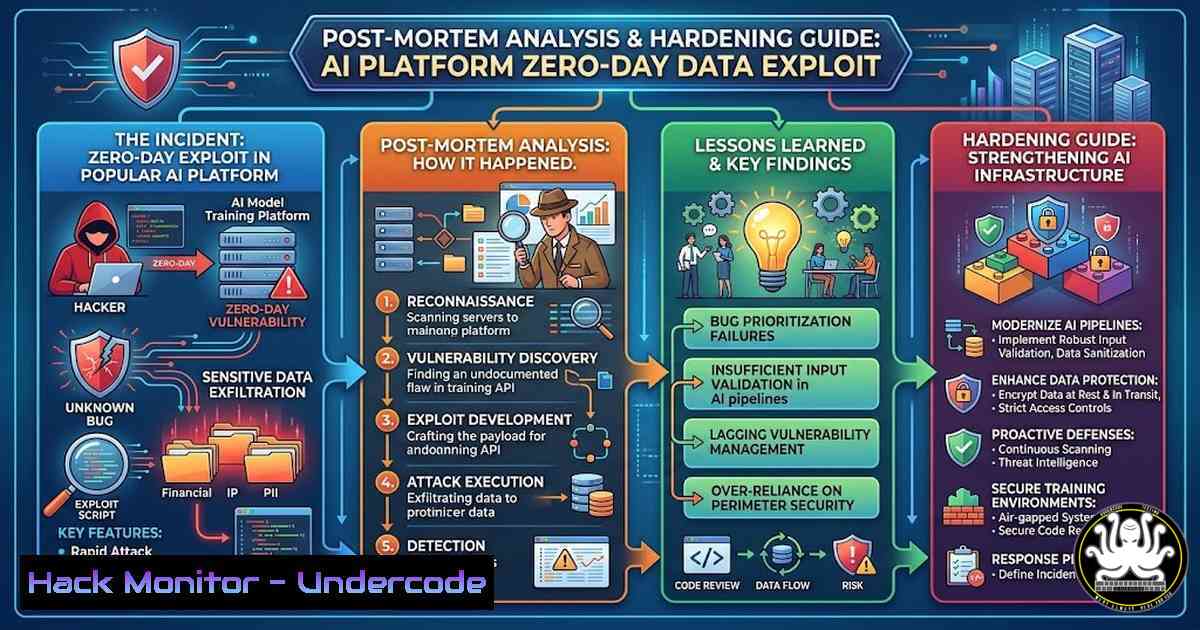
A critical vulnerability recently exploited in a widely used open-source AI model training orchestration platform has sent shockwaves through the DevSecOps community. The attack leveraged a chain of misconfigurations, including exposed API endpoints and weak cloud storage permissions, to exfiltrate terabytes of proprietary training data and model weights. This incident underscores the catastrophic risk of integrating AI development pipelines without the rigorous security controls applied to traditional production environments. We dissect the attack vector and provide a definitive guide to hardening your machine learning operations (MLOps) infrastructure.
Learning Objectives:
- Analyze the exploitation chain targeting MLOps platforms and cloud storage misconfigurations.
- Master reconnaissance commands to identify exposed APIs and data stores in your own environment.
- Implement step-by-step hardening procedures for cloud buckets, container registries, and orchestration APIs.
You Should Know:
1. Reconnaissance: Identifying Exposed MLOps Endpoints and Buckets
The initial breach began with simple, automated scans for exposed Jupyter Notebooks, TensorBoard instances, and MLflow tracking servers. Attackers often use search engines like Censys or Shodan to find these interfaces. Once an unauthenticated MLflow server is found, they can query its API to list experiments, runs, and artifacts.
Step‑by‑step guide explaining what this does and how to use it:
To audit your own exposure, you can simulate an attacker’s reconnaissance using `curl` and nmap.
- Check for exposed MLflow Tracking Server:
Replace with your server IP/domain
curl -X GET "http://your-mlflow-server.com:5000/api/2.0/mlflow/experiments/list" -H "Accept: application/json"
If this returns a JSON list of experiments without an authentication challenge, your server is critically exposed.
-
Scan for open Jupyter Notebooks (often on port 8888):
nmap -p 8888 --script http-title <target-ip-range>
Look for titles containing “Jupyter” or “Notebook”.
- Enumerate cloud storage buckets (using AWS CLI as an example):
Check if a bucket is listable by anyone
aws s3 ls s3://target-bucket-name --no-sign-request
If successful, this reveals directory structures containing datasets and potentially model files.
- Hardening Cloud Storage Buckets (AWS S3) for AI Artifacts
The exfiltration in this incident occurred because a public S3 bucket was configured to allow “List” access to “Authenticated Users” (any AWS user globally) rather than a specific service role.
Step‑by‑step guide explaining what this does and how to use it:
You must move from bucket-level policies to strict Identity and Access Management (IAM) roles.
- Remove public and authenticated users access:
Generate a bucket policy that denies all non-HTTPS and non-VPC traffic
aws s3api put-bucket-policy --bucket your-ai-bucket --policy file://policy.json
Example `policy.json` content to enforce VPC-only access:
{
"Version": "2012-10-17",
"Statement": [
{
"Effect": "Deny",
"Principal": "",
"Action": "s3:",
"Resource": [
"arn:aws:s3:::your-ai-bucket",
"arn:aws:s3:::your-ai-bucket/"
],
"Condition": {
"StringNotEquals": {
"aws:SourceVpc": "vpc-12345678"
}
}
}
]
}
- Enable default encryption (AES-256 or KMS):
aws s3api put-bucket-encryption \ --bucket your-ai-bucket \ --server-side-encryption-configuration '{"Rules": [{"ApplyServerSideEncryptionByDefault": {"SSEAlgorithm": "AES256"}}]}' -
Enable S3 Block Public Access at the account level:
aws s3control put-public-access-block \
--account-id 123456789012 \
--public-access-block-configuration BlockPublicAcls=true,IgnorePublicAcls=true,BlockPublicPolicy=true,RestrictPublicBuckets=true
3. Securing the MLOps API and Orchestration Layer
MLflow and similar tools often run with default configurations that lack authentication. Attackers exploited this to poison datasets or steal models.
Step‑by‑step guide explaining what this does and how to use it:
– Implement Reverse Proxy Authentication:
Never expose MLflow directly. Use Nginx to enforce basic auth or, preferably, forward authentication to an OAuth2 proxy.
 /etc/nginx/sites-available/mlflow
server {
listen 443 ssl;
server_name mlflow.yourcompany.com;

location / {
 Proxy to MLflow backend
proxy_pass http://127.0.0.1:5000;
proxy_set_header Host $host;

Basic authentication
auth_basic "Restricted Access";
auth_basic_user_file /etc/nginx/.htpasswd_mlflow;
}
}
Generate the `.htpasswd` file: sudo htpasswd -c /etc/nginx/.htpasswd_mlflow username.
- Restrict API Access by IP (Kubernetes example):
If using Kubernetes, leverage Network Policies to restrict traffic to the MLflow pod.network-policy.yaml apiVersion: networking.k8s.io/v1 kind: NetworkPolicy metadata: name: mlflow-ingress-policy spec: podSelector: matchLabels: app: mlflow policyTypes:</li> <li>Ingress ingress:</li> <li>from:</li> <li>ipBlock: cidr: 10.0.0.0/24 Your corporate VPN CIDR ports:</li> <li>protocol: TCP port: 5000
Apply with: `kubectl apply -f network-policy.yaml`
- Incident Response: Detecting Data Exfiltration from AI Pipelines
After the breach, the attackers initiated massive data downloads. Traditional DLP tools may miss this if the data is being pulled via APIs or cloud CLI tools.
Step‑by‑step guide explaining what this does and how to use it:
– Monitor CloudTrail for anomalous S3 GetObject calls (AWS):
 Using AWS CLI to find high-volume downloads
aws cloudtrail lookup-events \
--lookup-attributes AttributeKey=EventName,AttributeValue=GetObject \
--start-time "2024-05-20T00:00:00Z" \
--query 'Events[?contains(CloudTrailEvent, <code>"bytesTransferred":>100000000</code>)]'
This filters for GetObject events where transferred bytes exceed 100MB.
- Audit Docker Registry pulls:
If model images were stolen, check registry logs. For a private Harbor registry, you can query its DB or API.Example using curl against Harbor API v2.0 (requires auth) curl -u "admin:password" -X GET "https://your-harbor.com/api/v2.0/projects/ai/repositories/model-x/artifacts/latest/tags?page_size=100"
Analyze pull counts and source IPs from the registry’s audit logs, typically found in
/var/log/harbor/.
What Undercode Say:
- Key Takeaway 1: The velocity of AI development has created a “shadow MLOps” problem. Data scientists often prioritize accessibility over security, spinning up unauthenticated services on default ports. This must be countered by platform engineering teams providing secure, self-service “golden paths” that bake in authentication and encryption from the start.
- Key Takeaway 2: The blast radius of an AI data breach is immense. Unlike source code, which can be rotated, training data is often irreplaceable, and model weights represent sunk R&D costs and intellectual property. Protecting the artifact storage layer (S3 buckets, registry) with strict IAM and VPC endpoints is non-negotiable, as it is the primary target for exfiltration.
This incident serves as a critical reminder that AI infrastructure is not a separate playground but a high-value segment of the corporate attack surface requiring enterprise-grade security controls.
Prediction:
We predict a surge in “LLM-Sploitation” attacks where adversaries target the continuous integration pipelines of AI models. Instead of stealing the model, they will inject backdoors or biases during the training phase via compromised CI/CD tools, leading to supply chain attacks that compromise every application dependent on that model. The industry will see the emergence of dedicated “Model Signature Verification” as a standard step in the software development lifecycle, similar to SBOMs.
▶️ Related Video (74% Match):
🎯Let’s Practice For Free:
IT/Security Reporter URL:
Reported By: Saadabbas92 We – Hackers Feeds
Extra Hub: Undercode MoN
Basic Verification: Pass ✅


