Listen to this Post
Introduction:
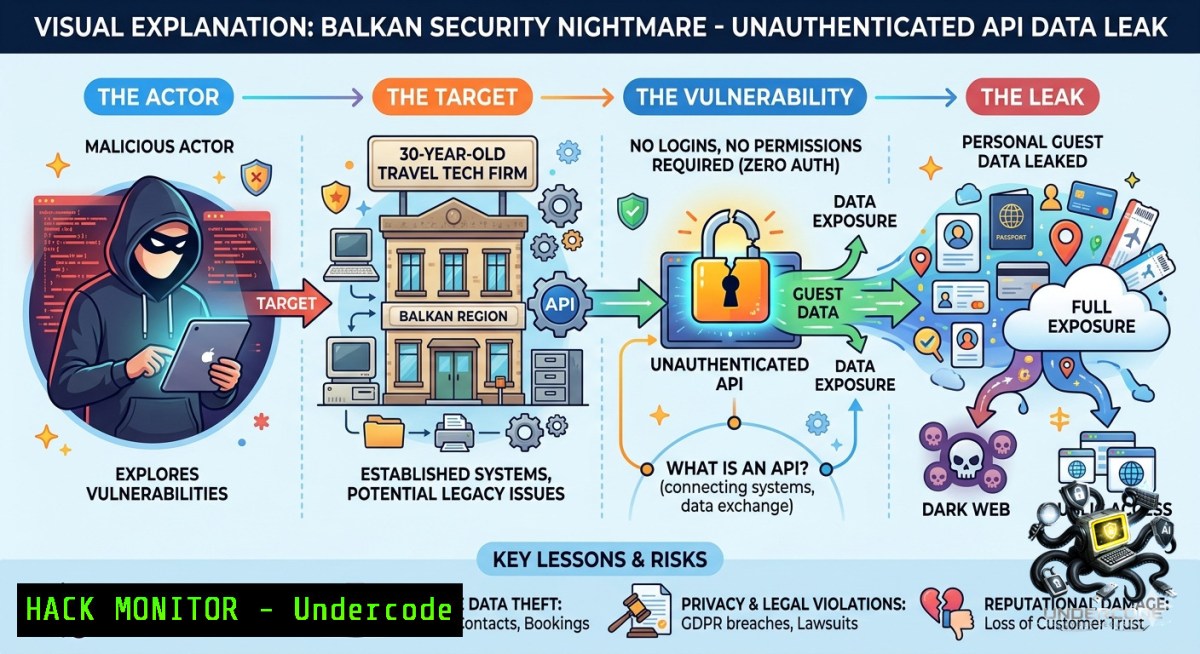
A Croatian travel software firm with 25–30 years of industry experience and high-profile domestic brands as clients was discovered running a web platform with no privacy policy, no API authentication, and completely exposed JavaScript business logic – including Lorem Ipsum placeholder comments and AI-generated Russian phishing code. The vulnerability, reported responsibly to CERT.hr and AZOP, demonstrates that even decades-old companies can fail at basic security hygiene, leaving guest PII accessible via a single tool called LopataJS.
Learning Objectives:
– Identify missing API authentication and exposed client‑side business logic in legacy web applications
– Implement access controls, monitoring, and GDPR‑compliant data handling for hospitality tech platforms
– Use command-line tools and browser DevTools to audit, harden, and mitigate unauthenticated API risks
You Should Know:
1. The Anatomy of an Unauthenticated API Disaster
This section expands on the post’s core finding: an API serving guest data without any authentication. Attackers only need a browser’s F12 (DevTools) to locate AJAX calls, then replay them with `curl` or a simple script.
Step‑by‑step guide to discover and test exposed APIs:
– Step 1: Open DevTools → Network tab → XHR/Fetch filter. Browse the site as a normal user; note any API calls returning JSON (e.g., `getGuests.php`, `reservations/list`).
– Step 2: Copy the request URL – often contains parameters like `hotelId=123`.
– Step 3: Replay with `curl` from Linux/macOS or WSL (no cookies/session required if unauthenticated):
curl -X GET "https://target.com/api/getGuests?hotelId=123" -H "Accept: application/json"
– Step 4: For Windows (PowerShell):
Invoke-RestMethod -Uri "https://target.com/api/getGuests?hotelId=123" -Method Get
– Step 5: Check response – if you receive guest names, emails, or booking details without a token, the API is wide open.
How to use this for hardening: Always require an API key, JWT, or session token on every endpoint that handles sensitive data. Use server-side middleware to verify authentication before processing any request.
2. Reverse Engineering Client‑Side Logic with LopataJS Techniques
The post mentions “LopataJS” as a tool that was sufficient to compromise the system. This refers to automated extraction of JavaScript comments, hidden endpoints, and hardcoded credentials from frontend code.
Step‑by‑step guide using native Linux tools:
– Step 1: Download all JavaScript files from the target site:
wget -r -l 1 -A.js https://target.com/
– Step 2: Extract all URLs and API endpoints from the JS files:
grep -oP 'https?://[^"]+' .js | sort -u > endpoints.txt
– Step 3: Look for comments revealing logic or developer notes:
grep -E '//|/\' .js
The post found `Lorem Ipsum` and Russian‑language comments inside AI‑generated phishing code.
– Step 4: Search for hardcoded credentials or internal paths:
grep -iE 'api[_-]?key|secret|password|token|admin' .js
– Step 5: Use `curl` to test each discovered endpoint (as shown in section 1).
On Windows, use `findstr`:
findstr /i "http:// https:// api key secret" .js
Mitigation: Never expose business logic or sensitive endpoints client‑side. Move all critical API calls to a backend‑only layer, use environment variables for keys, and obfuscate/minify JS without relying on obscurity.
3. Hardening APIs: From Zero to Authenticated
The affected firm had no authentication on its API. Here is a practical guide to adding multi‑layer protection using JWT (JSON Web Tokens) – applicable to PHP (since the post mentions PHP code) and Node.js.
Step‑by‑step implementation (PHP with Firebase JWT):
– Step 1: Install JWT library (composer):
composer require firebase/php-jwt
– Step 2: Generate a token upon login (example endpoint):
use Firebase\JWT\JWT;
$key = "your_256_bit_secret";
$payload = ["user_id" => 123, "exp" => time() + 3600];
$jwt = JWT::encode($payload, $key, 'HS256');
– Step 3: Create authentication middleware for all API endpoints:
function authMiddleware() {
$headers = getallheaders();
if (!isset($headers['Authorization'])) {
http_response_code(401);
die('No token');
}
$token = str_replace('Bearer ', '', $headers['Authorization']);
try {
$decoded = JWT::decode($token, $key, ['HS256']);
return $decoded;
} catch (Exception $e) {
http_response_code(401);
die('Invalid token');
}
}
– Step 4: Protect each endpoint by calling `authMiddleware()` at the start.
– Step 5: For Linux monitoring, use `tail -f /var/log/nginx/access.log` to watch for unauth attempts (status 401).
On Windows Server with IIS, enable Failed Request Tracing and use PowerShell to scan logs:
Select-String -Path "C:\inetpub\logs\LogFiles\.log" -Pattern "401"
4. GDPR and NIS2: What Every IT Manager Must Know
The post highlights a dangerous misconception: “NIS2 doesn’t apply to tourism yet, so GDPR doesn’t matter.” GDPR has been in force since 2018. No privacy policy and sharing guest data without disclosure is a direct violation – fines up to €20 million or 4% of global turnover.
Step‑by‑step compliance audit commands:
– Linux – Search for unencrypted PII in logs:
sudo grep -rE '[A-Za-z0-9._%+-]+@[A-Za-z0-9.-]+\.[A-Za-z]{2,}' /var/log/
– Windows – Use Findstr to scan IIS logs for sensitive data:
findstr /i "credit card cvv passport" C:\inetpub\logs\LogFiles\.log
– Network capture to verify API calls lack auth (Linux):
sudo tcpdump -i eth0 -A -s 0 'tcp port 443' | grep -i "Authorization"
– Use OWASP ZAP (cross‑platform) to automate API security scanning:
zap-cli quick-scan --self-contained --spider -t https://target.com/api/
– Remediation steps:
– Publish a privacy policy listing all data processors.
– Implement data retention and deletion procedures.
– Report any confirmed breach within 72 hours to the supervisory authority (AZOP).
5. Detecting AI‑Generated Malicious Code in Your Stack
The post notes that the phishing JavaScript and PHP found on the site were AI‑generated (with Russian comments). Attackers now use LLMs to produce functional, hard‑to‑distinguish malware.
Step‑by‑step detection using open‑source tools:
– Step 1: Extract all inline scripts and external JS (Linux):
grep -r 'script' /var/www/html/ | grep -oP 'src="\K[^"]+' > scripts.txt
– Step 2: Run `strings` on suspicious files to reveal comments or unusual variables:
strings suspicious.js | grep -iE 'russian|cyrillic|ai|gpt|llm'
– Step 3: Use ClamAV with custom signatures for known AI phishing patterns:
sudo clamscan -r --detect-broken --max-filesize=0 /var/www/html/
– Step 4: Windows – Use PowerShell to search for pattern‑based indicators:
Get-ChildItem -Recurse -Include .js,.php | Select-String -Pattern "eval\(|base64_decode|fromCharCode|cyrillic"
– Step 5: Manual review of comments – the post’s Russian comments are a red flag. Any non‑English developer notes in a production site should trigger investigation.
Mitigation: Run software composition analysis (SCA) tools like OWASP Dependency-Check. Enforce code review policies that flag auto‑generated code from untrusted sources.
6. Cloud Hardening for Travel Tech: AWS WAF, API Gateway, and Monitoring
Assume the breached firm moved to the cloud without fixing legacy flaws. Here is how to block unauthenticated API access at the cloud edge.
Step‑by‑step using AWS:
– Step 1: Deploy an API Gateway in front of existing endpoints. Disable direct access to backend servers.
– Step 2: Create a usage plan with API keys – even a simple static key blocks random scans.
– Step 3: Configure AWS WAF to reject requests missing a custom header (e.g., `X-API-Key`):
{
"Name": "RequireAPIKeyHeader",
"Priority": 0,
"Statement": {
"ByteMatchStatement": {
"SearchString": "X-API-Key",
"FieldToMatch": { "Headers": { "Name": "X-API-Key" } },
"TextTransformation": [ { "Priority": 0, "Type": "NONE" } ],
"PositionalConstraint": "EXACTLY"
}
},
"Action": { "Block": {} }
}
– Step 4: Enable CloudTrail and GuardDuty – commands via AWS CLI:
aws guardduty create-detector --enable
aws cloudtrail create-trail --1ame api-trail --s3-bucket-1ame your-bucket
– Step 5: Use VPC Flow Logs to detect anomalous API calls (Linux on‑prem or cloud):
aws logs filter-log-events --log-group-1ame VPCFlowLogs --filter-pattern "REJECT"
– Windows equivalent (using Azure instead): Use Azure Application Gateway with WAF policy, and Azure Monitor to alert on 401 responses.
What Undercode Say:
– Key Takeaway 1: Age and reputation do not replace basic security controls – no authentication, no monitoring, and exposed JavaScript are indefensible for any company handling PII, regardless of “30 years of experience.”
– Key Takeaway 2: Regulatory compliance (GDPR) is not optional and does not wait for NIS2. The tourism sector’s ignorance of data protection laws will lead to heavy fines and class‑action lawsuits after incidents like this.
– Analysis: The post reveals a systemic Balkan pattern: “we have a website” checkbox mentality, zero investment in security, and blaming external factors. The presence of AI‑generated phishing code with Russian comments suggests an automated, low‑skill attacker – yet the firm’s defenses were so weak that even unsophisticated tools succeeded. The incident should serve as a wake‑up call for all SMBs: run a basic API auth audit today, or expect your data to be scraped tomorrow.
Prediction:
– -1: GDPR enforcement will accelerate in Croatia and neighboring EU members – AZOP will issue fines exceeding €500,000 for this breach, setting a precedent for the hospitality tech sector. The company’s brand reputation among “great Croatian brands” will collapse, leading to client churn.
– -1: Attackers will automate LopataJS‑like scanning tools to find unauthenticated APIs in travel, booking, and camping platforms across the Balkans, triggering a wave of data leaks and phishing campaigns before the end of 2026.
– +1: This public disclosure (and CERT.hr/AZOP involvement) will force the industry to adopt minimum security standards – including mandatory API authentication and privacy policies – before NIS2’s 2027 deadline, potentially raising the baseline for all regional vendors.
▶️ Related Video (66% Match):
🎯Let’s Practice For Free:
🎓 Live Courses & Certifications:
[Join Undercode Academy for Verified Certifications](https://undercode.co.uk/certifications/)
🚀 Request a Custom Project:
Secure, high-velocity infrastructure and disruptive technological engineering. Contact our engineering team for high-tier development and proprietary systems:
[[email protected]](mailto:[email protected])
💎 Smart Architecture | 🛡️ Secure by Design | ⭐ Trusted by Thousands
IT/Security Reporter URL:
Reported By: [Anic Studio](https://www.linkedin.com/posts/anic-studio_lopatajs-staysafe-security-ugcPost-7469265867281690624-9OjF/) – Hackers Feeds
Extra Hub: Undercode MoN
Basic Verification: Pass ✅
🔐JOIN OUR CYBER WORLD [ CVE News • HackMonitor • UndercodeNews ]
[💬 Whatsapp](https://undercode.help/whatsapp) | [💬 Telegram](https://t.me/UndercodeCommunity)
📢 Follow UndercodeTesting & Stay Tuned:
[𝕏 formerly Twitter 🐦](https://x.com/undercodeupdate) | [@ Threads](https://www.threads.net/@undercodetesting) | [🔗 Linkedin](https://www.linkedin.com/company/undercodetesting/) | [🦋BlueSky](https://bsky.app/profile/undercode.bsky.social)


