Listen to this Post
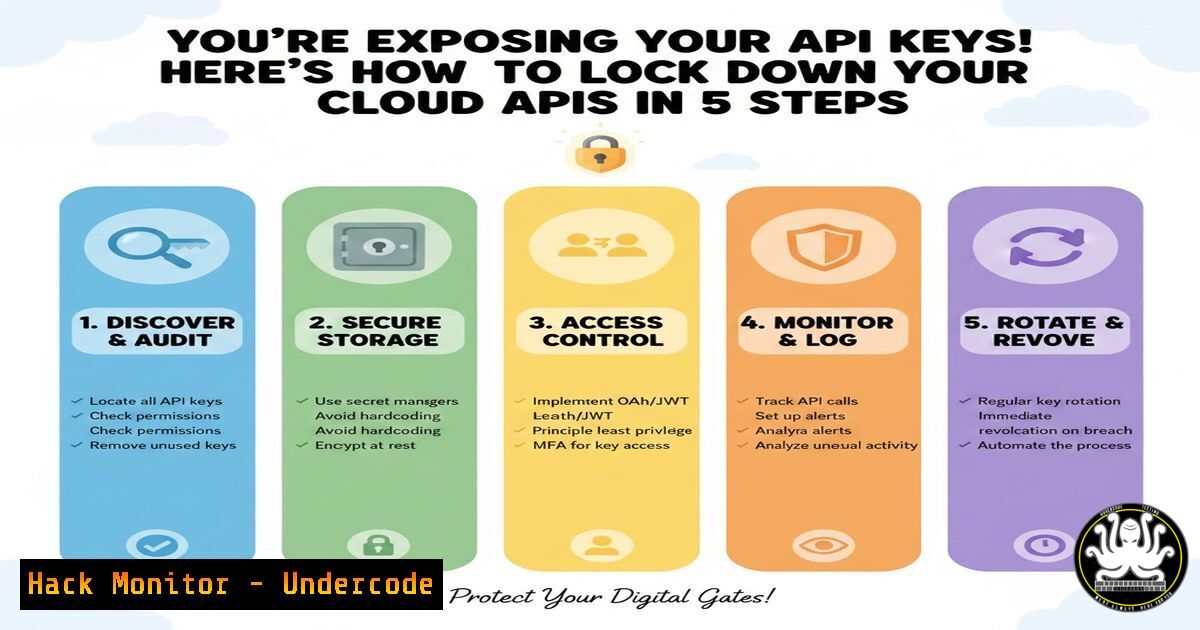
Introduction:
API security is critical in modern cloud environments, where exposed keys and misconfigured endpoints can lead to data breaches and unauthorized access. This article delves into hardening techniques for AWS, Azure, and GCP APIs, covering authentication, monitoring, and vulnerability mitigation. Understanding these practices is essential for DevOps and security teams to protect sensitive data.
Learning Objectives:
- Implement robust authentication and authorization for cloud APIs.
- Configure logging and monitoring to detect anomalous API activity.
- Apply vulnerability exploitation and mitigation techniques for common API security flaws.
You Should Know:
1. Enforcing Multi-Factor Authentication (MFA) and IAM Policies
Step‑by‑step guide explaining what this does and how to use it.
MFA adds an extra layer of security beyond passwords, while IAM policies define permissions. In AWS, enable MFA for root and IAM users via the CLI. Then, create a policy to restrict API calls without MFA.
– AWS CLI Commands:
 Enable virtual MFA device for an IAM user
aws iam enable-mfa-device --user-name Alice --serial-number arn:aws:iam::123456789012:mfa/Alice --authentication-code-1 123456 --authentication-code-2 789012
 Create IAM policy requiring MFA for sensitive API actions
cat > require-mfa-policy.json << EOF
{
"Version": "2012-10-17",
"Statement": [{
"Effect": "Deny",
"Action": ["s3:DeleteBucket", "ec2:StopInstances"],
"Resource": "",
"Condition": {"Null": {"aws:MultiFactorAuthAge": true}}
}]
}
EOF
aws iam create-policy --policy-name RequireMFA --policy-document file://require-mfa-policy.json
– Azure Equivalent: Use Azure AD Conditional Access policies in the portal to require MFA for API management.
2. Securing API Keys with Secret Management Tools
Step‑by‑step guide explaining what this does and how to use it.
Hard-coding API keys in source code is a major risk. Use secret managers like AWS Secrets Manager or HashiCorp Vault to store and rotate keys securely.
– Linux/Windows Tutorial: On Linux, install Vault and set up a secret engine.
 Download and start Vault dev server
wget https://releases.hashicorp.com/vault/1.15.0/vault_1.15.0_linux_amd64.zip
unzip vault_1.15.0_linux_amd64.zip
sudo mv vault /usr/local/bin/
vault server -dev &
 Store an API key
export VAULT_ADDR='http://127.0.0.1:8200'
vault kv put secret/api-keys/prod key=your_actual_key_here
 Retrieve in application
vault kv get secret/api-keys/prod
– AWS Secrets Manager CLI: Use `aws secretsmanager create-secret –name prod/APIKey –secret-string “{\”key\”:\”value\”}”` to store keys.
3. Configuring API Gateway Rate Limiting and Throttling
Step‑by‑step guide explaining what this does and how to use it.
Rate limiting prevents brute-force attacks and DDoS by capping requests per client. In AWS API Gateway, set usage plans and API keys.
– AWS Setup:
 Create usage plan
aws apigateway create-usage-plan --name "BasicPlan" --throttle burstLimit=100,rateLimit=50
 Create API key and associate with plan
aws apigateway create-api-key --name "ClientKey" --enabled
aws apigateway create-usage-plan-key --usage-plan-id <plan_id> --key-id <key_id> --key-type API_KEY
– GCP Cloud Endpoints: Edit OpenAPI spec to add `x-google-quota` limits.
4. Implementing OAuth 2.0 and JWT Validation
Step‑by‑step guide explaining what this does and how to use it.
OAuth 2.0 provides secure delegation, and JWTs ensure token integrity. Validate JWTs in your API code to prevent unauthorized access.
– Node.js Tutorial: Use `jsonwebtoken` library.
const jwt = require('jsonwebtoken');
const publicKey = <code>--BEGIN PUBLIC KEY--\nYOUR_PUBLIC_KEY\n--END PUBLIC KEY--</code>;
function validateToken(token) {
try {
const decoded = jwt.verify(token, publicKey, { algorithms: ['RS256'] });
return decoded;
} catch (err) {
console.error('JWT validation failed:', err);
return null;
}
}
// Use in Express middleware
app.get('/api/data', (req, res) => {
const token = req.headers.authorization?.split(' ')[bash];
if (!validateToken(token)) return res.status(401).send('Unauthorized');
res.json({ data: 'secure' });
});
– Windows PowerShell: Use `Invoke-RestMethod` with tokens for testing APIs.
- Monitoring and Logging API Activity with SIEM Integration
Step‑by‑step guide explaining what this does and how to use it.
Centralize logs from cloud APIs to detect threats. Use AWS CloudTrail or Azure Monitor logs and forward to SIEM like Splunk or ELK.
– Linux Commands for ELK Stack:
 Install Filebeat on Ubuntu to ship CloudTrail logs
wget -qO - https://artifacts.elastic.co/GPG-KEY-elasticsearch | sudo apt-key add -
sudo apt-get install apt-transport-https
echo "deb https://artifacts.elastic.co/packages/7.x/apt stable main" | sudo tee /etc/apt/sources.list.d/elastic-7.x.list
sudo apt-get update && sudo apt-get install filebeat
sudo filebeat modules enable aws
 Edit /etc/filebeat/filebeat.yml to configure CloudTrail input
sudo systemctl start filebeat
– Windows Event Forwarding: For on-prem APIs, use `wevtutil` to forward logs.
6. Exploiting and Patching Injection Vulnerabilities in APIs
Step‑by‑step guide explaining what this does and how to use it.
API endpoints vulnerable to SQL or NoSQL injection can be exploited to access databases. Demonstrate exploitation and mitigation.
– Vulnerability Exploitation Example: For a NoSQL injection in a Node.js/Express app with MongoDB, an attacker might send `{“user”: {“$ne”: null}}` in POST data to bypass authentication.
– Mitigation with Input Validation:
const mongoSanitize = require('express-mongo-sanitize');
app.use(mongoSanitize());
// Use parameterized queries for SQL databases
const sql = 'SELECT  FROM users WHERE id = ?';
db.query(sql, [bash], (err, results) => { ... });
– Windows Command for Testing: Use `curl` in PowerShell: `curl -X POST http://api.example.com/login -H “Content-Type: application/json” -d ‘{“user”: {“$ne”: null}}’` to test endpoints.
7. Hardening Cloud Storage APIs (S3, Blob Storage)
Step‑by‑step guide explaining what this does and how to use it.
Misconfigured storage APIs often leak data. Enforce bucket policies, disable public access, and encrypt data at rest.
– AWS S3 Commands:
 Disable public access block
aws s3api put-public-access-block --bucket my-bucket --public-access-block-configuration BlockPublicAcls=true,IgnorePublicAcls=true,BlockPublicPolicy=true,RestrictPublicBuckets=true
 Enable default encryption
aws s3api put-bucket-encryption --bucket my-bucket --server-side-encryption-configuration '{"Rules": [{"ApplyServerSideEncryptionByDefault": {"SSEAlgorithm": "AES256"}}]}'
 Set bucket policy to restrict access
cat > bucket-policy.json << EOF
{
"Version": "2012-10-17",
"Statement": [{
"Effect": "Deny",
"Principal": "",
"Action": "s3:GetObject",
"Resource": "arn:aws:s3:::my-bucket/",
"Condition": {"NotIpAddress": {"aws:SourceIp": ["192.0.2.0/24"]}}
}]
}
EOF
aws s3api put-bucket-policy --bucket my-bucket --policy file://bucket-policy.json
– Azure Blob Storage: Use `az storage account update –name
What Undercode Say:
- Key Takeaway 1: API security is not just about authentication; it requires a layered approach including secret management, rate limiting, and proactive monitoring to mitigate risks effectively.
- Key Takeaway 2: Cloud misconfigurations remain a top attack vector, so automating security policies with infrastructure-as-code tools like Terraform can prevent human error.
Analysis: The techniques outlined highlight the convergence of IT operations and cybersecurity, where DevOps teams must adopt security-first practices. As APIs become the backbone of digital services, their hardening is non-negotiable. The inclusion of exploitation steps underscores the importance of understanding attacker methodologies to build robust defenses. Training courses on platforms like Coursera (e.g., “APIs Security” by AWS) or Udemy (e.g., “API Security in Cloud”) are recommended to stay updated.
Prediction:
In the next 2-3 years, AI-driven attacks will increasingly target APIs using automated fuzzing and machine learning to bypass traditional defenses. This will spur the adoption of AI-powered security tools for real-time API threat detection and response, integrating with zero-trust architectures. Cloud providers will embed more granular API security controls, but skill gaps in API security management will remain a challenge, emphasizing the need for continuous training.
🎯Let’s Practice For Free:
IT/Security Reporter URL:
Reported By: Hector Acostar – Hackers Feeds
Extra Hub: Undercode MoN
Basic Verification: Pass ✅


