Listen to this Post
Introduction:
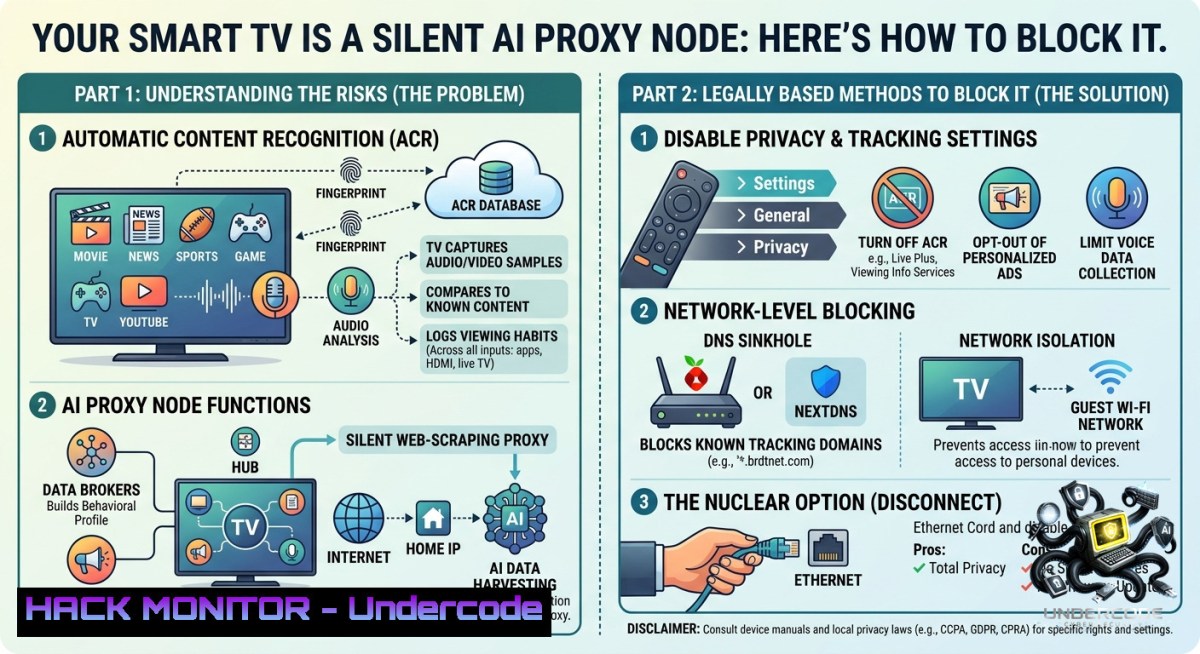
The always‑on device in your living room might be secretly powering the AI economy. A recent investigation by Include Security has revealed that Bright Data, the world’s largest residential proxy network, uses an SDK embedded in free smart TV and mobile apps to turn consumer devices into exit nodes that relay web‑scraping traffic for AI model training—often without users’ meaningful consent. The trade‑off for “fewer ads” can be up to 200 GB of your monthly bandwidth being silently consumed by someone else’s bot, exposing you to legal liability and performance degradation.
Learning Objectives:
– Understand how the Bright Data SDK bypasses VPNs and inspection tools to turn your home IP into a commercial proxy.
– Learn to detect the presence of Bright Data components on Android, iOS, and smart TV platforms.
– Implement network‑level and host‑based countermeasures to block the peer tunnel and protect your bandwidth.
You Should Know:
1. Reverse‑Engineering the Bright Data SDK: How Your TV Becomes an Exit Node
The Bright Data SDK is a commercial library that app publishers integrate to monetize their user base. On every launch, the SDK fetches an unauthenticated configuration from `clientsdk.bright‑sdk.com`, which contains feature flags, idle detection thresholds, per‑country bandwidth caps, and a partner manifest. The peer tunnel is then established via a WebSocket to `proxyjs.brdtnet.com:443`—note that the TLS certificate still bears the legacy name `.luminatinet.com`, a useful detection indicator.
The handshake begins with the server assigning a session ID (`cid`) and continuously polling the device for telemetry: battery level, screen on/off state, CPU/memory usage, and network type. Once the device reports “idle,” the server pushes `cmd_tun` frames—plain JSON instructions that the SDK executes as HTTP requests against third‑party websites, using the user’s residential IP as the source. The researchers found that the peer channel has no real authentication, and the command protocol is less secure than typical malware C2 infrastructure.
The idle detection logic is deliberately broad: the configuration includes `”ignore_screen_on”: true` and `”ignore_on_call”: true`, meaning the device will relay traffic even while you are actively watching or on a phone call, as long as CPU and battery thresholds are met. For smart TVs, which are always plugged in and often unattended, this makes them the “ultimate residential proxy”.
Step‑by‑step guide to detect and block the SDK:
1. Inspect DNS traffic on your router.
Use a packet capture tool like `tcpdump` or Wireshark to monitor queries for the known Bright Data domains. On Linux (e.g., a Raspberry Pi running Pi‑hole), run:
sudo tcpdump -i eth0 -1 port 53 | grep -E "brdtnet|luminatinet|bright-sdk"
2. Block the domains at the DNS level.
Add the following entries to your Pi‑hole’s denylist or to your router’s custom DNS filtering rules:
proxyjs.brdtnet.com
proxyjs.luminatinet.com
proxyjs.bright-sdk.com
clientsdk.bright-sdk.com
clientsdk.brdtnet.com
Blocking `proxyjs.` kills the peer tunnel without affecting Bright Data’s customer‑facing proxy service, which runs on separate domains.
3. Apply TLS SNI filtering (for advanced networks).
Configure your firewall to drop or alert on TLS handshakes where the Server Name Indication (SNI) matches `.brdtnet.com`, `.luminatinet.com`, or `.luminati.io`.
4. Use certificate fingerprint blocking.
The current certificate for `.brdtnet.com` has SHA256 `313ce4ec7d5a51e5…` and for `.luminatinet.com` `5028612e625befea…`. You can import these into tools like NextDNS or custom IDS rules.
2. VPN and Inspection Bypasses: Why Your Security Tools Won’t See It
The Bright Data SDK employs two independent techniques to avoid detection, making it unusually stealthy for a commercially distributed component. The control plane (config fetch, telemetry pings) is built on low‑level CFNetwork primitives rather than URLSession, defeating many mobile app security tools that rely on hooking higher‑level APIs. The data plane (the peer tunnel) uses Apple’s `NWConnection` API with `requiredInterface` set to the physical network interface (`en0` for WiFi or `pdp_ip0` for cellular), which intentionally bypasses any configured VPN tunnel. The researchers confirmed this empirically: their TLS interception captured every other HTTPS call from the SDK except the connection to `proxyjs.brdtnet.com:443`, even though port 443 was explicitly redirected to the inspector.
The implications are serious for enterprise security teams. If a corporate device runs a Bright‑SDK‑enabled app, the scraping traffic will exit through the cellular interface, bypassing corporate WiFi and any VPN‑based inspection. For home users, the peer traffic is equally invisible to standard parental controls and many consumer firewalls.
Step‑by‑step guide for device‑level detection (Android and iOS):
1. On Android, monitor running processes and network sockets.
Connect via `adb` and search for evidence of the Bright Data library:
adb shell dumpsys package | grep -i bright
adb shell netstat -tun | grep -E "brdtnet|luminatinet"
2. On iOS (requires jailbreak or MDM with app‑binary scanning), scan for known symbols.
The Include Security researchers identified the Swift symbols `BrdWebSocketFacade` and `BrdNetwork.DNSResolver` as reliable indicators of the Bright Data SDK. Use a tool like `nm` on a decrypted IPA or integrate these signatures into your mobile threat defense solution.
3. For corporate‑managed devices, create an MDM policy that blocks any app containing these symbols.
This is the only way to catch the traffic when the device is off the corporate WiFi.
3. The Geography Tiers: Uneven Exploitation Across the Globe
The unauthenticated configuration file reveals stark differences in how Bright Data treats devices based on their country. Uzbekistan and Oman are given the most aggressive allowances: devices can relay down to 1% battery, with a daily cap of 1 GB and a monthly cap of 30 GB—far above the default worldwide limits of 50 MB daily and 500 MB monthly. At the other extreme, Qatar and UAE devices are throttled to 40 MB daily and 250 MB monthly. The researchers speculate that this reflects deliberate market segmentation: relaxing limits where grid power is stable and bandwidth is abundant, while tightening them where mobile data is expensive. From a security standpoint, this means that users in certain countries are unknowingly bearing a much larger share of the AI scraping infrastructure.
Step‑by‑step guide to audit your own exposure:
1. Check the partner manifest directly.
The Bright Data config endpoint is unauthenticated. Fetch it with `curl` to see which partner apps have been associated with the SDK:
curl -s "https://clientsdk.bright-sdk.com/sdk_config_ios.json" | jq '.partner_manifest'
Known smart‑TV partners include PlayWorks Digital (400+ game titles, reach ~250M TV homes), CloudTV (integrated across 125+ brands), and Longvision Media.
2. Review the apps on your Samsung Tizen or LG webOS smart TV.
These platforms remain the last major holdouts after Roku, Amazon Fire TV, and Google Android TV banned proxy SDKs. Navigate to the list of installed apps and look for any titles from the partner list above.
3. Monitor your monthly bandwidth usage before and after blocking.
Use your router’s traffic monitoring or a tool like `nethogs` on a Linux gateway. A sudden drop after applying DNS blocks is a strong indication that your TV was actively relaying.
4. Historical Precedent: From Hola VPN to AI Scraping
This model is not new. Bright Data is the corporate successor to Luminati Networks, which itself grew out of Hola VPN. In 2015, Hola was caught selling its free users’ bandwidth as exit nodes through Luminati, at $20 per gigabyte. An attacker used the Luminati network to launch a denial‑of‑service attack against 8chan, sending thousands of legitimate‑looking POST requests in 30 seconds and crashing the site. What has changed is the scale and the buyer. Anti‑bot defenses from Cloudflare, DataDome, and others now block scrapers coming from datacenter IPs, forcing AI companies to route their data harvesting through residential connections instead. Krebs reported in October 2025 that a glut of residential proxies from botnets like Aisuru is fueling large‑scale AI data harvesting, and Google dismantled the criminal IPIDEA proxy network in January 2026. Bright Data distinguishes itself by claiming an opt‑in consent screen, but as the Petflix example shows—where “occasionally” translates to a 200 GB monthly budget—the gap between the user‑facing text and the SDK’s actual configuration raises serious questions about whether that consent is meaningful.
What Undercode Say:
– Key Takeaway 1: The Bright Data SDK is technically sophisticated, intentionally designed to evade VPNs and standard monitoring tools, making it far more than a simple ad‑exchange trade‑off.
– Key Takeaway 2: The risk is not malware in the traditional sense, but the invisible commoditization of your home IP and bandwidth—with legal liability if the proxy is used for malicious purposes.
Expected Output:
The line between legitimate consent and predatory dark patterns has never been thinner. Consumers should treat any “opt‑in for fewer ads” prompt on a smart TV or mobile app with extreme skepticism and assume that their bandwidth will be used for purposes beyond the stated “occasional” use. Meanwhile, the security industry must update its detection tooling to account for SDKs that intentionally bypass VPNs and low‑level hooks—a trend that will likely spread to other data brokers. For now, the most practical defense remains network‑level blocking of the known Bright Data domains, combined with user education about the real cost of “free” apps.
Prediction:
– -1: As AI models grow hungrier for fresh training data, more legitimate-looking SDKs will embed residential proxy functionality, pushing the boundary of what regulators consider acceptable consent and creating a new category of “proxyware” that blurs the line between user participation and involuntary participation.
– -1: Lawsuits and regulatory actions are inevitable in the EU and other privacy‑focused jurisdictions once a high‑profile incident—such as a Bright Data proxy being used to access illegal content—leads back to an unknowing user’s home IP, triggering criminal investigations and civil liability.
– +1: The technical disclosures from Include Security will empower open‑source blocking tools (Pi‑hole, NextDNS, AdGuard) to maintain updated blocklists, and could pressure major app stores to require explicit, per‑session consent for any background networking that routes third‑party traffic.
▶️ Related Video (78% Match):
🎯Let’s Practice For Free:
🎓 Live Courses & Certifications:
[Join Undercode Academy for Verified Certifications](https://undercode.co.uk/certifications/)
🚀 Request a Custom Project:
Secure, high-velocity infrastructure and disruptive technological engineering. Contact our engineering team for high-tier development and proprietary systems:
[[email protected]](mailto:[email protected])
💎 Smart Architecture | 🛡️ Secure by Design | ⭐ Trusted by Thousands
IT/Security Reporter URL:
Reported By: [Mohit Hackernews](https://www.linkedin.com/posts/mohit-hackernews_your-smart-tv-might-be-scraping-the-web-share-7468944173539377152-MP1r/) – Hackers Feeds
Extra Hub: Undercode MoN
Basic Verification: Pass ✅
🔐JOIN OUR CYBER WORLD [ CVE News • HackMonitor • UndercodeNews ]
[💬 Whatsapp](https://undercode.help/whatsapp) | [💬 Telegram](https://t.me/UndercodeCommunity)
📢 Follow UndercodeTesting & Stay Tuned:
[𝕏 formerly Twitter 🐦](https://x.com/undercodeupdate) | [@ Threads](https://www.threads.net/@undercodetesting) | [🔗 Linkedin](https://www.linkedin.com/company/undercodetesting/) | [🦋BlueSky](https://bsky.app/profile/undercode.bsky.social)


