Listen to this Post
Introduction:
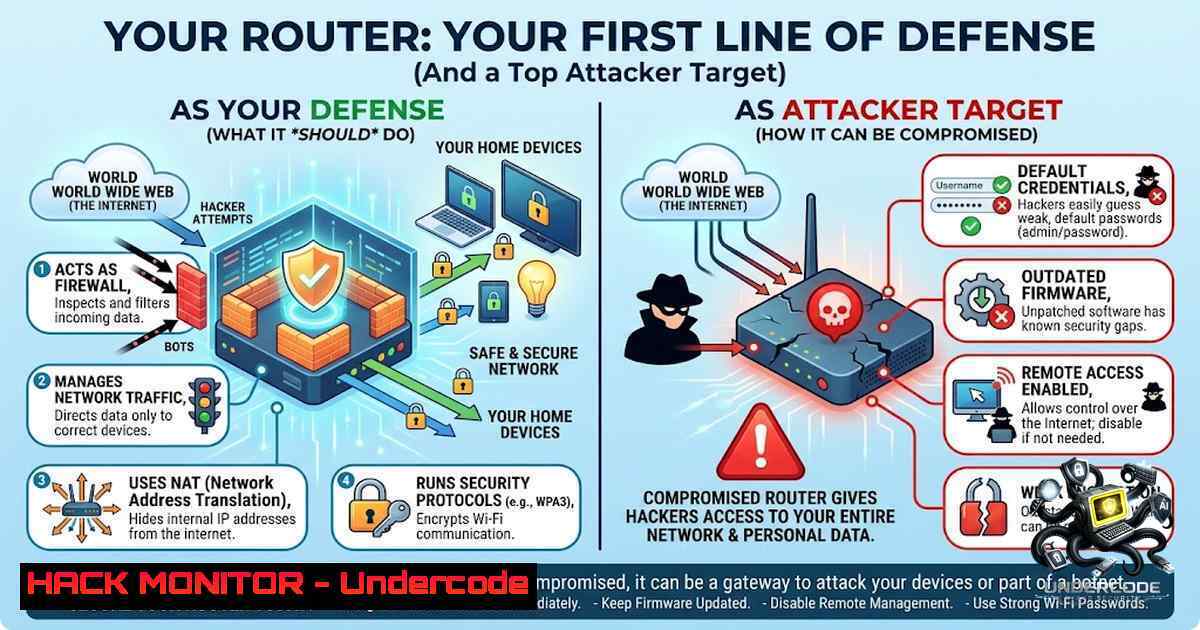
A router is far more than a plastic shell with LEDs – it is a miniature computer running a full operating system, managing network traffic, enforcing security policies, and sitting as the primary gateway between your internal network and the hostile Internet. From a cybersecurity perspective, the router is the first line of defense, yet it remains one of the most neglected assets in both home and enterprise environments, leading to countless breaches that begin at the network edge.
Learning Objectives:
- Understand the internal architecture of a modern router (CPU, RAM, flash, Wi-Fi radios) and how data flows from the WAN port to endpoint devices.
- Learn practical router hardening techniques, including firmware updates, credential management, VLAN segmentation, and disabling unnecessary services.
- Master Linux and Windows commands to audit router security, capture traffic, configure logging, and scan for exposed management interfaces.
You Should Know:
1. The Hidden Attack Surface: Router Management Interfaces
Most routers expose a web-based administration panel on port 80 or 443. Attackers constantly scan for these interfaces, especially those with default credentials or remote management enabled.
Step‑by‑step guide to discover and secure your router’s management interface:
1. Find the router’s IP address (default gateway):
- Windows: `ipconfig | findstr /i “Default Gateway”`
– Linux: `ip route | grep default | awk ‘{print $3}’`
- Scan for open management ports (use Nmap from a trusted internal host):
nmap -p 80,443,8080,8443,22,23,161 <router-IP>
-
Access the admin panel via a web browser. If default credentials work (e.g., admin:admin), change them immediately.
-
Disable remote management (usually under “Administration” or “Remote Access”). Ensure management is only allowed from the local LAN.
-
Enable HTTPS for the admin interface and use a strong, unique password. Where supported, enable multi‑factor authentication (MFA).
2. Firmware: The Most Overlooked Security Patch
Outdated firmware contains known vulnerabilities that attackers weaponize within hours of disclosure. Router vendors release patches for critical bugs, yet many devices never receive updates.
Step‑by‑step firmware update process:
- Check current firmware version – log into the router and look for “Firmware Version” or “System Information”.
-
Visit the vendor’s support site and compare your version with the latest stable release.
-
Download the firmware (prefer HTTPS) and verify its integrity using checksums:
Linux/macOS
sha256sum firmware.bin
Windows PowerShell
Get-FileHash firmware.bin -Algorithm SHA256
-
Apply the update via the router’s web interface. Never interrupt power during the upgrade.
-
After reboot, re‑check the firmware version and reapply any custom security settings (updates often reset configurations).
-
Enable automatic updates if the router supports verified signed updates – otherwise, set a calendar reminder to check quarterly.
3. Logging and Monitoring: Your Router’s Silent Witness
Routers generate valuable logs: connection attempts, firewall drops, admin logins, and DHCP assignments. Without centralized logging, these clues vanish upon reboot.
Step‑by‑step to forward router logs to a SIEM or syslog server:
- Enable syslog on the router (usually under “Administration” → “Logs” or “System Log”). Set the remote syslog server IP to your logging host.
2. Set up a syslog receiver on Linux:
sudo apt install rsyslog  Debian/Ubuntu
sudo systemctl enable rsyslog
 Configure /etc/rsyslog.conf to listen on UDP 514
$ModLoad imudp
$UDPServerRun 514
sudo systemctl restart rsyslog
- On Windows, use Syslog‑ng or forward events to a SIEM like Splunk Free (500 MB/day) or Wazuh.
-
Monitor critical log patterns – repeated admin login failures, WAN‑side access attempts to port 22/443, or unexpected reboots.
-
Use logwatch or a simple grep to spot anomalies:
sudo tail -f /var/log/syslog | grep -i "failed|unauthorized|attack"
-
Network Segmentation with VLANs – Stopping Lateral Movement
Once an attacker compromises a single IoT device, they can pivot to critical systems unless VLANs isolate traffic. VLANs create separate broadcast domains, limiting the blast radius of a breach.
Step‑by‑step VLAN configuration (generic, works on OpenWrt, pfSense, or enterprise gear):
- Plan your VLANs – e.g., VLAN 10 for trusted computers, VLAN 20 for IoT devices, VLAN 30 for guests.
-
On the router’s switch configuration, create each VLAN and assign untagged ports for endpoints:
– Port 1 (WAN) – untagged VLAN 1 (native)
– Port 2 (trusted) – untagged VLAN 10
– Port 3 (IoT) – untagged VLAN 20
– Port 4 (guest) – untagged VLAN 30
- Create VLAN interfaces on the router and assign IP subnets (e.g., 192.168.10.1/24 for VLAN 10).
-
Configure firewall rules to block inter‑VLAN traffic by default, then allow only specific flows (e.g., trusted VLAN can initiate RDP to IoT VLAN only if needed).
-
Test segmentation – from an IoT device, try to ping the trusted subnet gateway; the ping should fail.
-
Disabling Unused Services – Less Code, Fewer Bugs
Routers often enable UPnP, WPS, Telnet, and SNMP by default – each an unnecessary attack vector. UPnP has a long history of remote code execution flaws; WPS can be brute‑forced in hours.
Step‑by‑step to disable dangerous services:
- Scan your router for open ports (from inside and outside the network). Use an external VPS to test WAN‑facing ports:
nmap -sS -p- <your-public-IP>
2. Log into the router and disable:
- UPnP (Universal Plug and Play) – found under “Advanced” → “UPnP”
- WPS (Wi‑Fi Protected Setup) – under “Wireless” → “WPS”
- Telnet (port 23) – under “Administration” → “Remote Access” (use SSH instead)
- SNMP (port 161) – unless you actively monitor with strong community strings
- For enterprise routers (Cisco / Juniper), use CLI commands:
no ip http server
no ip http secure-server
no service telnet
-
Verify closure – re‑run the nmap scan. Open ports should only be those absolutely necessary (e.g., VPN, essential management).
6. Hardening Wi-Fi Security: Beyond WPA2
WPA2‑PSK is vulnerable to KRACK and offline dictionary attacks. WPA3 eliminates these weaknesses but requires hardware support.
Step‑by‑step to harden wireless security:
- Upgrade to WPA3 if your router and clients support it. On enterprise networks, use WPA3‑Enterprise with 802.1X.
-
If stuck on WPA2, use a long, random passphrase (≥ 20 characters, mixed case, numbers, symbols) to resist brute‑force.
3. Disable WPS (already covered in section 5).
-
Enable PMF (Protected Management Frames) – under wireless advanced settings – to block deauthentication attacks.
-
On Linux, audit your Wi-Fi security (requires monitor mode):
sudo airmon-1g start wlan0
sudo airodump-1g wlan0mon
Look for WPS‑enabled or WPA2‑only networks
-
For Windows, use `netsh wlan show networks mode=bssid` to inspect nearby access points and their encryption types.
7. Continuous Assessment: Automated Router Auditing
Manual checks are forgotten. Automate router security scans to catch configuration drift and new vulnerabilities.
Step‑by‑step to set up automated router auditing:
- Use OpenVAS / Greenbone – install on a Linux VM:
sudo apt install gvm
sudo gvm-setup
sudo gvm-start
Then create a target for your router’s IP and schedule a weekly scan.
-
Write a simple audit script (bash + nmap + curl) that checks for open ports, default pages, and expired SSL certificates:
!/bin/bash
ROUTER="192.168.1.1"
nmap -p 22,23,80,443,161,8080 $ROUTER > router_ports.txt
curl -k -I https://$ROUTER | grep "Server:" >> router_headers.txt
-
Send alerts – use `mail` or integrate with Slack via webhook when a high‑risk port appears.
-
Review results monthly and verify that firmware updates have not re‑enabled disabled services.
What Undercode Say:
- Key Takeaway 1: Routers are full‑fledged computers that demand the same rigorous patch and configuration management as servers – neglecting them turns your gateway into a backdoor.
- Key Takeaway 2: A misconfigured router nullifies even the best next‑gen firewall; infrastructure hygiene (firmware, credentials, logging, segmentation) is the true foundation of network security.
Analysis: Yasin Ağırbaş’s post reframes the router from a mundane appliance to a critical security control point. The diagram and component breakdown remind us that every packet passes through the CPU, RAM, and flash – all of which can be subverted by firmware exploits or weak configs. The discussion poll about the most overlooked router security practice is telling: while many choose “firmware updates” or “strong credentials,” continuous monitoring and logging often gets ignored because it requires proactive effort and storage. Attackers know this – they erase logs, disable syslog, and operate quietly. Moreover, the misconception that “firewalls protect us” ignores that the router itself is a firewall, routing engine, and management interface all in one. A properly hardened router includes VLANs to segment IoT garbage from finance servers, disables UPnP that malware loves, and forwards logs to a SIEM where anomalies trigger alerts. Organizations should add router security to their vulnerability management lifecycle, using tools like Nmap for discovery and OpenVAS for scheduled audits. The bottom line: secure the gateway before debating which firewall vendor to buy.
Prediction:
- +1 As edge computing and 5G expand, routers will evolve into zero‑trust enforcement points with built‑in IDS/IPS, AI‑driven anomaly detection, and seamless cloud‑managed security policies, making per‑device agents obsolete.
- -1 However, the vast installed base of legacy routers (ISP‑provided, consumer grade, unpatched) will remain the primary entry vector for botnets (e.g., Mirai variants) and ransomware attacks over the next three years, especially as IoT malware increasingly targets exposed management interfaces and default credentials.
▶️ Related Video (66% Match):
🎯Let’s Practice For Free:
🎓 Live Courses & Certifications:
Join Undercode Academy for Verified Certifications
🚀 Request a Custom Project:
Secure, high-velocity infrastructure and disruptive technological engineering. Contact our engineering team for high-tier development and proprietary systems:
[email protected]
💎 Smart Architecture | 🛡️ Secure by Design | ⭐ Trusted by Thousands
IT/Security Reporter URL:
Reported By: Yasinagirbas Cybersecurity – Hackers Feeds
Extra Hub: Undercode MoN
Basic Verification: Pass ✅


