Listen to this Post
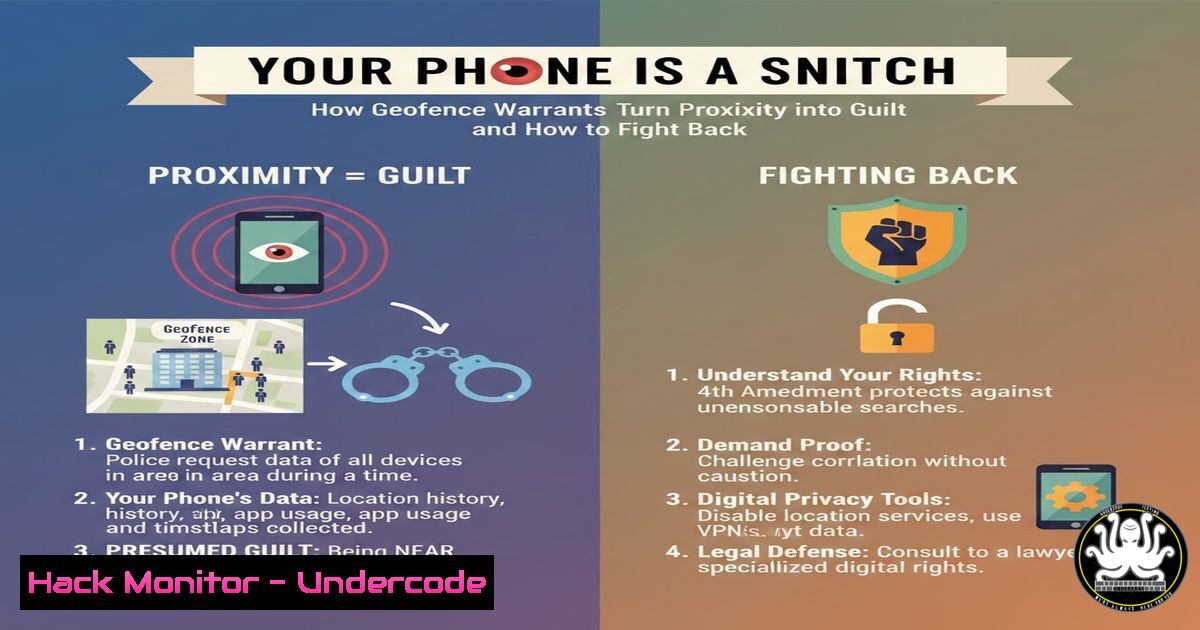
Introduction:
In an era of ubiquitous connectivity, your smartphone continuously broadcasts a digital trail of your physical movements, often without your explicit consent or awareness. This location data, aggregated by tech giants like Google, has become a powerful tool for law enforcement through “geofence warrants,” creating a paradigm where mere proximity to a crime scene can render you a prime suspect. This article dissects the technical and legal mechanics of this surveillance, exploring the profound cybersecurity and privacy implications for every individual.
Learning Objectives:
- Understand the technical architecture behind location tracking and how geofence warrants leverage this data.
- Learn practical, immediate steps to minimize your device’s location footprint across Android, iOS, and desktop systems.
- Explore advanced technical countermeasures, including network obfuscation and encryption, to enhance your digital privacy posture.
You Should Know:
- The Technical Anatomy of a Geofence Warrant: How Your Phone’s Sensors Betray You
A geofence warrant is a legal demand for all device location data within a defined geographical area during a specific time window. Technically, this data is sourced from:
GPS/GNSS: Precise satellite positioning.
Wi-Fi Triangulation: Your device scans for Wi-Fi access point BSSIDs (Basic Service Set Identifiers), and Google’s database maps these to physical addresses.
Cell Tower Triangulation: Connection logs from cellular carriers pin you to sectors from nearby towers.
Bluetooth Beacons: Interaction with public Bluetooth signals.
Step-by-Step Guide:
- Data Aggregation: Your phone, with Location Services enabled, silently sends sensor data (GPS coordinates, Wi-Fi BSSIDs, cell tower IDs) to Google/Apple.
- Warrant Execution: Law enforcement submits a warrant for a “geofence” (e.g., 200 meters around 123 Main St, between 2-4 PM).
- Database Query: Google runs a query on its massive “Sensorvault” database, returning anonymized device IDs (“Anonymous Device 7B3”) that match the criteria.
- Narrowing the List: Police may request a second, more precise filter, narrowing the list.
- De-anonymization: Finally, a warrant compels Google to provide account names, emails, and detailed location histories for the remaining devices.
-
Locking Down Location Services: A Step-by-Step Hardening Guide
Minimizing data collection at the source is the first line of defense.
On Android:
Go to Settings > Location. Toggle off “Use location.”
Tap Location Services > Google Location Accuracy. Turn off “Improve Location Accuracy.” This prevents the use of Wi-Fi and Bluetooth scanning to augment GPS.
Review app permissions: Settings > Privacy > Permission manager > Location. Revoke for all non-essential apps.
On iOS:
Go to Settings > Privacy & Security > Location Services. You can disable entirely or customize per app. Set non-essential apps to “Never.”
Scroll to the bottom. Tap System Services. Disable “Significant Locations” and “iPhone Analytics.”
On Windows (to prevent location-based tracking):
 Open PowerShell as Administrator and disable location services
Set-ItemProperty -Path "HKLM:\SOFTWARE\Policies\Microsoft\Windows\LocationAndSensors" -Name "DisableLocation" -Type DWord -Value 1
On Linux (Fake GPS for Analysis):
For privacy testing, you can use `gpsd` with simulated data:
sudo apt install gpsd gpsd-clients  Debian/Ubuntu
sudo systemctl stop gpsd
gpsfake -c 1 simulated_nmea_log.txt  Feed a fake NMEA log file
- Obfuscating Your Digital Trail: VPNs, Private DNS, and Encrypted Messaging
When you must go online, obfuscate your origin.
VPN (Virtual Private Network): Routes all traffic through an encrypted tunnel to a remote server, masking your true IP and location. Use reputable, no-log providers.
Linux CLI connection example (using OpenVPN):
sudo openvpn --config client.ovpn --auth-user-pass auth.txt
Private DNS (DNS-over-HTTPS/TLS): Prevents your DNS queries (which reveal your browsing destinations) from being snooped on by your ISP.
Configure in Firefox: Settings > Network Settings > Enable DNS over HTTPS (use Cloudflare `1.1.1.1` or Quad9 9.9.9.9).
Encrypted Communication: Use Signal or other end-to-end encrypted (E2EE) platforms. Disable cloud backups of messages which can be subpoenaed.
4. Advanced Forensic Countermeasures: Encryption and Anti-Forensic Tools
To protect data at rest from physical seizure or advanced warrants.
Full-Disk Encryption (FDE):
Windows: Enable BitLocker.
macOS: Enable FileVault.
Linux (LUKS):
sudo cryptsetup luksFormat /dev/sdX  Replace sdX with target drive
sudo cryptsetup luksOpen /dev/sdX my_encrypted_volume
sudo mkfs.ext4 /dev/mapper/my_encrypted_volume
Veracrypt for Volumes: Create encrypted containers for sensitive files.
Tails OS: A live, amnesiac operating system that runs from USB, leaves no trace on hardware, and forces all traffic through Tor.
- The Legal and Technical Counter-Argument: Understanding Your Rights
Technology is part of the solution; the other is legal awareness.Fourth Amendment Challenges: Geofence warrants are facing legal challenges for being “general warrants” that violate the Fourth Amendment by searching data of innocent people without probable cause directed at them.
If Contacted:
- Do Not Speak to Law Enforcement Without an Attorney. Anything you say can be used against you.
- Secure Your Devices. Ensure they are encrypted and password-protected.
- Review Warrant Scope: A warrant may be limited. A skilled attorney can challenge its breadth or the data’s reliability.
Digital Hygiene Audit: Regularly check and delete your location history.
Google Timeline: Visit https://myactivity.google.com/ > Delete activity by > Choose “Location History.”
What Undercode Say:
Key Takeaway 1: Privacy is No Longer Default, It’s a Configuration. The default settings of every major platform and device are engineered for maximum data extraction. Proactive, informed configuration—turning services off, denying permissions, using encryption—is the new baseline for personal cybersecurity.
Key Takeaway 2: Your Digital Persona is a Legal Entity. The data exhaust you create forms a “digital twin” that can be arrested, prosecuted, and used as evidence. Managing this entity’s footprint is as critical as your physical actions.
The Zachary McCoy case is not an anomaly but a template. It exposes a systemic shift in investigative work, where fishing expeditions in digital lakes replace targeted, suspect-driven inquiries. While useful for solving crimes, the technology’s scalability and opacity pose a fundamental threat to a free society, creating a perpetual digital lineup of millions. The technical community must prioritize developing and advocating for privacy-by-design systems, while individuals must move beyond passive concern to active configuration of their digital lives.
Prediction:
The tension between geofence surveillance and privacy will catalyze three developments: First, a rise in “adversarial interoperability” tools that automatically inject noise into location data or spoof sensor inputs at the OS level. Second, accelerated adoption of decentralized, privacy-preserving architectures like the Fediverse, forcing a fundamental rethink of centralized data aggregation. Third, and most critically, we will see landmark Supreme Court rulings that will either severely restrict the use of geofence warrants by requiring heightened probable cause, or tragically, sanctify them, effectively anointing the continuous, warrantless tracking of public movement as legal and normal. The outcome will define privacy for the 21st century.
▶️ Related Video (74% Match):
🎯Let’s Practice For Free:
IT/Security Reporter URL:
Reported By: Chiraggoswami23 Digitalprivacy – Hackers Feeds
Extra Hub: Undercode MoN
Basic Verification: Pass ✅


