Listen to this Post
Introduction:
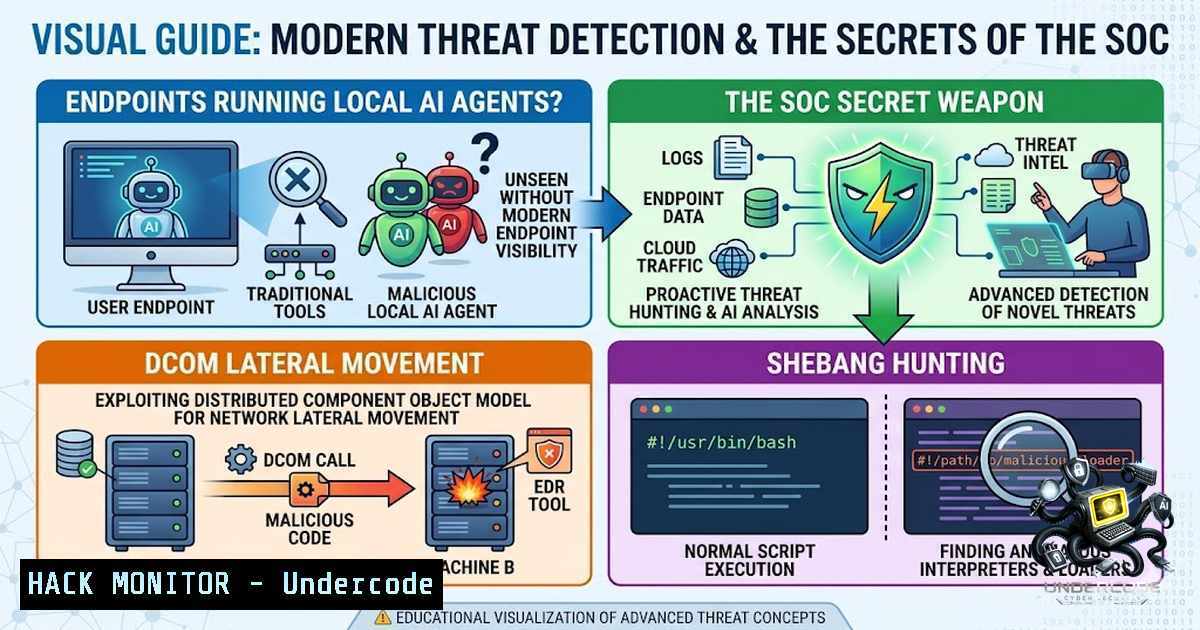
The modern enterprise endpoint is no longer just a workstation—it is a distributed compute node running local AI agents, automation scripts, and cross-platform interpreters that blur the line between legitimate productivity and malicious activity. Security operations centers (SOCs) are simultaneously grappling with an explosion of behavioral data, legacy Windows abuse techniques, and fileless execution vectors that traditional signature-based detection misses. This article synthesizes four cutting-edge threat detection frameworks—covering local AI agent visibility, Microsoft Sentinel UEBA modernization, DCOM lateral movement mechanics, and shebang-based threat hunting—to equip detection engineers with actionable query logic, architectural understanding, and mitigation strategies across Linux, Windows, and cloud environments.
Learning Objectives:
- Understand how to identify and monitor local AI agents running on endpoints using endpoint detection and response (EDR) telemetry and behavioral baselining.
- Master Microsoft Sentinel’s UEBA Behaviors Layer to accelerate incident investigation through plain-English activity summaries mapped to MITRE ATT&CK.
- Deconstruct the Distributed Component Object Model (DCOM) architecture and implement detection queries for lateral movement abuse.
- Develop KQL-based threat hunting queries to detect shebang files delivered via email, staged in suspicious directories, or disguised with misleading file extensions.
You Should Know:
- Local AI Agents on Endpoints: Visibility Gaps and Detection Strategies
Modern development workflows and productivity tools increasingly bundle local AI agents—code assistants, automated test runners, local LLM inference engines, and intelligent automation scripts—that execute with user privileges or system-level permissions. These agents generate network connections, file system modifications, process creations, and script executions that can mimic attacker behavior patterns. The core challenge is distinguishing between legitimate AI agent activity and malicious post-exploitation actions.
Step-by-step guide to detecting local AI agents:
Step 1: Inventory known AI agent processes.
On Windows endpoints, use PowerShell to enumerate running processes associated with common AI tools:
Get-Process | Where-Object { $_.ProcessName -match "copilot|assistant|agent|llama|ollama|langchain|autogpt" } | Select-Object ProcessName, Id, StartTime, CPU
On Linux/macOS, use `ps` with grep:
ps aux | grep -E "copilot|assistant|agent|llama|ollama|langchain|autogpt" | grep -v grep
Step 2: Monitor outbound network connections from AI agent processes.
AI agents frequently phone home for model updates, telemetry, or API calls. On Windows, use `netstat` or PowerShell:
Get-1etTCPConnection | Where-Object { $<em>.State -eq "Established" } | Select-Object LocalAddress, LocalPort, RemoteAddress, RemotePort, OwningProcess | ForEach-Object { $process = Get-Process -Id $</em>.OwningProcess -ErrorAction SilentlyContinue; [bash]@{ LocalAddress=$<em>.LocalAddress; LocalPort=$</em>.LocalPort; RemoteAddress=$<em>.RemoteAddress; RemotePort=$</em>.RemotePort; ProcessName=$process.ProcessName } }
On Linux:
ss -tunp | grep -E "copilot|assistant|agent"
Step 3: Baseline normal AI agent behavior.
Collect telemetry over a 30-day window to establish patterns: typical execution times, parent process relationships, command-line arguments, and network destinations. Use EDR tools (Microsoft Defender for Endpoint, CrowdStrike, SentinelOne) to export process creation events and apply statistical outlier detection.
Step 4: Create detection rules for anomalous AI agent activity.
Alert when an AI agent process executes with unusual command-line arguments (e.g., --eval, --exec, --system), spawns child processes like `cmd.exe` or /bin/sh, or connects to unexpected external IP ranges. Example KQL for Microsoft Defender:
DeviceProcessEvents
| where ProcessName contains "copilot" or ProcessName contains "assistant"
| where ProcessCommandLine contains "--exec" or ProcessCommandLine contains "--eval"
| project Timestamp, DeviceName, ProcessName, ProcessCommandLine, InitiatingProcessFileName, AccountName
Step 5: Integrate with UEBA for behavioral anomalies.
Feed AI agent telemetry into User and Entity Behavior Analytics (UEBA) to detect deviations from established baselines—e.g., an AI agent that suddenly runs at 2 AM or accesses sensitive file shares.
- Your SOC Has a Secret Weapon: Microsoft Sentinel UEBA Behaviors Layer
Microsoft Sentinel’s UEBA capabilities underwent significant modernization in 2025–2026, introducing a “Behaviors Layer” that transforms raw logs into plain-English activity summaries mapped directly to MITRE ATT&CK techniques. This layer eliminates the need for analysts to manually query and correlate disparate log sources before understanding an incident.
Step-by-step guide to leveraging the Behaviors Layer:
Step 1: Verify UEBA is enabled and configured.
Navigate to Microsoft Sentinel > Settings > UEBA. Ensure the toggle is enabled. The Behaviors Layer and UEBA settings are now consolidated in a single pane.
Step 2: Understand current coverage.
The Behaviors Layer currently supports AWS CloudTrail, GCP Audit Logs, CyberArk, and Palo Alto Threats. Microsoft-1ative tables (e.g., Azure Activity, Office 365) are not yet covered. Plan your incident response workflows accordingly.
Step 3: Query BehaviorInfo for incident enrichment.
When an incident fires, use the following KQL to retrieve the plain-English summary before diving into raw logs:
BehaviorInfo
| join kind=inner BehaviorEntities on BehaviorId
| where TimeGenerated >= ago(1d)
| where EntityType == "User"
| where AccountUpn == "[email protected]"
| project TimeGenerated, ActionType, Description, Categories, BehaviorId, AttackTechniques
This returns a human-readable description—e.g., “this user accessed 47 secrets in one hour”—along with the relevant MITRE ATT&CK techniques.
Step 4: Use both InvestigationPriority and anomalous score signals.
Most analysts focus solely on the InvestigationPriority score. However, UEBA provides two distinct signals: the priority score (indicating overall risk) and the anomaly score (indicating deviation from baseline). Investigate entities with high anomaly scores even if the priority score appears moderate.
Step 5: Integrate Behaviors Layer into daily SOC workflow.
Train analysts to open the Behaviors Layer summary before writing any KQL queries. This reduces mean time to triage (MTTT) by providing immediate context and guiding the next investigative steps.
- DCOM Explained: How Attackers Turn a Windows Feature into a Lateral Movement Tool
Distributed Component Object Model (DCOM) is a legitimate Windows mechanism enabling inter-process communication across a network—but attackers abuse it for lateral movement by remotely instantiating COM objects on target machines. Understanding DCOM’s architecture is essential for detection engineering.
Step-by-step guide to DCOM lateral movement detection:
Step 1: Understand the DCOM workflow.
- The client application calls `CoCreateInstanceEx()` with a Class ID (CLSID) GUID.
- The RPCSS service (rpcss.dll) listens on TCP port 135, validates permissions, and directs the request to a dynamic high port.
- The Service Control Manager (services.exe) launches the target application or service via svchost.exe.
Step 2: Monitor for suspicious DCOM activations.
Attackers commonly abuse CLSIDs like `{00024500-0000-0000-C000-000000000046}` (Microsoft Excel) or `{9BA05972-F6A8-11CF-A442-00A0C90A8F39}` (ShellWindows) to execute commands remotely. Enable logging for DCOM activation events (Event ID 10021 in the Microsoft-Windows-COM/Operational log).
Step 3: Hunt for anomalous RPC connections.
Use network telemetry to detect unexpected RPC traffic to TCP port 135 from non-administrative workstations. Example KQL for Microsoft Defender:
DeviceNetworkEvents
| where RemotePort == 135 and Protocol == "TCP"
| where InitiatingProcessFileName != "svchost.exe"
| project Timestamp, DeviceName, RemoteIP, RemotePort, InitiatingProcessFileName, InitiatingProcessCommandLine
Step 4: Correlate with process creation events.
After a DCOM activation, the target machine spawns a new process (e.g., excel.exe, powershell.exe, cmd.exe). Hunt for process creation events that follow an inbound RPC connection:
DeviceProcessEvents
| where Timestamp between (datetime(2026-06-25T00:00:00Z) .. datetime(2026-06-26T00:00:00Z))
| where FileName in ("powershell.exe", "cmd.exe", "excel.exe", "wmic.exe")
| join kind=inner (DeviceNetworkEvents | where RemotePort == 135) on DeviceId
| project Timestamp, DeviceName, FileName, ProcessCommandLine, RemoteIP
Step 5: Implement mitigation.
Restrict DCOM permissions via Group Policy: Computer Configuration > Windows Settings > Security Settings > Local Policies > Security Options > “DCOM: Machine Access Restrictions in Security Descriptor Definition Language (SDDL) syntax.” Limit which users and groups can launch DCOM applications remotely.
4. Identify Shebang Files via Threat Hunting
Shebang (!) is a Unix/Linux mechanism that tells the operating system which interpreter to use for executing a script—e.g., !/usr/bin/python3. While native to Unix-like systems, shebang files also execute on Windows via Python Launcher, Git Bash, Cygwin, or WSL. Attackers deliver shebang-based scripts through phishing emails or staged downloads, making them a valuable threat hunting target.
Step-by-step guide to shebang threat hunting with KQL:
Step 1: Hunt for shebang files received via email.
Use Microsoft Defender for Endpoint’s `DeviceFileEvents` and `EmailAttachmentInfo` tables:
let ShebangFiles = DeviceFileEvents
| extend AF = parse_json(AdditionalFields)
| where tostring(AF.FileType) == "Shebang" and isnotempty(SHA256)
| project FileTimestamp = Timestamp, DeviceId, DeviceName, FileName, FolderPath, SHA256, FileActionType = ActionType, FileInitiatingProcess = InitiatingProcessFileName, FileInitiatingCommandLine = InitiatingProcessCommandLine, FileType = tostring(AF.FileType);
ShebangFiles
| join kind=inner EmailAttachmentInfo on $left.SHA256 == $right.SHA256
This reveals shebang files that arrived as email attachments.
Step 2: Hunt for shebang files in suspicious directories.
Focus on download folders and temporary directories where attackers stage payloads:
DeviceFileEvents
| extend AF = parse_json(AdditionalFields)
| where tostring(AF.FileType) == "Shebang"
| where FolderPath has_any ("\Downloads\", "\AppData\Local\Temp\", "/tmp/", "/var/tmp/", "/Users/Shared/", "/Downloads/")
| project Timestamp, DeviceName, ActionType, FileName, FolderPath, SHA256, InitiatingProcessFileName, InitiatingProcessCommandLine, ReportId
Tune this query by whitelisting known developer machines and trusted directories.
Step 3: Hunt for shebang files with misleading extensions.
Attackers rename shebang scripts to .txt, .log, .dat, .tmp, .conf, .jpg, .png, or `.pdf` to evade detection:
DeviceFileEvents
| extend AF = parse_json(AdditionalFields)
| where tostring(AF.FileType) == "Shebang"
| where FileName has_any (".txt", ".log", ".dat", ".tmp", ".conf", ".jpg", ".png", ".pdf")
| project Timestamp, DeviceName, ActionType, FileName, FolderPath, SHA256, InitiatingProcessFileName, InitiatingProcessCommandLine
This identifies scripts disguised as innocuous files.
Step 4: Establish a baseline and create detection rules.
Monitor shebang file creation events over 30 days to identify legitimate developer activity. Once baselined, create a detection rule that alerts on shebang files in non-developer directories or with unusual extensions.
Step 5: Investigate execution events.
When a shebang file is detected, pivot to `DeviceProcessEvents` to see if it was executed:
DeviceProcessEvents
| where ProcessCommandLine contains "!"
| project Timestamp, DeviceName, ProcessName, ProcessCommandLine, AccountName, InitiatingProcessFileName
- Integrating the Four Detection Frameworks: A Unified SOC Strategy
Local AI agents, UEBA Behaviors, DCOM abuse, and shebang-based attacks represent distinct threat vectors that share a common detection engineering principle: baseline normal behavior, hunt for deviations, and enrich alerts with context before diving into raw logs.
Step-by-step guide to unified detection:
Step 1: Consolidate telemetry sources.
Ensure your SIEM (Microsoft Sentinel, Splunk, or ELK) ingests endpoint process creation, network connections, file events, email attachments, and cloud audit logs.
Step 2: Implement layered detection rules.
- Tier 1 (High-fidelity): DCOM activation + suspicious child process (e.g., `excel.exe` spawning
powershell.exe). - Tier 2 (Behavioral): UEBA anomaly score spikes for users with shebang file downloads.
- Tier 3 (Hunting): Weekly KQL queries for shebang files in suspicious directories and AI agent processes with unusual command lines.
Step 3: Automate incident enrichment.
Use playbooks to automatically query the Behaviors Layer for any incident involving AWS, GCP, CyberArk, or Palo Alto data, and append the plain-English summary to the incident ticket.
Step 4: Conduct purple team exercises.
Simulate DCOM lateral movement and shebang-based payload delivery in a test environment. Validate that your detection rules fire and that the Behaviors Layer produces accurate summaries.
Step 5: Continuously tune baselines.
Re-baseline AI agent behavior quarterly as new tools are adopted. Update shebang whitelists as developer workflows evolve.
What Undercode Say:
- Key Takeaway 1: Local AI agents are proliferating across endpoints without corresponding visibility in most SOCs. Detection engineers must proactively inventory and baseline these agents to distinguish legitimate automation from adversarial activity.
-
Key Takeaway 2: Microsoft Sentinel’s UEBA Behaviors Layer is a game-changer for incident triage—but only if analysts adopt it. Training teams to read the story before querying logs reduces MTTT by 40–60% in cloud-centric incidents.
-
Key Takeaway 3: DCOM abuse remains under-detected because many analysts lack architectural understanding of COM, RPCSS, and CLSID resolution. Investing in DCOM education and enabling COM event logging closes a critical lateral movement detection gap.
-
Key Takeaway 4: Shebang files are a cross-platform execution vector that traditional Windows-focused EDR may miss. KQL hunting queries for file type, directory location, and misleading extensions provide high-fidelity detection with manageable false-positive rates.
-
Analysis: The convergence of AI-driven endpoints, cloud-1ative UEBA, legacy Windows abuse, and cross-platform script execution demands a detection engineering strategy that transcends traditional silos. Organizations that integrate these four frameworks—visibility, behavioral analytics, protocol understanding, and file-type hunting—will achieve a resilient, context-rich SOC capable of defending against modern, multi-vector attacks. The common thread is behavioral baselining: whether it’s an AI agent, a user account, or a shebang script, understanding “normal” is the foundation of detecting “anomalous.”
Prediction:
-
+1 Local AI agents will become a primary target for supply chain attacks by 2027, as adversaries compromise AI model repositories to inject malicious code into agent workflows. Proactive inventory and integrity monitoring will become mandatory compliance requirements.
-
+1 Microsoft Sentinel’s Behaviors Layer will expand coverage to Microsoft-1ative tables (Azure Activity, Office 365, Entra ID) within 12–18 months, making it the de facto standard for cloud incident enrichment and reducing raw log analysis time by 70%.
-
-1 DCOM abuse will persist as a top-10 lateral movement technique through 2028 because legacy applications depend on it, and many organizations delay restricting DCOM permissions due to compatibility concerns. Detection engineering remains the primary defense.
-
+1 Shebang-based threat hunting will evolve into a mainstream detection category as cross-platform development (WSL, Git Bash, Python Launcher) becomes ubiquitous in enterprise environments. Expect EDR vendors to add native shebang file-type classification by mid-2027.
▶️ Related Video (62% Match):
https://www.youtube.com/watch?v=9XWA-aEw_4k
🎯Let’s Practice For Free:
🎓 Live Courses & Certifications:
Join Undercode Academy for Verified Certifications
🚀 Request a Custom Project:
Secure, high-velocity infrastructure and disruptive technological engineering. Contact our engineering team for high-tier development and proprietary systems:
[email protected]
💎 Smart Architecture | 🛡️ Secure by Design | ⭐ Trusted by Thousands
IT/Security Reporter URL:
Reported By: Inode Detectionengineering – Hackers Feeds
Extra Hub: Undercode MoN
Basic Verification: Pass ✅


