Listen to this Post
Introduction
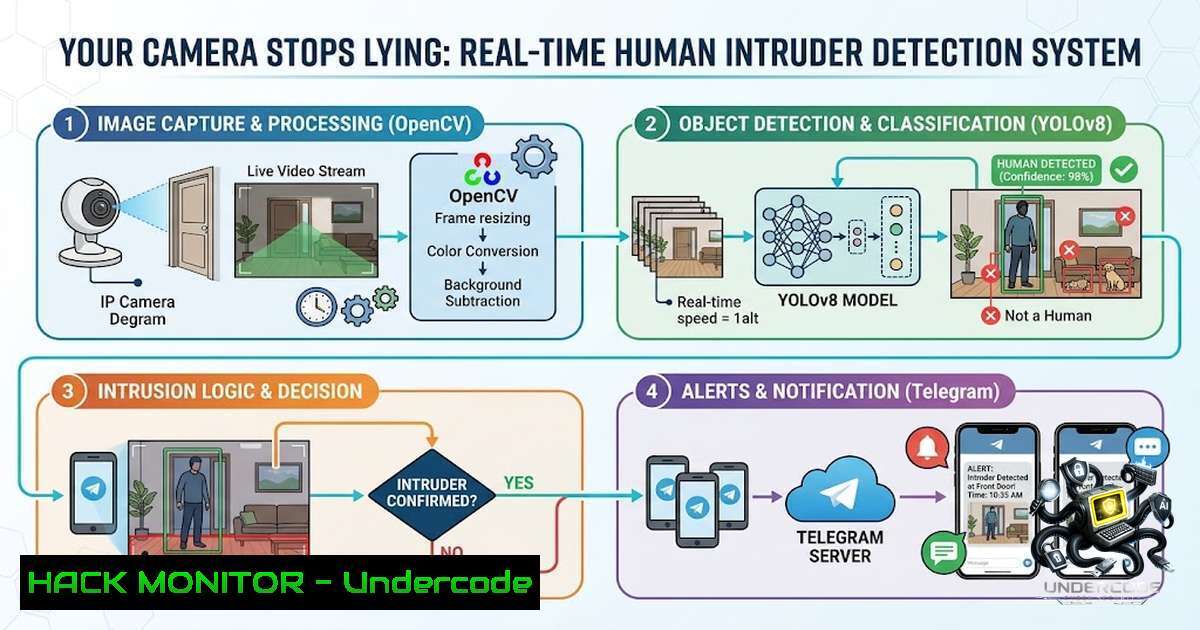
Traditional motion‑triggered security cameras are notorious for their high false‑positive rates, flooding users with alerts for passing cars, swaying curtains, or even pets. This constant noise desensitizes users and undermines trust in the surveillance system. The solution lies in intelligent edge processing, where computer vision models, optimized for CPU inference, differentiate humans from other moving objects before an alert is ever sent. This article breaks down an open‑source project that implements a real‑time intruder detection pipeline using Python, OpenCV, YOLOv8, and the Telegram Bot API, highlighting the engineering decisions that suppress false alarms and ensure reliable, low‑latency notifications.
Learning Objectives
- Understand how to combine frame differencing with object detection to create a two‑stage motion classification pipeline.
- Learn to deploy a YOLOv8n model for CPU‑based inference and configure detection sensitivity.
- Implement background threading for Telegram alerts to maintain real‑time video processing performance.
- Identify strategies for reducing false positives in computer vision‑based security systems.
You Should Know
1. The Two‑Stage Pipeline: Motion Pre‑screening with OpenCV
The system avoids running resource‑intensive YOLO inference on every single frame. Instead, it uses a fast, lightweight motion detector based on frame differencing.
OpenCV compares the current frame against a reference frame captured approximately two seconds earlier. Absolute differences are calculated, converted to grayscale, and then thresholded to create a binary motion mask. Contour analysis on this mask determines if the movement area exceeds a defined threshold. Only then does the pipeline invoke the YOLOv8 model for classification.
This pre‑screening drastically reduces CPU load, allowing the system to run on devices without a dedicated GPU. To implement this, you can use the following Python snippet:
import cv2
import numpy as np

def detect_motion(frame, prev_frame, threshold=500):
diff = cv2.absdiff(frame, prev_frame)
gray = cv2.cvtColor(diff, cv2.COLOR_BGR2GRAY)
blur = cv2.GaussianBlur(gray, (5, 5), 0)
_, thresh = cv2.threshold(blur, 20, 255, cv2.THRESH_BINARY)
contours, _ = cv2.findContours(thresh, cv2.RETR_EXTERNAL, cv2.CHAIN_APPROX_SIMPLE)
for contour in contours:
if cv2.contourArea(contour) > threshold:
return True
return False
The `threshold` parameter is configurable, allowing users to adjust sensitivity to lighting changes or small movements, directly addressing the issue of false alerts from minor disturbances.
2. Integrating YOLOv8n for Human Classification
Once motion is confirmed, the pipeline passes the current frame to the Ultralytics YOLOv8n model. This nano version is chosen for its balance of speed and accuracy, particularly for CPU deployment.
The model performs inference, and the system checks the detected objects for the ‘person’ class (class ID 0). To minimize false classifications, you can implement a confidence threshold (e.g., conf=0.5). Only when a person is detected above this threshold does the system proceed to save the frame.
from ultralytics import YOLO
model = YOLO('yolov8n.pt')

def is_person_detected(frame, conf_threshold=0.5):
results = model(frame, conf=conf_threshold)
for result in results:
boxes = result.boxes
if boxes is not None:
for box in boxes:
cls = int(box.cls[bash])
if cls == 0:  person class
return True
return False
For advanced users, the system can be extended to include classes like ‘car’ or ‘animal’ to log non‑human events without sending alerts, providing a comprehensive activity log.
3. Configuring the Telegram Bot for Instant Alerts
The project leverages the Telegram Bot API to push notifications to the user’s phone. A background thread is used to send the alert, ensuring that the video capture loop does not pause while the image is uploaded.
Setup Steps:
- Create a Bot: In Telegram, search for `@BotFather` and use the `/newbot` command. Copy the generated API token.
- Get Chat ID: Send a message to your bot, then visit `https://api.telegram.org/bot
/getUpdates` to find your chat ID. - Implement the Sender: Use the `requests` library to send a photo and a caption.
import requests
import threading

def send_telegram_alert(photo_path, timestamp, bot_token, chat_id):
def task():
url = f"https://api.telegram.org/bot{bot_token}/sendPhoto"
with open(photo_path, 'rb') as photo:
payload = {'caption': f'🚨 Intruder Detected at {timestamp}'}
files = {'photo': photo}
requests.post(url, data=payload, files=files)
threading.Thread(target=task).start()
By executing the upload in a separate thread, the main loop continues processing frames, maintaining real‑time performance.
4. Managing Cooldown Logic to Prevent Alert Flooding
A person standing in front of the camera could trigger dozens of alerts. To prevent this, the system implements a smart cooldown mechanism. After an alert is sent, the system enters a cooldown state for a defined duration (e.g., 60 seconds). During this period, even if a human is detected, no new alert is generated.
This logic is crucial for user experience, preventing notification spam and reducing redundant data storage. The cooldown timer is typically implemented using Python’s `time` module:
import time

last_alert_time = 0
cooldown_seconds = 60

if is_person_detected(frame) and (time.time() - last_alert_time > cooldown_seconds):
 Save frame and send alert
last_alert_time = time.time()
This simple addition significantly enhances the usability of the security system.
5. Optimizing for CPU‑Only Environments
Running YOLO models on CPU can be challenging. The project uses YOLOv8n, the smallest model, which is optimized for CPU inference. Performance can be further enhanced by:
– Reducing Input Size: Resizing frames to 640×640 before inference.
– Using `float16` Precision: If supported by the CPU and PyTorch.
– Batch Processing: Although not used here, grouping frames for inference can improve throughput in high‑activity scenarios.
Linux Command to Monitor CPU Usage:
htop
or for a quick snapshot:
top -p $(pgrep -f 'python.intruder')
Windows Command (PowerShell) to Monitor Python Process:
Get-Process python | Select-Object CPU, WorkingSet
These commands help in tuning the motion threshold and inference interval to balance performance and accuracy.
6. Extending the Project: Logging and Data Storage
Beyond alerts, the project logs every detection event—whether it’s a human, a vehicle, or an unknown movement. This data is crucial for post‑event analysis and fine‑tuning the system.
A simple CSV log can be implemented:
import csv
from datetime import datetime

def log_event(event_type, timestamp):
with open('detection_log.csv', 'a', newline='') as file:
writer = csv.writer(file)
writer.writerow([timestamp, event_type])
For human detections, the system saves the frame as a JPEG. It’s recommended to also save cropped bounding boxes of the person for a clearer record.
What Undercode Say
- Key Takeaway 1: The combination of traditional computer vision (motion detection) and deep learning (YOLO) is a powerful, efficient approach for real‑time surveillance, enabling CPU‑based systems to be both smart and responsive.
- Key Takeaway 2: Effective security systems are defined not by their ability to detect but by their ability to filter. The cooldown logic and pre‑screening layers are what transform this from a technical demo into a practical, usable tool.
Analysis: The project provides an excellent blueprint for building edge‑AI security systems. By offloading the heavy lifting of classification to only when motion is detected, it overcomes the computational bottleneck of continuous inference. The use of Telegram for alerts is a cheap and reliable delivery mechanism, offering a significant advantage over proprietary, costly notification services. The code is well‑structured, allowing for easy configuration of thresholds, making it adaptable to different environments (e.g., indoor vs. outdoor). However, challenges remain with heavy occlusion and lighting variations, which could be mitigated by incorporating temporal analysis or ensemble models.
Prediction
- +1: The rise of affordable, high‑performance CPU boards (e.g., Raspberry Pi 5, Intel NUC) will see a democratization of advanced AI security features, moving them beyond high‑cost commercial solutions to accessible DIY projects.
- +1: Integration with home automation protocols (e.g., MQTT, Home Assistant) will be the next logical step, allowing the system to trigger other actions like turning on lights or locking doors upon detection.
- -1: The reliance on local CPU processing limits the complexity and accuracy of models, potentially failing against sophisticated adversarial attacks or in scenes with high motion and dense crowds.
- -1: Without proper encryption and access controls for the Telegram bot token and the camera feed, the system introduces a new attack surface that could be exploited to spy on the user or inject false alerts.
- -1: As open‑source security systems proliferate, they may become targets for attackers seeking to understand and bypass common detection algorithms, leading to a new wave of evasion techniques.
▶️ Related Video (74% Match):
🎯Let’s Practice For Free:
🎓 Live Courses & Certifications:
Join Undercode Academy for Verified Certifications
🚀 Request a Custom Project:
Secure, high-velocity infrastructure and disruptive technological engineering. Contact our engineering team for high-tier development and proprietary systems:
[email protected]
💎 Smart Architecture | 🛡️ Secure by Design | ⭐ Trusted by Thousands
IT/Security Reporter URL:
Reported By: Shoovoon Computervision – Hackers Feeds
Extra Hub: Undercode MoN
Basic Verification: Pass ✅


