Listen to this Post
Introduction:
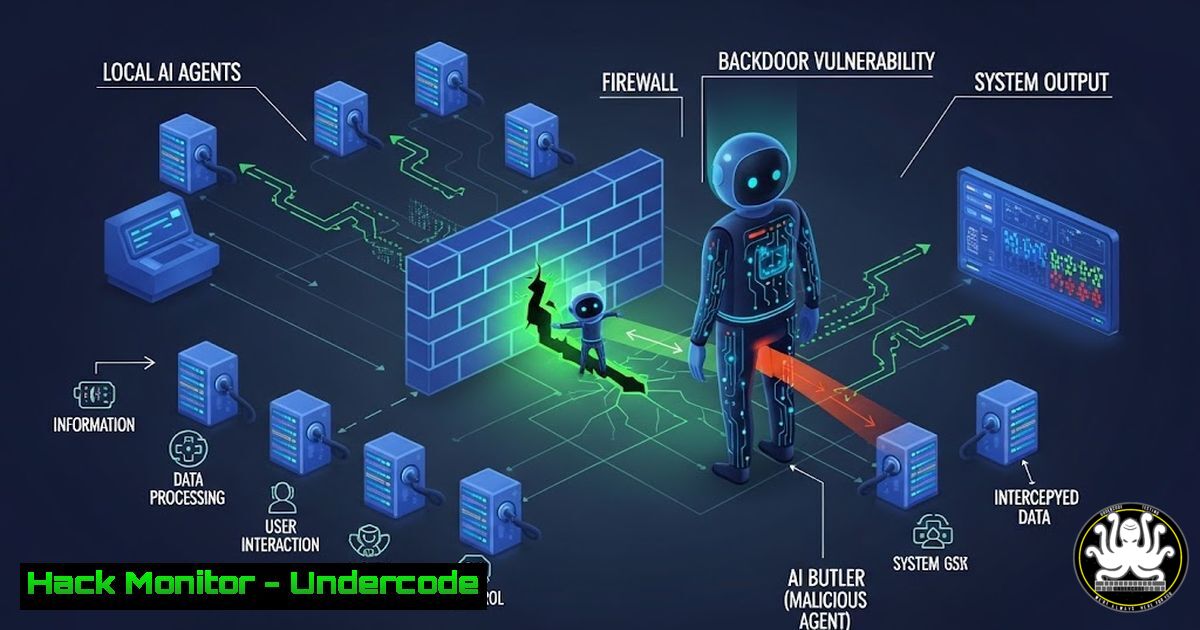
The rise of local AI agents like OpenClaw represents a paradigm shift, moving AI from cloud-based chat interfaces to powerful, autonomous tools on your desktop. These agents can read files, execute commands, and automate tasks, promising unprecedented productivity. However, this power comes with profound risk, effectively turning early adoption into a voluntary subscription to Vulnerability-as-a-Service. By installing such agents, users may inadvertently grant remote operators root-level access to their digital lives, bypassing decades of established security protocols in the name of innovation.
Learning Objectives:
- Understand the critical security risks posed by locally-installed, early-stage AI agents.
- Learn how to safely isolate and experiment with potentially malicious or vulnerable software using sandboxing techniques.
- Implement a framework for credential and environment hygiene to protect sensitive data and systems from compromised agents.
You Should Know:
- The New Threat Model: AI Agents as Privileged Attack Vectors
Early-stage AI agents operate with high system privileges to fulfill their intended functions—accessing files, managing applications, and controlling systems. This makes them a perfect target for exploitation. A malicious “skill file” (a plugin or capability module for the agent) or a vulnerability in the agent’s own code can turn this tool into a trojan horse. Unlike traditional malware, it arrives with a legitimate purpose and the user’s explicit permission to operate at a privileged level.
Step‑by‑step guide explaining what this does and how to use it.
Concept: Treat every AI agent as untrusted code. Before installation, conduct basic threat analysis.
1. Source Audit: Only download agents or skill files from official, verifiable repositories. Check for PGP signatures if available.
2. Permission Scrutiny: During installation, note every permission requested (file system access, network access, keyboard control). If the requests seem excessive for its stated task, abort.
3. Static Analysis (Basic): For skill files, which are often scripts (Python, JavaScript), use command-line tools to scan for obvious red flags.
On Linux/Mac: Use `grep -r “os.system\|subprocess\|eval\|exec” /path/to/skill/files` to find dangerous execution commands.
On Windows (PowerShell): `Select-String -Path “.py” -Pattern “os\.system|subprocess”` to perform a similar search.
2. Imperative Isolation: Sandboxing with Virtual Machines
The most effective way to protect your host system is to never run the agent on it. A Virtual Machine (VM) acts as a disposable, isolated environment.
Step‑by‑step guide explaining what this does and how to use it.
Concept: Create a dedicated lab VM for all high-risk experimentation.
1. Choose Your Hypervisor: Install VirtualBox or VMware Workstation Player (free for personal use).
2. Create the VM: Set up a new VM with a lightweight Linux distribution (e.g., Ubuntu Server) or a Windows evaluation copy. Allocate minimal necessary resources (2 CPU cores, 4GB RAM, 40GB disk).
3. Network Configuration: Set the VM’s network adapter to NAT mode. This allows the VM outbound internet access but isolates it from your primary home/office network, preventing lateral movement.
4. Experiment & Snapshot: Before installing the AI agent, take a VM snapshot. This saves the clean state. After your testing, you can revert to this snapshot, wiping away all changes and any potential malware.
3. Lightweight Containment: Using Docker for Process Isolation
For a less resource-intensive option than a full VM, Docker provides containerization, isolating processes at the kernel level.
Step‑by‑step guide explaining what this does and how to use it.
Concept: Run the agent in a container with no persistent access to host resources.
1. Install Docker: Follow official guides for your OS (sudo apt install docker.io on Ubuntu, install Docker Desktop on Windows/Mac).
2. Craft a Dockerfile: Create a `Dockerfile` that defines a minimal image, copies the agent in, and runs it as a non-root user.
FROM alpine:latest
RUN adduser -D appuser
WORKDIR /app
COPY ./openseal-agent ./
USER appuser
CMD ["./openseal-agent"]
3. Build and Run with Restrictions:
 Build the image
docker build -t agent-test .
 Run with no network, read-only filesystem, and dropped capabilities
docker run --rm --network none --read-only --cap-drop=ALL agent-test
This command runs the agent in a container with no network, a read-only root filesystem, and all Linux capabilities removed, severely limiting its attack potential.
4. Credential Hygiene: The Zero-Trust Approach for Agents
Never store production credentials, API keys, or sensitive files on a machine running an experimental agent. Assume the agent will be compromised.
Step‑by‑step guide explaining what this does and how to use it.
Concept: Implement environment-level and secrets management controls.
- Use Ephemeral Environment Variables: Instead of hardcoding keys, pass them at runtime. In your sandbox/VM, set credentials for the session only.
Linux/Mac: `export OPENAI_API_KEY=”sk-xxx” && ./agent`
Windows (Cmd): `set OPENAI_API_KEY=sk-xxx && agent.exe`
The variable dies with the shell session.
- Leverage a Secrets Manager (Advanced): For testing cloud integrations, use a local secrets manager like HashiCorp Vault in dev mode or even a dedicated, isolated cloud tenant with short-lived credentials obtained via OAuth or IAM roles.
5. Endpoint Hardening: Limiting Blast Radius
Harden the environment within your sandbox or test machine to contain any breach.
Step‑by‑step guide explaining what this does and how to use it.
Concept: Apply the principle of least privilege to the test environment itself.
1. Use a Non-Privileged User: Never run the agent as root or Administrator. Create a dedicated, low-privilege user account.
Linux: `sudo useradd -m -s /bin/bash agentuser`
Windows: Create a standard user via `net user agentuser /add`
2. Restrict Filesystem Access: Use filesystem permissions to jail the agent.
Linux: Create a dedicated directory and use `chmod` and `chown` to restrict access. Consider using `chroot` for advanced isolation.
Windows: Use the `icacls` command to restrict a folder to the specific user account.
3. Employ Host-Based Firewalls: Even within a VM, block all unnecessary inbound/outbound traffic.
Linux (UFW): `sudo ufw default deny incoming; sudo ufw default deny outgoing; sudo ufw allow out 53,80,443/tcp` (only allow DNS/HTTP/HTTPS out).
Windows (Firewall): Create a new outbound rule blocking all connections, then create allow rules for specific agents only if needed.
What Undercode Say:
- The Liability Layer is Real: Major tech companies’ deliberate pace in deploying agentic AI isn’t a technological failure but a risk-management strategy. Individual enthusiasts and companies bypassing this are assuming immense, often unquantified, liability.
- Security is a Feature, Not an Afterthought: The post underscores that for 99% of users, the “speed features” of these agents currently far outpace their “safety features.” The prudent choice isn’t between adoption or obscurity, but between managed, contained experimentation and reckless deployment.
The analysis reveals a critical inflection point. The democratization of powerful AI tools is colliding with the foundational principles of cybersecurity. The post correctly reframes early adoption not as a competitive advantage but as a risk assessment exercise. The technical community’s challenge is to develop standardized security frameworks—like the sandboxing and hardening steps outlined—that can keep pace with innovation. Ignoring this turns your cutting-edge tool into the weakest link in your security chain, a fully-privileged backdoor waiting to be exploited not just by the agent’s authors, but by anyone who finds a vulnerability in their code.
Prediction:
The immediate future will see the first major breach attributed directly to a compromised or malicious local AI agent or its skill file marketplace. This will trigger a regulatory and industry scramble, leading to the rapid development of “security certs” for AI agents, mandatory sandboxing standards, and the emergence of “Hardened AI Agent” distributions focused on security-first configurations. The open-source agent ecosystem will fork, with one branch prioritizing unfettered capability and another embracing robust, auditable safety. Enterprises will mandate agent security frameworks, making today’s sandboxing practices tomorrow’s compliance requirements.
▶️ Related Video (80% Match):
🎯Let’s Practice For Free:
IT/Security Reporter URL:
Reported By: Michael Wahl217 – Hackers Feeds
Extra Hub: Undercode MoN
Basic Verification: Pass ✅


