Listen to this Post
Introduction:
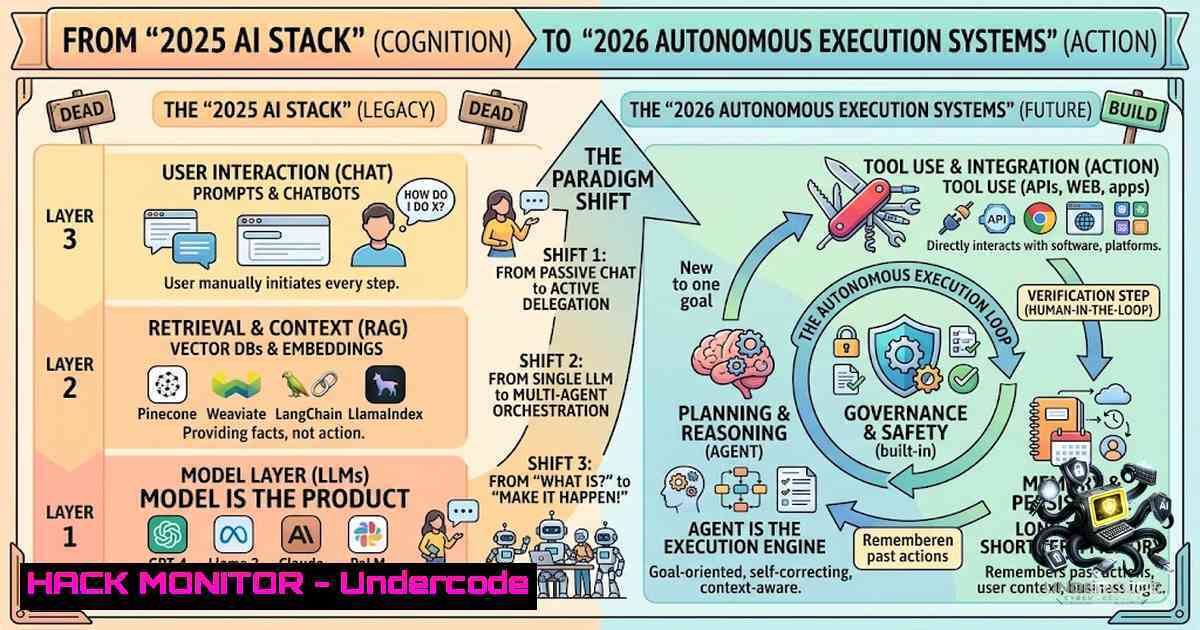
The artificial intelligence landscape is undergoing a paradigm shift, moving away from generative question-answering towards autonomous action and system orchestration. As of 2026, the competitive advantage no longer lies in possessing a tool with the most features but in designing a stack where AI executes the work for you. This transition from “search and create” to “direct and execute” necessitates a parallel evolution in cybersecurity and IT operations, as these automated systems must be secured, managed, and optimized to prevent them from becoming attack vectors.
Learning Objectives:
- Understand the architectural shift from feature-rich AI tools to workflow-automated execution platforms.
- Learn how to integrate, secure, and optimize the 2026 AI stack using DevOps, cloud, and security principles.
- Acquire practical commands for deploying, monitoring, and hardening automated AI agents within a corporate environment.
- Hardening the Gateway: API Security for Autonomous Agents
In a 2026 stack, applications like ChatGPT, Perplexity, and Gamma do not operate in isolation; they communicate via APIs. An autonomous system is only as secure as its weakest API key. The old method of embedding keys in environment variables is insufficient. We must now implement a Zero-Trust architecture for AI agents, requiring mutual TLS (mTLS) and short-lived tokens.
Step‑by‑step guide:
- Generate a Service Account Key: Instead of user credentials, create a dedicated service account for your AI automation tools (e.g., in Google Cloud or AWS IAM).
- Restrict API Permissions: Apply the principle of least privilege. Ensure the key used by “Gmail + Gemini” can only read threads and send replies, but cannot delete or modify account settings.
- Rotate Secrets Automatically: Use a secret manager (like HashiCorp Vault or AWS Secrets Manager) to rotate keys automatically.
- Implement mTLS: Configure your reverse proxy (e.g., Nginx) to require client certificates.
– Linux (Nginx configuration):
server {
listen 443 ssl;
server_name api.automation.local;
ssl_client_certificate /etc/nginx/client-certs/ca.crt;
ssl_verify_client on;
location / {
proxy_pass http://ai_backend;
}
}
– Windows (PowerShell – Testing Cert):
Test-Certificate -Cert "Cert:\CurrentUser\My\Thumbprint" -Policy SSLClientAuthentication
2. Automating Threat Intelligence with Perplexity Research
“Search gives direction” implies that AI is now acting as a Tier 1 SOC analyst. Instead of opening 15 tabs to investigate an IP, you can create a script that queries the Perplexity API to get “direction, summary, and comparison.” This allows for rapid triage of security threats.
Step‑by‑step guide:
- Curl Request Setup: Use `curl` to interact with the AI research endpoint.
- JSON Parsing: Extract the summary and actionable advice using
jq. - Integration with SIEM: Feed the summarized response into your SIEM (e.g., Splunk) or ticketing system.
– Linux Command:
 Fake API call to Perplexity for threat research
curl -X POST https://api.perplexity.ai/query \
-H "Authorization: Bearer $PERPLEXITY_KEY" \
-H "Content-Type: application/json" \
-d '{"query": "Research IP 203.0.113.45 for recent C2 activity. Summarize."}' \
| jq '.summary' >> threat_intel_log.txt
– Windows PowerShell:
$Body = @{ query = "Analyze $IP for malware signatures" } | ConvertTo-Json
Invoke-RestMethod -Uri "https://api.perplexity.ai/query" -Method Post -Body $Body -ContentType "application/json" | Select-Object -ExpandProperty summary
- The “Gamma” Principle: Treating Infrastructure as Code (IaC) as “Slides”
Gamma converts ideas into presentations. In IT, this translates to converting architectural blueprints into Infrastructure as Code (Terraform/Pulumi). By 2026, AI tools (like GitHub Copilot X) will execute the creation of CloudFormation templates based on a simple description of the architecture.
Step‑by‑step guide:
- Write the “Idea”: Create a natural language prompt describing your VPC and subnets.
- Generate IaC: Use an AI terminal agent to generate the Terraform script.
- Validate and Execute: Run `terraform plan` and `terraform apply` to execute the build.
– Linux (Terraform validation):
terraform init
terraform validate
terraform plan -out=tfplan.binary
terraform apply tfplan.binary
4. Hardening: Add a Sentinel policy to ensure no public S3 buckets are created.
4. Securing the “Content” Pipeline (Taplio/Saywhat)
Content tools are moving from writing to “angles and hooks.” For security teams, this means generating threat hunting hypotheses or incident reports. However, this introduces data leakage risks. We must implement Data Loss Prevention (DLP) at the proxy level to ensure sensitive customer data is not sent to third-party AI engines.
Step‑by‑step guide:
- Set up a Forward Proxy: Use Squid or an NGINX reverse proxy to intercept all traffic destined for API endpoints.
- Implement Keyword Filtering: Use `grep` or `awk` in a monitoring script to detect patterns like “SSN” or “PII” before the request leaves the corporate network.
- User/Group Restrictions: On Windows, configure Group Policy to restrict which processes (e.g., Chrome vs. Corporate App) can access specific API endpoints.
5. Fast Editing vs. Vulnerability Patching (CapCut/OpusClip)
The shift to “fast editing, control, and deployment” in video mirrors the shift in vulnerability management. Zero-day vulnerabilities must be patched rapidly. The “2026 stack” involves automated patch management tools (e.g., Ansible or Azure Automation) that execute remediation tasks without waiting for admin approval.
Step‑by‑step guide:
- Inventory: Scan for unpatched systems using `nmap` or
WinRM. - Automated Remediation: Use Ansible to push the patch.
– Linux (Ansible Playbook for CVE-2026):
- hosts: web_servers
tasks:
- name: Apply critical security update
apt:
name: openssl
state: latest
update_cache: yes
3. Verification: Ensure the version matches the expected build.
– Windows Command:
wmic qfe list brief /format:texttable
- Browser Understanding (Perplexity Comet) vs. Web Application Firewall (WAF)
“Browsers understand tabs” implies AI can interpret user intent. For security, this means the WAF must evolve to understand attack intent, not just signatures. We utilize ModSecurity with Core Rule Set (CRS) but enhanced by AI-driven logs to detect anomalies in user behavior (session hijacking).
Step‑by‑step guide:
1. Enable ModSecurity in Apache/Nginx.
- Log Analysis: Use `awk` and `sort` to parse access logs and find unusual user agents that are trying to “act” on behalf of the user (bot detection).
– Linux Command:
grep -E "POST|PUT" /var/log/nginx/access.log | awk '{print $1}' | sort | uniq -c | sort -1r
3. Geo-Blocking: Restrict access to AI admin panels to specific IPs.
- From Meeting Transcripts to Decisions (Fireflies vs. Granola)
Granola converts meetings into “decisions and next actions.” In IT security, this means converting compliance checklists (e.g., SOC2, ISO 27001) into automated audit scripts. AI can read meeting notes regarding “new firewall rules” and automatically execute a Terraform plan to implement them, provided the Jira ticket is approved.
Step‑by‑step guide:
- API Integration: Connect your project management tool (Jira) to your CI/CD pipeline (Jenkins/GitHub Actions).
- Automated Execution: When a ticket status changes to “Approved,” the AI system triggers a Jenkins job.
3. Code (Jenkinsfile snippet):
stage('Auto-Deploy Firewall Rule') {
steps {
sh 'terraform apply -auto-approve -var="rule=allow_443"'
}
}
4. Compliance Check: After deployment, run a `nmap` scan to ensure the port is open or closed as expected.
What Undercode Say:
- Key Takeaway 1: The primary security risk in 2026 is not the data the AI processes, but the actions the AI takes on your behalf. If an AI agent is compromised, it can execute malicious code, change firewall rules, or leak data, making Identity and Access Management (IAM) the most critical defense layer.
- Key Takeaway 2: Automation requires abstraction. The core philosophy of “building the idea first” applies to DevOps. You no longer configure servers; you define the desired state (using IaC), and the tool executes it. This reduces human error (the primary cause of breaches) but necessitates rigorous validation of the AI-generated code.
Analysis: The transition to automated execution systems demands a blended approach of “Shift-Left” security and operational observability. While the post highlights efficiency, the hidden implication is the massive attack surface introduced by AI agents having write/execute privileges. If an attacker poisons the data or prompt used by your “Gamma” or “CapCut” equivalent (i.e., your build pipeline), they could inject backdoors into production. Therefore, organizations must focus on securing the AI’s context and training data. The person who wins in 2026 isn’t just the one with the best tools, but the one who has implemented the strictest guardrails (rate limiting, token expiration, and RBAC) around those tools.
Prediction:
- +1 The adoption of autonomous AI stacks will drastically reduce Mean Time to Resolution (MTTR) for IT incidents, with automated scripts handling 60% of tier-1 alerts without human intervention.
- +1 Cyber insurance premiums will decrease for companies that can prove they have automated compliance checks, as the “human error” variable is significantly minimized.
- -1 We will witness a surge in “AI Prompt Injection” attacks targeting automated systems, where malicious code embedded in an email (read by Gmail+Gemini) forces the AI to execute unauthorized commands to the backend.
- -1 The role of the “System Administrator” will bifurcate; those who cannot code or automate will be replaced by the AI stack, creating a significant skills gap and potential for misconfiguration.
- -1 Regulatory fines for data breaches are likely to increase if an automated system, like “Perplexity,” sends PII to an external API without proper DLP controls in place.
▶️ Related Video (84% Match):
🎯Let’s Practice For Free:
🎓 Live Courses & Certifications:
Join Undercode Academy for Verified Certifications
🚀 Request a Custom Project:
Secure, high-velocity infrastructure and disruptive technological engineering. Contact our engineering team for high-tier development and proprietary systems:
[email protected]
💎 Smart Architecture | 🛡️ Secure by Design | ⭐ Trusted by Thousands
IT/Security Reporter URL:
Reported By: Shaonkabir Ai – Hackers Feeds
Extra Hub: Undercode MoN
Basic Verification: Pass ✅


