Listen to this Post
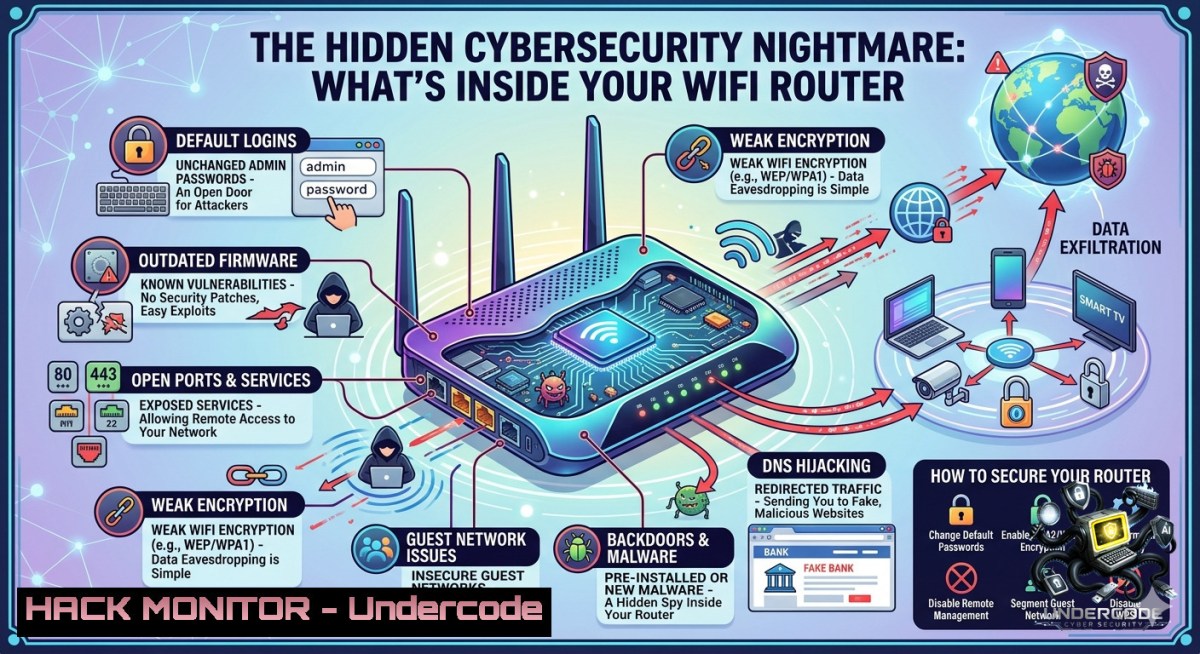
Introduction:
A home or office WiFi router is often dismissed as a simple utility—plug it in, connect, and forget. However, beneath its plastic casing lies a fully operational embedded system that handles routing, wireless signal processing, traffic filtering, and security enforcement. For cybersecurity professionals, understanding each internal component (WAN/LAN ports, CPU/SoC, RAM, flash firmware, WiFi radios, antennas, voltage regulation, and status LEDs) transforms vague network theory into actionable defense knowledge.
Learning Objectives:
- Identify the attack surface of a consumer or enterprise router by mapping hardware components to potential vulnerabilities.
- Execute command-line reconnaissance and hardening techniques on router firmware, wireless interfaces, and network traffic.
- Apply segmentation, monitoring, and patch management strategies to mitigate common router-based exploits.
You Should Know:
1. Router Hardware Reconnaissance & Firmware Analysis
Understanding your router’s internal anatomy is the first step toward securing it. Each component can be a vector: the WAN port faces the internet, LAN ports expose internal devices, flash memory stores vulnerable firmware, and the CPU/SoC processes every packet—possibly with backdoors.
Step‑by‑step guide to enumerate router hardware details remotely (without physical access):
1. Discover the router’s IP and model
- Linux: `ip route | grep default` or `route -1`
- Windows: `ipconfig | findstr “Default Gateway”`
- Then run `nmap -sV -O 192.168.1.1` (replace with gateway IP) to fingerprint OS and open services.
2. Check for known firmware vulnerabilities
- Extract the firmware version from the router’s web interface or via SNMP:
`snmpwalk -v2c -c public 192.168.1.1 1.3.6.1.2.1.1.1.0`
- Cross‑reference the version with CVE databases (e.g., cvedetails.com or `searchsploit` on Kali).
3. Test for default or weak credentials
- Use `hydra -l admin -P /usr/share/wordlists/fasttrack.txt 192.168.1.1 http-get /`
- For Windows, use `nmap –script http-default-accounts 192.168.1.1`
- Backup and analyze the firmware (if you have physical access and legal permission)
– Use `binwalk` to extract the filesystem: `binwalk -e firmware.bin`
– Look for hardcoded keys, backdoor telnet/ssh, or plaintext credentials.
2. Wireless Security Auditing & Deauthentication Defenses
The WiFi radio module and antennas are often the most accessible attack surface. Rogue deauthentication frames can disconnect clients, forcing them to reconnect to a malicious access point.
Step‑by‑step guide to test and harden wireless security:
- Put your wireless card in monitor mode (Linux only)
sudo airmon-1g start wlan0
sudo airodump-1g wlan0mon
2. Capture and inspect handshake packets
`sudo airodump-1g -c 6 –bssid TARGET_MAC -w capture wlan0mon`
3. Simulate a deauth attack (for authorised testing only)
`sudo aireplay-1g -0 5 -a TARGET_MAC -c CLIENT_MAC wlan0mon`
4. Mitigation commands on router (via SSH or web CLI)
– Enable 802.11w (Management Frame Protection) if supported.
– On OpenWrt/LEDE: `uci set wireless.@wifi-iface
.ieee80211w='2' ; uci commit`
- On enterprise gear (Cisco): `dot11 mgmtframe-protection required`

Windows equivalent: Use `netsh wlan show networks mode=bssid` to detect nearby APs, but deauth attacks require third‑party tools like Wireshark with Npcap (limited to monitor mode on select adapters). Better to use Linux for auditing.

<h2 style="color: yellow;">3. Network Segmentation & VLAN Hardening</h2>

A router’s LAN ports and wireless SSIDs can be isolated to prevent lateral movement after a breach. Segmentation is a fundamental control that many routers support poorly or obscurely.

Step‑by‑step guide to configure basic segmentation on common routers (OpenWrt / DD‑WRT):

<h2 style="color: yellow;">1. Create a VLAN for IoT devices</h2>

<ul>
<li>SSH into the router: `ssh [email protected]` </li>
<li>Edit `/etc/config/network` and add:
[bash]
config device 'vlan10'
option type '8021q'
option ifname 'eth0'
option vid '10'
option name 'eth0.10'
config interface 'iot'
option ifname 'eth0.10'
option proto 'static'
option ipaddr '192.168.10.1'
option netmask '255.255.255.0'
2. Block inter‑VLAN routing by default (using iptables)
iptables -I FORWARD -i br-lan -o eth0.10 -j DROP
iptables -I FORWARD -i eth0.10 -o br-lan -j DROP
iptables -I FORWARD -i eth0.10 -o wan -j ACCEPT  allow IoT internet only
- Create a guest Wi‑Fi on its own subnet
– Via LuCI (web) → Network → Wireless → Add → create new interface on a separate bridge.
Windows / client side verification:
– `tracert 192.168.10.1` from a LAN client to confirm lack of route.
4. Router Logging, Monitoring, and Anomaly Detection
Most routers keep local logs in volatile RAM or limited flash. Attackers erase these quickly. Forward logs to a remote SIEM or syslog server.
Step‑by‑step guide to configure syslog and detect port scans / brute force:
1. Enable syslog on router
- OpenWrt: edit `/etc/config/system` → add `option log_ip ‘192.168.1.100’` (your logging server)
- Factory routers: look for “System Log” or “Syslog” in the web interface.
- Set up a basic syslog receiver on Ubuntu
sudo apt install rsyslog
sudo sed -i 's/^module(load="imudp")/module(load="imudp")/g' /etc/rsyslog.conf
Add: module(load="imudp") and input(type="imudp" port="514")
sudo systemctl restart rsyslog
3. Detect scanning activity from logs
- Real‑time watch: `tail -f /var/log/syslog | grep -E “SCAN|BRUTE|INVALID”`
- Use `fail2ban` on the router itself (if resources allow) to block repeated failed SSH logins.
AI‑assisted monitoring: Tools like Zeek (formerly Bro) with machine learning plugins can profile normal traffic baselines. Example deployment on a span port:
`docker run -it –1et=host zeek/zeek:latest zeek -i eth0`
Then feed Zeek logs to an ML framework (e.g., `sklearn` isolation forest) to detect anomalous outbound flows.
5. Firmware Update Automation & Supply Chain Risks
Flash memory holds the router’s operating system. Unpatched vulnerabilities in VPN tunnels, DNS, or UPnP are routinely exploited. Moreover, many routers ship with hidden backdoors or test certificates.
Step‑by‑step guide to hardening firmware lifecycle:
1. Verify signed firmware images
- Download from official vendor only. Compare SHA256: `sha256sum firmware.bin` against vendor’s published hash.
- Check for hardcoded credentials using a firmware extraction tool
– After `binwalk` extraction, grep for common patterns:
`grep -r “pass\|key\|secret\|token” extracted_fs/`
`find extracted_fs/ -1ame “.conf” -exec cat {} \; | grep -i “admin”`
3. Automate update checks with a cron job (on OpenWrt)
!/bin/bash
 /etc/cron.daily/fwcheck
curl -s https://downloads.openwrt.org/releases/ | grep $(cat /etc/openwrt_release | grep DISTRIB_RELEASE | cut -d"'" -f2) > /tmp/version
if grep -q "new" /tmp/version; then
logger "New firmware available. Manual upgrade required."
fi
Make it executable: `chmod +x /etc/cron.daily/fwcheck`
- For enterprise environments, use a hardware security module (HSM) to store signing keys and implement remote attestation for each router boot.
6. Cloud & API Security for Router Management
Modern “smart” routers expose cloud APIs for remote management via mobile apps. These APIs are frequently misconfigured, allowing attackers to bypass firewalls.
Step‑by‑step guide to assess router API security (for bug bounty or internal audit):
- Intercept traffic from the vendor’s mobile app using Burp Suite or mitmproxy.
– Set up a proxy on your phone and install Burp’s CA certificate.
– Look for API endpoints like `https://api.routercloud.com/v1/device/config`.
2. Test for IDOR (Insecure Direct Object References)
– Change the device ID in a request: `GET /device/12345/config` → try `12346`
– On Linux, automate with `curl` and a loop:
for id in {12345..12350}; do curl -H "Authorization: Bearer $TOKEN" "https://api.routercloud.com/v1/device/$id/config"; done
- Check for missing rate limiting on password reset endpoints
– Use `hydra` or `ffuf` to brute‑force one‑time codes.
- Remediation (vendor side): enforce per‑user API keys, implement OAuth2 with short‑lived tokens, and validate ownership via HMAC.
7. Voltage & Physical Tamper Detection
Voltage regulation and power management can be manipulated to glitch the CPU and extract firmware keys. While advanced, physical attacks are feasible for red teams.
Step‑by‑step guide for low‑cost physical tamper detection (defender perspective):
- Apply tamper‑evident seals over the router’s screw holes and serial console ports.
-
Monitor power fluctuations using a Raspberry Pi with an ADC (ADS1115) connected to the router’s power rail. If voltage drops below 3.0V for more than 10 ms, trigger an alert:
import Adafruit_ADS1x15
adc = Adafruit_ADS1x15.ADS1115()
while True:
v = adc.read_adc(0)  (4.096/32768)
if v < 3.0: send_alert()
-
For enterprises, deploy routers with secure cryptoprocessors (TPM 2.0) that seal keys to hardware and detect enclosure opening.
What Undercode Say:
- Infrastructure awareness is non‑negotiable: Before mastering cloud security or SOC analytics, you must dissect the everyday devices – routers, switches, access points – because they form the first line of defence and the attacker’s first target.
- Fundamentals beat fancy tools: A defender who can manually enumerate a router’s NAT table, analyse a packet capture for DNS exfiltration, and apply iptables segmentation will outperform teams that only rely on automated scanners.
Analysis (10 lines):
Undercode’s post underscores a critical blind spot in modern cybersecurity training: overemphasis on advanced threats (zero‑days, APTs) while ignoring the embedded systems that route all traffic. The router, with its mix of WAN, LAN, Wi‑Fi, and firmware, is a microcosm of enterprise network security. By understanding how the CPU handles NAT, how RAM stores ephemeral connection tables, and how flash memory can be corrupted, blue teams can move from reactive patching to proactive hardening. This approach directly reduces the attack surface of remote code execution vulnerabilities (e.g., VPNFilter, Mirai) and misconfigurations like UPnP exposure. Moreover, the physical layer – voltage regulation, LEDs, antennas – reminds us that security is not just software; it’s hardware, supply chain, and environmental. For training courses, modules should include hands‑on labs where students extract firmware, simulate deauth attacks, and configure VLANs on real routers. Only then does “network security” become tangible. The diagram referenced is a powerful teaching tool; every SOC analyst should be able to label those components and explain their risk implications. In short, maturity begins where the cable plugs in.
Prediction:
- +1 The renewed focus on router internals will drive affordable “cyber‑hygiene appliances” – small devices that audit home/office routers for misconfigurations and firmware vulnerabilities, similar to Pi‑hole but with security scoring.
- -1 As more routers gain cloud management APIs and AI‑driven traffic optimisation, the attack surface for mass exploitation via vendor backdoors or SSRF will expand. Expect at least two major ISP‑grade router botnets in the next 18 months.
- +1 Open‑source router firmware (OpenWrt, OPNsense) will see increased adoption in SMEs, fuelled by training courses that include real‑world exploitation labs, thereby creating a skilled workforce capable of maintaining secure edge devices.
▶️ Related Video (84% Match):
🎯Let’s Practice For Free:
🎓 Live Courses & Certifications:
Join Undercode Academy for Verified Certifications
🚀 Request a Custom Project:
Secure, high-velocity infrastructure and disruptive technological engineering. Contact our engineering team for high-tier development and proprietary systems:
[email protected]
💎 Smart Architecture | 🛡️ Secure by Design | ⭐ Trusted by Thousands
IT/Security Reporter URL:
Reported By: Yildiz Yasemin – Hackers Feeds
Extra Hub: Undercode MoN
Basic Verification: Pass ✅


