Listen to this Post
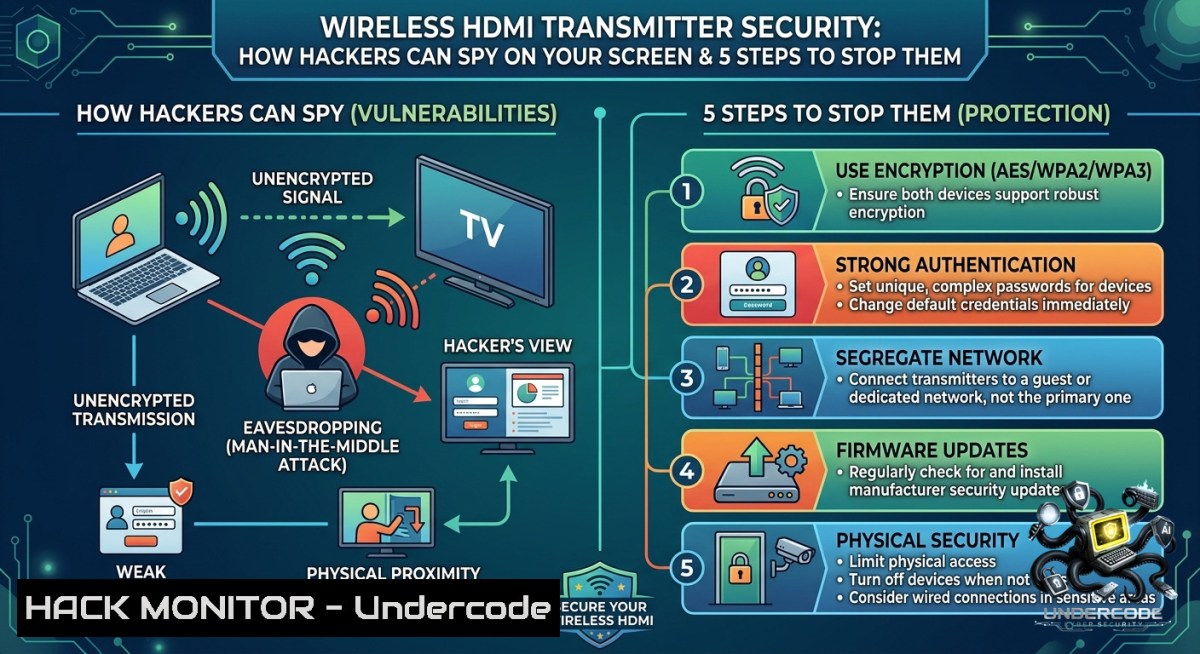
Introduction:
Wireless HDMI transmitters offer unparalleled convenience for presentations and home entertainment, but they broadcast video signals over unlicensed radio frequencies—creating a massive cybersecurity blind spot. Attackers equipped with software-defined radios (SDRs) or modified Wi-Fi adapters can intercept, replay, or even inject malicious content into these streams, bypassing traditional network security controls. This article dissects real-world wireless video eavesdropping techniques and provides actionable hardening measures for IT professionals, security architects, and AV integrators.
Learning Objectives:
– Identify inherent vulnerabilities in consumer and enterprise wireless HDMI systems (lack of encryption, weak pairing protocols, and RF leakage)
– Perform passive signal interception using open-source tools (RTL-SDR, Wireshark, and spectrum analyzers) on Linux and Windows
– Implement layered mitigations including signal shielding, HDCP enforcement, and rogue device detection
You Should Know:
1. The Hidden Risks of Unencrypted Video Streams
Most low-to-mid-range wireless HDMI kits transmit video without any encryption, relying instead on simple frequency-hopping spread spectrum (FHSS) or direct 2.4/5 GHz modulation. This means anyone within range with a compatible receiver can decode the stream. For extenders that use Wi-Fi (e.g., over IP), the traffic often runs on open ports with no WPA2.
Step‑by‑step guide to detect vulnerable wireless HDMI traffic (Linux):
1. Put your wireless card into monitor mode:
sudo airmon-1g start wlan0
sudo airmon-1g check kill
2. Capture raw 2.4 GHz traffic:
sudo airodump-1g -c 6 --band bg wlan0mon -w hdmi_capture
3. For HDMI-over-IP devices (common on Ethernet/WiFi bridges), use `nmap` to discover them:
sudo nmap -sS -p 5000-6000,8000-9000 192.168.1.0/24 --open
4. On Windows (with Wireshark and Npcap), enable monitor mode via `netsh wlan set interface interface=”Wi-Fi” mode=monitor`. Then filter for `rtp` or `udp.port == 5004` to spot video streams.
What to look for: MAC addresses of unknown manufacturers (search OUI), constant UDP streams with high packet rates (>10 Mbps), or SSIDs like “HDMI-EXT-XXXX” with no encryption.
2. Man-in-the-Middle Attacks Using Software-Defined Radio
With a $30 RTL-SDR dongle, an attacker can capture the analog or digital modulation used by many wireless HDMI transmitters. Some models use analog FM modulation (similar to old analog TV), which can be trivially demodulated. Others use simple QPSK without authentication.
Step‑by‑step SDR interception (Linux):
1. Install RTL-SDR drivers and GNU Radio:
sudo apt install rtl-sdr gnuradio gqrx-sdr
2. Identify your device’s center frequency (typically 2.4 GHz, 5.8 GHz, or 60 GHz). Use `rtl_power` to scan:
sudo rtl_power -f 2400M:2500M:1M -g 40 -i 2s scan.csv
3. Use GQRX to visually identify the signal—look for a wide, constant carrier when the HDMI source is active.
4. Record the IQ stream:
rtl_sdr -f 2450M -s 2.4e6 -g 30 capture.bin
5. Demodulate using GNU Radio Companion or a Python script (for FM analog) to reconstruct video frames.
Mitigation: Only use wireless HDMI products that explicitly support HDCP 2.2+ or AES-128 encryption. Avoid unbranded or “no-1ame” transmitters. For critical environments, switch to wired HDMI or fiber optic extenders.
3. Hardening Your Wireless HDMI Configuration
Most devices come with default settings that maximize range but minimize security. Changing these parameters can drastically reduce the attack surface.
Step‑by‑step hardening (vendor-agnostic):
1. Disable auto-pairing – Force manual pairing via a physical button or a PIN. Avoid devices that pair by simply powering on.
2. Change the transmission channel – Use the manufacturer’s app or web interface (often accessible via the device’s IP, e.g., `http://192.168.1.100:8080`). Move away from crowded default channels.
3. Reduce transmit power if adjustable. Lower power = smaller signal leakage.
4. Enable encryption – Some enterprise models offer WPA2-PSK or WPA3. For those without, place the transmitter and receiver inside a Faraday enclosure (see section 4).
5. Monitor for rogue receivers – Use a spectrum analyzer to spot unexpected emissions. Command-line example with `rtl_power` and heatmap generation:
rtl_power -f 2400M:2500M:1M -i 5s -g 50 -1 baseline.csv
rtl_power -f 2400M:2500M:1M -i 5s -g 50 -1 live.csv
diff baseline.csv live.csv | grep ">"
Windows alternative: Use Acrylic Wi-Fi Professional or inSSIDer to scan for new 2.4/5 GHz devices that appear only when your HDMI transmitter is active.
4. Physical Security and Signal Shielding for Wireless HDMI
When encryption is not an option, RF containment becomes the primary defense. A Faraday cage—even a makeshift one—can block outgoing signals from leaking beyond your room.
Step‑by‑step to build a low-cost Faraday enclosure for the receiver:
1. Purchase copper mesh (or use aluminum foil with a non-conductive liner).
2. Line the inside of a metal tool case or a cardboard box covered with multiple layers of heavy-duty aluminum foil (ensure conductive continuity).
3. Place the wireless HDMI receiver inside the cage. Run the HDMI cable out through a small hole fitted with a ferrite bead (to act as a waveguide beyond cutoff).
4. Test leakage by walking outside the room with an SDR or a smartphone spectrum analyzer app (e.g., RF Signal Tracker). The signal should drop below -90 dBm.
For professional settings: Use certified TEMPEST-level shielding or purchase pre-made Faraday bags designed for RF isolation.
5. Detecting and Blocking Rogue HDMI Receivers with IDS/IPS
In corporate environments, wireless HDMI transmitters often connect to laptops that are also on the corporate Wi-Fi. This creates a bridge: an attacker with a rogue receiver can capture the video, while a separate attack can exfiltrate that video via the target’s own network.
Step‑by‑step to integrate wireless HDMI monitoring into your security stack:
1. Use a dedicated RF sensor (e.g., an RTL-SDR running `rtl_power` continuously) to establish a baseline of ambient 2.4/5 GHz noise.
2. Configure a script to alert when new strong signals appear at the frequencies used by authorized transmitters.
3. For HDMI-over-IP devices, create firewall rules to block unauthenticated UDP streams:
– On Linux using `iptables`:
sudo iptables -A INPUT -p udp --dport 5004:5010 -m state --state NEW -j DROP
sudo iptables -A OUTPUT -p udp --sport 5004:5010 -m state --state NEW -j DROP
– On Windows using `netsh advfirewall`:
netsh advfirewall firewall add rule name="Block HDMI UDP" dir=in protocol=udp localport=5004-5010 action=block
4. Deploy a wireless intrusion prevention system (WIPS) that can de-authenticate rogue stations (if they use Wi-Fi-based HDMI). Most enterprise WIPS like Cisco DNA or Aruba can be tuned to flag unknown devices broadcasting high-throughput video.
What Undercode Say:
– Key Takeaway 1: Consumer wireless HDMI devices prioritize ease-of-use over security—most lack basic encryption, making them trivial to intercept with $30 SDRs. Treat any wireless video link as public information unless you have verified cryptographic protection.
– Key Takeaway 2: Physical layer defenses (Faraday cages, power reduction, channel hopping) are underutilized but highly effective, especially when encryption is absent. Regular RF spectrum monitoring should be part of physical security audits for boardrooms and SCADA control rooms.
– Analysis: The rise of BYOD and wireless presentation systems in hybrid workplaces has dramatically increased the attack surface for visual eavesdropping. While Wi-Fi and Bluetooth have matured security standards, the fragmented wireless HDMI market lags years behind. Attackers are already weaponizing these gaps—recent red-team exercises show that intercepting a CEO’s wireless presentation is often easier than phishing credentials. Organizations must either mandate wired connections for sensitive content or adopt next-generation standards like WirelessHD with 128-bit AES. The convenience-cost trade-off is no longer acceptable.
Prediction:
– -1: By 2027, unencrypted wireless HDMI will be implicated in at least three major corporate data breaches, leading to class-action lawsuits against manufacturers that failed to implement basic security controls.
– -1: As SDR hardware becomes cheaper and more accessible (sub-$10), script-kiddie tools for HDMI interception will proliferate, making casual spying a realistic threat in apartments, hotels, and co-working spaces.
– +1: The emergence of Wi-Fi 7 and WPA3’s Enhanced Open (OWE) will pressure wireless HDMI vendors to finally adopt standardised encryption, potentially rendering older vulnerable models obsolete. Early adopters of secure wireless video will gain a competitive advantage in privacy-focused markets.
▶️ Related Video (74% Match):
🎯Let’s Practice For Free:
🎓 Live Courses & Certifications:
[Join Undercode Academy for Verified Certifications](https://undercode.co.uk/certifications/)
🚀 Request a Custom Project:
Secure, high-velocity infrastructure and disruptive technological engineering. Contact our engineering team for high-tier development and proprietary systems:
[[email protected]](mailto:[email protected])
💎 Smart Architecture | 🛡️ Secure by Design | ⭐ Trusted by Thousands
IT/Security Reporter URL:
Reported By: [Industrialdesign Craftsmanship](https://www.linkedin.com/posts/industrialdesign-craftsmanship-productdesign-ugcPost-7469015930950287360-qD14/) – Hackers Feeds
Extra Hub: Undercode MoN
Basic Verification: Pass ✅
🔐JOIN OUR CYBER WORLD [ CVE News • HackMonitor • UndercodeNews ]
[💬 Whatsapp](https://undercode.help/whatsapp) | [💬 Telegram](https://t.me/UndercodeCommunity)
📢 Follow UndercodeTesting & Stay Tuned:
[𝕏 formerly Twitter 🐦](https://x.com/undercodeupdate) | [@ Threads](https://www.threads.net/@undercodetesting) | [🔗 Linkedin](https://www.linkedin.com/company/undercodetesting/) | [🦋BlueSky](https://bsky.app/profile/undercode.bsky.social)


