Listen to this Post
Introduction
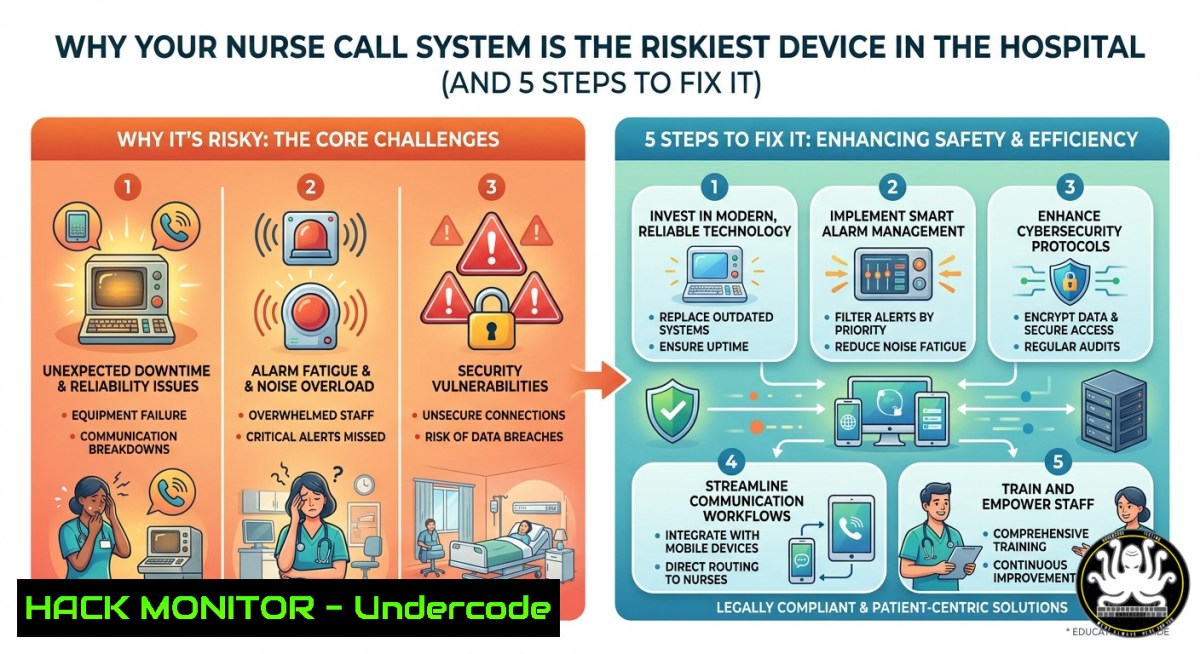
In the hyper-connected ecosystem of modern healthcare, where Internet of Medical Things (IoMT) devices promise efficiency and better patient outcomes, a silent crisis is unfolding. Nurse call systems—the critical lifeline between a patient in distress and a caregiver—have been identified as the riskiest connected medical devices in clinical environments, with a staggering 39% harboring critical severity unpatched vulnerabilities. While Securitas Healthcare markets its Arial Emergency and Nurse Call system as a tool to “build trust” through data-driven visibility, the recent spate of firmware recalls and server software failures exposes a darker reality: these life-sustaining systems are prime targets for malicious actors, and the consequences of a breach extend far beyond data loss to direct threats to patient safety.
Learning Objectives
- Identify the specific firmware and software vulnerabilities affecting Securitas Healthcare’s Arial Nurse Call systems and understand the potential hazards, including notification failures and battery depletion.
- Analyze network-level attack vectors against nurse call systems and other IoMT devices, learning how insecure configurations can lead to patient data breaches or system shutdowns.
- Execute hands-on security hardening commands for Windows-based Arial servers and Linux-based ancillary systems, along with configuration checks for network segmentation.
You Should Know
- Exposing the Firmware Cracks: When “Smart” Devices Go Silent
The most immediate danger in nurse call systems isn’t a sophisticated cyberattack—it’s fundamental firmware failures that disable the device’s core function. In 2025, Securitas Healthcare recalled over 5,600 Arial 900 MHz call stations due to a critical firmware bug that prevented low-battery alerts from being transmitted. Similarly, older Wi-Fi call stations (CSK200-1069 models) were recalled because a firmware issue caused them to stop transmitting alarms or prematurely deplete batteries without any visible warning. On the software side, specific versions of the Arial Server Software (11.1.4.9 through 11.1.6.2) were found to cease notifying staff of new calls if a previous call was “declined” in the mobile app.
Step-by-step guide to checking and mitigating firmware risks:
1. Inventory and Version Check:
- Identify devices: Record MAC addresses and serial numbers for all Arial call stations.
- Check firmware versions: Access the device’s web interface (usually `http://
:8080/status` or similar) or use a discovery tool. - Cross-reference: Compare against known vulnerable versions (e.g., CSK200-900 with firmware 1.6.3, Arial Server Software versions 11.1.4.9, 11.1.5.5, 11.1.6.2).
- Compliance check: Use a vulnerability scanner like Tenable or Qualys to query SNMP for device details.
2. Apply Mitigations:
- For Arial Server (Windows): Follow the manufacturer’s guidance to not “decline” calls manually. Instead, restart the server service using PowerShell:
Run as Administrator
Get-Service -Name "ArialServer" | Restart-Service
- For affected Wi-Fi call stations: Immediately contact Securitas Healthcare Technical Support at 1-800-380-8883 for a firmware upgrade or replacement.
- Segmentation: Isolate all IoMT devices onto a dedicated VLAN to contain any potential lateral movement from a compromised device.
- The Network is the Battlefield: IoMT Attack Vectors and Lateral Movement
A nurse call system isn’t an island; it’s a node on your network. Attackers who breach a facility via a phishing email can scan for these devices, exploit default credentials, and move laterally to access Electronic Health Records (EHRs), launch ransomware, or simply cripple the call system. Research shows that close to 100% of healthcare organizations are supporting connected devices that contain known exploited vulnerabilities. This section focuses on hardening the network path to and from the Arial system.
Step-by-step guide to network hardening:
- Port Scanning and Discovery (from a security assessment perspective):
– Use `nmap` from a Linux machine on the same subnet to discover active Arial devices:
 Scan for common nurse call system ports (e.g., 5000-5010, 8000-8100)
sudo nmap -sS -p 5000-5010,8000-8100,22,135,445 <target_subnet/24> -oN arial_scan.txt
– To identify specific services, use version detection:
 Detailed version and OS detection
sudo nmap -sV -sC -O <target_ip>
2. Access Control and Hardening (Windows & Linux Commands):
– Windows (Arial Server): Restrict inbound RDP and SMB to only authorized admin workstations using Windows Firewall:
 Allow RDP only from specific IP
New-NetFirewallRule -DisplayName "Restrict_RDP" -Direction Inbound -Protocol TCP -LocalPort 3389 -RemoteAddress 192.168.1.0/24 -Action Allow
 Block SMB inbound from all except specific backup server
New-NetFirewallRule -DisplayName "Block_SMB_Default" -Direction Inbound -Protocol TCP -LocalPort 445 -Action Block
– Linux (for management consoles or integrated systems): Harden SSH access.
 Edit /etc/ssh/sshd_config to disable root login and password auth
sudo sed -i 's/PermitRootLogin yes/PermitRootLogin no/' /etc/ssh/sshd_config
sudo sed -i 's/PasswordAuthentication yes/PasswordAuthentication no/' /etc/ssh/sshd_config
sudo systemctl restart sshd
- Cloud API and Mobile Application Security: The Invisible Perimeter
The modern nurse call system extends beyond the hospital Wi-Fi. The Arial system integrates with mobile apps and potentially cloud-based reporting platforms. Each API endpoint and mobile backend represents a potential breach point. In 2024, the FDA even issued a Class 2 recall for an Arial mobile app version that failed to receive critical notifications.
Step-by-step guide to API and mobile security assessment:
1. Intercepting and Analyzing Mobile Traffic:
- Set up a proxy like Burp Suite or OWASP ZAP on a laptop.
- Configure your mobile device to use the laptop as a proxy (enable “Proxy” in Wi-Fi settings).
- Install the proxy’s CA certificate on the mobile device to decrypt HTTPS traffic.
- Launch the Arial Care Giver Mobile Application and trigger a test alarm. Observe the API calls (e.g.,
POST /api/v1/alarms). Check for: - Lack of certificate pinning: Can you see the decrypted JSON data?
- Exposed API keys: Look for hardcoded keys in the URL or headers.
- Insecure data exposure: Are patient names and room numbers sent in plaintext within the JSON payload?
2. Cloud Configuration Hardening (AWS/Azure):
- Securitas has a history of misconfigured cloud storage. In 2021, a Securitas Amazon S3 bucket was left unauthenticated, exposing 3TB of sensitive data.
- Action: If your facility uses any cloud-connected features of the Arial system, conduct an audit of the cloud tenant.
- Azure CLI command to check for public blob containers:
az storage container list --account-name <your_storage_account> --query "[?properties.publicAccess != null]"
- AWS CLI command to check S3 bucket ACLs:
aws s3api get-bucket-acl --bucket <bucket_name>
aws s3api get-public-access-block --bucket <bucket_name>
- Building an Active Defense: Monitoring and Incident Response
Passive security is insufficient. You need active, continuous monitoring to detect when a “Missing Device” alert is a hardware failure versus a symptom of a system-wide cyber event. Integrating Arial system logs with a Security Information and Event Management (SIEM) platform is critical.
Step-by-step guide to integrating Arial logs for security monitoring:
1. Enable Windows Event Logging on the Arial Server:
– Open `Event Viewer` (eventvwr.msc).
– Navigate to `Applications and Services Logs` > `Arial Server` (or similar vendor-specific log).
– Right-click, select Properties. Ensure `Enable logging` is checked. Set maximum log size to 2GB and select Archive the log when full.
2. Centralize Logs with Sysmon and Winlogbeat:
- Download and install Sysmon from Microsoft. Install a standard configuration (e.g., SwiftOnSecurity’s sysmon-config).
- Install Winlogbeat on the Arial server to forward logs to a central Elastic Stack or Splunk instance.
- PowerShell snippet to install and configure Winlogbeat:
Download and extract Winlogbeat
Invoke-WebRequest -Uri "https://artifacts.elastic.co/downloads/beats/winlogbeat/winlogbeat-8.11.0-windows-x86_64.zip" -OutFile "C:\winlogbeat.zip"
(Requires manual config of winlogbeat.yml to point to your SIEM)
3. Create Detection Rules:
- Rule 1: Multiple Device Disconnections. If 5+ call stations log a “Missing Device” alert within 60 seconds, this could indicate a network segmentation attack or a de-authentication flood.
- Rule 2: Unusual Authentication Attempts. Monitor for multiple failed logins to the Arial Server via RDP (Event ID 4625). A brute-force attack may precede ransomware deployment.
- Crisis Simulation: Tabletop Exercise for a Nurse Call System Failure
Planning for a failure is as important as preventing one. Run a tabletop exercise where a ransomware attack has encrypted the Arial Server, and call stations show “Offline.” This forces the clinical and IT teams to execute manual protocols.
Step-by-step guide to running a Tabletop Exercise (TTX):
- Scenario Setup: “The Arial server console shows a ransomware note. All mobile app notifications have stopped. Staff are not receiving any alerts from Room 204.”
- Inject 1 (IT): Restore the Arial Server from the most recent offline backup. Can you do this? Where is the backup stored? Is the backup network also encrypted?
- Inject 2 (Clinical): Immediately initiate manual rounding protocols. Assign staff to physically check on all high-risk patients every 15 minutes until the system is restored.
- Inject 3 (Communication): How does the charge nurse communicate this failure to residents’ families without causing panic? The original post mentions “families want proof”—how do you provide proof when your data system is down?
- After-Action Review: Document the time it took for IT to declare a disaster and for clinical to successfully switch to manual operations. Identify and patch any single points of failure.
What Undercode Say:
- The “Digital Trust” Paradox is Real. Securitas Healthcare markets its system as building trust through “data-driven visibility,” but a firmware crash or a ransomware lockdown shatters that trust instantly. Families want proof of safety, but they get proof of vulnerability instead.
- Patch Management is Patient Safety. The statistics are damning: 39% of nurse call systems have critical unpatched CVEs. Healthcare IT often treats these as low-priority “non-PACS” devices. This analysis makes it clear: neglecting to patch a call station is the functional equivalent of leaving a defibrillator uncharged.
Prediction:
The convergence of aging Windows-based medical systems with modern, cloud-connected APIs will define the next wave of healthcare ransomware. As smart hospitals deploy over 7 million IoMT devices by 2026, attacks will shift from encrypting EHRs to leveraging these devices as entry points for supply-chain ransomware. Regulators like the FDA and HHS will soon mandate SBOMs (Software Bill of Materials) and real-time vulnerability scanning for all Class II medical devices, including nurse call systems. Healthcare organizations that fail to segment their IoMT networks today will find themselves not just in a data breach notification—but in a courtroom, answering for patient harm caused by a preventable firmware flaw.
▶️ Related Video (72% Match):
🎯Let’s Practice For Free:
IT/Security Reporter URL:
Reported By: Testimonialtuesday Seniorliving – Hackers Feeds
Extra Hub: Undercode MoN
Basic Verification: Pass ✅
🎓 Live Courses & Certifications:
Join Undercode Academy for Verified Certifications


