Listen to this Post
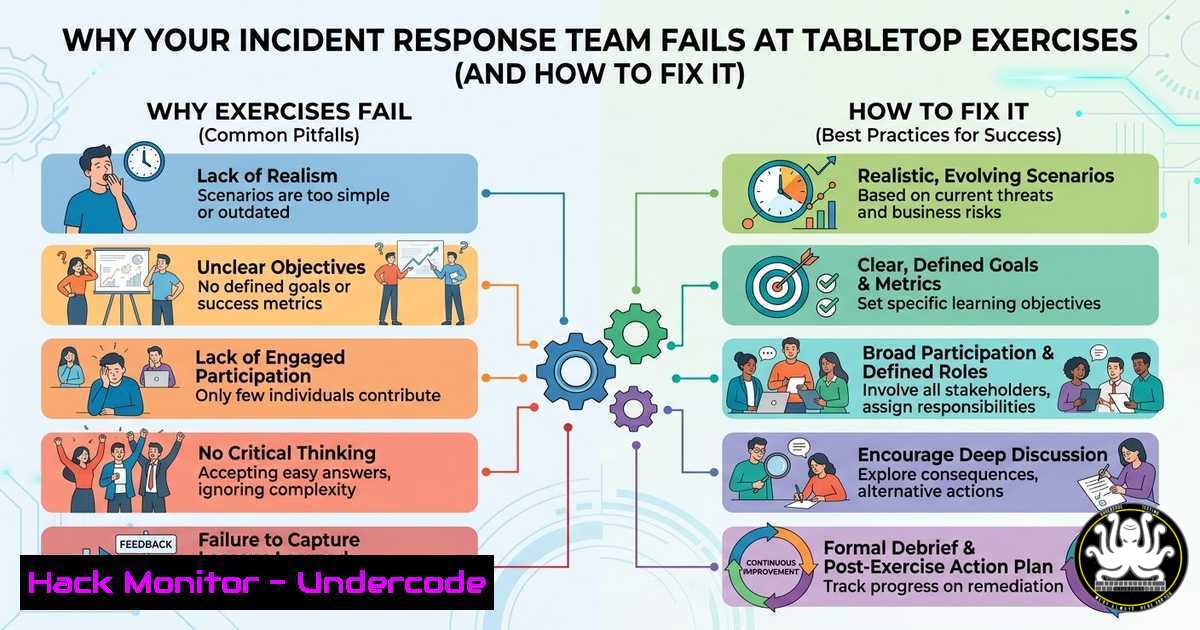
Introduction:
In the high-stakes world of cybersecurity incident response, the difference between a contained breach and a catastrophic data leak often comes down to team cohesion and shared situational awareness. Tabletop exercises are designed to stress-test these very dynamics, yet many teams fall into a critical trap: relying on individual memory rather than a collective, visualized operational picture. When team members operate with divergent mental models of an attack, decision-making fractures, and the response fails.
Learning Objectives:
- Understand the cognitive biases and communication breakdowns that plague incident response teams during crisis simulations.
- Learn to implement a “Visualizer” role to establish and maintain a Common Operating Picture (COP).
- Master facilitation techniques to expose information silos and ensure all team members are operating from the same data set.
You Should Know:
- The Divergence Problem: Why Mental Models Fail Under Pressure
Gregor Wegberg’s observations highlight a universal truth in IT crisis management: human memory is unreliable, especially under stress. As an incident escalates—whether it’s a ransomware deployment or a data exfiltration—the volume of information overwhelms individual cognitive capacity. One analyst may be fixated on the initial infection vector (e.g., a phishing email), while another is focused on the lateral movement detected (e.g., PsExec usage), and a third is worrying about public relations fallout.
This divergence creates a fractured response. Commands are given based on incomplete information, and critical Indicators of Compromise (IOCs) are forgotten. The goal of a tabletop exercise is not just to test the technical playbook, but to expose this very human vulnerability before a real attacker does.
2. Step-by-Step: Implementing the “Visualizer” Role
To combat the divergence problem, you must move information from individual brains to a shared physical or digital space. This is the role of the Visualizer.
- Step 1: Assign the Role Pre-Incident. Before the exercise (or real incident) begins, designate one person whose sole job is not to solve the problem, but to track it. This is not the note-taker; this is the visual architect.
- Step 2: Establish a Timeline. The Visualizer draws a horizontal timeline on a whiteboard or in a shared Miro board. As the incident unfolds, they plot events: “Phishing email received 09:00,” “Malware downloaded 09:05,” “C2 Beacon Outbound 09:12.”
- Step 3: Map the Kill Chain. Alongside the timeline, the Visualizer maps events to the Cyber Kill Chain or MITRE ATT&CK framework. For example, they would note “Privilege Escalation achieved via CVE-2023-1234 on Host X.”
- Step 4: Track Decisions and Actions. Every decision made by the incident commander must be visualized. “Isolated Host A,” “Blocked IP 192.0.2.1 on Firewall,” “Notified Legal Team.” This prevents the team from repeating actions or forgetting they are waiting on a critical step.
- Step 5: The “Ground Truth” Check. At regular intervals (every 15 minutes of exercise time), the facilitator or Incident Commander points to the board and asks, “Is everyone operating from this picture?” This forces the team to reconcile their mental models with the visual representation.
3. Step-by-Step: The Facilitator’s “Hot Seat” Summary Technique
Wegberg’s first tip is a powerful tool to expose hidden divergence. As a facilitator, you must actively break the flow to test memory and perception.
- Step 1: Introduce an Unpredictable Summary. After a significant event in the scenario (e.g., the discovery of a backdoor user account), do not ask for a volunteer. Instead, point to a specific team member—perhaps one who has been quiet or one who is deeply technical.
- Step 2: The Command: Say, “Without looking at anyone else’s notes or the board, summarize for us the last three events that led us here.”
- Step 3: Analyze the Result. You will often get three different answers from three different people. One might say “We saw a suspicious PowerShell,” another “The alert came from the EDR,” and another “We decided to shut down the server.” This lack of alignment is the learning point.
- Step 4: The Debrief. Immediately after the summary, ask the team: “Why did we hear three different things? What information was missed? How do we ensure this doesn’t happen in a real crisis?” This directly leads to the realization that a visual aid is non-negotiable.
- Technical Implementation: Building Your Common Operating Picture (COP)
In a real-world IT environment, the COP cannot be just a feeling; it must be backed by data. While a whiteboard works for tabletops, a real incident requires tooling.
- Linux Command for Live IOC Sweep: To verify if a host is compromised based on a new IOC (e.g., a malicious domain
evil.c2), a responder might run a `grep` command across logs. This data should then be added to the COP.sudo grep -r "evil.c2" /var/log/ | awk -F: '{print $1}' | sort -uWhat this does: Recursively searches all logs in `/var/log` for the malicious domain and prints the unique filenames where it appears, identifying affected services.
-
Windows Command for Persistence Checks: When the COP indicates a potential scheduled task persistence mechanism, a responder can run:
Get-ScheduledTask | Where-Object {$<em>.TaskPath -notlike "Microsoft" -and $</em>.State -eq "Ready"} | Format-Table TaskName, TaskPath, StateWhat this does: Lists all non-Microsoft scheduled tasks that are ready to run, helping to identify potential backdoors planted by an attacker.
-
Centralizing the COP: Tools like TheHive, Cortex, or even a shared Markdown file in a Git repository can serve as the digital COP. The key is that every change is logged, and every responder has read access to the “ground truth.”
5. Low-Tech vs. High-Tech: The Tools of Visualization
Wegberg mentions digital tools as a last resort. This is a critical nuance. In a crisis, physical whiteboards and sticky notes are often superior to complex digital tools because they are instantaneous and require no authentication or network access (which might be compromised).
- Physical Board Technique: Use the “SWARM” method. Divide the board into sections:
1. Incident Facts: Verified technical details.
- Assumptions: Things believed to be true but unconfirmed.
3. Questions: Information gaps that need filling.
4. Actions: Commands issued and by whom.
- Digital Tool Technique: If using Miro, MURAL, or a dedicated SOC dashboard, create a locked “Source of Truth” frame that only the Visualizer can edit. All other participants should have a “read-only” view of this frame to prevent accidental overwrites or “death by a thousand edits.”
What Undercode Say:
- Key Takeaway 1: Technical skill is useless without shared situational awareness. A team of brilliant analysts operating from different mental models is less effective than a coordinated team of average analysts following a single, visualized plan.
- Key Takeaway 2: The role of the Visualizer is as critical as the Incident Commander. By offloading the memory burden to a physical or digital space, you free the team to focus on analysis and containment, rather than trying to remember who did what and when.
The post from Gregor Wegberg underscores a fundamental flaw in how we prepare for cyber crises: we focus on the “what” (malware, exploits) and forget the “who” (the human team). A successful tabletop exercise doesn’t just prove you can follow a playbook; it proves you can think together. By forcing visual clarity and exposing cognitive divergence, you build a team that is resilient not just to malware, but to the chaos of the unknown. In the digital trenches, a shared view of the battlefield is the only thing that prevents friendly fire.
Prediction:
As cyber threats become more automated and fast-moving, the future of incident response will pivot from purely technical detection to advanced “cognitive security.” We will see the rise of AI-powered Visualizers—digital co-pilots that ingest telemetry, phone call transcripts, and chat logs to automatically generate and maintain a real-time Common Operating Picture. This will force human teams to evolve further, moving from data gatherers to high-level strategic decision-makers who manage the AI-driven COP.
▶️ Related Video (78% Match):
🎯Let’s Practice For Free:
IT/Security Reporter URL:
Reported By: Gregorwegberg Du – Hackers Feeds
Extra Hub: Undercode MoN
Basic Verification: Pass ✅


