Listen to this Post
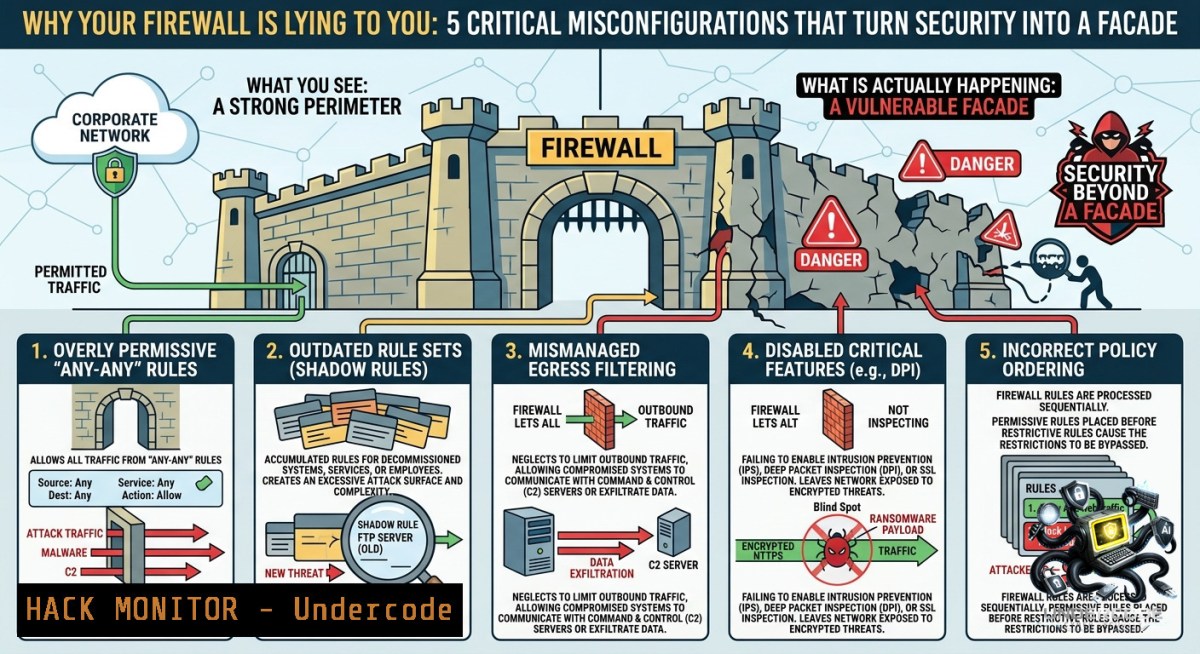
Introduction:
Firewalls are no longer simple packet filters—they are the bedrock of network security, enforcing least privilege, segmentation, and threat visibility. Yet a single misconfigured rule can nullify years of security investment, creating dangerous blind spots for SOC teams and enabling attackers to move laterally undetected.
Learning Objectives:
– Implement stateful and next-generation firewall rules using CLI tools (iptables, nftables, Windows Defender Firewall)
– Detect and remediate common firewall misconfigurations including open ports, weak outbound policies, and log gaps
– Integrate firewall logs with SIEM for threat hunting and incident response automation
1. Hardening Linux iptables: From Stateless to Stateful Rules
What it does:
iptables is the traditional Linux firewall. A stateless rule checks every packet in isolation; a stateful rule tracks connections (e.g., `-m state –state ESTABLISHED,RELATED`) to reduce attack surface and improve performance.
Step‑by‑step guide:
1. View current rules (as root or with sudo):
sudo iptables -L -v -1
2. Set default policies to DROP for incoming and forwarded traffic (allow outgoing to avoid locking yourself out):
sudo iptables -P INPUT DROP
sudo iptables -P FORWARD DROP
sudo iptables -P OUTPUT ACCEPT
3. Allow loopback and established connections (stateful tracking):
sudo iptables -A INPUT -i lo -j ACCEPT
sudo iptables -A INPUT -m state --state ESTABLISHED,RELATED -j ACCEPT
4. Allow specific services (e.g., SSH from a management subnet):
sudo iptables -A INPUT -p tcp --dport 22 -s 192.168.1.0/24 -j ACCEPT
5. Save rules persistently:
sudo iptables-save > /etc/iptables/rules.v4  Debian/Ubuntu
sudo service netfilter-persistent save  alternative
Why it matters:
Stateless rules alone cannot prevent session hijacking. Stateful inspection is the minimum for production systems.
2. Windows Defender Firewall: Advanced Security with PowerShell
What it does:
Windows Firewall supports inbound/outbound filtering, per‑profile rules (Domain/Private/Public), and integration with IPSec. Misconfigured outbound rules are a top source of data exfiltration.
Step‑by‑step guide:
1. List all rules with their enabled status:
Get-1etFirewallRule | Select-Object DisplayName, Enabled, Direction, Action
2. Block all outbound traffic by default (then allow only needed):
Set-1etFirewallProfile -All -DefaultOutboundAction Block
3. Allow outbound HTTPS and DNS:
New-1etFirewallRule -DisplayName "Allow Outbound HTTPS" -Direction Outbound -Protocol TCP -RemotePort 443 -Action Allow
New-1etFirewallRule -DisplayName "Allow Outbound DNS" -Direction Outbound -Protocol UDP -RemotePort 53 -Action Allow
4. Enable logging for dropped packets:
Set-1etFirewallProfile -All -LogFileName C:\Windows\System32\LogFiles\Firewall\pfirewall.log -LogAllowed False -LogBlocked True
5. Audit rule changes via PowerShell transcription or Group Policy.
Pro tip:
Use `New-1etFirewallRule -Action Block -Description “Temporary block”` during incident response to isolate a compromised host.
3. Next‑Gen Firewall (NGFW) Configuration: Suricata as an Open Source IPS
What it does:
NGFWs add Deep Packet Inspection (DPI), intrusion prevention, and application awareness. Suricata can run inline as a IPS or in IDS mode to emulate NGFW capabilities.
Step‑by‑step guide:
1. Install Suricata (Ubuntu example):
sudo add-apt-repository ppa:oisf/suricata-stable
sudo apt update && sudo apt install suricata
2. Set inline mode (requires NFQUEUE):
sudo iptables -I INPUT -j NFQUEUE --queue-1um 0
sudo iptables -I OUTPUT -j NFQUEUE --queue-1um 0
3. Edit `/etc/suricata/suricata.yaml`:
– Set `af-packet` mode to `inline`
– Enable emerging threats ruleset
4. Run Suricata inline:
sudo suricata -c /etc/suricata/suricata.yaml -q 0
5. Test with a malicious pattern (e.g., EICAR string over HTTP) and verify the firewall drops the packet.
Note:
NGFWs without regular signature updates and SSL/TLS inspection become blind to encrypted threats.
4. Web Application Firewall (WAF) Deployment with ModSecurity
What it does:
A WAF protects web apps from SQLi, XSS, and other L7 attacks. ModSecurity with the OWASP Core Rule Set (CRS) is the industry standard.
Step‑by‑step guide (Apache + ModSecurity):
1. Install ModSecurity:
sudo apt install libapache2-mod-security2
sudo a2enmod security2
2. Download and enable OWASP CRS:
sudo git clone https://github.com/coreruleset/coreruleset /etc/modsecurity/crs
sudo cp /etc/modsecurity/crs/crs-setup.conf.example /etc/modsecurity/crs/crs-setup.conf
3. Configure detection only (initially to avoid blocking legitimate traffic):
SecRuleEngine DetectionOnly
4. Test with SQLi payload:
curl -X GET "http://your-server/page?id=1' OR '1'='1"
Check `/var/log/apache2/modsec_audit.log`
5. Switch to `On` after tuning and configure anomaly scoring thresholds.
Key takeaway:
A WAF in “allow all” mode is a false sense of security—just like a misconfigured network firewall.
5. SIEM Integration: Sending Firewall Logs to Wazuh (OSSEC)
What it does:
Centralized log monitoring enables SOC analysts to correlate firewall drops with endpoint alerts. Wazuh is an open-source SIEM/XDR platform.
Step‑by‑step guide:
1. Install Wazuh agent on the firewall host (Linux):
curl -s https://packages.wazuh.com/4.x/wazuh-install.sh | bash
2. Configure agent to read iptables logs:
Edit `/var/ossec/etc/ossec.conf`, add:
<localfile>
<log_format>syslog</log_format>
<location>/var/log/kern.log</location>
</localfile>
3. Restart agent:
sudo systemctl restart wazuh-agent
4. Create custom rule on the Wazuh server to alert on repeated firewall denies:
<rule id="100100" level="10">
<if_sid>5716</if_sid>
<match>DPT=22.SRC=</match>
<description>SSH brute force detected by firewall</description>
</rule>
5. Monitor dashboard and set up email alerts for critical events.
Impact:
Without SIEM integration, firewall logs are noise; with SIEM, they become actionable threat intelligence.
6. Auditing Firewall Rules: Automating Least Privilege Checks
What it does:
Over time, firewalls accumulate obsolete and over‑permissive rules. Automated auditing identifies rules that violate the principle of least privilege.
Step‑by‑step guide (using `iptables` and custom script):
1. List all rules with line numbers:
sudo iptables -L INPUT -v -1 --line-1umbers
2. Find rules allowing ANY source (`0.0.0.0/0`):
sudo iptables -S INPUT | grep "0.0.0.0/0" | grep ACCEPT
3. Check for unused rules (use `iptables -L -v -1` and look for zero byte/packet counters):
sudo iptables -L -v -1 | awk '$2==0 && $3==0'
4. Remove a rule by line number:
sudo iptables -D INPUT 5
5. Schedule weekly audits with `cron`:
0 2 1 /usr/local/bin/firewall-audit.sh | mail -s "Firewall Audit" [email protected]
Common mistake:
Leaving “temporary” rules for months. Regular reviews are non‑negotiable.
What Undercode Say:
– Key Takeaway 1: Firewalls are not just access control devices—they are critical visibility and forensic tools. Without log monitoring and SIEM integration, even a perfect rule set cannot detect an ongoing breach.
– Key Takeaway 2: The most common and dangerous firewall mistake is ignoring outbound traffic. Attackers who gain a foothold rely on unrestricted egress for C2 communication and data exfiltration.
Analysis (10 lines):
The original post by Okan YILDIZ correctly emphasizes that firewall value lies in context, policy, and disciplined decision‑making—not merely writing rules. From a blue team perspective, stateless firewalls are obsolete for any environment facing modern threats; stateful or NGFW is mandatory. However, many organizations still deploy WAFs in “log‑only” mode or fail to review iptables rules quarterly. The most overlooked attack vector is outbound traffic: SOC teams rarely block ports like 443 outbound, allowing malware to masquerade as legitimate HTTPS. Combining firewall logs with a SIEM transforms reactive block/allow decisions into proactive threat hunting. Finally, the rise of encrypted traffic demands SSL/TLS inspection at the firewall, which introduces performance and privacy trade‑offs. Misconfigurations in this area (e.g., incomplete decryption policies) create blind spots larger than having no firewall at all. The document linked (https://lnkd.in/djM7KdF3) likely expands on these failure modes.
Prediction:
– -1: As encrypted traffic becomes the norm (90%+ of web traffic by 2026), firewalls that lack robust TLS inspection will become near‑useless, forcing organizations to either accept massive visibility gaps or deploy expensive inline decryption solutions that introduce latency and legal risks.
– +1: The integration of firewalls with automated SOAR platforms will mature, enabling real‑time rule adjustments based on threat intelligence feeds—reducing mean time to remediate (MTTR) from days to seconds.
– -1: Misconfigured cloud firewalls (AWS Security Groups, Azure NSGs) will remain the leading cause of data breaches in hybrid environments, as DevOps teams prioritize connectivity over least privilege, creating a false sense of security that attackers actively probe for.
▶️ Related Video (76% Match):
🎯Let’s Practice For Free:
🎓 Live Courses & Certifications:
[Join Undercode Academy for Verified Certifications](https://undercode.co.uk/certifications/)
🚀 Request a Custom Project:
Secure, high-velocity infrastructure and disruptive technological engineering. Contact our engineering team for high-tier development and proprietary systems:
[[email protected]](mailto:[email protected])
💎 Smart Architecture | 🛡️ Secure by Design | ⭐ Trusted by Thousands
IT/Security Reporter URL:
Reported By: [Yildizokan Cybersecurity](https://www.linkedin.com/posts/yildizokan_cybersecurity-firewall-networksecurity-ugcPost-7467840978096185344-Zd7M/) – Hackers Feeds
Extra Hub: Undercode MoN
Basic Verification: Pass ✅
🔐JOIN OUR CYBER WORLD [ CVE News • HackMonitor • UndercodeNews ]
[💬 Whatsapp](https://undercode.help/whatsapp) | [💬 Telegram](https://t.me/UndercodeCommunity)
📢 Follow UndercodeTesting & Stay Tuned:
[𝕏 formerly Twitter 🐦](https://x.com/undercodeupdate) | [@ Threads](https://www.threads.net/@undercodetesting) | [🔗 Linkedin](https://www.linkedin.com/company/undercodetesting/) | [🦋BlueSky](https://bsky.app/profile/undercode.bsky.social)


