Listen to this Post
Introduction
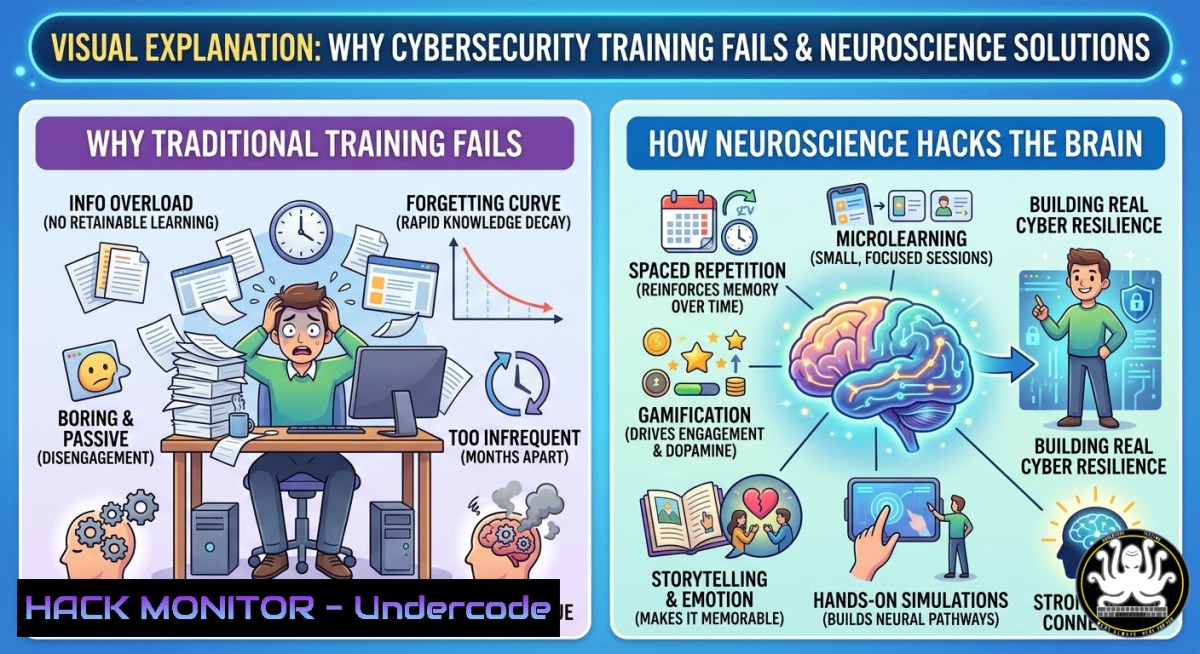
Traditional cybersecurity awareness training—filled with slides, policies, and dull e-learning modules—rarely changes long-term behavior because the brain prioritizes emotional engagement over passive information. Neuroscience reveals that immersive, story-driven experiences trigger memory retention and reflex formation, transforming how employees respond during actual cyberattacks.
Learning Objectives
- Understand the cognitive mechanisms behind emotional memory and its application to security awareness
- Implement immersive training scenarios using cinema, simulation, and storytelling techniques
- Apply neuroscience-based principles to design behavior-changing cybersecurity programs
You Should Know
- Building an Emotionally Engaging Phishing Simulation with GoPhish
Most phishing tests fail to create lasting behavioral change because they lack narrative context and emotional stakes. This step‑by‑step guide sets up a realistic, story‑driven phishing campaign that triggers an emotional response—such as urgency, curiosity, or fear—and then measures user reactions.
Step‑by‑step guide (Linux – Ubuntu/Debian):
1. Install GoPhish – an open‑source phishing framework:
sudo apt update && sudo apt install -y wget unzip sqlite3
wget https://github.com/gophish/gophish/releases/download/v0.12.1/gophish-v0.12.1-linux-64bit.zip
unzip gophish-v0.12.1-linux-64bit.zip -d gophish
cd gophish
sudo ./gophish
- Access the admin console – open `https://your-server-ip:3333` (default credentials: admin/gophish). Change password immediately.
-
Create an emotional landing page – use HTML/CSS that mimics a breached internal system. Add a fake “Your account has been compromised – click to verify your identity” message with a countdown timer to induce urgency.
-
Craft a story‑driven email – example scenario: “HR Urgent: Your payroll update failed. Click to avoid delay.” Use variables (
{{.FirstName}}) for personalization. -
Launch the campaign – schedule the send and monitor real‑time clicks. After completion, run this SQLite query to analyze emotional engagement (time spent on landing page):
sqlite3 gophish.db "SELECT event, timestamp FROM events WHERE event='clicked' ORDER BY timestamp;"
Windows equivalent – use PowerShell to simulate a local phishing test with Send‑MailMessage (for internal testing only):
$credentials = Get-Credential
Send-MailMessage -SmtpServer "smtp.yourdomain.com" -Port 587 -UseSsl -Credential $credentials -From "[email protected]" -To "[email protected]" -Subject "URGENT: Your password expires in 1 hour" -Body "Click https://fake-login-page to keep access." -Priority High
This emotional trigger – urgency mixed with fear of losing access – engages the amygdala, dramatically improving memory retention compared to a generic “be aware of phishing” slide.
2. Measuring Cognitive Engagement Using SIEM Queries (Splunk/ELK)
Emotion isn’t subjective; you can quantify it by monitoring anomalous user behavior before and after training. Use SIEM logs to detect hesitation, errors, or rapid clicks—indicators of emotional arousal.
Step‑by‑step (Elastic Stack – Linux):
- Install Filebeat to forward Windows Event Logs (Security, PowerShell) to Elasticsearch:
curl -L -O https://artifacts.elastic.co/downloads/beats/filebeat/filebeat-8.11.0-amd64.deb
sudo dpkg -i filebeat-8.11.0-amd64.deb
sudo filebeat modules enable windows
-
Configure filebeat.yml to include emotional‑behavior metrics: rapid login failures, out‑of‑hours access, repeated file opens. Example filter:
filebeat.inputs:</p></li>
</ol>

<p>- type: log
enabled: true
paths:
- /var/log/windows/security.log
include_lines: ['4625', '4648', '4663']  Failed logon, logon with explicit creds, file access
- Create a Kibana dashboard – visualize “stress events” per department before and after immersive training. Use this Lens formula to detect clusters of rapid clicks (time difference < 2 seconds between two security events):
{ "script": "doc['timestamp'].value - doc['prev_timestamp'].value < 2000 ? 'rapid_arousal' : 'normal'" } -
Set alerts – when a user shows >5 rapid arousal events per hour, trigger a follow‑up micro‑simulation (e.g., a pop‑up asking “Did you feel rushed just now?”). This closes the feedback loop.
Windows‑native alternative – use PowerShell to query recent security event IDs and calculate the average time between logon attempts:
Get-WinEvent -FilterHashtable @{LogName='Security'; ID=4625} -MaxEvents 100 | ForEach-Object { $_.TimeCreated } | Measure-Object -DifferenceThese metrics turn emotional engagement into actionable data, allowing you to refine your neuroscientific training approach.
- Creating Immersive Cinema‑Grade Training Scenarios with OpenShot & AI Voiceover
The post highlights cinema as a powerful emotional vector. You don’t need a Hollywood budget; use free tools to produce short, dramatic security vignettes.
Step‑by‑step (Linux & Windows):
1. Install OpenShot – cross‑platform video editor:
sudo add-apt-repository ppa:openshot.developers/ppa
sudo apt update && sudo apt install openshot-qt
- Write a 90‑second micro‑script – example: “Sarah receives a ‘CEO urgent wire transfer’ SMS while on vacation. She has 10 seconds to decide.” Use low‑angle shots and tense background music (free from Pixabay).
-
Generate realistic deepfake voice narration using open‑source AI (Coqui TTS on Linux):
pip install TTS
tts --text "Your bonus will be cancelled if you don't reply now." --model_name tts_models/en/ljspeech/tacotron2-DDC --out_path urgency.wav
-
Add interactive decision points – embed the video into a Moodle or SCORM package with branches. Use this HTML5 template to pause the video and show two choices:
</p></li> </ol> <video id="securityClip" ontimeupdate="if(this.currentTime > 15 && this.currentTime < 16) showChoices()"> <source src="phishing_scene.mp4" type="video/mp4"> </video> <div id="choiceBox" style="display:none;"> <button onclick="submitChoice('click_phish')">Click link to verify</button> <button onclick="submitChoice('call_it')">Call IT helpdesk</button> </div> <p>- Upload to a learning platform – track choices and replay the video with a different ending based on the decision. This creates emotional reinforcement through consequence.
The combination of visual storytelling, urgent audio, and active decision‑making triggers the brain’s episodic memory system, far outlasting any PDF handout.
- Hardening Endpoints Against Social Engineering (PowerShell & Linux Hardening)
Emotional training reduces risky behavior, but technical controls must catch the remaining errors. Use these commands to block the most common social‑engineering attack vectors.
Windows – Disable PowerShell Script Execution from Email Attachments:
 Set execution policy to restricted for all users except signed scripts
Set-ExecutionPolicy Restricted -Scope LocalMachine -Force

Block macros in Office via Group Policy (run as Admin)
New-Item -Path "HKLM:\SOFTWARE\Policies\Microsoft\Office\16.0\excel\security" -Force | New-ItemProperty -Name "VBAWarnings" -Value 4 -PropertyType DWord

Log all PowerShell attempts to event log for emotional‑awareness monitoring
Set-ItemProperty -Path "HKLM:\SOFTWARE\Policies\Microsoft\Windows\PowerShell\ScriptBlockLogging" -Name "EnableScriptBlockLogging" -Value 1
Linux – Disable Click‑to‑Run Suspicious Attachments (AppArmor/SELinux):
 Restrict browser download directory execution
echo "private /home//Downloads/ r," | sudo tee -a /etc/apparmor.d/local/usr.bin.firefox
sudo systemctl reload apparmor

Use auditd to monitor when someone opens an unexpected .exe in WINE
sudo auditctl -w /home//.wine/drive_c/ -p x -k wine_exec

Prevent LibreOffice macros without digital signature
sudo sed -i 's/AllowMacroExecution=./AllowMacroExecution=0/g' /etc/libreoffice/sofficerc
These technical barriers buy time even if an employee momentarily succumbs to an emotional trigger, creating a “second chance” layer.
- Using Generative AI to Craft Adaptive Emotional Scenarios (LangChain + GPT)
Static examples lose impact after the first viewing. Use LLMs to generate personalized, emotionally varied phishing lures and training narratives on‑the‑fly.
Step‑by‑step (Python, Linux/Windows):
- Set up LangChain with a local model (Ollama) to avoid sending data to third parties:
curl -fsSL https://ollama.com/install.sh | sh
ollama pull llama2:7b
pip install langchain langchain-community
-
Create a dynamic scenario generator – feed it user role, recent stressors (from SIEM logs), and desired emotion (fear, curiosity, authority):
from langchain.llms import Ollama llm = Ollama(model="llama2:7b", temperature=0.8)</p></li> </ol> <p>prompt = f""" Generate a 3‑sentence cybersecurity training scenario for a {user_role} who has recently {stress_indicator}. Use the emotion: {emotion}. End with a single clear action (click, call, ignore). """ scenario = llm.invoke(prompt) print(scenario)- Deploy as a Microsoft Teams or Slack bot – every week, the bot messages each employee with a unique, emotionally charged micro‑training. Track reply choices to build a behavioral baseline.
Windows scheduled task – run the script every Monday:
$Action = New-ScheduledTaskAction -Execute "python.exe" -Argument "C:\scripts\gen_scenario.py"
$Trigger = New-ScheduledTaskTrigger -Weekly -DaysOfWeek Monday -At 9am
Register-ScheduledTask -TaskName "AI_Emotional_Training" -Action $Action -Trigger $Trigger
This adaptive approach respects the neuroscience principle that variety and personalization increase emotional salience and long‑term retention.
- Building a Crisis Simulation Cyber Range with Docker (Immersive Stress Test)
Create a safe, simulated environment where employees experience a full‑blown ransomware attack with realistic emotional pressure—screen locks, fake ransom notes, and ticking clocks.
Step‑by‑step (Linux):
- Deploy an isolated range using the open‑source GRF (Cyber Range Framework):
git clone https://github.com/globaleaks/cyber-range-framework.git
cd cyber-range-framework
docker-compose up -d
-
Add a ransomware simulator – a Python script that renames all files in a sandboxed directory and displays a countdown:
import os, time sandbox = "/tmp/employee_docs" for file in os.listdir(sandbox): os.rename(f"{sandbox}/{file}", f"{sandbox}/{file}.encrypted") print("YOUR FILES ARE ENCRYPTED. 5 minutes remaining.") for i in range(300, 0, -1): os.system(f"wall 'Time left: {i} seconds'") time.sleep(1) -
Launch the drill – employees must use incident response checklists (no PowerPoints allowed) under time pressure. Measure cortisol spikes via biometric wearables (optional) or simply record decision times.
-
After‑action review – replay the session using ttyrec (Linux):
sudo apt install ttyrec
ttyrec my_crisis_session
employee works under stress
exit
ttyplay my_crisis_session  replay to analyze panic‑driven mistakes
This full‑immersion method replicates the neurological conditions of a real breach, forging automatic reflexes that survive high‑stress situations.
- Deploying a Neuroscience‑Informed Security Awareness Dashboard (ELK + Emotion Tags)
Transform raw logs into a visual dashboard that highlights emotional hotspots, allowing you to tailor training interventions.
Step‑by‑step (Elastic Stack):
- Ingest user feedback from post‑simulation surveys – after each immersive training, ask one question: “What did you feel?” (Fear, Confidence, Confusion, Urgency). Use Logstash to parse:
filter { csv { columns => ["user_id","emotion","time_spent"] } mutate { add_field => { "[bash]" => "if [bash] == 'Fear' { 5 } elsif [bash] == 'Urgency' { 4 } else { 0 }" } } } -
Create a heatmap – overlay emotion scores with department and time of day. Use this Elasticsearch aggregation:
{ "aggs": { "emotion_by_dept": { "terms": { "field": "department.keyword" }, "aggs": { "avg_emotion": { "avg": { "field": "emotion_score" } } } } } } -
Automate remediation – when a department’s average emotion score drops below 2 (apathy), trigger a mandatory cinema‑based retraining. Use Kibana’s alerting:
POST _watcher/watch/_execute
{
"watch": {
"trigger": { "schedule": { "interval": "1d" } },
"input": { "search": { "request": { "body": { "query": { "range": { "avg_emotion": { "lte": 2 } } } } } } },
"actions": { "email": { "email": { "to": "[email protected]", "subject": "Emotional Apathy Alert" } } }
}
}
This dashboard turns the abstract concept of “emotional engagement” into a measurable, actionable metric, exactly as the post’s neuroscience thesis demands.
What Undercode Say
Key Takeaways from the Post:
- Traditional cybersecurity training fails because it informs but does not transform; lasting change requires emotional immersion.
- The intersection of cinema, neuroscience, and emotion creates memorable learning that forms reflexive behaviors during real crises.
- Resilience is not just technical—it depends on how the human brain reacts under stress, which can be conditioned through immersive design.
Analysis (10 lines):
The post correctly identifies a critical gap in the security industry: we have over‑engineered technical controls while neglecting the human operating system. Neuroscience confirms that the amygdala (emotional center) outranks the prefrontal cortex (rational analysis) in high‑pressure situations. Most training targets the rational brain, which shuts down during a breach. By integrating story‑driven, emotionally charged simulations—like the cinema‑grade scenarios described above—organizations can hardwire protective reflexes. The provided technical implementations (GoPhish with urgency scripts, SIEM‑based arousal detection, AI adaptive scenarios) turn theory into practice. However, organizations must also avoid “emotional fatigue” from over‑stimulation; balance is key. The future of cybersecurity awareness lies in adaptive, neuroscientifically‑validated platforms that measure and respond to affective states in real time.
Prediction
Within three years, traditional e‑learning modules will be replaced by adaptive, emotion‑sensing platforms that use biometric feedback (webcam gaze tracking, voice stress analysis) to tailor immersive security narratives in real time. Cyber resilience will become a formal neuroscience discipline, with CISOs employing cognitive scientists alongside engineers. Organizations that fail to adopt emotional‑anchored training will suffer disproportionately high breach rates from social engineering, while early adopters will build a workforce that instinctively resists manipulation—making the human element the strongest link, not the weakest. Sovereignty and resilience will hinge not on firewalls alone, but on how well we program the brain’s automatic threat response through the power of emotion and story.
▶️ Related Video (78% Match):
🎯Let’s Practice For Free:
IT/Security Reporter URL:
Reported By: Sandra Aubert – Hackers Feeds
Extra Hub: Undercode MoN
Basic Verification: Pass ✅🔐JOIN OUR CYBER WORLD [ CVE News • HackMonitor • UndercodeNews ]
📢 Follow UndercodeTesting & Stay Tuned:
- Create a Kibana dashboard – visualize “stress events” per department before and after immersive training. Use this Lens formula to detect clusters of rapid clicks (time difference < 2 seconds between two security events):


