Listen to this Post
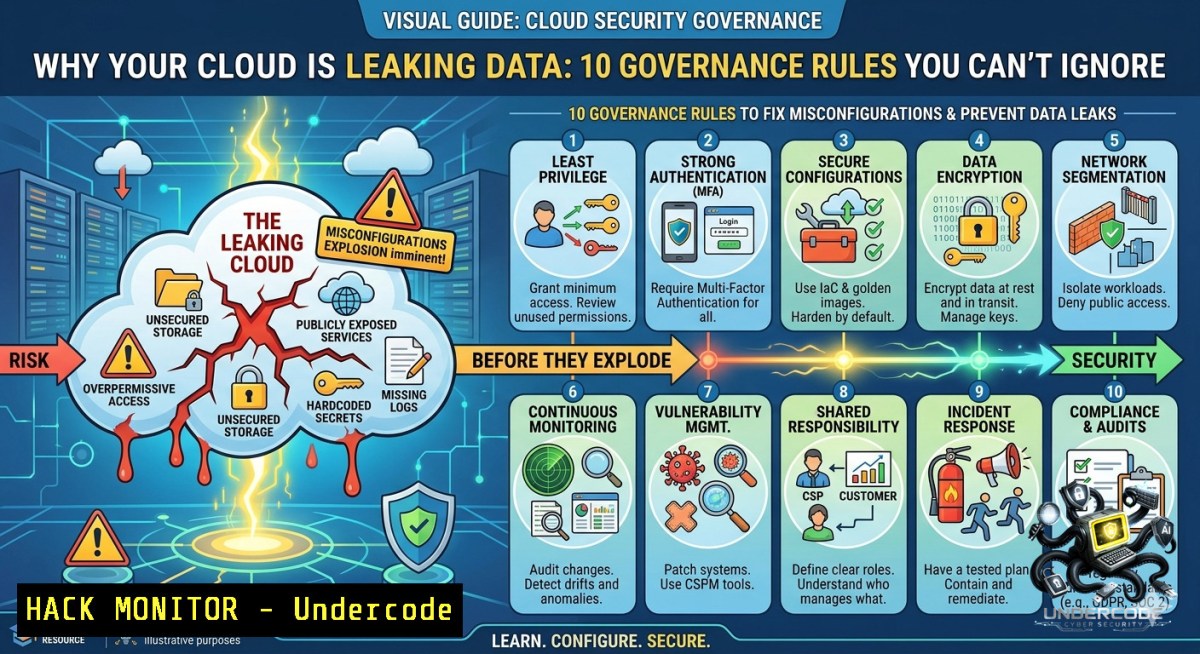
Introduction:
Cloud security failures rarely stem from the cloud provider’s infrastructure—they originate from human-driven misconfigurations, excessive permissions, and fragmented governance. Treating cloud security as a one-time checklist rather than continuous governance exposes organizations to data breaches, compliance violations, and account takeovers. This article transforms Okan YILDIZ’s governance insights into actionable steps, including CLI commands, policy templates, and hardening techniques for AWS, Azure, and GCP.
Learning Objectives:
- Implement least privilege access and enforce MFA across all cloud identities using native tools.
- Detect and remediate common misconfigurations (public buckets, open security groups, weak logging) with automated scripts.
- Build a continuous cloud governance framework covering encryption, network segmentation, incident response, and exit planning.
You Should Know:
1. Mapping Cloud Assets & Ownership Blind Spots
Before securing anything, you must answer: “What are we running, and who owns it?” Unclear ownership leads to orphaned resources, forgotten storage, and zombie IAM roles.
Step‑by‑step guide (AWS example):
- Inventory all resources using AWS Config or Azure Resource Graph.
- Tag every resource with
Owner,Environment,DataClassification, andBackupSchedule. - Identify untagged resources with a weekly automated report.
Commands:
- AWS CLI (Linux/macOS/Windows):
aws resourcegroupstaggingapi get-resources --tags-per-page 100 --query 'ResourceTagMappingList[?contains(Tags[?Key==Owner].Value,null)]' --output table - Azure CLI:
`az resource list –tag “Owner=null” –query “[].{Name:name, Type:type}”`
- PowerShell (Windows):
`Get-AzResource | Where-Object {$_.Tags.Owner -eq $null}`
Pro tip: Automate untagged resource alerts via CloudWatch or Azure Monitor.
2. Enforcing Least Privilege & Removing Excessive Permissions
Excessive IAM permissions are the 1 cloud attack vector. Attackers who compromise a single over‑privileged user can pivot to data stores, serverless functions, or even delete backups.
Step‑by‑step IAM hardening:
- Enable IAM Access Analyzer (AWS) or Entra ID Access Reviews (Azure) to identify unused permissions.
- Apply “deny by default” – remove wildcard actions (“) and replace with specific service permissions.
- Implement just‑in-time (JIT) elevation using a privileged access management (PAM) tool.
Linux / Windows verification commands:
- AWS CLI (check for admin policies):
`aws iam list-attached-user-policies –user-1ame –query ‘AttachedPolicies[?PolicyName==`AdministratorAccess`]’`
- Azure CLI (list role assignments):
`az role assignment list –assignee–query “[?roleDefinitionName==’Contributor’ || roleDefinitionName==’Owner’]”`
– gcloud (GCP overly broad roles):
`gcloud projects get-iam-policy –flatten=”bindings[].members” –filter=”bindings.role:roles/owner”`
Remediation: Replace `AdministratorAccess` with managed policies like `ReadOnlyAccess` + specific service actions.
- Locking Down Public Exposure (S3 Buckets, Blobs, & SQL Instances)
Publicly exposed storage accounts are the most common cloud breach cause (e.g., Capital One, Uber). Even “private” buckets can become public via misconfigured ACLs or anonymous IAM principals.
Step‑by‑step to detect and block public exposure:
- Enable Block Public Access at the account/organization level (AWS S3, Azure Storage, GCP Cloud Storage).
- Run an automated scanner daily to list all public resources.
- For existing public buckets: change permissions immediately and enable encryption.
Commands:
- AWS S3 (list public buckets):
aws s3api list-buckets --query "Buckets[?Name!=null]" | while read bucket; do aws s3api get-bucket-acl --bucket $bucket --query 'Grants[?Grantee.URI==http://acs.amazonaws.com/groups/global/AllUsers`]’; done` - Azure PowerShell (public containers):
Get-AzStorageContainer | Where-Object {$_.PublicAccess -1e "Off"} - Windows (using Azure CLI):
az storage container list --account-1ame <ACCOUNT> --query "[?publicAccess!='off']"
Mitigation: Immediately apply `–block-public-acls` and `–ignore-public-acls` flags.
4. Centralized Logging & Real‑Time Monitoring
Weak or missing logs delay breach detection by weeks. You need centralized logs (CloudTrail+CloudWatch, Azure Monitor, GCP Operations) and alerts for anomalous API calls.
Step‑by‑step logging setup:
- Enable all data plane and management plane logs across every cloud service.
- Send logs to a centralized SIEM (Splunk, Sentinel, or native log aggregation).
- Create alerts for: failed logins, policy changes, bucket deletions, and privilege escalations.
Linux (send CloudTrail to CloudWatch with AWS CLI):
`aws cloudtrail put-event-selectors –trail-1ame –advanced-event-selectors file://selectors.json`
(Example selector includes `readWriteType: All`)
Windows (PowerShell for Azure diagnostic settings):
`Set-AzDiagnosticSetting -ResourceId
GCP (enable audit logs via gcloud):
`gcloud services enable logging.googleapis.com`
`gcloud projects add-iam-policy-binding –member=user:[email protected] –role=roles/logging.viewer`
Alert rule example (AWS):
`aws events put-rule –1ame “IAMPolicyChange” –event-pattern ‘{“source”:[“aws.iam”],”detail-type”:[“AWS API Call via CloudTrail”],”detail”:{“eventName”:[“AttachUserPolicy”,”AttachRolePolicy”]}}’`
5. Encryption at Rest & In Transit (Don’t Trust Defaults)
Many cloud providers default to encryption, but misconfigurations or customer‑managed key (CMK) mishandling can nullify protection. Always enforce HTTPS and require TLS 1.2+.
Step‑by‑step encryption hardening:
- Enable default encryption on all storage buckets (AES‑256 or CMK).
2. Rotate CMKs every 90 days using automation.
- Force HTTPS only via bucket policies or Azure custom domain rules.
Commands:
- AWS S3 (apply default encryption):
`aws s3api put-bucket-encryption –bucket –server-side-encryption-configuration ‘{“Rules”:[{“ApplyServerSideEncryptionByDefault”:{“SSEAlgorithm”:”AES256″}}]}’`
- Azure (require secure transfer):
`az storage account update –1ame–resource-group –https-only true`
– Windows PowerShell (check TLS settings on Azure storage):
`(Get-AzStorageAccount -1ame -ResourceGroupName ).EnableHttpsTrafficOnly`
Verification for Linux (test TLS using openssl):
`openssl s_client -connect mybucket.s3.amazonaws.com:443 -tls1_2`
6. Infrastructure as Code (IaC) Security Reviews
IaC (Terraform, CloudFormation, ARM) introduces risks like hardcoded secrets or overly permissive security groups. Pre‑deployment scanning prevents drift and misconfigurations.
Step‑by‑step IaC hardening:
- Run static analysis with
checkov,tfsec, or `cfn-1ag` on every commit. - Implement policy‑as‑code using Open Policy Agent (OPA) or AWS Service Control Policies (SCPs).
- Never store secrets in variable files – use cloud secrets manager.
Commands (Linux/macOS):
- Install checkov: `pip install checkov`
– Scan Terraform directory: `checkov -d ./terraform`
– Scan CloudFormation template: `cfn_nag_scan –input-template template.yaml`
Windows (using PowerShell + Docker for tfsec):
`docker run –rm -v ${PWD}:/src aquasec/tfsec /src`
Example SCP (AWS) to deny public S3 access:
{
"Version": "2012-10-17",
"Statement": [{
"Effect": "Deny",
"Action": "s3:PutBucketPublicAccessBlock",
"Resource": "",
"Condition": {"Bool": {"aws:PrincipalIsAWSService": "false"}}
}]
}
7. Cloud Exit Planning & Vendor Risk Management
Cloud exit planning ensures you can migrate data and workloads without vendor lock‑in – a critical governance requirement for compliance (e.g., DORA, ISO 27001).
Step‑by‑step exit readiness:
1. Maintain encrypted, portable backups (no proprietary formats).
2. Document all API dependencies and alternative providers.
- Test a quarterly “exit dry run” – restore a workload to a different cloud or on‑prem.
Commands for portable backups:
- AWS S3 sync to local (Linux):
`aws s3 sync s3://my-bucket ./backup –sse –delete`
- Azure Blob download with AzCopy (Windows):
`azcopy copy “https://account.blob.core.windows.net/container/” “C:\backup” –recursive`
– GCS to AWS (using gsutil and aws cli):
`gsutil -m rsync -r gs://my-bucket s3://my-bucket`
Vendor risk assessment checklist:
- Subprocessor list and data residency – required for GDPR.
- Right‑to‑audit clause and penetration testing frequency.
- Breach notification SLA (≤72 hours).
What Undercode Say:
- Key Takeaway 1: Cloud risk is not about the provider’s “shared responsibility” line – it’s about your governance gaps. Misconfigurations and excessive permissions will always outnumber zero‑days.
- Key Takeaway 2: Continuous governance beats any one‑time audit. Every new API key, bucket, or user must trigger automated checks (IaC scanning + real‑time monitoring + weekly access reviews).
Analysis (10 lines):
The post emphasizes that cloud security failures are self‑inflicted wounds, not provider flaws. Okan YILDIZ correctly highlights that checklists create a false sense of security – attackers love static controls. Modern cloud environments change hourly; therefore, governance must be dynamic and code‑driven. The most overlooked aspect is cloud exit planning: most companies cannot leave their cloud within 30 days because they’ve built on proprietary services without portable backups. Also, vendor risk management is often an afterthought – yet third‑party SaaS tools (like Slack or GitHub integrated with cloud IAM) are common backdoors. The technical commands provided above (e.g., public bucket detection, IAM analyzer, IaC scanning) are not optional – they should run in your CI/CD pipeline. Finally, “least privilege” is not a policy document; it’s a daily discipline enforced by automated denial. Without that, you’re hoping, not protecting.
Prediction:
- -1 Cloud governance will become a mandatory regulatory requirement (similar to SOC2 Type II) within 18 months, triggered by rising breach costs. Organizations that rely on manual reviews will face existential fines and insurance denials.
- +1 AI‑driven cloud security posture management (CSPM) will automate 80% of misconfiguration detection and remediation by 2026, reducing human error from 90% of incidents to under 30%.
- -1 The shift to “continuous governance” will increase cloud operating costs by 15–20% due to mandatory logging, SIEM ingestion, and IaC scanning – but the cost of a breach remains 10x higher.
- +1 Open standards for cloud exit (e.g., OpenTofu, cloud‑agnostic backup formats) will mature, lowering vendor lock‑in risks and making multi‑cloud disaster recovery affordable for mid‑market firms.
▶️ Related Video (74% Match):
🎯Let’s Practice For Free:
🎓 Live Courses & Certifications:
Join Undercode Academy for Verified Certifications
🚀 Request a Custom Project:
Secure, high-velocity infrastructure and disruptive technological engineering. Contact our engineering team for high-tier development and proprietary systems:
[email protected]
💎 Smart Architecture | 🛡️ Secure by Design | ⭐ Trusted by Thousands
IT/Security Reporter URL:
Reported By: Yildizokan Cloudsecurity – Hackers Feeds
Extra Hub: Undercode MoN
Basic Verification: Pass ✅


