Listen to this Post
Introduction:
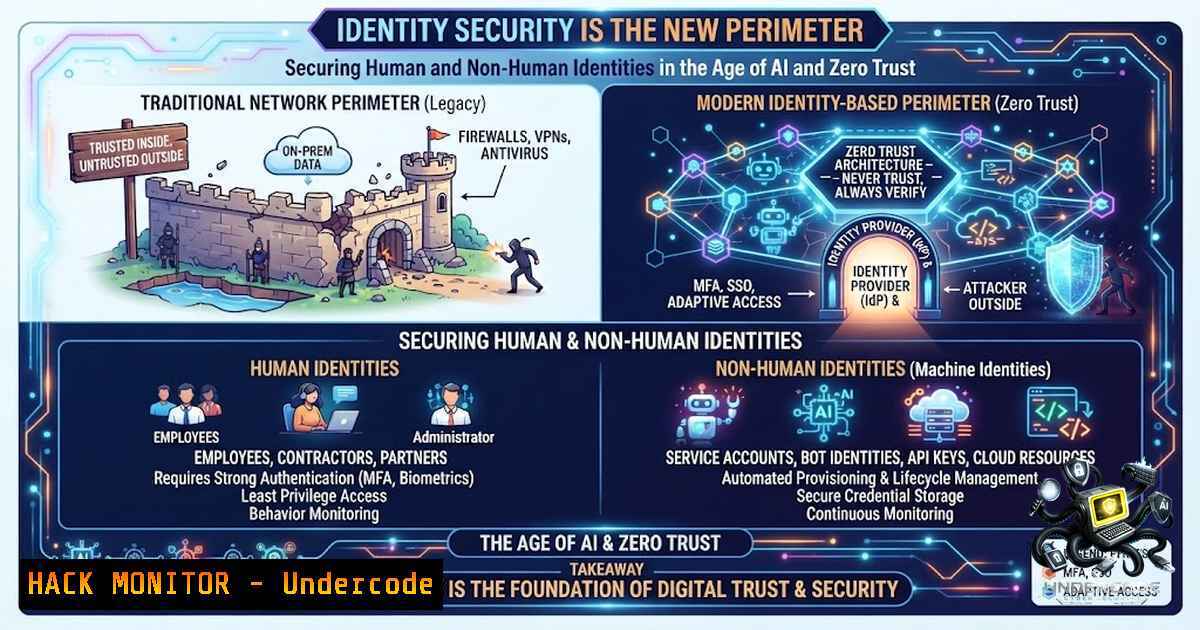
For years, the security industry operated under the assumption that the network perimeter was the primary defense line. However, the explosion of cloud applications, APIs, and now autonomous AI agents has rendered that model obsolete. The modern attack surface is defined not by firewalls, but by identities—both human and machine. As organizations accelerate their digital transformation, Identity and Access Management (IAM) is no longer just a supporting function; it has become the very foundation of cybersecurity. This shift demands a fundamental re-architecture of security strategies, focusing on least privilege, Zero Trust principles, and robust governance for the burgeoning number of non-human identities (NHIs).
Learning Objectives:
- Understand why identity has become the new security perimeter and the critical role of IAM in a Zero Trust architecture.
- Learn how to implement and enforce least privilege access controls using command-line tools across Linux, Windows, and cloud environments.
- Master practical techniques for managing and securing Non-Human Identities (NHIs), including service accounts, API keys, and AI agents.
- Acquire hands-on skills for automating identity governance, access reviews, and configuration management using SailPoint, Okta, and Microsoft Entra ID.
- Building an Identity-First Security Posture with Zero Trust
The core tenet of Zero Trust is “never trust, always verify.” This paradigm shifts the focus from network-based security to identity-based security. In this model, every access request—whether from a human user, a service account, or an AI agent—is continuously authenticated, authorized, and validated based on context and risk. CISA emphasizes that “Zero Trust cannot be achieved without strong identity management and mature ICAM capabilities”.
How to Implement Identity-First Zero Trust Controls:
- Enforce Multi-Factor Authentication (MFA) for All Users: This is the first and most critical step. For cloud and on-premises applications, solutions like Okta provide robust MFA capabilities. Administrators can configure and manage MFA factors using Okta’s Factors API.
– Okta API Example (Conceptual): To enforce MFA, you would configure a policy using the Okta Admin API. While a direct `curl` command is complex, a policy-as-code approach is recommended.
2. Implement Conditional Access Policies: Restrict access based on user, location, device health, and risk level. In Microsoft Entra ID, you can manage these via the Azure portal, CLI, or PowerShell.
3. Adopt Just-in-Time (JIT) Access: Grant elevated permissions only when needed and for a limited time. This minimizes the risk of standing privileges.
4. Continuous Monitoring and Auditing: Use SIEM and identity analytics tools to detect anomalous behavior. For example, to audit sudoers on Linux, use getent group sudo. On Windows, audit privileged groups using PowerShell: Get-ADGroupMember "Domain Admins".
- Mastering Least Privilege: The Principle of Minimum Access
The Principle of Least Privilege (PoLP) dictates that every user, process, and system component should operate with the minimum permissions required to perform its function. Implementing PoLP is a multi-environment challenge that requires automation to scale effectively.
Step-by-Step Guide: Auditing and Implementing Least Privilege
1. Audit Existing Permissions (Linux):
- List all users with sudo privileges:
getent group sudo | cut -d: -f4. - Find files with world-writable permissions:
find / -perm -o+w -type f 2>/dev/null. - List all user crontabs:
for user in $(getent passwd | cut -d: -f1); do crontab -u $user -l; done.
2. Audit Existing Permissions (Windows):
- List members of high-privilege groups:
Get-ADGroupMember "Domain Admins" | Select-Object Name
Get-ADGroupMember "Enterprise Admins" | Select-Object Name
- Find all admin users on a local machine:
Get-LocalGroupMember Administrators.
3. Enforce Least Privilege via Automation:
- Use tools like Ansible to enforce desired states. A playbook can ensure that only specific users are in the `sudo` or `docker` groups.
- On Windows, implement Privileged Access Workstations (PAWs) and use Just Enough Administration (JEA) to restrict what commands users can run.
3. Securing Non-Human Identities (NHIs): The Next Frontier
The rise of APIs, microservices, and AI agents has led to an explosion of Non-Human Identities (NHIs). These include service accounts, API keys, OAuth tokens, and the identities of AI agents. Unmanaged NHIs represent a massive and often overlooked attack surface. A developer hardcoding an API key into source code is a classic and dangerous pitfall.
How to Secure NHIs:
- Establish a Single Source of Truth: Maintain a comprehensive inventory of all NHIs across your hybrid and multi-cloud infrastructure.
- Eliminate “Forever” Credentials: Implement short-lived credentials and automated credential rotation.
- Automate Lifecycle Management: Ensure NHIs are automatically de-provisioned when the application or service they belong to is decommissioned.
- Treat NHIs as Critical Infrastructure: Apply the same governance and monitoring rigor to NHIs as you do to human accounts.
-
The Age of Agentic AI: A New Identity Class
Agentic AI—autonomous AI agents that perform tasks and make decisions—introduces a new and complex identity challenge: the Autonomous Non-Human Identity (A-1HI). These agents act on their own, interact across systems, and require a new approach to IAM. Traditional, human-centric IAM models are not equipped to handle the dynamic and unpredictable nature of AI agents.
Step-by-Step Guide: Governing Agentic AI Identities
- Assign Unique, Verifiable Identities: Each AI agent must have a cryptographically bound identity, eliminating the use of shared keys or service accounts.
- Implement AI-to-AI Credential Brokering: Use a secure broker to manage credentials between AI agents and the systems they access.
- Enforce Granular, Context-Aware Access Control: Define narrow jobs and permissions for each agent, ensuring it can only access the data and tools necessary for its specific function.
- Log with Cryptographic Integrity: Log all AI agent actions to ensure a non-repudiable audit trail for forensic analysis.
5. Automating Identity Governance with SailPoint and PowerShell
SailPoint Identity Security Cloud (ISC) is a leading platform for automating identity governance. By leveraging its APIs and PowerShell SDK, organizations can scale their IAM processes, automate access reviews, and ensure compliance.
Essential SailPoint ISC Administration Commands:
1. Installing the SailPoint CLI:
- Windows: `winget install sailpoint.cli` (or download the binary).
- Linux/macOS: Use a package manager or download the prebuilt binary.
2. Export Environment Variables (Linux/macOS):
export SAILPOINT_TENANT="your-tenant"
export SAILPOINT_CLIENT_ID="your-client-id"
export SAILPOINT_CLIENT_SECRET="your-client-secret"
3. Basic SailPoint CLI Commands:
- List identities: `sailpoint identities list`
– Get a specific identity: `sailpoint identities get –id`
– Search for identities:sailpoint search --query "displayName:john". - List access profiles: `sailpoint access-profiles list`
- PowerShell SDK for ISC: The PowerShell SDK allows for complex automation. For example, to get a list of all identities:
Connect-SailPoint -Tenant "your-tenant" -ClientId "your-client-id" -ClientSecret "your-client-secret"
Get-SailPointIdentity
This SDK provides a checklist of objects that need to be reassigned before an identity can be deleted.
-
Mastering Cloud Identity with Microsoft Entra ID (Azure AD)
Microsoft Entra ID is the cornerstone of identity management in the Azure ecosystem. Managing Entra ID effectively requires proficiency with both the Azure CLI and the Entra PowerShell module.
Essential Entra ID Administration Commands:
1. Azure CLI:
- Login to Azure: `az login`
– List all tenants:az account tenant list. - Create a new user: `az ad user create –display-1ame “John Doe” –password “P@ssw0rd!” –user-principal-1ame “[email protected]”`
– Assign a role to a user: `az role assignment create –assignee “user-id” –role “Reader” –scope “/subscriptions/…”`
– List Conditional Access Policies: `az rest –method get –url “https://graph.microsoft.com/v1.0/identity/conditionalAccess/policies”`
2. Entra PowerShell Module:
- Connect to Entra ID:
Connect-Entra -Scopes 'User.ReadWrite.All', 'Group.ReadWrite.All'. - Get a tenant by domain:
Resolve-EntraTenant -Domain "yourdomain.com". - List all users: `Get-EntraUser -All $true`
– Create a new group: `New-EntraGroup -DisplayName “Security Group” -MailEnabled:$false -SecurityEnabled:$true -MailNickname “SecGroup”`
What Balakrishna D. Say:
- Identity is the Foundation of Security: The core message is that identity management is not just a support function but the bedrock of a modern security posture, especially as organizations adopt AI and cloud technologies at a rapid pace.
- Non-Human Identity Management (NHIM) is Critical: The explosion of applications, automation, and AI agents means the number of non-human identities is growing just as fast as human ones, demanding equal governance and security attention.
Balakrishna’s analysis highlights a pivotal shift in cybersecurity. The traditional perimeter is gone, and identity is the new control plane. His emphasis on NHIM is particularly timely; many organizations have a massive, unmanaged inventory of service accounts and API keys that are prime targets for attackers. The principles of Least Privilege and Zero Trust, which have been foundational for human access, are now being applied to machines and AI agents. This requires a new level of automation and integration across IAM, cloud security, and AI security tools. The future of IAM lies in treating every identity—human or machine—with the same rigorous scrutiny, ensuring that the right identity has the right access at the right time, for the right reason.
Prediction:
- +1 The integration of AI into IAM will lead to a new generation of “self-healing” identity systems that can automatically detect and remediate permission sprawl and policy violations in real-time.
- -1 The rapid adoption of Agentic AI will outpace the development of robust identity governance frameworks, leading to a wave of high-profile data breaches involving compromised AI agents.
- +1 Non-Human Identity Management will emerge as a distinct and highly specialized cybersecurity discipline, creating significant demand for professionals skilled in securing machine-to-machine communication.
- -1 Organizations that fail to automate their access review processes will struggle to maintain compliance and will be increasingly vulnerable to insider threats and privilege escalation attacks.
- +1 The convergence of IAM, cloud security, and API security will lead to more unified platforms that provide a single pane of glass for managing all identities across the enterprise.
- -1 The complexity of managing identities across hybrid and multi-cloud environments will continue to be a major source of security misconfigurations and operational overhead for the next 3-5 years.
▶️ Related Video (68% Match):
🎯Let’s Practice For Free:
🎓 Live Courses & Certifications:
Join Undercode Academy for Verified Certifications
🚀 Request a Custom Project:
Secure, high-velocity infrastructure and disruptive technological engineering. Contact our engineering team for high-tier development and proprietary systems:
[email protected]
💎 Smart Architecture | 🛡️ Secure by Design | ⭐ Trusted by Thousands
IT/Security Reporter URL:
Reported By: Balakrishna D143 – Hackers Feeds
Extra Hub: Undercode MoN
Basic Verification: Pass ✅


