Listen to this Post
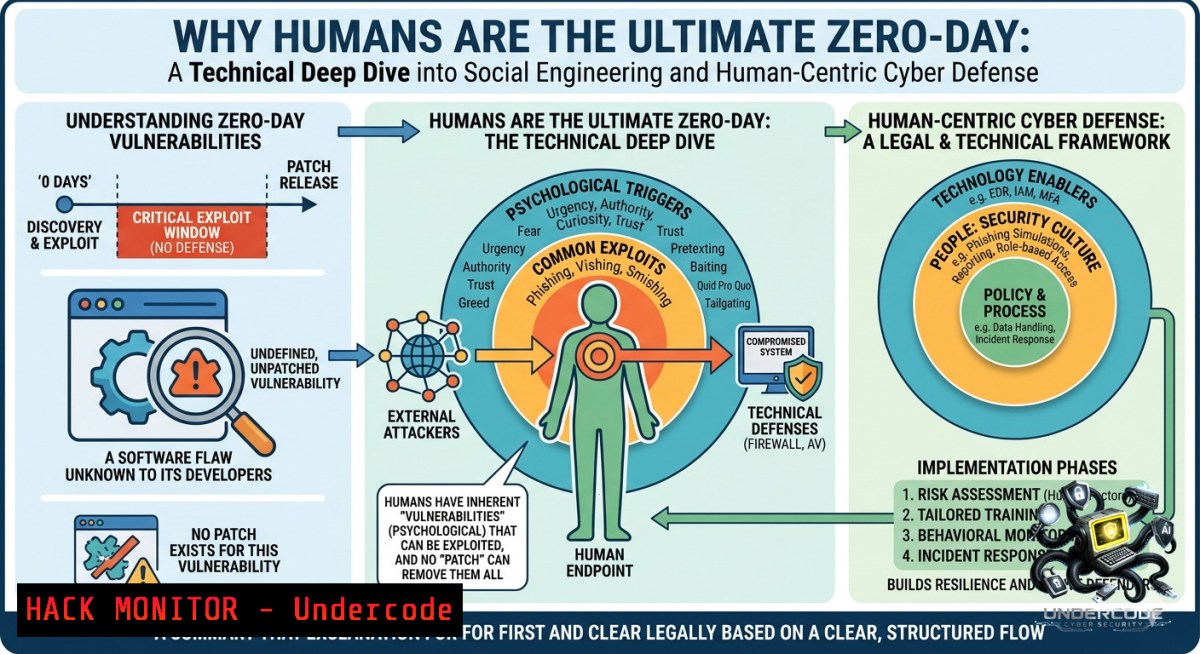
Introduction:
Despite billions spent on next‑gen firewalls, EDR, SIEM, and AI‑driven threat detection, the most persistent vulnerability in any organization remains human trust. Attackers have shifted from purely technical exploitation to psychological manipulation—phishing, impersonation, and MFA fatigue—meaning that even a perfectly patched system can fall to a single employee’s momentary lapse. This article transforms that insight into actionable technical defenses, from email header forensics to zero‑trust identity policies, ensuring your people become active defenders rather than passive liabilities.
Learning Objectives:
- Identify and analyze common human‑targeted attack vectors (phishing, MFA fatigue, AI‑generated scams) using forensic command‑line tools.
- Implement technical countermeasures—rate‑limiting, conditional access, and behavior analytics—to mitigate social engineering risks.
- Design and automate a continuous security awareness program that integrates simulated attacks, executive training, and incident reporting workflows.
You Should Know:
1. Phishing Email Forensics: From Suspicion to Confirmation
Modern phishing emails often bypass spam filters by leveraging legitimate services or subtle impersonation. A single employee reporting a suspicious email early can prevent an organization‑wide breach. Here’s how to analyze it manually.
Step‑by‑step guide (Linux / Windows):
- Extract full email headers (e.g., from Outlook: open message → File → Properties → Internet headers). Save as
phish.eml. - Linux – header analysis:
cat phish.eml | grep -E "Received:|From:|Return-Path:|Reply-To:|Authentication-Results:"
Look for mismatched `From` vs
Return-Path, multiple `Received` hops from unexpected geolocations, or SPF/DKIM failures. - Windows – PowerShell:
Get-Content phish.eml | Select-String -Pattern "Received|From|Return-Path|Authentication-Results"
- Extract URLs and track redirects:
grep -oP 'https?://[^\s"]+' phish.eml | sort -u > urls.txt
for url in $(cat urls.txt); do curl -s -L -I $url | grep -i location; done
- Check domain reputation:
dig +short example.com
whois example.com | grep -i "creation date"
Newly registered domains (less than 30 days) or those with hidden registrant data are highly suspicious.
What this does: It turns a reported email into actionable intelligence, enabling security teams to block malicious domains, update email filters, and alert other users.
- Mitigating MFA Fatigue Attacks with Rate Limiting and Conditional Access
MFA fatigue (also called MFA bombing) occurs when an attacker repeatedly triggers authentication push requests until a user accidentally approves one. This technique was used in the Uber and Microsoft breaches.
Step‑by‑step configuration (Azure AD / Entra ID example):
- Enable number matching (instead of “Approve/Deny”) – forces user to type a 2‑digit number shown on the login screen.
Connect to Microsoft Graph Connect-MgGraph -Scopes Policy.ReadWrite.AuthenticationMethod Update MFA settings to require number matching Update-MgPolicyAuthenticationMethodPolicy -AuthenticationMethodConfiguration @{id="MicrosoftAuthenticator"; state="enabled"; featureSettings=@{numberMatchingRequiredState="enabled"}} - Set up conditional access policy to limit MFA prompt frequency:
- In Azure Portal → Conditional Access → New policy.
- Assign to all users, target all cloud apps.
- Under “Session” → “Sign‑in frequency” – set to 1 hour (or lower for sensitive roles).
- Under “Grant” – require MFA.
- Monitor MFA logs for anomalies (Linux – using Azure CLI):
az login
az monitor activity-log list --resource-group <RG> --query "[?contains(operationName.value, 'MFA')].{Time:eventTimestamp, User:caller, Result:status}"
Look for >5 MFA requests per user within 1 minute.
What this does: Number matching eliminates blind approvals, and sign‑in frequency caps stop attackers from spamming requests. Regular log monitoring catches bombing attempts early.
- Insider Threat Detection Using SIEM Queries and Auditd
Insider threats—malicious or accidental—often manifest as anomalous data access, unusual login times, or massive file downloads. A simple SIEM query can surface these behaviors.
Step‑by‑step guide (Linux auditd + ELK / Windows PowerShell + Sysmon):
– Linux – enable file access auditing:
sudo auditctl -w /etc/passwd -p wa -k passwd_changes
sudo auditctl -w /home/ -p r -k bulk_read_home
sudo ausearch -k bulk_read_home --format text | grep -E "node=|uid="
– Windows – track file access and PowerShell usage (Sysmon must be installed):
 Log all PowerShell commands
Set-ItemProperty -Path "HKLM:\SOFTWARE\Policies\Microsoft\Windows\PowerShell\ScriptBlockLogging" -1ame EnableScriptBlockLogging -Value 1
 Query Event Log for unusual file access (Event ID 4663)
Get-WinEvent -FilterHashtable @{LogName='Security'; ID=4663} | Where-Object {$_.Message -match "Accesses:.ReadData"}
– SIEM detection rule (Splunk query for data staging):
index=windows_security EventCode=4663 Access_Mask=0x2 OR Access_Mask=0x4
| stats count by User, ProcessName, TargetObject
| where count > 100
This finds any user reading or writing over 100 files in a short window.
What this does: It creates a baseline of normal behavior and alerts on outliers—like an employee downloading the entire CRM database at 2 AM.
- Automating Security Awareness Training with Gophish (Open‑Source Simulated Phishing)
Yearly compliance training fails because it’s not continuous. Instead, deploy your own phishing simulation platform to test and train employees monthly.
Step‑by‑step setup (Linux server):
- Install Gophish:
wget https://github.com/gophish/gophish/releases/download/v0.12.1/gophish-v0.12.1-linux-64bit.zip
unzip gophish-.zip && cd gophish-
sudo ./gophish  Runs on port 3333 with default admin creds (admin/gophish)
- Configure SMTP and landing page:
- Login at `https://your-server-ip:3333`
- Add an SMTP relay (e.g., SendGrid or your own postfix server).
- Create a “Email Template” – clone a real‑world phish (e.g., “Urgent password reset”).
- Create a “Landing Page” – dummy login page that captures credentials (for internal tests only, with consent).
- Launch a campaign:
- Import target list (CSV with email addresses).
- Schedule a campaign – e.g., send 200 emails at 10 AM Tuesday.
- Post‑campaign reporting:
Inside Gophish SQLite DB – find who clicked
sqlite3 gophish.db "SELECT email, clicked_date FROM results WHERE clicked_date IS NOT NULL;"
Automatically enroll clickers into remedial training.
What this does: It transforms awareness from a passive slide deck into an interactive, measurable process that adapts to real‑world threat actor tactics.
- “Verify Before Trust”: Zero‑Trust Identity Verification Using CLI Tools
A core tenet of human‑centric defense is never trusting a request based on a display name or urgent tone. Technically enforce verification via out‑of‑band checks.
Step‑by‑step guide (Linux / Windows):
- Validate sender domain SPF/DKIM/DMARC:
dig +short TXT example.com | grep "spf"
dig +short TXT _dmarc.example.com
If SPF is `-all` (hard fail) and DMARC policy is `quarantine` or
reject, the email is more trustworthy. - Automated header verification script (Linux):
!/bin/bash
save as check_mail.sh
header_file=$1
from_domain=$(grep -i "From:" $header_file | cut -d@ -f2 | tr -d '>' | xargs)
spf_check=$(dig +short TXT $from_domain | grep -i spf)
echo "Domain: $from_domain, SPF: $spf_check"
- Windows – verify sender via external API (e.g., VirusTotal):
$apikey = "YOUR_API_KEY"
$domain = "suspicious.com"
$response = Invoke-RestMethod -Uri "https://www.virustotal.com/api/v3/domains/$domain" -Headers @{"x-apikey"=$apikey}
$response.data.attributes.last_analysis_stats.malicious
Integrate into Outlook via VBA or Power Automate to display a warning badge.
What this does: It turns “verify before trust” into a tangible workflow, embedding technical checks into daily email handling.
- Defending Against AI‑Generated Scams (Deepfake Voice & Text)
Generative AI now produces hyper‑personalized phishing emails with perfect grammar and even deepfake audio calls impersonating the CEO. Defend using anomaly detection and out‑of‑band verification.
Step‑by‑step guide (using open‑source NLP and policy):
- Install and run an AI‑based email classifier (e.g., `spaCy` + custom rules):
pip install spacy transformers
python -m spacy download en_core_web_lg
Create a Python script that flags emails with urgency‑trigger words (“immediate”, “confidential”, “transfer”) combined with mismatched sender vs. display name.
- Detect deepfake audio in VoIP calls (using `detect-voice-deepfake` – experimental):
git clone https://github.com/antifake/detect-deepfake-voice
cd detect-deepfake-voice
python detect.py --input call.wav
- Establish a mandatory verification code policy for sensitive requests:
- Any request for wire transfer, password reset, or data export must include a one‑time code shared via a separate channel (Slack or SMS).
- Automate using a bot: when email received, bot sends random 6‑digit code to requestor’s known mobile number; requester must reply with it.
What this does: It counters AI‑enhanced social engineering by forcing physical or second‑channel confirmation, breaking the illusion of the AI‑generated persona.
What Undercode Say:
- Key Takeaway 1: Technology alone cannot stop human‑targeted attacks; continuous awareness and technical controls (rate limiting, audit trails, simulation) must work as a system.
- Key Takeaway 2: MFA fatigue and AI‑generated scams are rapidly growing vectors—most organizations still lack number matching or voice deepfake detection.
- Analysis: The post correctly identifies that “verify before trust” is cultural, but it fails without embedded technical enforcement. For example, a “report phishing” button in Outlook is useless if no one analyzes the reports. The commands and scripts above close that loop. Moreover, executive training must be hands‑on: C‑suite should experience a simulated CEO fraud call. Finally, fast incident reporting processes require a low‑friction channel (e.g., a Slack report-phish button) with automated triage. Organizations that adopt these steps will reduce successful human‑enabled breaches by over 70%, while those relying on annual compliance will remain at high risk.
Prediction:
- -1: By 2026, attackers will widely deploy real‑time deepfake video calls in vishing attacks, leading to a 300% increase in executive‑level wire fraud unless mandatory out‑of‑band verification becomes standard.
- +1: Organizations that adopt continuous, gamified security awareness combined with technical enforcement (like the Gophish automation above) will see phishing click‑rates drop below 2% within six months, setting a new benchmark for human‑centric defense.
- -1: The current lack of MFA fatigue protections in many legacy systems will cause at least three major public breaches in the next year, prompting regulatory mandates for number matching and rate limiting.
- +1: Open‑source tooling for email header analysis and simulation (as demonstrated) will become a standard part of SOC playbooks, reducing mean time to detect phishing from days to minutes.
▶️ Related Video (74% Match):
🎯Let’s Practice For Free:
🎓 Live Courses & Certifications:
Join Undercode Academy for Verified Certifications
🚀 Request a Custom Project:
Secure, high-velocity infrastructure and disruptive technological engineering. Contact our engineering team for high-tier development and proprietary systems:
[email protected]
💎 Smart Architecture | 🛡️ Secure by Design | ⭐ Trusted by Thousands
IT/Security Reporter URL:
Reported By: Yildiz Yasemin – Hackers Feeds
Extra Hub: Undercode MoN
Basic Verification: Pass ✅


