Listen to this Post
Introduction:
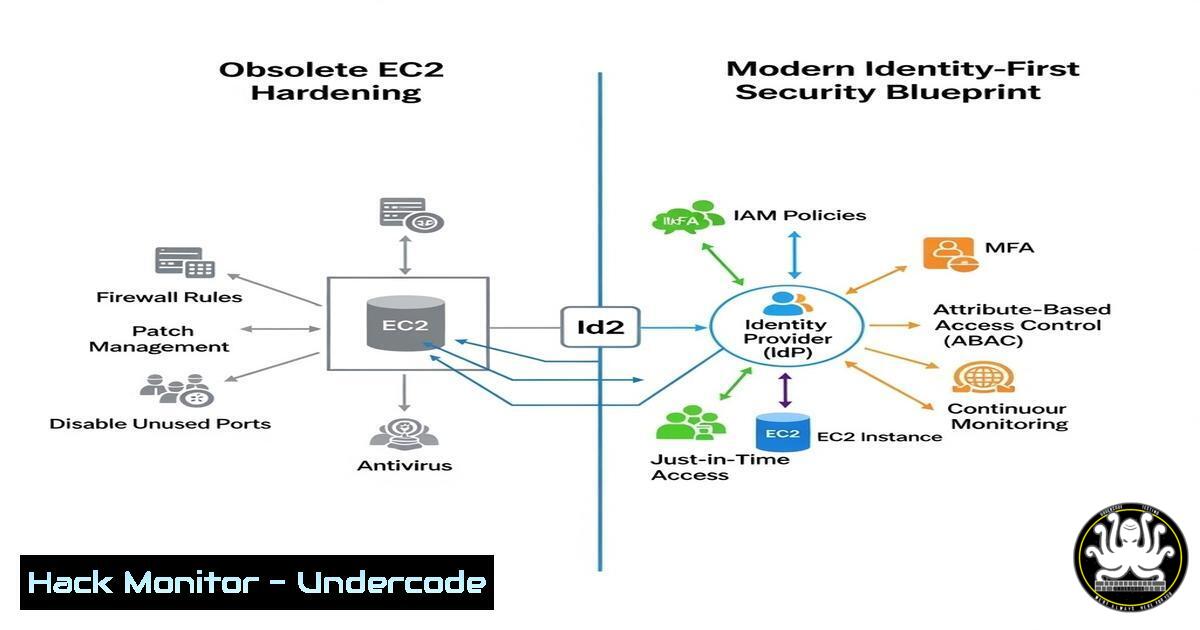
For years, securing Amazon EC2 meant locking down SSH, patching kernels, and obsessing over Security Group rules. That model assumes the server is the trust boundary. Modern cloud breaches prove otherwise—attackers don’t break encryption; they steal keys. The shift from network‑centric to identity‑centric security architecture is the single most important evolution in cloud defense. This article dissects Devendra Prasad Manam’s security architecture framework and provides the exact Linux, Windows, and AWS CLI commands to implement a zero‑trust EC2 environment.
Learning Objectives:
- Objective 1: Eliminate long‑term credentials on EC2 and enforce IAM‑roles with session logging.
- Objective 2: Architect private‑subnet deployments that prevent lateral movement and public exposure.
- Objective 3: Automate continuous compliance, encryption governance, and immutable recovery.
You Should Know:
- Kill SSH: Enforce AWS Systems Manager (SSM) with Full Audit Logging
Extended from the post: “Use SSM Session Manager with session logging instead of SSH.”
This removes inbound ports, bastion hosts, and the risk of leaked private keys.
Step‑by‑step guide (AWS CLI + Linux verification):
 1. Attach IAM role with AmazonSSMManagedInstanceCore policy
aws ec2 associate-iam-instance-profile \
--instance-id i-1234567890abcdef0 \
--iam-instance-profile Name=SSM-Instance-Profile

<ol>
<li>Verify SSM agent is running on Linux instance
sudo systemctl status amazon-ssm-agent</p></li>
<li><p>On Windows EC2 (PowerShell)
Get-Service AmazonSSMAgent</p></li>
<li><p>Start a session without SSH
aws ssm start-session --target i-1234567890abcdef0</p></li>
<li><p>Enable session logging to S3/CloudWatch
aws ssm update-document \
--name "SSM-SessionManagerRunShell" \
--document-version "\$LATEST" \
--content file://session-manager-logging.json
Example `session-manager-logging.json` snippet (enable CloudWatch):
"inputs": {
"cloudWatchLogGroupName": "/ec2/session-logs",
"cloudWatchEncryptionEnabled": true
}
Architectural win: No inbound SSH rules, no bastion, no key pairs.
- Private‑Only Subnets and VPC Endpoints – Starve the Attack Surface
Extended: “Place EC2 in private subnets by default… Use VPC Endpoints to avoid internet egress.”
Data exfiltration often happens via public S3 endpoints or unauthenticated APIs.
Step‑by‑step guide (AWS CLI verification + Linux egress test):
 1. Check if instance has public IP (should be false)
aws ec2 describe-instances --instance-ids i-1234567890abcdef0 \
--query 'Reservations[bash].Instances[bash].PublicIpAddress'

<ol>
<li>Create VPC Gateway Endpoint for S3 (private routing)
aws ec2 create-vpc-endpoint \
--vpc-id vpc-0abcd1234 \
--service-name com.amazonaws.us-east-1.s3 \
--route-table-ids rtb-0abcd5678</p></li>
<li><p>On Linux EC2 – confirm no internet egress (should timeout)
curl -I https://aws.amazon.com --connect-timeout 5
ping -c 3 8.8.8.8</p></li>
<li><p>On Windows – test network isolation
Test-Connection 8.8.8.8 -Count 2
Pro tip: Remove routes to Internet Gateway (IGW) from private subnet route tables.
3. Enforce EBS Encryption with Customer‑Managed Keys (CMKs)
Extended: “Enforce EBS encryption using KMS with CMKs.”
Default AWS‑managed keys work, but CMKs allow you to revoke, audit, and enforce key usage boundaries.
Step‑by‑step guide (AWS CLI + Linux encryption verification):
 1. Enable automatic EBS encryption by default (per region)
aws ec2 enable-ebs-encryption-by-default --region us-east-1

<ol>
<li>Create KMS key with alias
aws kms create-key --description "CMK for EC2 volumes"
aws kms create-alias --alias-name alias/ebs-cmk --target-key-id <key-id></p></li>
<li><p>Launch instance with explicit CMK encryption
aws ec2 run-instances \
--image-id ami-0abcdef1234567890 \
--instance-type t3.micro \
--block-device-mappings "[{\"DeviceName\":\"/dev/sda1\",\"Ebs\":{\"Encrypted\":true,\"KmsKeyId\":\"alias/ebs-cmk\"}}]"</p></li>
<li><p>On Linux – verify dm-crypt status (EBS encryption is transparent, but confirm at OS)
lsblk
sudo dmsetup table
Compliance win: AWS Config rule `encrypted-volumes` becomes automatically compliant.
4. Continuous Vulnerability Intelligence with Inspector + GuardDuty
Extended: “Enable Amazon Inspector for continuous CVE assessment… Use GuardDuty for behavioral anomaly detection.”
Security posture must be measurable in near real‑time, not just during annual pen tests.
Step‑by‑step guide (AWS CLI activation + Linux/Windows remediation):
 1. Enable Amazon Inspector v2
aws inspector2 enable --resource-types EC2 --account-ids <account-id>

<ol>
<li>Enable GuardDuty
aws guardduty create-detector --enable</p></li>
<li><p>Linux – manually check for critical CVE (example: log4j)
sudo yum update --security -y  Amazon Linux
dpkg -l | grep log4j  Debian/Ubuntu</p></li>
<li><p>Windows – check for missing patches (PowerShell)
Get-HotFix | Sort-InstalledOn
Alerting architecture: Aggregate findings in AWS Security Hub and forward to Slack/PagerDuty.
- Immutable EC2: From Snowflake Servers to Golden AMIs
Extended: “Use Auto Scaling Groups for immutable infrastructure… Deploy hardened, version‑controlled AMIs.”
Patching a running server should be a red flag; replacing it with a hardened image is the blue‑team standard.
Step‑by‑step guide (EC2 Image Builder + CI/CD):
 1. Create an Image Builder pipeline with CIS benchmarks
aws imagebuilder create-image-pipeline \
--name "hardened-amazon-linux-2" \
--image-recipe-arn arn:aws:imagebuilder:us-east-1:123456789012:image-recipe/hardened-linux-recipe/1.0.0 \
--infrastructure-configuration-arn arn:aws:imagebuilder:us-east-1:123456789012:infrastructure-configuration/ec2-ssm-infra

<ol>
<li>Build the AMI automatically
aws imagebuilder start-image-pipeline-execution --image-pipeline-arn <pipeline-arn></p></li>
<li><p>Launch instance from golden AMI via Auto Scaling Group
aws autoscaling create-launch-configuration \
--launch-configuration-name gold-ami-lc \
--image-id ami-0goldenhardened123 \
--instance-type t3.micro \
--associate-public-ip-address false</p></li>
<li><p>Old instance termination – no manual SSH patching ever
Linux hardening inside AMI (example `hardening.sh`):
!/bin/bash
yum update -y
yum install -y aide
aide --init
mv /var/lib/aide/aide.db.gz /var/lib/aide/aide.db.gz
echo "0 3    /usr/sbin/aide --check" >> /etc/crontab
6. Secrets Rotation: Never Hardcode, Never Stale
Extended: “Store secrets in Secrets Manager with rotation enabled.”
If a secret exists in code or userdata, assume it is already compromised.
Step‑by‑step guide (AWS CLI + Lambda rotation):
 1. Store database password
aws secretsmanager create-secret \
--name prod/rds/master \
--secret-string '{"username":"admin","password":"TempPass123!"}'

<ol>
<li>Force immediate rotation (requires Lambda rotation function)
aws secretsmanager rotate-secret \
--secret-id prod/rds/master \
--rotation-lambda-arn arn:aws:lambda:us-east-1:123456789012:function:SecretsManagerRDSMySQLRotation</p></li>
<li><p>Retrieve secret at runtime without storing
SECRET_STRING=$(aws secretsmanager get-secret-value --secret-id prod/rds/master --query SecretString --output text)
Windows/Linux application usage: Read secret via AWS SDK at boot, never write to disk.
What Undercode Say:
- Key Takeaway 1: The network perimeter is dead. Identity is the new firewall. If you still manage SSH keys and bastion hosts, you are maintaining technical debt, not security.
- Key Takeaway 2: Immutability defeats persistence. Attackers love long‑running servers. Auto‑scaling, golden AMIs, and CI/CD pipelines for infrastructure are not DevOps luxuries—they are security controls.
- Analysis: The framework presented collapses the traditional “patch and pray” model. Every layer—identity, network, data, operations—is codified and enforced by the control plane, not by fragile human compliance checks. The shift to declarative security (AWS Config, Service Control Policies) means misconfigurations become drift, not breaches. Organizations that master this architecture can sustain a breach without it becoming a catastrophe.
Prediction:
Within three years, SSH and RDP will be banned entirely for production EC2 workloads in regulated industries. Cloud providers will release “no‑public‑IP”‑by‑default enforcement at the organizational level. The next evolution will be AI‑driven policy generation: Security Hub findings will automatically generate IAM policies and Security Group rules via generative AI, closing the loop from detection to remediation without human intervention. Security architecture will shift from “what do we block?” to “what do we intentionally allow?”
▶️ Related Video (90% Match):
🎯Let’s Practice For Free:
IT/Security Reporter URL:
Reported By: Devendraprasadmanam %F0%9D%97%97%F0%9D%97%B2%F0%9D%98%80%F0%9D%97%B6%F0%9D%97%B4%F0%9D%97%BB%F0%9D%97%B6%F0%9D%97%BB%F0%9D%97%B4 – Hackers Feeds
Extra Hub: Undercode MoN
Basic Verification: Pass ✅


