Listen to this Post
Introduction:
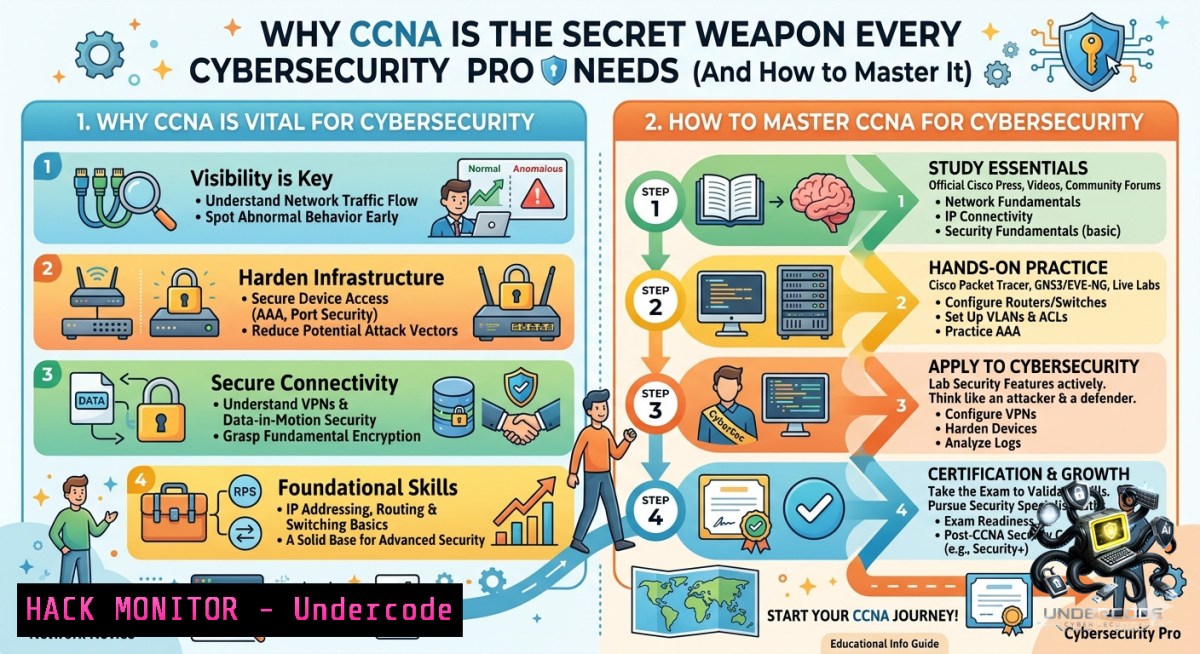
Before you can block an attack, you have to understand how packets think. Networking fundamentals—from subnetting to routing protocols—are the invisible backbone of every firewall rule, SIEM alert, and zero-trust policy. Without this foundation, security tools become black boxes, and misconfigurations create the very vulnerabilities you’re trying to close.
Learning Objectives:
- Apply subnetting and VLAN segmentation to contain lateral movement in a compromised network.
- Configure ACLs and NAT rules that enforce least privilege while troubleshooting common traffic blocks.
- Map network logs (ARP, DHCP, routing tables) to real attack patterns and incident response workflows.
You Should Know:
- Subnetting & IP Addressing – The Blueprint of Network Segmentation
Subnetting isn’t just about saving IP addresses; it’s your primary tool for isolation in a zero-trust architecture. Understanding CIDR, network addresses, and broadcast domains allows you to design security zones (DMZ, internal, management) and quickly identify anomalous traffic crossing boundaries.
Step‑by‑step guide to calculate a subnet and apply it in Linux/Windows:
- Given: `192.168.1.0/24` – create a `/28` subnet (16 addresses, 14 usable).
2. Find subnet mask: `/28` = `255.255.255.240`.
- First subnet: network
192.168.1.0, usable192.168.1.1 – 192.168.1.14, broadcast192.168.1.15. - Linux – verify and add a static route for that subnet:
ip route add 192.168.1.0/28 via 192.168.1.1 dev eth0
ip route show | grep 192.168.1.0/28
- Windows – configure a static IP within the subnet:
netsh interface ip set address "Ethernet0" static 192.168.1.10 255.255.255.240 192.168.1.1
ipconfig /all
-
ARP, DHCP, DNS & NAT – Core Services Every SOC Analyst Must Troubleshoot
These protocols are the most common sources of “mysterious” network issues and are frequently exploited in man‑in‑the‑middle attacks (ARP spoofing, rogue DHCP, DNS poisoning). Knowing how to inspect them is a non‑negotiable SOC skill.
Step‑by‑step guide to inspect and harden each service:
- ARP – view and clear the cache (Linux/Windows):
Linux
arp -1
sudo ip neigh flush all
Windows
arp -a
netsh interface ip delete arpcache
Security tip: Static ARP entries prevent spoofing but are hard to scale. Use Dynamic ARP Inspection on managed switches.
2. DHCP – identify rogue servers:
 Linux – listen for DHCP offers
sudo tcpdump -i eth0 -1 port 67 or port 68
 Windows – show DHCP leases
ipconfig /all | findstr "DHCP"
Mitigation: Enable DHCP snooping on Cisco switches (ip dhcp snooping).
3. DNS – test resolution and detect poisoning:
dig google.com @8.8.8.8
nslookup google.com 192.168.1.1
Hardening: Use DNSSEC and restrict recursive queries to authorized subnets.
- NAT – verify translation tables (check for source/destination NAT misconfigurations):
Linux (netfilter)
sudo conntrack -L | grep -i nat
Cisco command: `show ip nat translations`
- Switching, VLANs & Trunking – Containing Lateral Movement
VLANs are the foundation of network segmentation in data centers and campus networks. A misconfigured trunk can leak traffic between security zones, and Spanning Tree Protocol (STP) failures can create broadcast storms that mimic DoS attacks.
Step‑by‑step guide to configure a secure VLAN trunk (Cisco IOS):
1. Create two VLANs:
vlan 10
name USERS
vlan 20
name SERVERS
2. Assign access ports:
interface GigabitEthernet0/1
switchport mode access
switchport access vlan 10
3. Configure a trunk between switches with allowed VLANs only (avoid default “allow all”):
interface GigabitEthernet0/24
switchport mode trunk
switchport trunk allowed vlan 10,20
switchport trunk native vlan 999  unused VLAN to prevent VLAN hopping
4. Enable STP PortFast only on access ports (never on trunks):
interface GigabitEthernet0/1
spanning-tree portfast
5. Verify configuration:
show vlan brief
show interfaces trunk
show spanning-tree
- Routing Fundamentals & Dynamic Protocols (OSPF, BGP) – How Path Decisions Become Security Policies
Routing determines which paths an attacker can take. A static route pointing to a compromised next‑hop, an OSPF route injection, or BGP hijacking can redirect traffic through a malicious device. Understanding administrative distance (AD) and metrics is crucial for anomaly detection.
Step‑by‑step guide to inspect routing tables and detect route anomalies (Linux/Windows/Cisco):
1. View the routing table:
 Linux
ip route show
route -1
 Windows
route print
 Cisco IOS
show ip route
- Check OSPF neighbors and LSDB for unexpected routes:
Cisco
show ip ospf neighbor
show ip ospf database
-
Add a floating static route (backup with higher AD):
Linux: AD is metric
sudo ip route add 10.0.0.0/8 via 192.168.2.1 metric 100
Cisco: AD 250 for backup
ip route 10.0.0.0 255.0.0.0 192.168.2.1 250
-
Detect BGP path manipulation (using `tcpdump` or netflow):
sudo tcpdump -i eth0 -1 'tcp port 179' BGP port
-
ACLs (Access Control Lists) – Traffic Filtering as a Security Enforcer
ACLs are the most direct way to block malicious IPs, restrict management access, and enforce policy between VLANs. However, ordering and implicit deny rules are frequently misunderstood, leading to either over‑permission or silent drops that break applications.
Step‑by‑step guide to write, apply, and troubleshoot an extended ACL (Cisco IOS):
- Create an ACL that allows SSH only from management subnet and denies everything else:
access-list 101 permit tcp 192.168.100.0 0.0.0.255 any eq 22
access-list 101 deny ip any any log
- Apply it inbound on a VLAN interface (VLAN 10):
interface Vlan10
ip access-group 101 in
3. Test connectivity and view hits:
show access-list 101
show ip interface Vlan10 | include access
4. Linux equivalent using `iptables`:
sudo iptables -A INPUT -p tcp --dport 22 -s 192.168.100.0/24 -j ACCEPT
sudo iptables -A INPUT -j LOG --log-prefix "Dropped by ACL: "
sudo iptables -A INPUT -j DROP
sudo iptables -L -v -1
5. Windows Defender Firewall (PowerShell):
New-1etFirewallRule -DisplayName "Allow SSH from Mgmt" -Direction Inbound -Protocol TCP -LocalPort 22 -RemoteAddress 192.168.100.0/24 -Action Allow
Get-1etFirewallRule -DisplayName "Allow SSH from Mgmt" | Get-1etFirewallPortFilter
- Device Hardening & Secure Management (IPv6, WLAN, VPN)
Modern networks are multi-protocol (IPv6 often forgotten and misconfigured), wireless (rogue APs, weak encryption), and remote-access VPNs (tunneling risks). Hardening every device—from switches to routers—is the last line before an attacker pivots.
Step‑by‑step checklist for router/switch hardening (Cisco):
1. Disable unused services:
no ip http-server
no ip http-secure-server
no service finger
no service tcp-small-servers
2. Control plane policing (CoPP): protect CPU from excess traffic:
control-plane host
service-policy input COPP_POLICY
3. Enable SSH v2 and disable Telnet:
ip domain-1ame lab.local
crypto key generate rsa modulus 2048
transport input ssh
line vty 0 4
transport input ssh
4. IPv6 security – block unwanted RA messages and enforce source guard:
 Linux – disable IPv6 if not needed
sysctl -w net.ipv6.conf.all.disable_ipv6=1
Cisco: `ipv6 nd raguard` on access ports.
- Check WLAN security settings (ensure WPA3 or at least WPA2‑AES, no TKIP):
– Use a wireless analyzer like `airodump-1g` (Kali) to audit nearby SSIDs for weak encryption.
What Undercode Say:
- Key Takeaway 1: CCNA is not “basic networking”; it’s the shared language between network engineers, SOC analysts, and cloud architects. Every firewall rule, SD‑WAN policy, and Kubernetes CNI plugin ultimately relies on the same OSI layers, routing decisions, and ACL logic taught in CCNA.
- Key Takeaway 2: The most dangerous vulnerabilities aren’t zero‑days—they are misunderstood VLAN trunks, forgotten static routes, and ACLs with mismatched ordering. Hands‑on practice with subnet calculation, packet tracing, and command‑line verification turns abstract theory into real incident response muscle.
Analysis (10 lines):
The post correctly argues that memorizing commands without understanding traffic flow leads to fragile security architectures. In my experience, junior defenders who skip networking spend hours chasing false positives because they can’t distinguish a broadcast storm from a DoS attack or a misconfigured NAT from a data exfiltration tunnel. Conversely, engineers who master CCNA concepts can read a firewall log and immediately visualize the path a packet takes, the ACLs it hits, and the routing table that sent it there. This skill is especially critical in cloud environments (AWS VPC route tables, Azure NSGs, GCP firewall rules) that abstract away the physical layer but still obey the same IP and routing rules. Moreover, the rise of eBPF-based observability and zero‑trust micro‑segmentation requires precisely this “how packets think” mental model. The post’s emphasis on troubleshooting—not just configuration—is spot-on. Real breaches are stopped when someone notices an ARP cache mismatch or a BGP path anomaly, not when they recite command syntax. Ultimately, CCNA remains a top‑tier investment for any cybersecurity professional because networks are the battlefield, and you cannot defend territory you do not understand.
Expected Output:
Prediction:
+N The demand for professionals who can fuse CCNA fundamentals with security tooling will grow as zero‑trust segmentation (e.g., Illumio, VMware NSX) requires precise network math.
+N Cloud providers will further abstract routing, but the need for deep subnetting and NAT knowledge will actually increase in hybrid environments where on‑prem and cloud must interoperate securely.
-1 If educational paths continue to prioritize “cloud certifications” over CCNA, we will see a surge of misconfigured VPCs, open S3 buckets reachable via improper route tables, and insider lateral movement that simple firewalls cannot stop.
+N AI‑driven network detection systems (NDR) will still require human analysts who can validate alerts by manually checking routing tables, ACL counters, and VLAN trunks—a skill only CCNA-level training provides.
▶️ Related Video (78% Match):
🎯Let’s Practice For Free:
🎓 Live Courses & Certifications:
Join Undercode Academy for Verified Certifications
🚀 Request a Custom Project:
Secure, high-velocity infrastructure and disruptive technological engineering. Contact our engineering team for high-tier development and proprietary systems:
[email protected]
💎 Smart Architecture | 🛡️ Secure by Design | ⭐ Trusted by Thousands
IT/Security Reporter URL:
Reported By: Yildizokan Ccna – Hackers Feeds
Extra Hub: Undercode MoN
Basic Verification: Pass ✅


