Listen to this Post
Introduction:
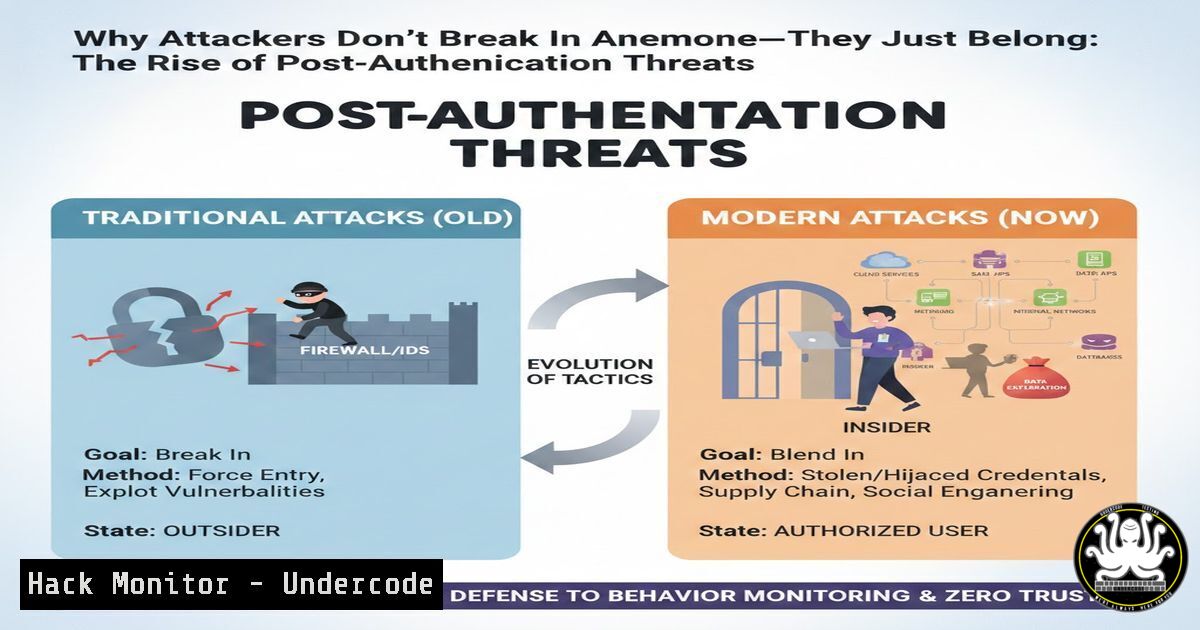
The modern cybersecurity landscape has shifted from defending perimeters to managing trust. Attackers are no longer focused on exploiting technical vulnerabilities to breach firewalls; instead, they are exploiting organizational trust mechanisms. By analyzing recent SaaS breaches, a clear pattern emerges: the adversary doesn’t need to defeat authentication; they need to survive after it. This article delves into the lifecycle of trust, exploring how attackers leverage legitimate access and why security teams must shift their focus from the checkpoint of login to the continuous validation of user behavior.
Learning Objectives:
- Understand the shift from perimeter-based security to post-authentication threat management.
- Learn to audit and harden identity and access management (IAM) policies against insider threat tactics.
- Identify and mitigate common misconfigurations in SaaS environments that allow attackers to blend in with normal activity.
You Should Know:
1. Auditing MFA Reset and Helpdesk Privileges
Attackers often target helpdesk personnel with social engineering to reset Multi-Factor Authentication (MFA) for a target account. If your organization’s helpdesk can bypass MFA without rigorous verification, you are vulnerable. We need to audit who can perform these resets and under what conditions.
Step‑by‑step guide (Windows/Active Directory & Azure AD):
1. Audit Helpdesk Group Membership:
Open PowerShell as an Administrator and run the following command to list members of privileged groups often used for helpdesk functions:
Get-ADGroupMember -Identity "Helpdesk" | Select-Object Name, SamAccountName
(Replace “Helpdesk” with your specific group name, e.g., “Service Desk Operators”).
- Review Azure AD Authentication Methods (MFA Reset Privileges):
In Azure AD, global admins and authentication admins can reset MFA. To audit recent MFA reset activity, use the Azure AD PowerShell module:Connect to Azure AD Connect-AzureAD Get audit logs for MFA resets (requires Azure AD Premium P1/P2) Get-AzureADAuditDirectoryLogs -Filter "Category eq 'Authentication' and ActivityDisplayName eq 'Reset user password'"
-
What this does: These commands reveal who holds the keys to the kingdom. If the helpdesk group contains unnecessary users, or if recent MFA resets lack a corresponding helpdesk ticket number, it indicates a procedural gap that attackers can exploit.
2. Analyzing OAuth Application Permissions
Attackers trick users into granting “legitimate-looking” OAuth apps permissions to read email, access files, or send mail. Once approved, the attacker has persistent access without needing a password. This section focuses on identifying overly permissive and suspicious OAuth grants.
Step‑by‑step guide (Microsoft 365 / Azure AD):
1. Review Enterprise Applications via Azure Portal:
Navigate to Azure Active Directory > Enterprise applications. Under “Application type,” select “All applications” and apply.
– Focus on applications with a high number of “Consent granted” entries.
– Look for apps created by “Anonymous” or with generic developer names.
2. Use PowerShell to Audit High-Risk Permissions:
The following script uses the `AzureAD` module to find OAuth apps with mail-read permissions, a common target for attackers.
Connect-AzureAD
 Get all OAuth2PermissionGrants (delegated permissions)
Get-AzureADOAuth2PermissionGrant | Where-Object {$<em>.Scope -like "Mail.Read"} | Format-List ClientId, Scope, PrincipalId
 Get all Service Principals (app permissions)
Get-AzureADServicePrincipal | Where-Object {$</em>.AppRoles -ne $null} | Select-Object DisplayName, AppRoles
What this does: It lists every application that can read user mailboxes. Investigate any unexpected entries. If an app has `Mail.Read` but its purpose is “Document Signing,” that is a clear red flag.
3. Identifying Privileged Users with Bulk Export Rights
Data exfiltration rarely involves complex code; it often uses the “Export to CSV” button in a SaaS app. Attackers compromise accounts that have permissions to export large datasets, such as CRM records, financial data, or source code repositories.
Step‑by‑step guide (Linux – General Principle & Git Context):
While SaaS controls are UI-driven, the principle of “who can export” is universal. In a DevOps context, protecting source code is critical.
1. Audit Git Repository Access (Linux/Git):
On a Git server, review the access control files to see who has read/pull access to sensitive repositories.
 For a simple Git server using filesystem ACLs
cat /path/to/repo/config
 Or, if using Gitolite, check the configuration:
cat ~/.gitolite/conf/gitolite.conf
 Look for lines like:
 repo @critical-project
 RW+ = admin-user
 R = developer-user  'R' means read/clone access
What this does: It shows exactly which users can clone (export) the entire source code. If an intern has read access to a core banking repository, your attack surface is larger than necessary.
2. Review SaaS Application Logs (Conceptual Command):
While you cannot run a Linux command on Salesforce, you can use `curl` to query their API for user permissions.
 Example: Using curl to query Salesforce for users with the "Export Reports" permission
curl https://yourInstance.salesforce.com/services/data/v58.0/query?q=SELECT+Name+FROM+PermissionSet+WHERE+Permissions_ExportReport+=+true -H "Authorization: Bearer YOUR_ACCESS_TOKEN"
This demonstrates the principle of programmatically auditing permissions that lead to bulk data export capabilities.
4. Monitoring Session Behaviour Post-Authentication
Once authenticated, most systems assume the user is benign. Attackers exploit this by performing actions that deviate from the user’s baseline, such as logging in from a new device, accessing unusual data, or creating forwarding rules.
Step‑by‑step guide (Windows Event Logs):
- Enable and Review Windows Security Logs for Unusual Logons:
Attackers often use stolen tokens or credentials to log in from atypical locations. We need to look for `Event ID 4624` (Logon) and correlate it with geographic location or unusual time.Search for successful logons (Event ID 4624) in the last 24 hours $StartTime = (Get-Date).AddHours(-24) Get-WinEvent -FilterHashtable @{LogName='Security'; ID=4624; StartTime=$StartTime} | Where-Object { $<em>.Properties[bash].Value -ne $null } | Select-Object TimeCreated, @{Name='User'; Expression={$</em>.Properties[bash].Value}}, @{Name='IP Address'; Expression={$_.Properties[bash].Value}} | Format-Table -AutoSizeWhat this does: This PowerShell cmdlet filters the Security log for recent logons and extracts the username and source IP. An IP from a country where the user has never been should trigger an investigation.
2. Check for Mail Forwarding Rules (Microsoft 365):
Attackers often set up inbox rules to forward sensitive emails to an external address. Use PowerShell to audit all users for forwarding rules.
Connect-ExchangeOnline
 Get all mailboxes and their forwarding rules
Get-Mailbox -ResultSize Unlimited | Get-InboxRule | Where-Object {$_.ForwardTo -ne $null} | Select-Object Name, ForwardTo
What this does: It lists every inbox rule that forwards email. An unexpected rule forwarding “Invoice” emails to a Gmail address is a classic sign of compromise.
5. Hardening Session and Token Lifecycles
Authentication tokens are the new keys. If they never expire or are cached insecurely, an attacker who gains access to a user’s machine can replay these tokens indefinitely.
Step‑by‑step guide (Linux – Token Security & Windows – Browser Credentials):
1. Inspect Stored Tokens on Linux (Example: AWS CLI):
If a developer’s machine is compromised, the attacker will look for cloud tokens.
 Check for hardcoded AWS credentials
cat ~/.aws/credentials
 Check for temporary session tokens
env | grep AWS
 Check for GitHub tokens
cat ~/.config/gh/hosts.yml
Mitigation: Short-lived tokens and rotating credentials rendered these static values useless.
2. Windows – Reviewing Browser Credential Storage:
On a Windows machine, browsers often store session cookies and tokens. An attacker uses tools like `SharpChrome` or simply navigates to chrome://settings/passwords. A defender should test their own environment:
– Open Chrome/Edge.
– Navigate to `chrome://settings/content/allCookies` and edge://settings/passwords.
– Check: Are there active sessions for corporate SaaS apps? Is the “Offer to save passwords” feature enabled? These features, while convenient, can be a post-exploitation goldmine for an attacker.
What Undercode Say:
- Trust Decay is a Feature, Not a Bug: The core vulnerability is not the absence of MFA, but the persistence of trust. Organizations must implement “just-in-time” and “just-enough-access” principles, ensuring that elevated privileges are ephemeral and require re-validation.
- Visibility is the New Perimeter: Since attackers operate with valid credentials, the focus must shift to behavior analytics. If you cannot detect the difference between a human user exporting 10 records and an automated script exporting 10,000, you are blind.
Prediction:
The next wave of SaaS breaches will not make headlines for technical sophistication, but for their quiet, business-destroying impact. We will see a rise in “identity denial-of-service” attacks, where attackers use valid credentials to trigger irreversible business processes, such as initiating fund transfers or altering supply chain orders. Security investments will pivot heavily from “prevention” to “real-time detection and automated response” within the application layer, forcing a convergence of IAM, SIEM, and SOAR into a single “Identity Threat Detection and Response” (ITDR) fabric.
▶️ Related Video (82% Match):
🎯Let’s Practice For Free:
IT/Security Reporter URL:
Reported By: Ola O – Hackers Feeds
Extra Hub: Undercode MoN
Basic Verification: Pass ✅


