Listen to this Post
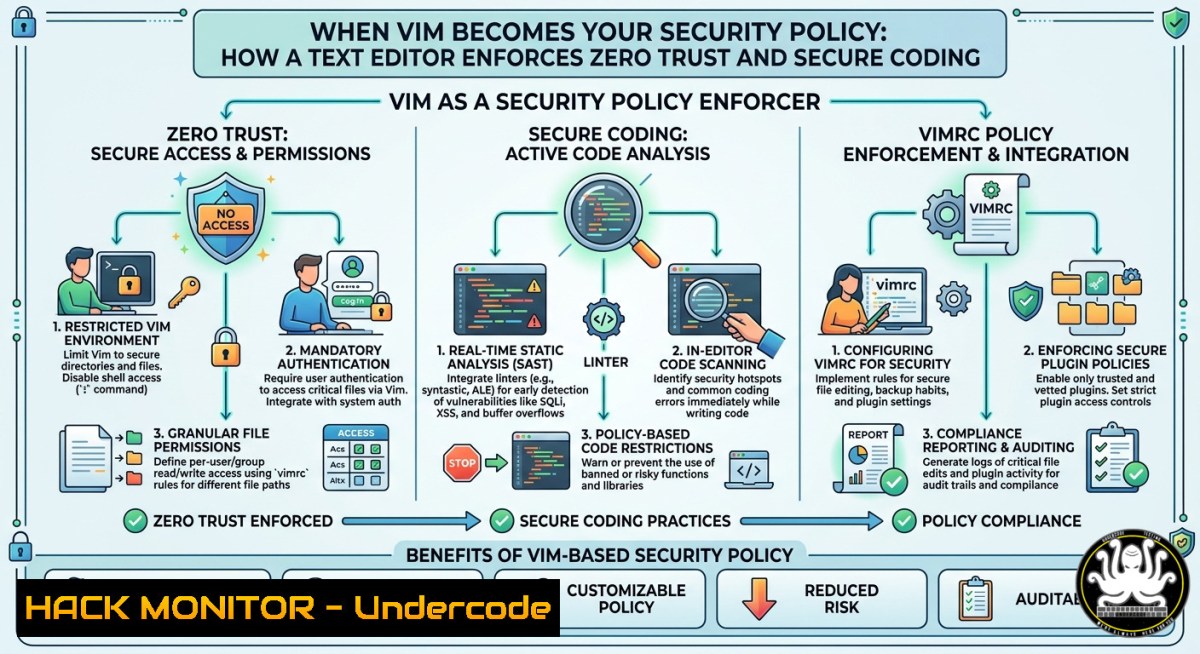
Introduction:
Most organizations treat security policy as a static PDF or a compliance checklist—rarely touched, seldom enforced. But what if your everyday code editor, Vim, became the active enforcement point for encryption, access controls, and secure configuration? By extending Vim with cryptographic plugins, automated linters, and policy-as-code scripts, you can transform a developer’s primary tool into a real‑time security gatekeeper.
Learning Objectives:
- Configure Vim to automatically encrypt/decrypt sensitive files using GPG and enforce read/write permissions.
- Implement custom Vim scripts that scan for dangerous patterns (hardcoded secrets, unsafe functions) and block edits.
- Use Vim as a policy‑as‑code validator for Kubernetes YAML, Terraform, and cloud IAM policies.
You Should Know
1. Auto‑Encrypting Secrets with Vim + GPG
Vim can transparently encrypt any file with `:set cryptmethod` or external GPG. This prevents secrets from resting in plaintext on disk.
Step‑by‑step guide – Linux (also works on Windows with GPG4Win):
1. Install GPG and vim‑gpg plugin:
sudo apt install gpg vim  Debian/Ubuntu
 Windows: download GPG4Win and add gpg.exe to PATH
mkdir -p ~/.vim/pack/plugins/start
git clone https://github.com/jamessan/vim-gpg ~/.vim/pack/plugins/start/vim-gpg
2. Create a `.env.gpg` file – Vim will prompt for a recipient key:
vim secret.env.gpg
 Inside: API_KEY=sk-abc123
 Save → Vim asks for GPG recipient ID
3. To encrypt existing files without plugin:
:set cryptmethod=blowfish2
:X " Prompts for password
:w
4. Enforce that all `.key` or `.pem` files must be encrypted by adding to ~/.vimrc:
au BufReadPre,BufNewFile .key,.pem setlocal noswapfile nobackup
au BufReadPre,BufNewFile .key,.pem command! -nargs=0 Encrypt :set cryptmethod=blowfish2 | :X
What this does: Every time a secret file is opened, Vim loads the GPG plugin, decrypts on‑the‑fly, and re‑encrypts on save. If GPG fails, the file remains unreadable.
2. Blocking Hardcoded Credentials in Real Time
Use Vim’s `autocmd` with a custom search script to prevent committing or saving files that contain secrets.
Step‑by‑step guide – cross‑platform (`.vimrc`):
1. Add a pattern list to `~/.vim/patterns/blocklist.txt`:
AKIA[0-9A-Z]{16}
sk-[a-zA-Z0-9]{48}
--BEGIN RSA PRIVATE KEY--
password\s=\s['"][^'"]+['"]
2. Insert this function into `.vimrc`:
function! CheckForSecrets()
let blocklist = readfile(expand("~/.vim/patterns/blocklist.txt"))
for pattern in blocklist
if search(pattern, 'nw') != 0
echohl ErrorMsg
echo "🚨 SECURITY POLICY: hardcoded secret detected! Save blocked."
echohl None
set nomodifiable
return 1
endif
endfor
return 0
endfunction
autocmd BufWritePre  if CheckForSecrets() | :undo | endif
3. To also block copy‑paste (mitigate exfiltration):
autocmd TextYankPost if CheckForSecrets() | call setreg(v:event.regname, '') | endif
Usage: When a developer tries to save `app.py` containing password = "admin123", Vim shows an error and reverts the file. No external linter required.
3. Policy‑as‑Code Validation for Kubernetes & Terraform
Vim can run kubeval, tfsec, or `checkov` on every save, turning the editor into a compliance enforcer.
Step‑by‑step guide – Linux/macOS (Windows WSL2 recommended):
1. Install tools:
 Linux
curl -s https://raw.githubusercontent.com/instrumenta/kubeval/master/install.sh | sudo bash
 tfsec
curl -s https://raw.githubusercontent.com/aquasecurity/tfsec/master/scripts/install_linux.sh | bash
2. Add to `.vimrc` to validate Kubernetes YAML:
autocmd BufWritePost .yaml,.yml if expand('%:e') == 'yaml' |
\ silent !kubeval --strict % |
\ if v:shell_error |
\ cfile % |
\ copen |
\ endif
3. For Terraform (`.tf`):
autocmd BufWritePost .tf :silent !tfsec --no-color --format=text % 2>&1 | tee /tmp/tfsec_out
autocmd BufWritePost .tf :cgetfile /tmp/tfsec_out | copen
4. Enforce cloud hardening – block public S3 buckets directly in Vim:
autocmd BufReadPost .tf if search('acl\s=\s"public-read"') | call setline(line('.'), ' BLOCKED BY POLICY: ' . getline('.')) | endif
What this does: Every time a YAML or TF file is saved, Vim runs external policy engines. Any violation opens the quickfix list, forcing the developer to fix before proceeding.
- Vim as a Log Analysis & Intrusion Detection Interface
Use Vim’s built‑in `:make` and pattern highlighting to spot attacks in real time.
Step‑by‑step guide – live log monitoring:
1. Create a `~/.vim/ftdetect/security_log.vim`:
au BufRead,BufNewFile /var/log/ setfiletype securitylog
2. Define highlighting for attack patterns in `~/.vim/syntax/securitylog.vim`:
syntax match AlertWord "FAILED password|Invalid user|SQL injection"
syntax match CriticalWord "root login|sudo.COMMAND"
highlight AlertWord ctermfg=red guifg=red
highlight CriticalWord ctermfg=darkred guifg=darkred term=bold
3. Add a one‑key analysis macro:
:nnoremap <F5> :%!grep -E "Failed|Invalid|401|403"<CR>
4. On Windows (PowerShell alternative):
:nnoremap <F5> :%!findstr /R "Failed Invalid 401 403"<CR>
Usage: Open `/var/log/auth.log` (Linux) or `C:\inetpub\logs\.log` (Windows, via WSL). Vim instantly colors failed login attempts. Press `F5` to filter only suspicious entries.
5. Hardening Vim Itself Against Exploitation
Attackers often target editor plugins. Lock down Vim’s own configuration.
Step‑by‑step guide – all OS:
1. Disable unsafe modelines (CVE‑2019‑20079):
set nomodeline
set modelines=0
2. Restrict write permissions to `~/.vimrc` and plugins:
 Linux
chmod 640 ~/.vimrc
chown root:youruser ~/.vimrc
 Windows (PowerShell as Admin)
icacls $HOME_vimrc /inheritance:r /grant:r "${env:USERNAME}:(R,W)"
3. Prevent shell commands from within Vim (disable `:!` for junior users):
cabbrev ! echo "Shell access blocked by security policy"
4. Use Vim’s `secure` option when reading files from untrusted sources:
:set secure
- API Security – Vim as a Manual Fuzzing Tool
Combine Vim’s macros with `curl` to test for injection or broken auth.
Step‑by‑step guide – Linux/macOS:
1. Create an API template file `api_fuzz_template.http`:
POST /login HTTP/1.1
Host: target.com
Content-Type: application/json
{"username":"FUZZ","password":"FUZZ"}
2. Record a macro to replace `FUZZ` with payloads:
qq " start recording
:%s/FUZZ/admin' OR '1'='1/g
:w !curl -X POST -H "Content-Type: application/json" -d @- http://target.com/login
q " stop recording
3. For Windows (using curl.exe): same macro but adjust path.
What this does: You manually test 50 payloads in minutes without Burp Suite. Vim becomes a lightweight API security scanner.
What Undercode Say:
- Key Takeaway 1: A text editor can be a powerful security enforcement boundary if you embed policy checks directly into the developer workflow.
- Key Takeaway 2: Using Vim’s autocommands and external tools (GPG, kubeval, tfsec) turns reactive compliance into proactive, real‑time guardrails.
Analysis: The idea of “Vim as security policy” flips the traditional model where security is external (CI/CD scans, separate linters). By integrating policy at the edit layer, you reduce the gap between coding and compliance. However, it requires disciplined `.vimrc` management and trust in the editor’s integrity. Attackers who compromise Vim itself (via malicious plugins) could bypass every check. Therefore, treat your `.vimrc` as a critical configuration file – sign it with GPG and monitor its hash. Additionally, this approach works best for small teams or security champions; for large orgs, combine it with pre‑commit hooks and server‑side policy engines. The biggest win: no additional tooling cost, and developers stay in their comfort zone while security becomes invisible friction, not a separate hurdle.
Prediction:
As supply chain attacks increasingly target developer environments, we will see “editor‑native security” become a standard feature in IDEs – not just Vim plugins. Microsoft has already added `Dev Tunnels` and secret scanning to VS Code. Within 18 months, expect enterprise‑distributed `.vimrc` policies that enforce memory‑safe language usage, zero‑trust file encryption, and automated CVE checking on every keystroke. The editor will no longer be passive; it will be the first line of defense, and Vim’s lightweight extensibility puts it ahead of heavier IDEs. Organizations that adopt this now will have a head start in hardening their software supply chain from the inside out.
▶️ Related Video (74% Match):
🎯Let’s Practice For Free:
IT/Security Reporter URL:
Reported By: %F0%9D%97%AA%F0%9D%97%B5%F0%9D%97%B2%F0%9D%97%BB %F0%9D%97%A9%F0%9D%97%B6%F0%9D%97%BA – Hackers Feeds
Extra Hub: Undercode MoN
Basic Verification: Pass ✅


