Listen to this Post
Introduction:
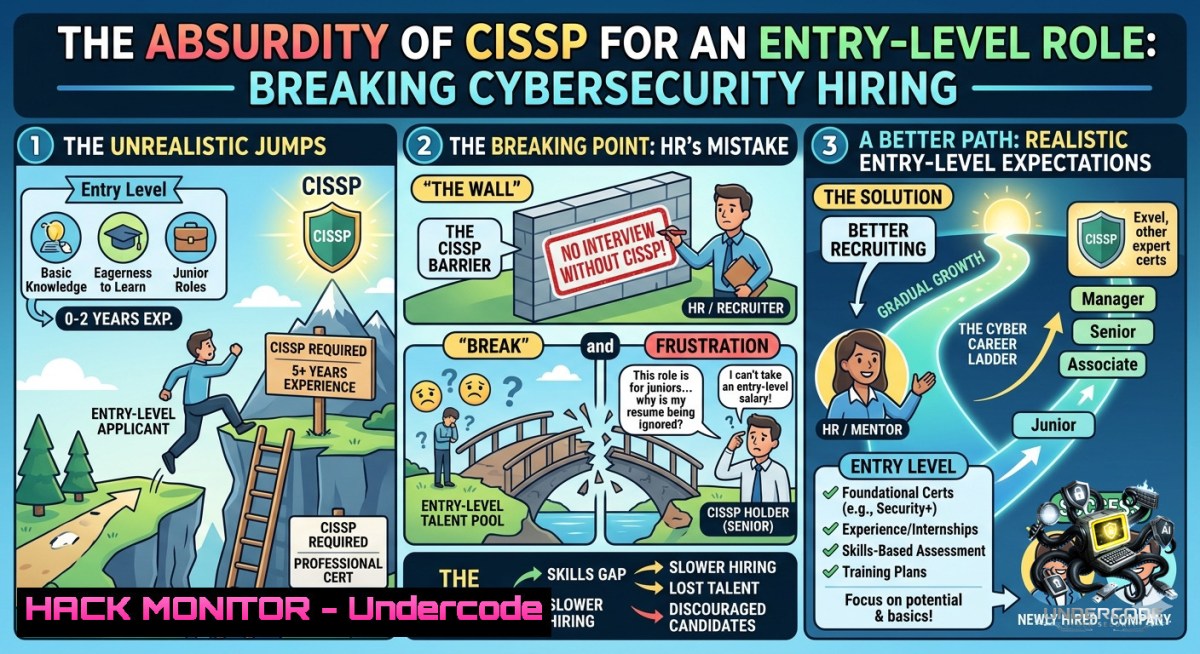
The cybersecurity industry faces a paradoxical crisis: organizations desperately need fresh talent, yet HR departments routinely list the Certified Information Systems Security Professional (CISSP)—a credential requiring five years of paid, relevant experience—as a “requirement” for junior or entry-level positions. This disconnect not only chokes the talent pipeline but also reveals a deep misunderstanding of what foundational security work actually entails, creating a gatekeeping culture that prioritizes paper credentials over practical aptitude.
Learning Objectives:
– Identify the mismatch between inflated certification requirements and the real-world skills needed for entry-level cybersecurity roles.
– Acquire hands-on technical competencies (Linux, Windows, cloud, and network security) that demonstrate value beyond certification hype.
– Build a portable portfolio of home-lab exercises and command-line proficiency to bypass credential gatekeeping in job applications.
You Should Know:
1. Linux Security Essentials That Actually Matter for Junior Analysts
While HR chases CISSP, real entry-level work begins with the command line. Below are core Linux commands and configurations that appear daily in Security Operations Center (SOC) tasks—no five-year experience required.
What this does: These commands help you inspect network connections, monitor system logs, and detect basic anomalies on a Linux endpoint.
Step‑by‑step guide:
1. Check active network connections and listening ports:
sudo netstat -tulpn | grep LISTEN
(Replace `netstat` with `ss -tulpn` on modern distributions)
2. List open files and associated processes (useful for finding malware persistence):
lsof -i -P -1 | grep LISTEN
3. Monitor authentication logs in real time for failed SSH attempts:
sudo tail -f /var/log/auth.log | grep "Failed password"
4. Set up a basic host-based firewall with iptables (allow only SSH and HTTP):
sudo iptables -A INPUT -p tcp --dport 22 -j ACCEPT
sudo iptables -A INPUT -p tcp --dport 80 -j ACCEPT
sudo iptables -A INPUT -j DROP
sudo iptables-save > /etc/iptables/rules.v4
5. Enable auditd to track changes to critical files (e.g., /etc/passwd):
sudo auditctl -w /etc/passwd -p wa -k passwd_changes
sudo ausearch -k passwd_changes
Why this replaces the CISSP myth: Demonstrating proficiency with these commands in a technical interview or a GitHub-lab repo carries more weight than a certificate you cannot yet earn.
2. Windows Hardening Without the Alphabet-Soup Credentials
Windows endpoints dominate enterprise environments. Entry-level analysts must know how to harden them using built-in tools—no CISSP needed.
What this does: Implements core Windows security controls (logging, AppLocker, and PowerShell restrictions) that map directly to SOC monitoring tasks.
Step‑by‑step guide (run PowerShell as Administrator):
1. Enable advanced audit logging for process creation and PowerShell:
auditpol /set /subcategory:"Process Creation" /success:enable /failure:enable
auditpol /set /subcategory:"PowerShell" /success:enable /failure:enable
2. Turn on PowerShell script block logging (critical for detecting malware):
Set-ItemProperty -Path "HKLM:\SOFTWARE\Policies\Microsoft\Windows\PowerShell\ScriptBlockLogging" -1ame "EnableScriptBlockLogging" -Value 1
3. Configure Windows Defender to submit samples automatically:
Set-MpPreference -SubmitSamplesConsent AlwaysPrompt
Set-MpPreference -MAPSReporting Advanced
4. Create a basic AppLocker rule to block executables from Temp folders:
New-AppLockerPolicy -RuleType Exe -User Everyone -Path "%USERPROFILE%\AppData\Local\Temp\" -Action Deny
5. Retrieve security event logs for failed logins (Event ID 4625):
Get-WinEvent -FilterHashtable @{LogName='Security'; ID=4625} | Select-Object TimeCreated, Message
Real-world application: These are the exact logs a Tier-1 SOC analyst reviews daily. Master them, and you are already employable regardless of HR’s wishlist.
3. Simulating a Phishing Investigation with Open Source Tools
Phishing remains the top initial access vector. Entry-level roles require you to analyze malicious emails and URLs—skills no certification guarantees.
What this does: Teaches you to safely inspect a suspicious URL and extract indicators of compromise (IOCs) using `curl`, Wireshark, and URL scan services.
Step‑by‑step guide:
1. Use a free URL scanning service (without clicking the link):
curl -s "https://urlscan.io/api/v1/search/?q=domain:example-phish.com" | jq .
2. Simulate a HTTP request to a suspicious domain with a spoofed User-Agent:
curl -A "Mozilla/5.0 (Windows NT 10.0; Win64; x64)" -I http://suspicious-link.com
(Examine the `Location` header for redirect chains)
3. Capture network traffic while loading a sandboxed URL (using tcpdump):
sudo tcpdump -i eth0 -c 100 -w phish_capture.pcap
Then analyze with Wireshark filters: `http.request` or `dns.qry.name contains “phish”`
4. Extract embedded URLs from an email’s raw source (EML file):
grep -oP '(http|https)://[^"]+' suspicious_email.eml | sort -u
5. Submit IOCs to VirusTotal via API (get your free key):
curl --request GET --url "https://www.virustotal.com/api/v3/urls/{URL_ID}" --header "x-apikey: YOUR_API_KEY"
Pro tip: Document each IOC in a structured format (STIX or simple CSV) to demonstrate threat intelligence workflow.
4. Cloud Misconfiguration Detection (Without a $10K Training Budget)
Misconfigured S3 buckets and open security groups cause more breaches than zero-days. Entry-level cloud security starts with the AWS CLI.
What this does: Identifies the most common cloud hardening failures using free command-line tools.
Step‑by‑step guide (configured with an AWS IAM read-only user):
1. List all S3 buckets and check for public block settings:
aws s3api list-buckets --query "Buckets[].Name" --output text | xargs -I {} aws s3api get-public-access-block --bucket {}
2. Find security groups with `0.0.0.0/0` inbound SSH (port 22):
aws ec2 describe-security-groups --filters Name=ip-permission.cidr,Values='0.0.0.0/0' --query 'SecurityGroups[?IpPermissions[?FromPort==`22`]]'
3. Check for unused IAM keys older than 90 days:
aws iam list-users --query "Users[].UserName" --output text | xargs -I {} aws iam list-access-keys --user-1ame {}
4. Enable AWS Config basic rules via CLI (requires service-linked role):
aws configservice put-config-rule --config-rule ConfigRuleName=s3-bucket-public-read-prohibited
5. Generate a security scorecard with Prowler (open-source tool):
git clone https://github.com/prowler-cloud/prowler
cd prowler
./prowler -M csv
Why this works for interviews: Bring a report of misconfigurations from your own sandbox AWS account. It proves initiative more powerfully than a certification checklist.
5. Building a Home Lab That Outranks HR’s Wishlist
Nothing beats practical experience. You can build a full enterprise simulation on a laptop with 16GB RAM.
What this does: Creates a virtual environment with Security Onion (IDS/NSM), Kali Linux (attack box), and a vulnerable target (Metasploitable).
Step‑by‑step guide:
1. Install VirtualBox or VMware Workstation Player (both free for personal use).
2. Download Security Onion ISO (from https://securityonion.net) – this gives you full packet capture, Zeek, and Suricata.
3. Deploy three VMs:
– Security Onion: 4GB RAM, 2 vCPUs, two network adapters (NAT + internal)
– Kali Linux: 2GB RAM, for running `nmap` and `metasploit`
– Metasploitable 2: 1GB RAM, deliberately vulnerable target
4. Configure the internal network (e.g., `192.168.100.0/24`) between Kali and Metasploitable, and mirror traffic to Security Onion’s monitoring interface.
5. Generate an attack from Kali: `nmap -sV -p- 192.168.100.3`
6. View alerts in Security Onion’s Kibana dashboard – search for “ET SCAN Nmap” signatures.
Learning payoff: You will have artifacts (PCAPs, alerts, logs) to attach to job applications. That is your “experience” equivalent.
6. API Security Testing with Curl and Postman
APIs are the new perimeter. Entry-level testers can learn to spot basic broken object-level authorization (BOLA) without expensive tools.
What this does: Demonstrates how to enumerate API endpoints and test for missing authorization.
Step‑by‑step guide (using a deliberately vulnerable lab like crAPI):
1. Deploy crAPI locally via Docker:
git clone https://github.com/OWASP/crAPI
cd crAPI
docker-compose up
2. Discover endpoints using `ffuf` (wordlist included with Kali):
ffuf -u http://localhost:8888/FUZZ -w /usr/share/wordlists/dirb/common.txt -fc 404
3. Capture API requests in Burp Suite Community or Postman Interceptor.
4. Modify a request parameter (e.g., `user_id=1` to `user_id=2`) and re-send:
curl -X GET "http://localhost:8888/api/user/2/profile" -H "Authorization: Bearer $TOKEN"
5. Check for CORS misconfigurations:
curl -H "Origin: https://evil.com" -I https://target-api.com/endpoint
(Look for `Access-Control-Allow-Origin: https://evil.com`)
Document your findings in a simple report – that is the same output a junior penetration tester produces.
7. Vulnerability Mitigation: From CVSS to Patch Management
Understanding how to prioritize vulnerabilities is a daily task. No CISSP required, just a method.
What this does: Walks through using the National Vulnerability Database (NVD) and command-line CVE checkers.
Step‑by‑step guide:
1. Retrieve the latest critical CVEs via NVD API:
curl "https://services.nvd.nist.gov/rest/json/cves/2.0?cvssV3Severity=CRITICAL&resultsPerPage=5"
2. Check if your Linux system has any known CVEs using `cve-check-tool`:
sudo apt install cve-check-tool
cve-check-tool --update
cve-check-tool --list-installed
3. For Windows, use `Get-WmiObject` to list missing patches:
Get-WmiObject -Class Win32_QuickFixEngineering | Sort-Object InstalledOn
4. Simulate a risk matrix (Likelihood x Impact) for a hypothetical CVE-2024-XXXX.
5. Write a one‑page mitigation plan:
– Immediate: Apply vendor patch or workaround
– Short‑term: Restrict network access via firewall rules
– Long‑term: Implement application allowlisting
Employer takeaway: This proves you can operationalize threat intelligence, a skill often assumed to require seniority.
What Undercode Say:
– Key Takeaway 1: HR’s obsession with CISSP for entry-level roles is a symptom of broken signal‑to‑noise ratio in hiring; the onus is on candidates to demonstrate hands-on proficiency through GitHub portfolios, home labs, and documented walkthroughs.
– Key Takeaway 2: The commands and configurations shown above are neither “advanced” nor “senior” – they are the daily bread of SOC analysts, cloud support engineers, and junior pentesters. Mastering them renders the CISSP gatekeeping irrelevant.
Analysis (approx. 10 lines):
The cybersecurity industry wastes enormous talent by conflating experience with expensive certifications. While the CISSP remains valuable for management and compliance roles, entry‑level positions require troubleshooting, log analysis, and basic hardening – none of which are exclusive to a credential. The real failure lies in HR’s inability to translate technical requirements into accurate job descriptions, often because they copy‑paste from senior roles or vendor marketing. Candidates who respond by building public evidence of their skills (this article’s entire second section) create a “portfolio offset” that bypasses automated filters. From a market perspective, the credential inflation trend will persist until hiring managers start rejecting unrealistic demands. However, the rise of skills‑based assessments (e.g., Capture The Flag challenges in interviews) offers a positive counterforce. Short‑term, expect more frustration; long‑term, practical portfolios will win.
Prediction:
– -1 Entry‑level burnout and talent shortage will worsen as junior candidates waste years chasing certifications they cannot yet earn, widening the cybersecurity workforce gap.
– -1 Wage suppression for truly junior roles will occur because only well‑connected or wealthy candidates (who can afford unpaid internships to earn “experience”) will pass HR screens.
– +1 Skills‑based hiring platforms (e.g., CyberSN, HackerRank for security) will gain adoption as organizations realize that CISSP‑only filters produce empty pipelines.
– +1 Open‑source home lab communities will explode (similar to 100DaysOfCode but for security), creating alternative credentialing that employers increasingly trust.
– -1 Predatory certification mills will proliferate by offering “CISSP prep for fresh graduates,” further diluting the value of the credential and wasting learner money.
▶️ Related Video (80% Match):
🎯Let’s Practice For Free:
🎓 Live Courses & Certifications:
[Join Undercode Academy for Verified Certifications](https://undercode.co.uk/certifications/)
🚀 Request a Custom Project:
Secure, high-velocity infrastructure and disruptive technological engineering. Contact our engineering team for high-tier development and proprietary systems:
[[email protected]](mailto:[email protected])
💎 Smart Architecture | 🛡️ Secure by Design | ⭐ Trusted by Thousands
IT/Security Reporter URL:
Reported By: [%F0%9D%97%AA%F0%9D%97%B5%F0%9D%97%B2%F0%9D%97%BB %F0%9D%97%9B%F0%9D%97%A5](https://www.linkedin.com/posts/%F0%9D%97%AA%F0%9D%97%B5%F0%9D%97%B2%F0%9D%97%BB-%F0%9D%97%9B%F0%9D%97%A5-%F0%9D%97%AA%F0%9D%97%AE%F0%9D%97%BB%F0%9D%98%81%F0%9D%98%80-%F0%9D%97%96%F0%9D%97%9C%F0%9D%97%A6%F0%9D%97%A6%F0%9D%97%A3-%F0%9D%97%B3%F0%9D%97%BC%F0%9D%97%BF-share-7468310161728925696-evZl/) – Hackers Feeds
Extra Hub: Undercode MoN
Basic Verification: Pass ✅
🔐JOIN OUR CYBER WORLD [ CVE News • HackMonitor • UndercodeNews ]
[💬 Whatsapp](https://undercode.help/whatsapp) | [💬 Telegram](https://t.me/UndercodeCommunity)
📢 Follow UndercodeTesting & Stay Tuned:
[𝕏 formerly Twitter 🐦](https://x.com/undercodeupdate) | [@ Threads](https://www.threads.net/@undercodetesting) | [🔗 Linkedin](https://www.linkedin.com/company/undercodetesting/) | [🦋BlueSky](https://bsky.app/profile/undercode.bsky.social)


