Listen to this Post
Introduction:
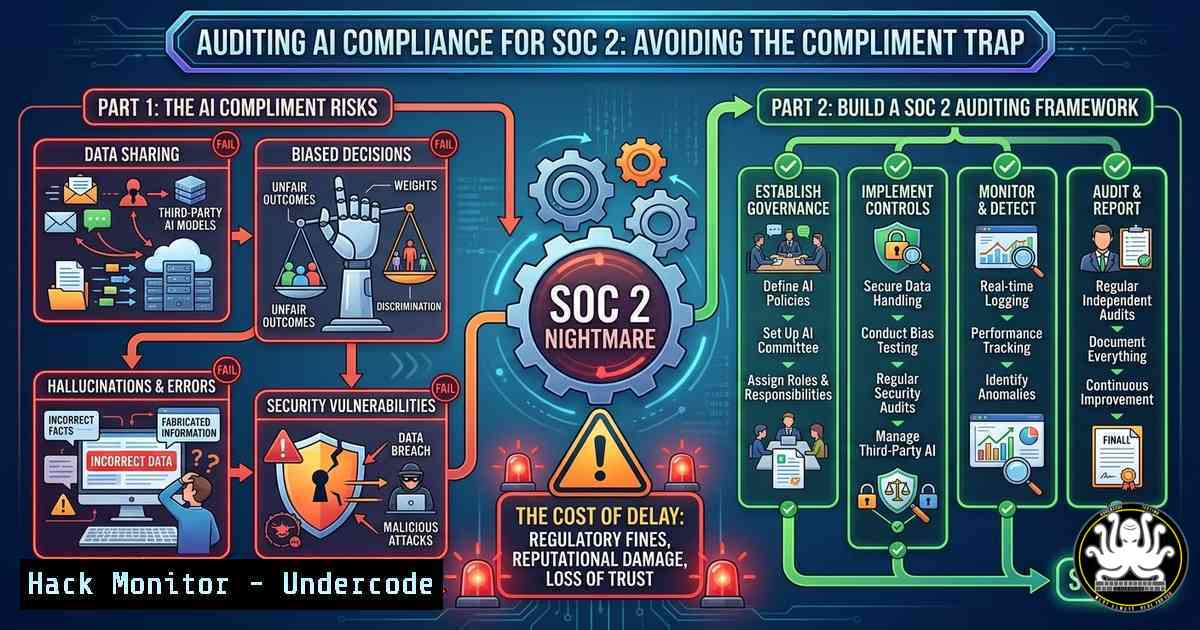
The line between automated sales engagement and cybersecurity compliance is rapidly blurring. As go-to-market (GTM) teams deploy AI agents to personalize outreach at scale, the same technologies are creating new attack surfaces and compliance liabilities. The recent LinkedIn exchange highlighting the absurdity of AI-generated compliments underscores a critical truth: if your AI can’t properly target a prospect, how can it be trusted to handle sensitive data or maintain SOC 2 compliance? This article explores the technical intersection of AI-driven communication, data privacy, and the hardening of automated systems against exploitation.
Learning Objectives:
- Understand how to audit AI interaction logs for compliance with SOC 2 and data privacy standards.
- Learn to map data flow in automated outreach tools to prevent unintentional data leakage.
- Identify the security risks inherent in AI-powered personalization engines and how to mitigate them.
You Should Know:
- Auditing Your AI’s Conversation Logs for Compliance (The SOC 2 Deep Dive)
The humorous suggestion to “inspect my procedures” if someone claimed to be SOC 2 compliant hits at the heart of modern IT auditing. When your AI sends messages, it is processing and storing data. You must verify that no Personally Identifiable Information (PII) is being mishandled or exposed in logs.
Step‑by‑step guide to auditing AI interaction logs on a Linux server:
Assuming your AI tool writes logs to /var/log/ai-agent/, you can use the following commands to check for sensitive data patterns.
First, navigate to the log directory:
cd /var/log/ai-agent/
Use `grep` to search for common PII patterns like email addresses:
grep -E -o "\b[A-Za-z0-9._%+-]+@[A-Za-z0-9.-]+.[A-Za-z]{2,6}\b" interaction.log | sort | uniq
This command extracts all email addresses, sorts them, and removes duplicates, allowing you to see exactly what contact information is being logged.
Next, check for IP addresses which could reveal user locations:
grep -E -o "([0-9]{1,3}.){3}[0-9]{1,3}" interaction.log | grep -v "192.168|10.|172.1[6-9]" | sort | uniq
This filters out private IP ranges, showing only public-facing IPs that might be considered sensitive.
For a more robust audit, use `jq` if the logs are in JSON format:
cat interaction.log | jq 'select(.data.pii != null) | {timestamp: .timestamp, user: .data.user_id, message: .data.message}'
This command filters and displays only log entries that contain a PII field, making it easier to review flagged content. Regularly running these audits ensures that your AI is not inadvertently storing sensitive data in violation of SOC 2 controls.
- Securing the Data Pipeline of AI Personalization Engines
The original post mentions using “perfect information” to identify buyer situations. This data-driven approach relies on APIs and data enrichment services, which are prime targets for API security breaches. If an attacker gains access to your enrichment API keys, they can exfiltrate your entire prospect database.
Step‑by‑step guide to hardening your AI’s data pipeline on Windows:
If your AI tools run on a Windows Server, you must secure API credentials and restrict data access.
Open PowerShell as an Administrator. First, check for hardcoded credentials in environment variables or scripts:
Get-ChildItem -Path C:\AI-Scripts -Recurse -File | Select-String -Pattern "api_key|apikey|secret|token"
This recursive search scans all script files for strings that look like exposed secrets. If any are found, they must be immediately moved to a secure vault.
Next, implement firewall rules to restrict which IPs can access your data enrichment APIs. Create an outbound rule that only allows your AI application to communicate with approved external services:
New-NetFirewallRule -DisplayName "Restrict AI Outbound" -Direction Outbound -LocalPort Any -Protocol Any -Action Block
New-NetFirewallRule -DisplayName "Allow AI to Enrichment API" -Direction Outbound -LocalPort Any -Protocol Any -RemoteAddress 203.0.113.45 -Action Allow
This creates a default block rule and then an explicit allow for your specific enrichment service IP, preventing data exfiltration to unauthorized endpoints if the AI is compromised.
- Defending Against AI-Powered Social Engineering (The “Compliment” Attack)
The conversation highlights how AI can be used to send mass, impersonal compliments. In a cybersecurity context, this is a vector for social engineering. Attackers can use AI to scrape LinkedIn profiles and generate highly personalized phishing messages.
Step‑by‑step guide to analyzing network traffic for malicious AI scrapers using Linux:
To protect your employees from AI-generated spear-phishing, you can monitor for scraping activity on your network perimeter.
Use `tcpdump` to capture traffic to known AI/LLM APIs that might be used for crafting these messages:
sudo tcpdump -i eth0 -A -s 0 'host api.openai.com or host api.anthropic.com' and 'port 443'
The `-A` flag prints the packet data in ASCII, allowing you to see if the content being sent to the API includes scraped profile data from your corporate website.
For a more detailed analysis, pipe this to `grep` to search for specific employee names or email domains:
sudo tcpdump -i eth0 -n -l 'tcp port 443' | grep -i "yourcompany.com"
If you see a high volume of requests from a single IP address to an AI API that include your corporate data, you may have identified a scraping bot that should be blocked via your firewall.
4. Hardening Cloud Configurations for AI Training Data
If your GTM team is using AI to analyze customer situations, the data is likely stored in a cloud bucket (e.g., AWS S3). Misconfigurations here are a leading cause of data breaches.
Step‑by‑step guide to auditing cloud storage for AI data:
Use the AWS CLI on a Linux machine to audit your S3 buckets for public access.
First, list all buckets:
aws s3 ls
Then, check the Access Control List (ACL) for each bucket to see if it is publicly readable:
aws s3api get-bucket-acl --bucket your-ai-data-bucket
Look for `URI=”http://acs.amazonaws.com/groups/global/AllUsers”` which indicates public access.
To check if the bucket policy allows public access:
aws s3api get-bucket-policy --bucket your-ai-data-bucket --query Policy --output text | jq .
If the policy contains "Principal": "", it is a critical vulnerability. Immediately apply a private policy:
aws s3api put-bucket-policy --bucket your-ai-data-bucket --policy '{
"Version": "2012-10-17",
"Statement": [
{
"Sid": "DenyPublicRead",
"Effect": "Deny",
"Principal": "",
"Action": "s3:GetObject",
"Resource": "arn:aws:s3:::your-ai-data-bucket/",
"Condition": {
"StringNotEquals": {
"aws:SourceVpc": "vpc-12345678"
}
}
}
]
}'
This policy restricts access to objects only from requests originating from your specific VPC, locking down the data.
5. API Security for Automated Outreach Tools
The “empty connection requests” mentioned in the comments are a tactic to bypass AI detection. In API terms, this means stripping metadata. Attackers use similar techniques to make malicious API calls look benign.
Step‑by‑step guide to validating API request integrity:
On a Linux server, use `curl` to inspect the headers of incoming requests to your own API endpoints to ensure they contain expected data and not just empty shells.
Simulate a legitimate request to your AI agent’s API:
curl -X POST https://yourapi.com/outreach \
-H "Content-Type: application/json" \
-H "X-API-Key: YOUR_KEY" \
-d '{"user_id": "123", "message": "personalized_content", "source": "internal_tool"}'
Then, monitor your API gateway logs to see what a malicious empty request looks like. Use `grep` to filter for requests missing the required `source` header:
cat /var/log/nginx/access.log | grep -v "source=internal_tool" | grep "POST /outreach"
If you see many POST requests without the proper internal source identifier, this could indicate an automated script trying to use your API without authorization. Implement a Web Application Firewall (WAF) rule to block requests lacking specific headers.
What Undercode Say:
- The AI Trust Gap: The LinkedIn post humorously highlights a massive trust gap. If AI cannot accurately target a message, its underlying logic cannot be trusted with secure data handling. Regular audits of AI outputs are not just a marketing function but a cybersecurity imperative.
- Data Privacy is the New Defense: The shift towards data-driven personalization (“perfect information”) means that your most valuable asset—your customer data—is also your biggest liability. Hardening the data pipeline from collection to analysis is the primary defense against both data breaches and reputational damage from AI missteps.
The conversation on LinkedIn about AI-generated spam is a microcosm of a larger challenge. As we deploy AI to interact with the world, we must also deploy the security frameworks to control it. The tools used for outreach are the same tools that, if left unsecured, can become vectors for data exfiltration or compliance violations. From auditing logs with Linux command-line tools to locking down cloud buckets, the technical steps to secure an AI agent are the same steps required to maintain enterprise-grade security. The joke about “inspecting procedures” is only funny until a regulator or an attacker actually does it.
Prediction:
Within the next 12 months, we will see the emergence of dedicated “AI Compliance Officers” and automated auditing tools specifically designed to monitor AI interaction logs. As regulations catch up to technology, the ability to prove that an AI’s communication was not only effective but also secure and privacy-compliant will become a standard part of SOC 2 and ISO 27001 audits. The convergence of GTM automation and cybersecurity will force companies to treat their AI agents as endpoints that require the same rigorous protection as any critical server.
▶️ Related Video (76% Match):
🎯Let’s Practice For Free:
IT/Security Reporter URL:
Reported By: Jordancrawford First – Hackers Feeds
Extra Hub: Undercode MoN
Basic Verification: Pass ✅


